
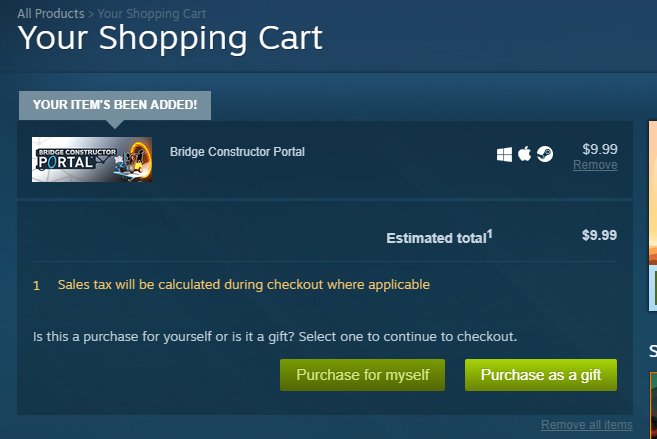
No, you cannot directly gift a free game on Steam. Free games are added to a user’s account directly, without the option to send them as a gift.
Ever wondered, “can you gift a free game on steam”? It’s a common question since sharing with friends is so fun. Steam makes it easy to gift paid games, but things work a little differently with freebies.
Free games are added directly to your library. This means there is no gift option for them. You simply click “play game” and it is instantly yours to enjoy.

Can You Gift a Free Game on Steam?
The question of whether you can gift a free game on Steam might seem a bit strange at first. After all, if a game is free, why would you need to gift it? But, like many things in the world of video games, there are nuances to understand. So, let’s dive in and explore the ins and outs of gifting free games on Steam, and why it sometimes is more complicated than you might think. It’s about more than just giving away something that costs nothing; it’s about how Steam works and what possibilities it provides for sharing gaming experiences.
Understanding Steam’s Gifting System
Before we get into the specifics of free games, let’s talk about how Steam’s gifting system generally works. Steam allows you to purchase games for your friends as gifts. When you do this, the game is added to the receiver’s account after they accept it. It’s a pretty straightforward system for paid games. You choose the game, select your friend, and send the gift. Steam then does the rest, making sure the gift gets delivered correctly. Now, this process is mainly designed for paid games, but it does impact how free games are handled, too.
The Basics of Steam Gifts
The gift system on Steam is pretty simple. When you want to gift a paid game, here’s what generally happens:
- You select the game you want to gift.
- You choose a friend from your Steam friends list.
- You complete the purchase, and the gift sits in your friend’s inbox.
- Your friend accepts the gift, and the game is added to their library.
This gifting approach ensures that the person receiving the game gets it easily without any hassle. It’s a good way for friends to share games with each other, particularly ones they know the receiver will enjoy.
The Peculiar Case of Free Games on Steam
So, what happens when we apply this to free games? The main quirk is that Steam’s gift system mainly designed for purchases, meaning it does not have a direct feature for gifting free games in the same way. Since free games don’t cost any money, you can’t technically “purchase” them as a gift. You can’t buy it for someone because it is already free. This difference impacts how we go about sharing these particular types of games with friends.
Why can’t we “gift” free games directly?
The reason for this boils down to how Steam tracks ownership. When you get a paid game, Steam records you as the owner of that game. This record makes it easy to track who owns what, and to verify if your friend owns the game when they receive a gift. With free games, however, the “purchase” part is absent. You simply add it to your account. Because you did not buy the game, there is no purchase to register as a gift. Steam just lets you grab the game without any exchange of money, so there’s no gift transaction to be processed. This makes things a bit different than gifting paid games.
Let’s imagine free-to-play game like Dota 2 or Counter-Strike 2. You can’t gift these games, because everyone can add them for free at any time. The system simply does not have a need to work as a gift, since the game is already free and can be added by anyone at their will. However, there are some alternative approaches to ‘gifting’ a free game and ensuring that your friends try it.
Ways to Share Free Games with Friends
Even though you can’t directly “gift” a free game, there are a few ways to help your friends try out a free game that you think they might enjoy. These methods require a bit more effort, but they can work really well for sharing great free titles.
The “Tell Your Friend” Method
The simplest way is just to let your friend know that the game is free on Steam. It seems obvious, but it’s effective! You could message your friend, share a link to the game’s page, or just talk about it. Sometimes a simple suggestion is all it takes. You’re not gifting the game in the traditional sense, but you’re opening the door for your friend to discover a new free game. By telling your friends, you are ensuring that they are aware of the game and can decide to add it to their library.
- Messaging: Send a message with the name of the game and a link to its Steam page.
- Chatting: Talk to your friend about why you think they would like the game.
- Social Media: Share your excitement about the game on social media and tag your friends.
Using the ‘Play Together’ Feature
Steam has a handy “Play Together” feature that works well for free games. This lets you invite your friend to play the game with you. While this doesn’t “gift” the game itself, it does nudge your friend to get the game and have a go. When friends play with friends, they are more likely to keep playing the game. It’s a great method to show how much fun a game can be.
- Send an Invite: When you are about to play the free game, send an invite to your friends.
- Group Play: Playing with friends is fun, and it motivates everyone to join the fun.
- Share the Experience: Share tips and tricks to help them get started and keep playing.
Sharing Game Information and Reviews
You can also share your thoughts about the free game by writing a review on the Steam page. If your friend sees that you are really enjoying the game and find it good, this might persuade them to try it out. Your positive reviews or recommendations can act like a virtual gift of sorts, guiding your friends towards a good time. Reviews, combined with game play sessions can help your friends understand the game better.
- Write a Review: Give a short, honest review highlighting the things you enjoy about the game.
- Post Screenshots: Sharing screenshots of your best moments can grab your friend’s attention.
- Give a Recommendation: Specifically recommend the game to your friend in a message.
Free Game DLC and Gifting
One common thing that makes things slightly tricky is the matter of DLC for free games. Sometimes, while the main game is free, there is paid downloadable content (DLC). What happens if you want to gift DLC for a free game? Can you do that? The answer is, yes, you can gift DLC for free games that are purchased. When gifting a DLC, you have the normal option of gifting it to one of your friends. This is quite beneficial, because if the game has a lot of additional content, you can gift specific aspects of the game to your friend, and play that content together.
How gifting DLC works:
- You choose the DLC you want to gift.
- You choose a friend on your list.
- They receive and accept the gift, and the DLC is added to their library.
Remember, this only applies to DLC that is not free. Free DLC would not be gifted. Steam does not allow you to gift free content at all, as the idea of the gift function is to distribute a purchased product to someone else. However, there are some special cases of free content which comes with a code or a link.
Special Cases: Free Game Keys and Bundles
Sometimes you might come across free game keys or free games included in bundles. This is a little different than games directly on Steam. Often, websites and promotional events give out free keys for Steam games. These games are not directly gifted on Steam; instead, you get a code that must be activated on Steam itself. Similarly, game bundles often provide multiple game keys, some of which might be for free games. In this case you will have a key to add into your Steam library, not a gift to give away.
How Free Game Keys Work
Free game keys work slightly differently than direct gifting. Here’s a quick rundown:
- Obtaining a Key: You receive a key from an external source such as a website, forum, or event.
- Activating on Steam: You enter the key in the Steam app and add it to your library.
- No Direct Gifting: Once the game is in your library, you can’t gift it to others as it was not a Steam purchase.
Bundles and Free Games:
Bundles can contain a mix of paid and free games. If you get a bundle and it contains a free game, you are essentially given a key to add it to your library. This can be a very cost-effective way to experience new games, and if you happen to get a free game you can experience it along with the other purchased games in the bundle.
So, while you can’t gift a free game directly from the Steam store, there are still ways to share gaming experiences with your friends. It might require a little more effort and explanation, but the joy of playing games together makes it worthwhile. Whether you’re sharing a link, inviting them to play, or reviewing the game for them to see, there are a number of ways to get your friends to try out the great free games on Steam.
The ability to gift games is one of the things that makes Steam such a popular platform for gamers. While you can’t directly give away free games as gifts, there is a lot you can still do to make sure you can still share fun and memorable gaming moments with friends. The platform’s community is built on the idea of sharing gaming experiences with friends, and Steam is constantly working to improve and support this aspect of the platform, so there is always a way to have fun together on Steam. Remember the point is to play and have fun, whether the game is free or paid.
How To Gift Games On Steam
Final Thoughts
Ultimately, you can’t directly gift a free game on Steam. Steam’s gifting system requires a purchase. The platform facilitates gifting paid games, not those already free.
Therefore, when thinking about sharing a free game, you must tell your friend how to grab it themselves. They can simply search for the title and add it to their own account without needing a gift. The game will be on their library.
So, while the question “can you gift a free game on steam” might seem simple, the answer is technically no.

