
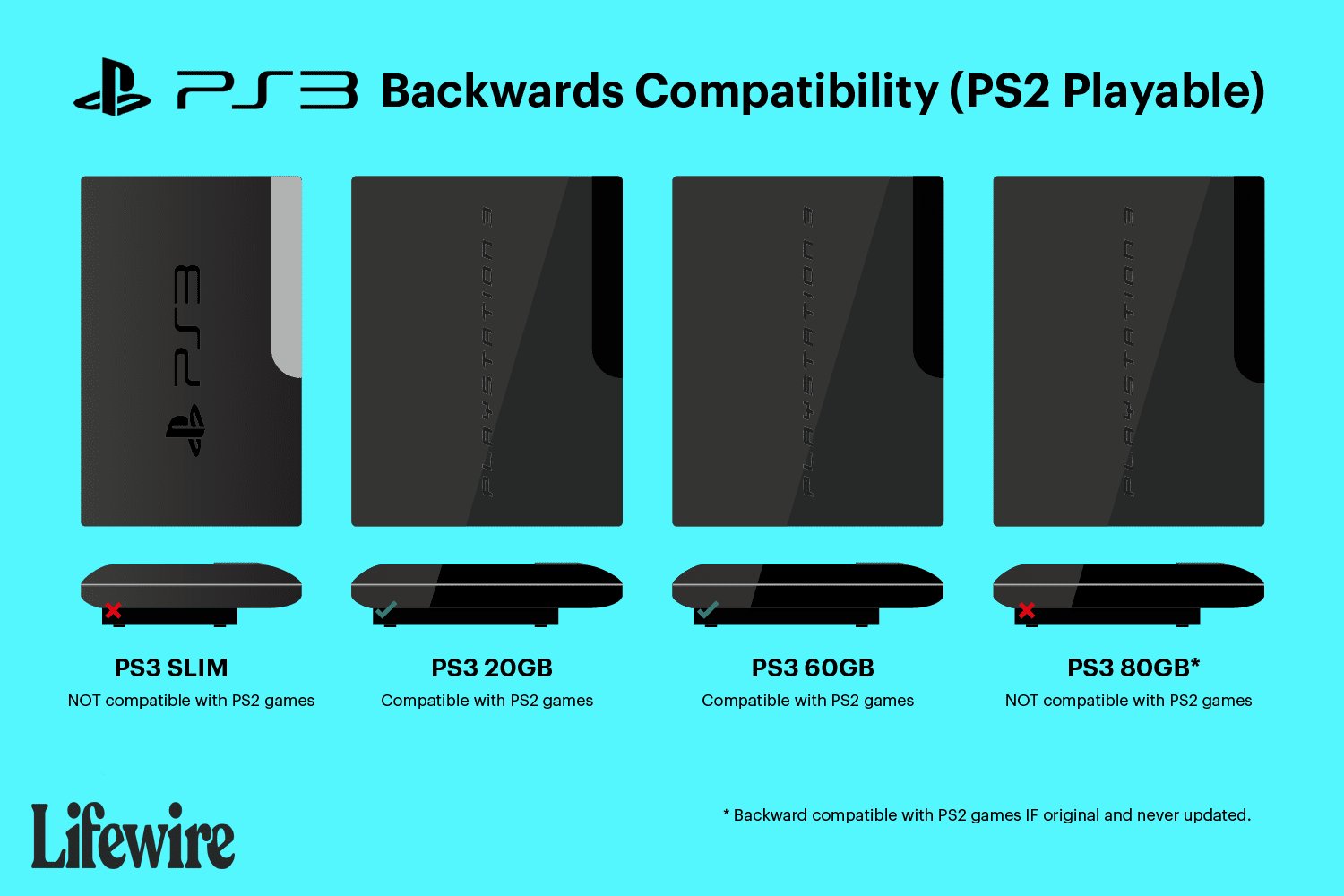
Unfortunately, not all PlayStation 3 consoles can play PlayStation 2 games. Only the original, early models of the PS3 had backwards compatibility for PS2 titles.
Many gamers fondly remember the PlayStation 2 era, filled with iconic games and countless hours of fun. A common question arises for those wanting to revisit these classics: can you play PlayStation 2 games on PlayStation 3? This is a topic that stirs up both nostalgia and confusion for many console users.
The reality is that the ability to play PS2 games on a PS3 depends entirely on the specific PS3 model you own. Only a limited set of older PlayStation 3 models, usually the very first ones, feature hardware allowing for backwards compatibility. This means later, more slimline PS3 versions cannot play PS2 games.

Can You Play PlayStation 2 Games on PlayStation 3?
The question of whether you can play your old PlayStation 2 games on a PlayStation 3 is a common one for gamers who grew up with the PS2. The simple answer is: it’s complicated! Not all PS3s are created equal when it comes to playing PS2 games. Let’s break down why this is, and what it means for you.
The Different Types of PlayStation 3 Consoles
Sony released several different versions of the PlayStation 3 over the years, and a key difference between these versions is their ability to play PlayStation 2 games. This feature is called “backwards compatibility,” and it’s not consistent across all PS3 models. To understand whether your PS3 can handle your PS2 library, we first need to understand the three main types of PlayStation 3 consoles:
- Original “Fat” PS3 Models (20GB, 60GB, 80GB): These were the first PS3 consoles released, and some of them had the remarkable ability to play PS2 games natively, meaning they had all the necessary hardware inside.
- Later “Fat” PS3 Models (Later 80GB, 160GB): Sony removed the PS2 hardware from these models to cut costs. These consoles did not play PlayStation 2 games using the same technology as the older models.
- Slim and Super Slim PS3 Models: These more compact versions of the PS3 did not have the PS2 hardware and didn’t support native backward compatibility.
Understanding Backwards Compatibility
Backwards compatibility means that a newer console can play games designed for an older console. There are two primary ways this is achieved: through hardware or through software. Let’s delve into each method:
Hardware-Based Backwards Compatibility
This is the best kind of backwards compatibility. It means the console has the actual components inside of it from the older console, like a miniature PS2 built into the PS3. This allows the PS3 to play the games exactly as they were designed to be played, with very few problems. The early “Fat” PS3s with either 20GB, 60GB, or the first 80GB hard drives had this feature.
Specifically, these early models had the PS2’s “Emotion Engine” processor and “Graphics Synthesizer” chip inside, allowing them to run PS2 games without any software simulation. This meant virtually every PS2 game would work almost perfectly.
Software-Based Backwards Compatibility (Emulation)
When Sony removed the PS2 hardware, they used software to try to play PS2 games. This is known as emulation. The PS3 uses software to “pretend” to be a PS2 console, translating the PS2 games’ code so the PS3 can understand it. However, software emulation is not perfect. It can sometimes lead to problems like games running slower, graphic glitches, or even not working at all. The later “Fat” PS3 models that removed the PS2 hardware used software emulation for some PS2 games, but it was far from comprehensive.
Identifying a Backwards Compatible PS3 Model
Figuring out if your PS3 can play PS2 games is easy, once you know what to look for. Here’s how:
- Model Number: Look at the sticker on the back of your PS3. The most important part to find is the model number. The fully backwards-compatible “Fat” models typically have one of these model numbers: CECHAxx (20GB), CECHBxx (60GB), CECHCxx (First 80GB models).
- Color of the PlayStation Logo: Another way to know is the color of the PlayStation logo on the top of the console. The very first PS3 models have a silver PlayStation logo on the top. This version always has full backwards compatibility. If the logo is in the PlayStation color scheme of black with white PlayStation text, the console most likely lacks the PS2 hardware.
- Number of USB Ports: The original PS3 models (with PS2 compatibility) have four USB ports on the front. All the later PS3 models usually have two USB ports on the front.
- PS2 Logo on the Box: If you still have the original box, look for the PlayStation 2 logo on the box. This will tell you if the console has the hardware to play PlayStation 2 games.
Important Note: If your PS3 has one of the model numbers starting with CECHExx, CECHGxx, CECHHxx, CECHJxx, CECHKxx, CECHLxx, CECHMxx, CECHPxx, CECHQxx, CECH-20xx, CECH-21xx, CECH-25xx, CECH-30xx, CECH-40xx, or CECH-42xx it means it is a later model, and does not have the hardware for backwards compatibility. These models cannot play PS2 games. It means your PS3 cannot play PS2 discs.
The “PS2 Classics” on PlayStation Store
Even if you don’t have a backwards-compatible PS3, there is a little bit of good news. You can still play some classic PS2 games on your PS3 by buying them digitally on the PlayStation Store. These games are called “PS2 Classics.” Here’s how these work:
- Digital Downloads: Instead of using your old PS2 discs, you download the games directly to your PS3 hard drive.
- Emulation Software: These games run using software emulation. Sony made improvements to the emulation software over time, so some PS2 classics look better and run better than PS2 games on the non-hardware backwards compatible PS3s.
- Limited Selection: The selection of PS2 classics on the PlayStation Store is limited. Not every PS2 game is available, so you need to check the store to see if your favorites are there.
- Cost: These games are not free. You need to buy them, just like any other digital game on the PlayStation Store.
Advantages and Disadvantages of PS2 Classics
Playing PS2 games through PS2 classics has its pluses and minuses.
Advantages
- Convenience: You don’t need to find your old PS2 games and console. Everything is on your PS3.
- Improved Graphics: Some PS2 classics have been updated with slightly better graphics.
- No disc: Digital games eliminate the need for discs so they don’t scratch or break.
Disadvantages
- Limited Selection: Your favorite PS2 game might not be on the PlayStation Store.
- Cost: You have to buy the games again, even if you have the original PS2 discs.
- Emulation issues: Some games might not run perfectly.
Game Compatibility and Performance
Whether you’re playing using a hardware-backwards compatible PS3 or through PS2 Classics, game compatibility and performance can be different. Let’s explore the performance for each type:
Hardware Backwards Compatible Models
When using one of the original “Fat” PS3 models with the built-in PS2 hardware, you’ll get the closest experience to playing on an original PS2. Most of the games work great, with few issues. You can experience full performance with little to no graphical problems or frame rate slowdown. However, a very small amount of PS2 games do have issues on the hardware-based compatible models.
What to expect:
- High Compatibility: Most PS2 games should work without problems.
- Accurate Performance: Games run like they would on an original PS2, both graphically and in speed.
- Occasional Glitches: Some games may have very minor graphic glitches or sound issues, but those are rare.
PS2 Classics (Software Emulation)
The performance of PS2 Classics varies by game and system. Sony has made improvements over the years, but some games still have performance issues.
What to Expect:
- Varying Compatibility: Some games run well, others might have problems.
- Performance Issues: Some games might run slower, have frame rate problems, or have sound issues.
- Updated Graphics: Some games may have slightly improved visuals.
Why Did Sony Remove Backwards Compatibility?
You might be wondering why Sony stopped including PS2 hardware in later PS3 models. The main reason was to reduce costs. Including the PS2 hardware made the PS3 more expensive to manufacture. By removing the PS2 hardware, they were able to sell the PS3 at a lower price, which made it more attractive to more people. This change was also made to move players towards the new generation of gaming rather than the old generation.
Tips for Playing PS2 Games on a PS3
If you are lucky enough to have a PS3 with PS2 backwards compatibility, or decide to purchase PS2 classics on PSN there are a few things you can do to try to make the experience better.
- Clean Your Discs: If you’re playing with original PS2 discs, make sure they are clean and free of scratches.
- Check for Game Updates: Some PS2 games have patches and updates available to fix any issues. You can sometimes find these updates through online communities or forums.
- Check Online Compatibility Lists: There are websites and communities that keep lists of known issues with specific PS2 games on different PS3 models. These lists can give you an idea of what problems you might encounter, and ways to solve them.
- Adjust Settings: In some PS2 Classics games, you can adjust display settings, such as the scaling to make the game fit your TV. Play around with these settings to get the best display.
Alternatives for Playing PS2 Games
If you don’t have a backwards-compatible PS3, and you can’t find your PS2 favorites on the PSN store, there are some alternatives to playing your PlayStation 2 games.
- Original PS2 Console: The best way to play most of your PS2 games is on an actual PS2 console. These consoles are still available, and they often come with multiple controllers and games.
- Emulators on PC: There are also emulators that let you play PS2 games on your computer. However, setting these up can be tricky, and the performance can depend on the power of your computer.
In the end, whether or not you can play your PS2 games on a PS3 depends on the specific model you own. If you have one of the earlier “Fat” models with hardware-based backwards compatibility, you’re in luck. If not, you can explore the options of PS2 classics available on the PlayStation Store, or consider other alternatives if all else fails. Each method has its benefits and drawbacks, but knowing your options ensures you can still enjoy the games from the PS2 era.
The PS3 Had a Hard Time Playing PS2 Games Because of…..Emotions?
Final Thoughts
So, can you play PlayStation 2 games on PlayStation 3? The answer is that it depends. Not all PS3 models offer backwards compatibility; only the early versions could play PS2 discs.
Later, slim and super slim PS3 models removed the PS2 hardware, therefore they do not offer this function. If you have an original fat PS3, you must check if it is one of the models that supports it.

