
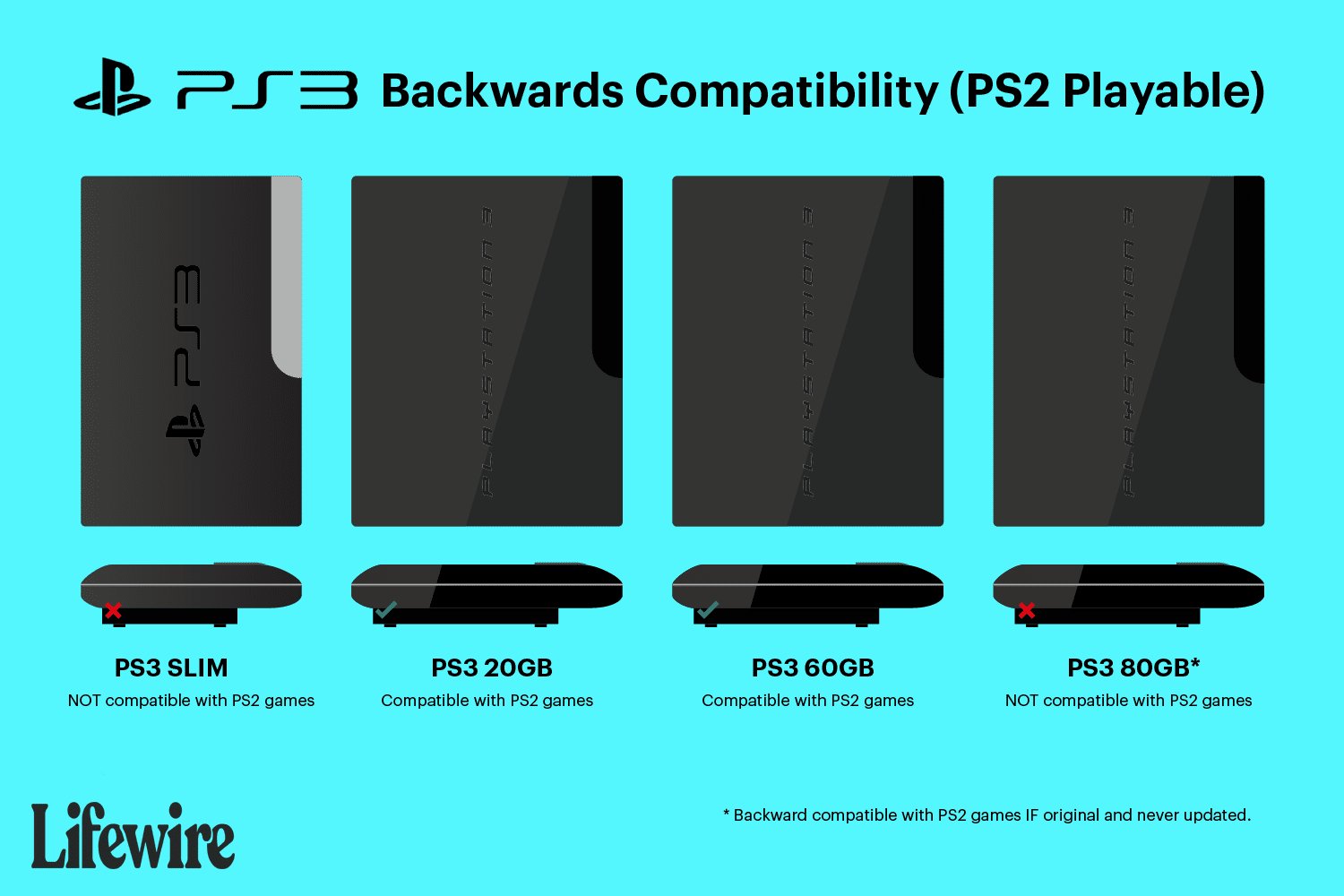
Unfortunately, you cannot play PS2 games on a PS3 Slim.
Many gamers wonder, can you play PS2 games on PS3 slim? It’s a common question among those looking to revisit classic titles. The original PlayStation 3 models offered backwards compatibility, a feature many loved. However, the slim version of the console removed this capability.
This change means that if you own a PS3 Slim, you’ll need to find alternative ways to play your favorite PS2 games. The decision to remove this feature came with the slimmer design. So, PS2 games will not work directly on PS3 Slim hardware.

Can You Play PS2 Games on PS3 Slim?
Okay, let’s talk about PlayStation – specifically, whether you can play those awesome PS2 games on the PS3 Slim. It’s a question many gamers have, especially if you’ve got a pile of classic PS2 games gathering dust. The short answer is: it’s a bit complicated. Not every PS3 Slim can play PS2 games, and that can be confusing. Let’s dive into all the details so you know exactly what’s up with PS2 games and your PS3 Slim.
The PS3 Slim and Backward Compatibility: A Quick Look
To understand why the PS3 Slim can’t just play every PS2 game, we need to talk about something called backward compatibility. This basically means a console can play games from older consoles. The very first PlayStation 3 models, often called “fat” PS3s, did have this ability. They had special hardware inside that allowed them to run PS2 games almost perfectly. But things changed when Sony released the PS3 Slim. Let’s see why that happened:
Why the PS3 Slim Lost PS2 Playback
When Sony made the PS3 Slim, they wanted to make it cheaper and smaller. To do this, they removed the special hardware that let the “fat” PS3s play PS2 games. This hardware, essentially the emotion engine and graphics synthesizer that made PS2 games work so well on old systems, were quite expensive to include. By cutting that out, Sony could make a more affordable system for everyone. It’s a bit sad for gamers wanting to play old favorites, but it helped a lot of people get into the PS3.
Identifying Your PS3 Slim Model
Not all PS3 Slims are created equal. There are different models, and knowing yours is key. It’s not just about it being a Slim; there’s a model number on the back of your console that tells the full story. You’ll see something like ‘CECH-2001A’, ‘CECH-2501B’, or ‘CECH-3001A’. Knowing this is important!
Finding the Model Number
To find this number, flip your PS3 Slim over. Look at the sticker on the bottom. The number is usually near the bar code and says “Model No.” followed by those letters and numbers we talked about. For example, it might say: “Model No. CECH-2501A”. Take a look now – we’ll need it to understand what your console can do!
The Key: CECH-2000 series
Here’s the thing you need to know: most PS3 Slim models can NOT play PS2 discs directly. The one exception might be some very early CECH-2000 series models. If you have a model number starting with CECH-20, you might have a sliver of hope but you need to check it specifically. These are the rarest, and it will be on the serial number of the PS3.
Other Slim Models: No PS2 Games
If your PS3 Slim model number starts with CECH-21, CECH-25, or CECH-30, unfortunately, it cannot play PlayStation 2 game discs. That special hardware is not included. If your console has a number in this series, then you can skip forward to next section which is the ways you can play PS2 games on PS3 Slim other than discs.
Alternative Ways to Play PS2 Games on PS3 Slim
So, your PS3 Slim can’t play PS2 discs directly? Don’t worry! There are other ways you can experience those classic games. Here are the main methods:
PlayStation Store: Digital Downloads
One great way to play some PS2 classics on any PS3 Slim is through the PlayStation Store. Sony has a selection of popular PlayStation 2 games that you can purchase and download directly to your console. These games are digital, so you won’t need your old discs, and are optimized to work on the PS3. This works great for players that don’t want to deal with their discs. To do this follow the steps below:
- Turn on your PS3 Slim and connect it to the internet.
- Go to the PlayStation Store. You can find this on the XrossMediaBar (XMB).
- Search for your favorite PS2 games, look for the classics section, or just browse around.
- Once you find a game you want, purchase it and then download it.
- After downloading, you can play the games directly from the Game section of the XMB.
PS2 Classics: Advantages and Disadvantages
Let’s discuss some of the pros and cons of this method:
- Pros: Easy access, no need for discs, games are often slightly upgraded for PS3, you can play most of the popular games, it is an legal way to play PS2 games
- Cons: You will need to pay to buy, not every PS2 game is available on PlayStation store, sometimes these games are more expensive than their original disc.
PlayStation Now (Subscription Service)
PlayStation Now is another option, but please note, PlayStation Now has transitioned to PlayStation Plus Premium. With this service (PS Plus Premium tier only), you gain access to a library of PS2 games that you can stream and play directly on your PS3 Slim. However, since PS3 is an older console, it does not support some of the features of PlayStation Plus Premium, which makes the streaming quality sometimes bad. You’ll need a strong internet connection for this method to work well and the service may not be available in all regions. Here’s how it usually works:
- Subscribe to PlayStation Plus Premium if you haven’t already
- Download the PS Now app (if needed – it is usually included on your console)
- Launch the app
- Browse the PS2 section
- Choose a game and start streaming to your console.
PS Plus Premium: Advantages and Disadvantages
Let’s take a look at pros and cons to this method:
- Pros: Access to a wide variety of games without needing to buy each one separately, you can play several games by paying a small amount monthly, no physical game discs needed
- Cons: It requires a monthly subscription, not all games are available, you need a good internet connection, it can sometimes lag.
Game Availability
The availability of PS2 games on both the PlayStation Store and PlayStation Plus Premium varies depending on your region. Some titles may be region-locked, or they may simply be unavailable. It is very important that you keep this in mind when you’re looking for a specific game. So, always double-check before committing to any purchase or subscription.
Emulators (unofficial option)
This is where things get a little complicated. There are unofficial ways to try and play PS2 games through emulators and modifying the ps3 software, which can be very tricky and is generally not recommended because of the possible issues you can face and also it may void your console warranty. Emulators are programs designed to mimic the hardware of another system, allowing you to play its games on a different device. However, these methods can be difficult to set up, may not work perfectly, and can violate Sony’s terms of service.
Why Emulators Are Tricky
Trying to use emulators on a PS3 Slim involves technical steps that can be difficult for a beginner. They often require special software and can cause issues on your console if done incorrectly. It can also be illegal to download the BIOS of the system, so these methods might get you into some troubles. Because of that, we will not be teaching how to use emulators in this guide.
Comparing Methods: Which is Right for You?
Let’s compare these methods side-by-side so you can decide what works best for you:
| Method | Ease of Use | Game Availability | Cost | Compatibility |
|---|---|---|---|---|
| PlayStation Store Downloads | Very Easy | Limited to available titles | Cost per game | High |
| PlayStation Plus Premium Streaming | Easy | Wide but not comprehensive | Monthly subscription | Depends on internet connection |
| Emulators (unofficial) | Difficult | Potentially all games | Potentially free, but complex setup | Unreliable, legal issues can arise |
This table should give you a good overview to help you make the correct decision for your needs and preferences
Understanding the Limitations
Even if you use the digital purchase method or the PlayStation Plus Premium subscription, there are still some limitations to consider. You might not be able to experience every single PS2 game you want. Some games may have small glitches or performance issues due to emulation, even if you are playing on a digital download or streaming.
Why Some Games May Not Work Perfectly
This happens because the PS3 is not running the games natively, as it would on a “fat” PS3. These games are essentially being translated to work on a different system. While the experience is usually very good, it’s not always going to be the exact same experience you’d have playing the game on the actual PS2 console.
Additional Tips
- Always keep your PS3 software up to date, as Sony may have made improvements for these older games.
- Always check your network connection if you plan to use streaming, a bad network may affect your game experience
- Be patient! Some games may take a bit of time to download and install.
Final Thoughts on PS2 Games and the PS3 Slim
While the PS3 Slim isn’t designed to play PS2 discs like the early “fat” PS3 models, you still have options. Digital downloads from the PlayStation Store or streaming with a PlayStation Plus Premium subscription can bring many beloved PS2 games to your PS3 Slim. It might not be a perfect solution, but it is something that will allow you to play those amazing PS2 games you love. Just remember that there may be differences, and you won’t be able to play all of your PS2 collection without buying those games digitally again.
Are ps2 games compatible with the ps3 slim?
Final Thoughts
In short, you cannot directly play PS2 games on a PS3 Slim. Sony removed the backward compatibility feature from the slim models. This design change means that the hardware needed to run PS2 discs is not present.
Therefore, if playing PS2 titles is crucial, you will need an original PlayStation 3 model. The PS3 Slim does not offer this feature, answering directly the question, can you play PS2 games on PS3 slim.

