
No, you cannot directly play PS5 games from an external hard drive. You can store them there, but you must transfer them back to the internal SSD to play.
Are you wondering about storing and playing your favorite PlayStation 5 games? Many gamers grapple with the storage limitations of the console. The question often pops up: can you play PS5 games on external hard drive? It’s a common concern as game sizes continue to grow.
While you can’t directly launch titles from external storage, utilizing a hard drive offers a practical way to manage your digital game library. This method lets you move games off the internal SSD when you’re not playing them, saving that premium space for active titles.

Can You Play PS5 Games on External Hard Drive?
Okay, so you’ve got your shiny new PlayStation 5, and you’re diving into all the amazing games. But then, BAM! You get that dreaded notification: “Your storage is full!” It’s like a punch to the gut, right? You’re itching to download more games, but your console is saying “No room!”. So, the big question pops into your head: can you play PS5 games on an external hard drive? It’s a great question, and the answer is a little bit more nuanced than a simple yes or no. Let’s break it down and explore all the important details about storing and playing PS5 games using an external drive. We’ll go through what you can do, what you can’t, and how to set everything up. Don’t worry, we’ll make it super easy to understand!
Understanding PS5 Storage
Before we dive into external hard drives, it’s good to understand how your PS5 uses its built-in storage. The PS5 comes with a super-fast internal Solid State Drive (SSD). This special drive is one of the key things that makes the PS5 so quick and smooth. It loads games quickly, and makes the whole experience feel really great. Sony chose this type of drive for a reason: it makes PS5 games work their very best. The internal drive is where you have to install your PS5 games to actually play them. You can’t just put a PS5 game on an external drive and start playing like you can with some other game systems. Why is that? Let’s find out.
The Speed Factor
The reason you can’t directly play PS5 games from an external drive has to do with speed. The internal SSD in your PS5 is incredibly fast. It can move data really quickly, which is essential for those fast-paced, detailed PS5 games. External drives, especially older ones, simply can’t keep up with that speed. If you tried to play a PS5 game from an external drive, you’d likely experience really long loading times, stuttering, and overall poor performance. It would make your gaming experience far from ideal. This doesn’t mean that external drives are useless though, not at all! They just need to be used in the right way.
So, What Can You Store on an External Hard Drive?
Even if you can’t directly play PS5 games from an external drive, there is a lot you can do. Think of an external drive as a big storage closet for your games. Here is what you can do using your external storage on PS5.
- PS4 Games: Here’s the best part! You can play your PS4 games directly from an external hard drive on your PS5. This is a fantastic way to free up space on your console’s internal drive. If you have a big collection of PS4 games, moving them to an external drive is a game-changer. They will run just as well as they did on your PS4, and it means you have more space for your PS5 titles.
- PS5 Game Storage (But Not Play): You can move and store your PS5 games on an external hard drive. This is crucial, it acts like a backup for the PS5 games you own. When you’re done playing a game and want to make room for a new one, you can move it to an external drive. Then, when you want to play it again, you can copy it back onto the PS5’s internal drive. It’s a little extra step, but it allows you to keep all of your games without needing to download them every time.
- Media: External drives are also excellent places to store your media files, such as pictures and videos. This is good for keeping your console organized.
So, even though you can’t directly play PS5 games from external drives, they’re very useful for managing storage and making the most out of your PlayStation 5.
Choosing the Right External Hard Drive
Okay, so you’re convinced that an external drive is the way to go. But with so many options available, which one should you pick? It’s important to consider a few key factors before you make your purchase.
Type of Drive: HDD vs. SSD
There are two main types of external hard drives: Hard Disk Drives (HDDs) and Solid State Drives (SSDs). Let’s look at the differences:
- HDD (Hard Disk Drive): HDDs are the more traditional type of external drive. They store data on spinning disks. They are generally cheaper and offer more storage for your money. However, they are slower than SSDs, which means the speed of moving data back and forth will be slower. Also, if you use an HDD to play PS4 games, you’ll have slower loading times compared to SSD or PS5’s internal drive.
- SSD (Solid State Drive): SSDs are the newer type of storage. They don’t use spinning disks; they use flash memory. They’re much faster than HDDs, making data transfer speed almost equal to the PS5’s internal drive in some cases. They are generally more expensive than HDDs, but for the speed they offer, many gamers consider it to be worth the extra cost. If your main goal is faster transfer speeds for your PS5 games stored on the external drive and better loading times for your PS4 games, then SSDs are the better choice.
Here’s a quick comparison in a table:
| Feature | HDD (Hard Disk Drive) | SSD (Solid State Drive) |
|---|---|---|
| Speed | Slower | Faster |
| Price | Cheaper | More Expensive |
| Durability | Less durable due to moving parts | More durable, no moving parts |
| Best for | Budget-conscious users storing PS4 games and PS5 game backups | Users wanting faster transfer speeds and performance |
Connection Type: USB 3.0 or Better
It’s also important to make sure that the drive you choose uses the right kind of connection. To get the best performance, especially for PS4 games, your external hard drive should use a USB 3.0 connection or better. USB 3.0 is a type of connection that allows data to move faster than older USB connections. Using a drive with USB 3.0 will help your PS4 games load faster and ensure smooth gameplay. USB 3.1 and USB 3.2 are even faster, so if you’re looking for the best performance they are an even better choice.
Storage Size: How Much Do You Need?
Choosing the right storage size depends on how many games you want to store. Here’s a rough guide to help you out:
- 1TB (Terabyte): This is a good starting point if you want to store a bunch of PS4 games and a few PS5 game backups.
- 2TB: This is a great size for many gamers, letting you have many PS4 games and a good number of PS5 game backups.
- 4TB or More: If you have a large game collection or you plan to download a lot of PS5 games, you might want to consider a 4TB drive or larger.
Think about the size of your game library. Remember that PS5 games take up more space than PS4 games, so plan accordingly.
Setting Up Your External Hard Drive
Alright, you’ve chosen your external drive. Now it’s time to set it up with your PS5. It’s a pretty easy process! Here’s how to do it:
Plugging In Your Drive
First things first, plug your external hard drive into one of the USB ports on the back of your PS5. Make sure the drive is powered on if it needs its own power supply. Your PS5 will usually detect the drive automatically.
Formatting Your Drive
Next, you need to format the drive so that your PS5 can use it. When you first plug it in, the PS5 will likely ask you if you want to format the drive as extended storage. If it doesn’t, you can go to Settings > Storage > Extended Storage to get it going. This process will erase all of the data from the drive, so make sure to back up any important files before you start! You’ll need to choose to format the drive as “extended storage.” Follow the instructions on the screen, and your PS5 will format the drive for you. It’s generally a very quick process.
Moving Games to Extended Storage
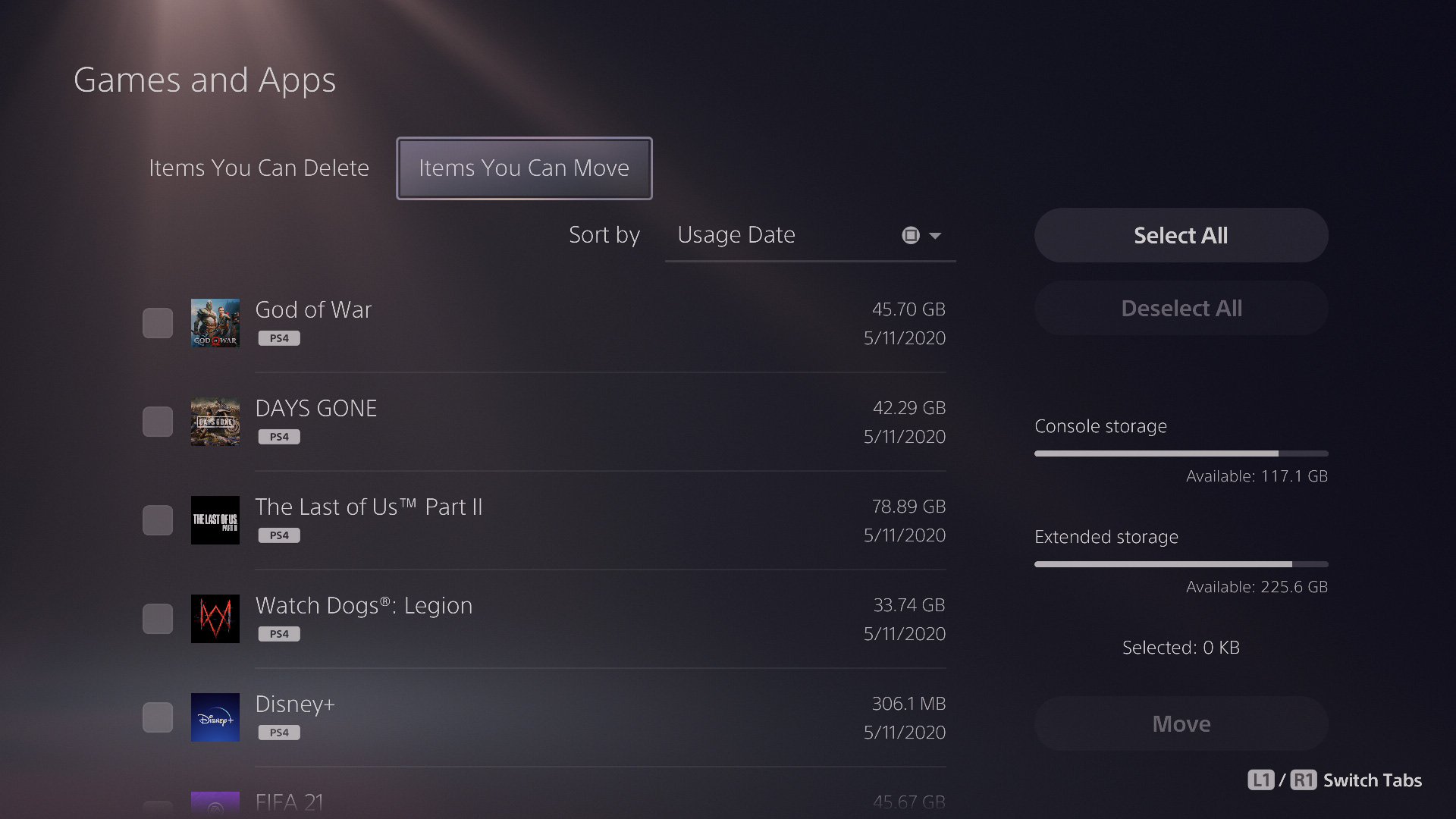
Once the drive is formatted, it is ready to store games. To move PS4 games to the external drive, go to Settings > Storage > Console Storage > Games and Apps. Then select the PS4 games you want to move and choose to move them to extended storage. PS4 games will move directly to the external drive, and you will be able to play them from there!
For PS5 games, the process is similar. Select the PS5 games you want to move, but you will just move them, not play them from the external drive. They will be stored there until you’re ready to move them back to your console. This makes it easy to move PS5 games around and free up precious space on your system. Now you have plenty of room for new games!
Troubleshooting Common Issues
Sometimes things don’t go exactly as planned. If you run into problems with your external hard drive, don’t worry! Here are some common issues and ways to fix them:
PS5 Not Recognizing the Drive
If your PS5 is not recognizing your drive, try the following:
- Check the connection: Make sure the USB cable is securely connected to both the drive and the PS5. Try a different USB cable.
- Try a different USB port: Sometimes, one USB port might have an issue. Try plugging the drive into another port.
- Restart your PS5: Sometimes, a simple restart can fix the issue. Turn your PS5 off completely, and then turn it back on.
- Check for power: Make sure the external drive is getting power. Some external drives need their own power supply. Make sure that is plugged in properly and turned on.
- Make sure the drive is supported: Your drive may not be compatible. If it is too old or doesn’t meet the minimum requirements, it might not work with the PS5. Check the manufacturer’s specifications of the hard drive for PS5 compatibility.
Slow Loading Times for PS4 Games
If you’re playing PS4 games from your external drive and the loading times are too slow, consider these steps:
- Use a USB 3.0 or better connection: Older USB connections will not give you the best results. Using the proper connection will make loading times much faster.
- SSD is better than HDD for gaming: If you are using an HDD, switching to an external SSD will likely make the biggest difference.
- Make sure the external drive is healthy: If you’ve been using an old drive for a long time, it might be wearing down. A damaged or old drive can cause slow loading times. Consider getting a new one.
- Free up storage on the drive: Too many files can slow a drive. Make sure you don’t have a bunch of unnecessary files on the external drive.
Drive Keeps Disconnecting
If your external drive keeps disconnecting from your PS5, you can try the following:
- Check the USB connection: Make sure the USB cable is fully inserted at both the drive and the console.
- Try a different USB cable: A damaged USB cable can lead to disconnection issues. Try swapping out for a new USB cable.
- Ensure it’s not a power issue: If your external drive needs its own power, make sure it is getting enough power. Try a different power adapter or outlet.
- Avoid using a USB hub: Sometimes, using a USB hub can cause disconnections or other issues. If you’re using a hub, try plugging the drive directly into your console.
- Check for Firmware Updates: Make sure your PS5 has the latest system software updates. Firmware updates from Sony can sometimes fix issues like this. Go to System > System Software > System Software Update in settings.
If you continue to have issues, it’s always a good idea to check online for specific solutions for your type of drive. Also, your external drive’s manual or website can help, as every drive is a little bit different.
With a little patience, most problems can be worked out, and you’ll be enjoying your extra storage in no time. Using an external drive is a great option for anyone with a PS5 who wants more storage for their games.
By understanding the capabilities and limitations of external storage, you can keep your games safe and your console running smoothly. You can enjoy all your favorite games, and make the most of your PlayStation 5’s impressive gaming library!
Why PS5 Games Cant Play From An External Drive
Final Thoughts
Yes, you can play PS5 games on external hard drives, but there’s a key detail. You can store them, but not play them directly.
This means you must transfer the game back to the console’s internal storage to actually play it. Therefore, external drives are useful for expanding storage.
To reiterate, ‘can you play ps5 games on external hard drive’ is answered as a storage solution, not direct gameplay.

