
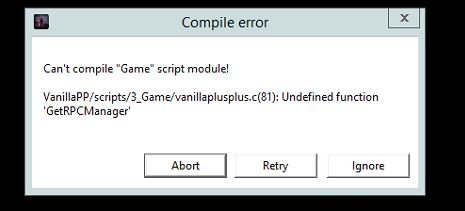
The error “can’t compile game script module dayz” often indicates issues with your DayZ mod files, such as syntax errors in scripts or incorrect file paths.
Experiencing the frustration of modding DayZ and hitting that wall, the “cant compile game script module dayz” error message? It’s a common headache for aspiring modders. This issue usually points to problems within your script files, or how they are organized.
Incorrect syntax within your scripts is a typical culprit, so carefully review the code you’ve written. Also, be very mindful of the folder structure and how your files are referencing each other to ensure the game can access them.

Why You Can’t Compile Game Script Module in DayZ: A Deep Dive
Okay, so you’re knee-deep in the world of DayZ, trying to get your server or mod just right, and then BAM! You hit the dreaded “cant compile game script module” error. It’s frustrating, we get it. It’s like trying to build a Lego castle, and the instructions suddenly turn into gibberish. This error basically means the game’s engine can’t understand the code you (or a mod) are trying to use. Let’s break down why this happens and how you can fix it. We will explore various reasons and how to handle these issues.
Understanding the Error Message
First off, let’s understand what the “cant compile game script module” error actually means. Think of game scripts as the instructions for how things work in DayZ. These scripts, written in a programming language (often SQF for DayZ), tell the game how zombies behave, how guns work, and even how food spoils. When the game engine starts, it reads these scripts. If something is wrong – a typo, a missing file, an incorrect command – the engine throws this error and says, “I can’t understand this!” It is important to note, that a game script error can have various reasons, and there is no single definite reason to cause this issue.
Common Reasons Behind the Error
There is a range of problems that can trigger this issue. Sometimes it’s a simple mistake you can quickly correct, other times it can be a more difficult problem to resolve. Let’s look at some of the main reasons:
Syntax Errors: These are like typos in your code. It could be a missing semicolon, a misplaced parenthesis, or a misspelling of a command. The game engine is very picky about these things.
Missing Files: The game’s scripts may reference another script or data file. If these files are missing, the engine will throw this error. Also, when you install any mods in DayZ, make sure the folder structure is correctly placed.
Incorrect File Paths: Just like missing files, if a script points to a file in the wrong location, it will cause an error. Imagine trying to find a book in the library, and the index points you to the wrong shelf.
Mod Conflicts: When different mods try to change the same things in the game, it can cause a conflict, and sometimes these conflicts show up as compilation errors. Because two or more mods might be making changes to same files.
Corrupted Game Files: Sometimes, the error might not even be your fault! Corrupted game files can mess up the compilation process.
Outdated Mods: When a mod is not updated it sometimes can break the game because the base game has been changed and the mod has not been updated to these changes.
Incorrect Mod installation Incorrect installation of mods can also cause compilation errors. You need to install mods according to the documentation provided by the mod authors.
Incorrect server configurations: Incorrect server settings also interfere in the compiling process and it can cause this error.
Diving Deeper into Syntax Errors
Syntax errors are very common, especially when you’re starting out. They are basically like grammar mistakes in programming. Here are some examples:
Missing semicolon (;): In SQF, many commands need a semicolon at the end, like saying “This is the end of my thought.” If you miss it, the game gets confused.
sqf
_variable = 10 // Incorrect: Missing semicolon
_variable = 10; // Correct
Misspelled commands: If you type spawnPalyer, instead of spawnPlayer, the game won’t understand the command, and will throw an error.
Incorrect use of quotation marks: If you use a quotation mark incorrectly, it can also throw an error. For example, if you write hint “Hello World without ending the quotation mark, then you will get this error.
Incorrect use of parentheses: Parenthesis is a crucial thing in SQF programming, and missing or incorrect use can cause errors. For example, if you do this _result = (10 + 5 2 then you are missing a closing parenthesis, and this will also cause a compilation error.
Incorrect use of variable: If you don’t define a variable before you use it, it can also cause an error. for example, if you write hint format [“This is %1”, _varibale]; and if you have not defined the _variable anywhere before this line, then it will give you a compilation error.
To spot these errors, carefully check your code. Some text editors have features to highlight these syntax problems for you.
How to Troubleshoot the “cant compile game script module” Error
Okay, let’s get into the fixing stuff! Here’s a step-by-step process to help you diagnose and solve this annoying error.
Step 1: Check Your Script Files for Syntax Errors
Use a Code Editor: Download a code editor like Notepad++, Visual Studio Code, or Sublime Text. These programs will highlight errors and make your code much easier to read.
Start Simple: Don’t edit huge blocks of code. If you made changes, undo them to the previous working version. Then add one change at a time and test. This way you can easily pinpoint where the problem is.
Look for the obvious: When a compile error occurs, the error message will usually tell you which file and what line caused the error. Make sure you look at the code near the error and see if you can find a syntax error.
Check Semicolons, Quotes, Parentheses: Double-check all semicolons, quotation marks, and parentheses. These are frequent offenders.
Variable Declaration: Make sure that before using a variable, you have defined it first.
Test Your Changes: After fixing the errors, try to compile. And continue this process until there are no errors.
Step 2: Verify File Paths and Check for Missing Files
Double Check File Names: Pay extra attention to file names and folder structures, and make sure that they match what is referenced in the script.
Be Careful with Capitalization: Linux-based servers, which are common for DayZ, treat file names differently based on capitalization. “MyFile.sqf” is different from “myfile.sqf”. So ensure that they are named correctly.
Use Absolute Paths (Sometimes): In some cases, using a full file path (like /path/to/your/file.sqf) rather than a relative path can help. This is especially the case in complex setups. However, avoid using absolute paths to your mod directory. Because, if you use absolute paths like your local drive, then it will not work on other PCs or servers.
Ensure Files Are Present: Make sure the files referenced in the script are actually in the location they should be in.
Step 3: Resolve Mod Conflicts
Disable Mods: The easiest way to figure out if you have a mod conflict is to temporarily disable your mods one by one, or a group at a time. If the error disappears when a mod is disabled, then that is probably the mod causing the problem.
Check Mod Order: The order of mods in your server or game launcher can sometimes cause problems. Try changing the mod order to see if it resolves the issue. Generally, the recommended order of the mods is stated on the mod page, so always follow that when setting up mods.
Update Your Mods: Outdated mods can sometimes conflict with the current version of the game. So always make sure to update your mods.
Ask for help: If you can’t resolve the issue by yourself, then go to mod pages, forums, or discord servers to ask for help. Other people may have faced the same issues and they might have found a fix for it.
Step 4: Verify Game File Integrity
Steam Verification:
Open Steam.
Go to your Library.
Right-click on DayZ.
Select “Properties.”
Go to “Local Files.”
Click on “Verify integrity of game files.”
This will help you to find the corrupted files and fix them.
Reinstallation (As a Last Resort): If file verification doesn’t solve the issue, it may be time to reinstall the game completely, as a last resort.
Step 5: Checking Server Configurations
Check startup parameters: Some of the issues may arise due to incorrect startup parameters. You can ask server providers for the correct startup parameters and compare them with your startup parameters.
Check server config files: If there are any syntax errors or misconfiguration in config files, then it can cause this compilation error. Go through each config file to see if you can find anything wrong.
Tools and Resources for Scripting in DayZ
DayZ Wiki: The official DayZ wiki is a goldmine of information. It contains details about scripting, functions, and other important stuff.
DayZ Modding Communities: There are a number of places you can go to find information and ask for help. Some of the important places are:
DayZ Discord Servers: Look for discord servers that are related to DayZ modding and scripting. These are great places to get quick help.
DayZ Forums: DayZ forums are good places to find information and ask for help. You can often find solutions to common issues there.
Github/Gitlab: Many DayZ modders often use github or gitlab to share their code and scripts, and it is a great place to find open-source code.
Code Editors: We talked about the importance of code editors. Some good choices are:
Visual Studio Code
Notepad++
Sublime Text
Atom
Following these steps will greatly improve your ability to diagnose and fix the “cant compile game script module” error. Remember, patience and careful checking are key to successful modding. Don’t give up!
Let’s look into a few scenarios. Below are a few examples of how compilation errors can occur and how to fix them.
Real World Examples of “cant compile game script module” Error:
Scenario 1: The Case of the Missing Semicolon
Let’s say you’re trying to modify a script that changes how fast players can run. You write the following code:
sqf
_player setUnitSpeed 1.2
This seems correct, right? The problem is that there’s no semicolon at the end of the line. The game engine is strict about semicolons. Here is the error log you might see:
19:26:38 Cant compile game script module 'path/to/script.sqf'
    Error: 'path/to/script.sqf'(1): Missing semicolon
Solution: Add the semicolon at the end of the line. Here is the corrected code:
sqf
_player setUnitSpeed 1.2;
Scenario 2: Incorrect File Path for a Custom Item
You want to add a custom item to your DayZ server, which requires a script to describe its properties. You create a file called my_custom_item.sqf, and then make a reference to it in your initialization script. Here is what is in my_custom_item.sqf:
sqf
_item = “My_Custom_Item”;
_item setVariable [“displayName”, “My Cool Item”];
Now you want to reference this file in your server, but you make a typo and write it like this in the init.sqf file:
sqf
#include “/path/to/mod/scripts/mycustomitem.sqf”
See that “mycustomitem.sqf” instead of “my_custom_item.sqf”. This will cause an error, because it is pointing to a file that doesn’t exist. Here’s what the error might look like:
19:45:12 Cant compile game script module 'path/to/server/init.sqf'
    Error: 'path/to/server/init.sqf'(1): File not found: /path/to/mod/scripts/mycustomitem.sqf
Solution: You need to correct the file path in the init.sqf file so that it matches the correct filename:
sqf
#include “/path/to/mod/scripts/my_custom_item.sqf”
Scenario 3: A Conflict between two Mods.
Let’s say you are running two mods – “ModA” and “ModB”. “ModA” changes the spawn locations of weapons and “ModB” also changes the spawn locations of weapons. This will cause a conflict because both mods are trying to change the same data. This conflict will often result in compilation errors.
Solution: Disable one of the mods to see if the compilation errors go away. If the errors disappear, it means the mods are conflicting. Then, you will need to find a solution for the conflict, this can be editing the mod configuration files, or you will need to find alternative mods which do not conflict.
These are just a few examples, but hopefully they show the different scenarios in which errors might occur.
By understanding these examples, you are better equipped to diagnose and solve the “cant compile game script module” error when it occurs.
Best Practices to Avoid Compilation Issues
Write Clean Code: Clear, well-formatted code is easier to read and debug. Use comments to explain what your code does. Indentation is very important. Make sure you indent your code well, as this improves the readability.
Test Frequently: Don’t wait until you have written hundreds of lines of code to test it. Test your code frequently, after adding small chunks of code. This way you can pinpoint where the errors occur.
Backup Your Files: Before making significant changes, back up your files. That way you can easily revert to a working state if things go wrong.
Stay Updated: Keep your game and mods up to date. Use the latest version of tools and editors.
Ask for Help when needed: When you can’t solve the problem yourself, do not hesitate to ask for help. There are a number of places to seek help from the community.
The “cant compile game script module” error in DayZ can be frustrating, but it’s not insurmountable. By understanding the common causes, following the troubleshooting steps, and applying best coding practices, you can significantly reduce the likelihood of these errors and get back to enjoying your game or mod. Happy scripting!
Remember that patience and a systematic approach are your best tools. Don’t give up, and keep exploring the world of DayZ scripting. Happy modding!
Complete Fix For Most DayZ Problems (PBO, Missing Mods, Etc.)
Final Thoughts
If you are experiencing the frustrating “cant compile game script module dayz” error, know that you’re not alone. This issue often stems from conflicts or errors within your mod files or potentially corrupted game files.
Troubleshooting must include verifying game file integrity and examining your mod setup carefully. Removing recently added mods and testing might help you isolate the culprit, but fixing the root cause can be tricky.
Ultimately, debugging this specific compile error, “cant compile game script module dayz,” requires a methodical approach to identify and resolve the underlying conflicts.

