
No, you do not need Game Pass to sync your Dead by Daylight (DBD) data on Xbox.
Figuring out the specifics of game data can feel tricky. You might wonder, “do i need game pass to sync xbox dbd?” The good news is, saving your progress in Dead by Daylight doesn’t depend on having an active Game Pass subscription.
Your game data syncs using your Xbox account, which is separate from Game Pass. This means you can continue your progress on different Xbox consoles, provided you are logged into the same account.

Do I Need Game Pass to Sync Xbox DBD?
Let’s dive deep into the world of Dead by Daylight (DBD) on Xbox and figure out if you really need Xbox Game Pass to keep all your progress in sync. This is a super common question, and it’s totally understandable why you’d be wondering! We’re going to go through all the details so you can understand how saving your game works and what you actually need to play and keep your game data safe on your Xbox. It’s important to know the difference between playing the game and having your progress saved across different Xbox devices. Let’s make it simple and clear.
Understanding Xbox Game Pass and its Purpose
First off, let’s clarify what Xbox Game Pass actually is. It’s a subscription service from Microsoft that gives you access to a large library of games that you can download and play as long as your subscription is active. Think of it like a super cool library for games! You can play a bunch of different titles for a monthly fee. Now, this service is great for playing different games, but it’s not necessarily the key to keeping your game saves in sync. While Game Pass does offer some cloud storage for saves within the games you play through Game Pass, it’s not the only way your progress in Dead by Daylight is saved.
How Does Xbox Save Game Data?
When you play a game on your Xbox, like Dead by Daylight, your game saves are automatically stored in the cloud, which is linked to your Xbox account. This means when you move from one Xbox to another or even if you use a different Xbox at your friend’s house, your game progress should follow you. The game automatically uploads your progress when you play and downloads it when you start a new session on a different device. This is separate from Xbox Game Pass. It’s a standard feature of Xbox accounts. Basically, your game save is tied to your account and follows that account on any console you sign into, without needing any kind of specific subscription.
The Core Question: Game Pass and Syncing DBD
So, here’s the big answer to our question: No, you do NOT need Xbox Game Pass to sync your Dead by Daylight (DBD) progress on your Xbox. Syncing your game data is part of the standard service that Microsoft offers through your Xbox account itself. As long as you are signed into your Xbox account, your save data will automatically sync. So, you’re safe!
Why People Might Think Game Pass is Required
There might be a little confusion about why some people think Game Pass is needed for syncing game saves. This is likely because Game Pass does offer a feature that allows some games to be played on both Xbox and PC, sometimes with cloud save syncing for these compatible games. People might think that because you can move from one Xbox to another that Game Pass is involved. But this isn’t how it is for DBD. Your save data is attached to your Xbox account and that is how it syncs. That’s why it’s important to know that the syncing of your DBD save data on Xbox consoles is tied to your Xbox account, not a Game Pass subscription.
How Dead by Daylight Saves Progress
Dead by Daylight, like many other games, makes sure to save your progress regularly. This includes a lot of stuff like:
- Your Killer and Survivor levels
- The perks you have unlocked
- Your collected items and add-ons
- Your bloodpoints and iridescent shards
- Your customization items
- Your overall player progression
This detailed information is saved securely to the cloud linked to your Xbox account. You don’t need to worry about manually saving or backing up the game; the process happens automatically. Each time you play, your game progress will be updated in the cloud, and each time you start the game, that save data will be loaded, ensuring you start right where you left off no matter which console you’re using.
Important Considerations for Multiple Xboxes
If you play on multiple Xboxes, here are some things you might want to be aware of:
- Internet Connection: A stable internet connection is needed for syncing your progress. Without it, your Xbox will have trouble uploading your recent changes to the cloud, and you might not be able to download the latest save data on a different console.
- Signing into the Correct Account: Make sure you are always signed in with the same Xbox account. If you accidentally play on a different account, your save data will be completely separate, and you might think your game is not syncing.
- Syncing Time: Sometimes, it takes a short while for your save data to sync between different consoles. You might see a little wait before everything updates. This is normal, so don’t worry if your new Xbox doesn’t have all your progress right away. Give it a few moments.
Troubleshooting Save Syncing Issues
Even though saving game data is usually pretty smooth, sometimes you might run into a problem. Here are a few things you can do if your Dead by Daylight save isn’t syncing properly:
Check Your Internet Connection
Make sure you are connected to the internet. A bad connection can prevent your game from uploading and downloading data to the cloud.
Restart Your Xbox Console
Sometimes a simple restart can fix issues. Turn off your Xbox completely, wait a few seconds, and then turn it back on again. That can sometimes clear up temporary problems that might stop your saves from working properly.
Check Your Xbox Account
Verify that you are signed into the correct Xbox account that you use when playing Dead by Daylight. Playing with the wrong account will not show the progress. This is also very important when playing on someone else’s Xbox.
Check Xbox Service Status
Visit the Xbox Live service status page to check if there are any known issues on the Xbox service. If the problem is on their end, there is nothing much you can do except wait for them to fix it. You can try later to see if your game progress is syncing properly.
Update Your Game
Make sure that your Dead by Daylight game is up-to-date. Sometimes a new game version can fix any kind of syncing issue.
Contact Xbox Support
If you’ve tried everything and your game is still not syncing correctly, it might be a good idea to get in touch with Xbox Support. They can give you specialized help and dig deeper into the problem.
Game Pass Benefits for Other Games
While Game Pass isn’t needed to sync your DBD progress on Xbox, it still has lots of other awesome benefits. It gives you access to a big library of games, often including brand new titles when they are launched. It’s a very affordable way to play many different games without having to buy them individually. Also, some games on Game Pass let you play on both your Xbox and PC with the same game save, letting you switch where you play as you see fit. Just remember that Dead by Daylight’s Xbox syncing does not require Game Pass because the syncs with your Xbox account.
Dead by Daylight Cross-Progression on Other Platforms
Now, it is important to mention that cross-progression for Dead by Daylight is limited. While your progression will sync between Xbox consoles, it will not carry over to other platforms such as PlayStation, PC, or Nintendo Switch. This means that your progress on Xbox remains unique to that ecosystem. If you decide to switch platforms to play DBD, you will, unfortunately, have to start over from the beginning.
Summary: Game Pass and DBD Sync
Let’s recap the key things we’ve talked about:
- Game Pass is NOT required to sync your Dead by Daylight data on Xbox.
- The save syncing feature is tied to your Xbox account, not Game Pass.
- Your game progress is automatically saved and synced to the cloud using your Xbox account.
- A good internet connection is needed to sync your progress.
- Cross-progression from Xbox to other platforms is not available.
Knowing the way game saving works can help you keep your progress safe and accessible anywhere you play on an Xbox. Now that you know the details, you can play Dead by Daylight with the peace of mind that your progress is saved and accessible to you anytime you want to play.
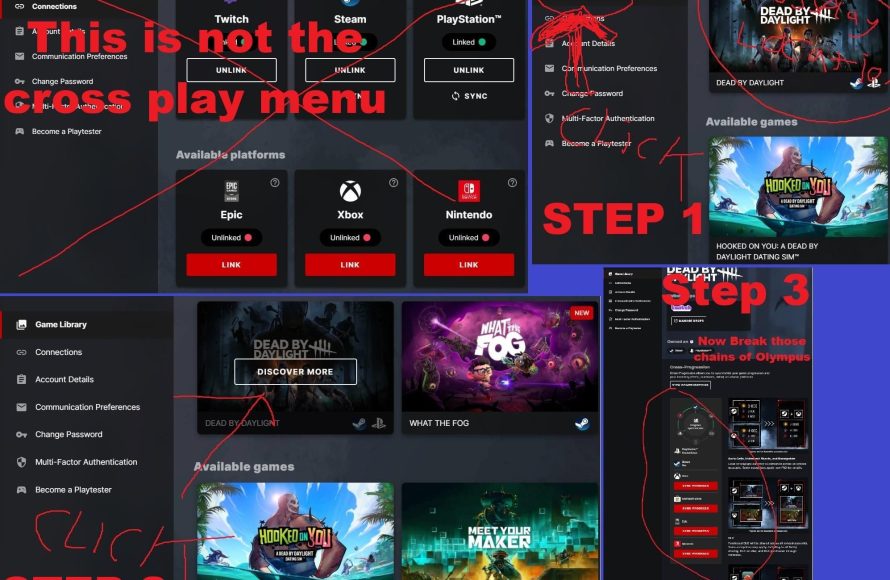
DBD Cross-Progression Step by Step Walk Through | Dead by Daylight
Final Thoughts
To synchronize your Dead by Daylight data across Xbox consoles, you must have an active Game Pass subscription. This requirement is because cloud saves utilize the Xbox network services, a part of the subscription. Without Game Pass, your progress might not properly sync.
So, the answer to ‘do i need game pass to sync xbox dbd’ is a clear yes, a subscription is required to ensure seamless data transfer. Playing offline will not sync your progress if you don’t have a subscription for that.

