
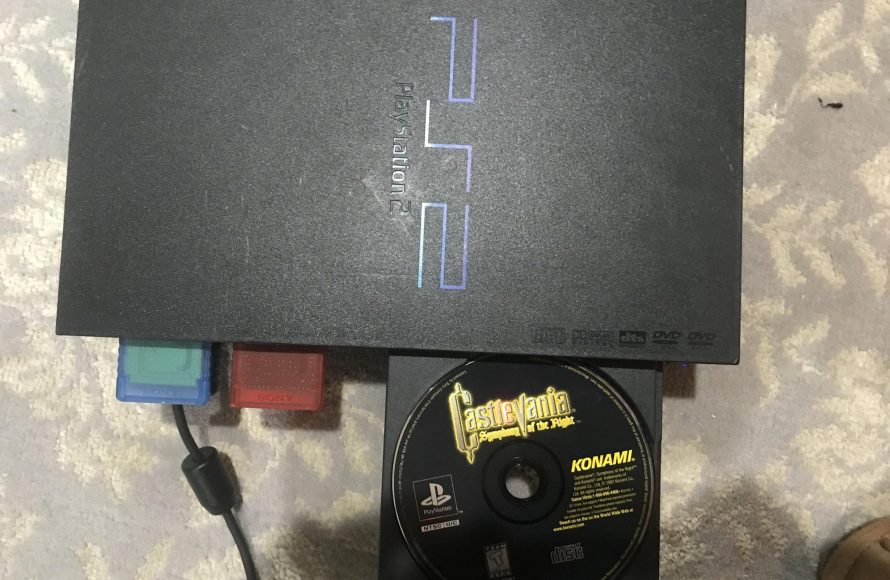
Yes, PS1 games work on PS2 consoles.
Ever wondered if that stack of classic PlayStation games you have would still be playable on your old PlayStation 2? Many gamers ponder “do ps1 games work on ps2,” and it’s a common question that pops up often.
The good news is, the PlayStation 2 was designed with backward compatibility in mind. This means you can generally pop in a PS1 disc and it will play without issues.

Do PS1 Games Work on PS2? A Deep Dive
Okay, let’s get right to it. You’ve got a stack of awesome PlayStation 1 (PS1) games and a PlayStation 2 (PS2) collecting dust. The big question is: Can you fire up those old classics on your PS2? The simple answer is a big, resounding YES! But, like with most things, there’s a little more to it than just popping in a disc and hitting play. Let’s explore all the cool details about playing PS1 games on a PS2.
The Magic of Backwards Compatibility
The PS2 was designed with a super cool feature: backwards compatibility. This fancy term means it can play games made for older systems, in this case, the PS1. Sony did this on purpose. They knew people had tons of PS1 games they still loved. Instead of making people buy a new console to play them, they let the PS2 handle it all. This is a huge win for gamers! Backwards compatibility allowed players to enjoy their existing game collection on the new system.
Think of it like this: your PS2 is like a super-powered time machine that can go back to the PS1 era. Pretty neat, huh?
How Does the PS2 Play PS1 Games?
The PS2 has special parts inside that allow it to understand how PS1 games work. These parts are like built-in translators. When you put a PS1 game in the PS2, the console recognizes it’s an older game, and switches its settings to play that game correctly. It’s not just a simple “read the disc” situation. The PS2 changes its inner workings to act like a PS1, but with better processing power.
Technical Details (Without Getting Too Complicated)
Inside the PS2, there is a specific processor that’s capable of running PlayStation 1 software. This processor isn’t active when playing PS2 games, but it springs to life when a PS1 disc is inserted. It’s like having a miniature PS1 hidden within the PS2. The graphic processing unit (GPU) also adjusts to display PS1 graphics correctly. It’s like the PS2 is showing the PS1 games through a special lens. This ensures that your older games look and play as they were originally designed, with minimal visual or performance differences.
The PS2’s memory controller, which manages how the system uses memory, also adjusts to the requirements of PS1 games. This keeps the games running smoothly. Even though the PS2 is more powerful than the PS1, it has to make those adjustments to correctly run older games.
Loading and Playing PS1 Games on Your PS2
Playing a PS1 game on your PS2 is very straightforward. Here’s a step-by-step guide:
- Make sure your PS2 is turned off.
- Open the disc tray.
- Place your PS1 game disc into the tray.
- Close the disc tray.
- Turn on your PS2.
The PS2 will now read the PS1 disc, just like it would with a PS2 game. When the main menu comes up, simply select ‘Start’ or ‘Play’ if needed, and the game will begin!
Important Considerations for Playing PS1 Games on PS2
There are a few things you should keep in mind when enjoying your PS1 favorites on the PS2:
- Controller Compatibility: You can use your standard PS2 controller for PS1 games, and it works perfectly. The controls will be the same as they were on the original PlayStation.
- Memory Cards: You will need a PS1 memory card to save your PS1 game progress. The PS2 memory card is only for PS2 games. Think of them like separate lockers for your game saves.
- Game Compatibility: While most PS1 games will work perfectly on the PS2, there are a few exceptions, where some games will not run properly or not work at all. Although it’s rare, it’s good to be aware that some obscure titles might have issues. We’ll talk more about that later.
Potential Issues and How to Handle Them
While the PS2 does a great job at playing PS1 games, there are some situations where you might encounter problems. Here’s a look at some common issues and what you can do about them:
Game Compatibility Problems
As mentioned earlier, there are a tiny number of PS1 games that may have problems playing on the PS2. These problems can include games freezing up, or not loading, or graphical glitches. This is usually due to the specific coding used in those games which the PS2 might not correctly interpret. This is rare but possible. A quick search online can usually let you know if a specific game has known problems.
What to Do if Your Game Doesn’t Work
- Clean the Disc: Sometimes, a dirty or scratched disc can cause problems. Carefully clean the disc with a soft, clean cloth. Wipe from the center out.
- Check the PS2 Lens: The laser inside the PS2, which reads the disc, might be dusty or having issues. There are lens cleaning discs that might help, but if that doesn’t work, you may need to get your PS2 checked out.
- Try Another PS2: If you have access to another PS2, try playing your game on it. If it works on another system, it may indicate an issue with your console.
- Online Resources: Use the power of the internet! Search online forums and communities to see if other gamers have experienced the same issues, and learn how they resolved it.
Memory Card Issues
Saving your PS1 game progress can sometimes be tricky. If you have an old PS1 memory card that hasn’t been used in years, it might not work. If the memory card is damaged or corrupted, you will not be able to use it. The PS2 saves PS2 games on a PS2 card and PS1 games on a PS1 card. They are not compatible. The PS1 memory card has to be in port one of the PS2 for it to work properly for playing PS1 games. You cannot save a PS1 game onto a PS2 memory card or vice versa.
Tips for Memory Card Success
- Try Another Card: If possible, try a different PS1 memory card. Sometimes one memory card can go bad.
- Make Sure It’s Clean: Ensure the metal pins of the card are clean and not corroded.
- Check the Ports: Sometimes the ports where you plug the card into the system can get dirty, try another port or clean it up a bit.
Visual and Audio Issues
Occasionally, you may experience minor graphical or audio issues while playing PS1 games on the PS2. This could include pixelated graphics, or sound effects that don’t sound quite right. Remember that the PS2 is designed for its own games, not exactly for PS1 games. These usually are minor issues.
Dealing with Minor Issues
- Adjust Settings: Experiment with your PS2’s display settings. Sometimes, switching between component and composite output can make a difference, or using different refresh rates, although this normally won’t have a big effect on older games.
- Check Cables: Make sure your audio and video cables are properly connected and undamaged.
Why Backwards Compatibility Was a Great Idea
Backwards compatibility is more than just a convenience; it’s a big deal in the gaming world. It lets gamers keep enjoying the games they love without needing to keep multiple consoles. It helps with nostalgia too. When you play a game from your past, it brings back good memories.
The Benefits of Backwards Compatibility
- Game Preservation: Backwards compatibility helps to keep older games alive so that new generations of gamers can play them.
- Saves Money: Gamers don’t need to repurchase old games for newer consoles if their old games work.
- Nostalgia Factor: It’s fun to revisit old games and see how far gaming technology has come.
The PS2: A Bridge Between Two Eras
The PlayStation 2 did something amazing by bridging the gap between the 32-bit era of the PS1 and the new, more powerful 128-bit era. It allowed gamers to transition smoothly without having to abandon their existing collections of games. The PS2 is not just a great console on its own; it’s also a time capsule, capable of taking you back to those magical days of the PlayStation 1. By playing old PS1 games on the PS2, you can see the amazing things developers were doing during that period of gaming.
Different PS2 Models and Backwards Compatibility
All models of the PlayStation 2 system have the ability to play PlayStation 1 games. From the initial “fat” PS2 models to the slimmer PS2 models, they all possess the backwards compatibility feature. The model of your PS2 shouldn’t affect how PS1 games perform. However, it’s worth mentioning that some later models of the PS2, particularly the slim models, could have less reliable disc drives due to their age. This is due to normal wear and tear.
Checking Your PS2 Model
- Look on the Bottom: The model number is printed on a sticker on the bottom of your PS2. Check the sticker for “Model No.” and you will see the identification number that will allow you to see if you have a fat PS2 or slim PS2.
- Check your Serial Number: You can Google what your serial number on your PS2 means and find which model you have.
So, to wrap it up, yes, PS1 games absolutely work on the PS2! You can dust off those classics and enjoy them all over again on your PS2. Just remember to use a PS1 memory card for saves, and be aware that a small number of games might have minor issues. It’s a great feature that lets you travel back to the past while also being able to enjoy modern games.
Does PS2 play PS1 games
Final Thoughts
Yes, the PS2 console plays nearly all PS1 games. This backwards compatibility feature is a key benefit. Gamers appreciate being able to enjoy their older collection on a newer system.
Therefore, if you have a PS2, you can play most of your PlayStation 1 titles. This makes your PS2 a versatile system for playing various games. You get two generations of gameplay. So, to answer it directly: do ps1 games work on ps2? Yes, almost all do.

