
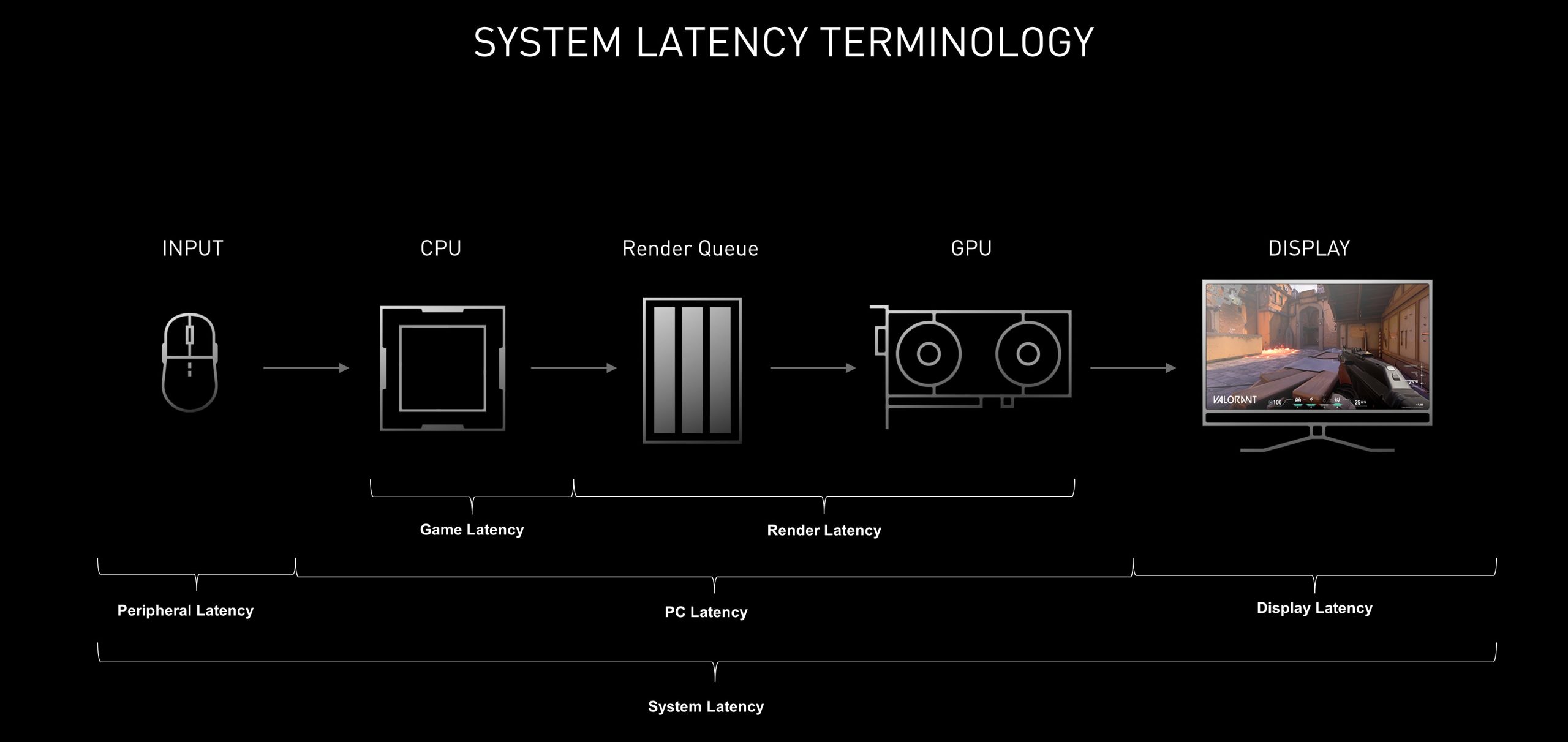
No, game latency caused by the CPU does not directly mean lower frames per second (FPS), though it can contribute to them.
Ever wondered about the connection between what your processor is doing and what you see on screen while gaming? It’s a common question, especially when performance dips unexpectedly. Many players ask, does game latency cpu mean fps?
We know slow processor performance can affect the responsiveness of your controls. However, that doesn’t translate perfectly into a drop in the number of frames you see per second. These are related, but not the same thing. Let’s investigate how these components affect your gaming experience.

Does Game Latency CPU Mean FPS? Understanding the Relationship
The world of gaming can be super exciting, but sometimes things get confusing. You might hear people talking about “latency,” “CPU,” and “FPS,” and wonder how they all fit together. One common question is: does a slow CPU cause high game latency and low frames per second (FPS)? Let’s break down these concepts and see how they connect.
What is Game Latency?
Imagine you’re playing a race car game. You press the button to turn, but the car doesn’t turn right away. There’s a delay between your action and what happens on the screen. That delay is called latency. It’s the time it takes for your input (like pressing a button) to travel through your computer, reach the game server, and for the game to show you the result. High latency means a longer delay, and it can make games feel laggy and unresponsive.
Types of Latency
Latency isn’t just one thing; it comes in different forms. Here are the main types you might encounter:
- Input Latency: The delay between your input (like moving your mouse or pressing a key) and your computer registering it.
- Network Latency: The delay it takes for your data to travel across the internet to the game server and back. This is often called “ping.”
- Processing Latency: The time it takes for your computer to process the game’s data and display it on the screen.
It’s important to know that while all types of latency impact your game, it’s often network latency that people mean when they simply say “latency”.
What is a CPU?
The CPU, or Central Processing Unit, is like the brain of your computer. It’s responsible for performing all the calculations and instructions your computer needs to run. When you’re gaming, the CPU has to handle many tasks, like:
- Figuring out the actions of all the characters in the game.
- Calculating physics, like how objects move and collide.
- Handling artificial intelligence (AI) for non-player characters.
- Sending data between different components of your computer.
A more powerful CPU can handle more complex tasks quickly, allowing the game to run more smoothly. A less powerful CPU may struggle, leading to slowdowns and potential issues related to latency.
What is FPS (Frames Per Second)?
Imagine a flipbook, where you see slightly different pictures in quick succession to create the illusion of movement. That’s essentially how games work. FPS, or frames per second, is how many of those pictures your computer can show you each second. A higher FPS means smoother and more fluid motion, while a lower FPS will appear choppy and less responsive.
Think of it this way, a game running at 60 FPS is going to feel much smoother than the same game running at 30 FPS. The higher the FPS number, the smoother it will look and feel, also giving you a better competitive edge in online gaming.
Factors Affecting FPS
Many factors influence your FPS in a game, such as:
- Graphics Card (GPU): This is the workhorse for displaying the visuals of a game. A stronger GPU will enable you to run the game at higher resolution and FPS.
- Game Settings: If you play on maxed out graphics setting your FPS may drop, if you lower those graphics setting, your FPS will generally increase.
- RAM: The amount of memory your computer has can affect its ability to keep up with the game and increase FPS.
The Link Between CPU, Latency, and FPS
Now, let’s get to the main question: how does your CPU affect latency and FPS? The CPU plays a vital role in processing the game’s logic and preparing the graphics data to be sent to the GPU. If your CPU is not fast enough to complete these tasks in a timely manner, there will be bottlenecks created.
CPU Bottlenecks and Latency
When your CPU is struggling to keep up with the game’s demands, it creates what’s known as a “bottleneck.” This means the CPU is holding back other parts of the system because it’s working at maximum capacity. A CPU bottleneck can cause a number of issues related to both latency and FPS:
- Increased Processing Latency: Your CPU can take too long to process game data, which can result in latency. This latency directly increases the processing latency.
- Lower FPS: If the CPU is too slow to process game data in time for the GPU to render the next frame, the overall frame rate (FPS) will drop.
- Inconsistent Frame Rates: The game might run smoothly sometimes, but then stutter and lag at other times, as the CPU struggles to keep up with sudden demands.
CPU and FPS – A Closer Look
As we noted earlier, the CPU has to send information to the GPU so that it can display what is going on in the game. If the CPU is unable to send the data to the GPU fast enough, then the GPU is waiting idle, which results in lower FPS. So while the GPU is responsible for rendering images on the screen, it still is dependent on the CPU to feed it the information to be rendered. That is why the CPU plays an important role in your FPS.
Here’s an analogy: imagine the CPU is like a chef preparing ingredients, and the GPU is the cook making the meal. If the chef (CPU) is slow, the cook (GPU) has to wait, and the food (game) takes longer to be served (displayed).
How a Faster CPU Can Help
A faster, more powerful CPU can process game data more quickly and efficiently, resulting in a number of benefits:
- Reduced Processing Latency: A fast CPU can reduce the processing time for game data, leading to less input lag and smoother gameplay.
- Higher FPS: Because the CPU is able to keep up with demand, it can feed data to the GPU faster and more consistently, leading to higher frames per second.
- More Consistent Frame Rates: A strong CPU can handle demanding parts of the game without causing sudden frame rate drops or stutters, leading to smoother, more enjoyable game play.
Does Only The CPU Affect Latency?
While the CPU is definitely an important factor in game latency, it’s not the only one. As we previously discussed, other types of latency, like network latency, also play a huge role. Even if you have a super fast CPU, if your internet connection is slow, you’ll still experience lag. Let’s compare several scenarios.
Scenario 1: Good CPU, Slow Internet
In this scenario, you might have an amazing CPU but slow download and upload speeds. Your computer can process game data super quickly, but the data isn’t getting to and from the game servers fast enough. This results in high latency and a choppy gaming experience. This is largely a case of high “ping” time.
Scenario 2: Slow CPU, Good Internet
Here, you might have a good and fast internet connection, but your CPU is older and can’t keep up with the demands of the game. This results in both lower FPS and high processing latency.
Scenario 3: Slow CPU, Slow Internet
This is obviously the worst case scenario. You’ll have both high latency due to slow internet and slow processing, and low FPS because your CPU can’t keep up. Everything in your game will be laggy and unresponsive.
Scenario 4: Good CPU, Good Internet
In this best case scenario you have a powerful CPU and a fast internet connection. You should experience smooth gameplay, high frame rates, and low latency. You will have the best competitive advantage possible.
Comparing the Scenarios
Let’s take a look at a table which shows the different scenarios and their impacts on latency and FPS.
| Scenario | CPU | Internet | Latency | FPS |
|---|---|---|---|---|
| 1 | Good | Slow | High (Mostly Network) | Good |
| 2 | Slow | Good | High (Mostly Processing) | Low |
| 3 | Slow | Slow | Very High | Low |
| 4 | Good | Good | Low | High |
As you can see, both your CPU and internet play a vital role in making sure your game runs smoothly. That means you need both a powerful CPU and fast internet to experience the best performance in your games.
Other Factors That Can Affect Latency and FPS
Besides CPU and network issues, many other things can affect your game performance. Here are some of them:
- GPU (Graphics Card): A slow GPU can cause low FPS.
- RAM (Random Access Memory): Insufficient RAM can also slow down game performance and cause stuttering.
- Hard Drive/SSD: If your game is installed on a slow hard drive, loading times and performance might suffer.
- Background Programs: Running too many programs while gaming can make the CPU work harder and cause latency issues.
- Game Settings: High graphics settings can put more strain on the GPU and cause FPS to drop, and even cause additional workload for the CPU.
- Drivers: Outdated video card drivers can cause issues with game performance and stability.
- Game Optimization: A poorly optimized game will run poorly on all machines.
Troubleshooting Latency and FPS Issues
If you’re dealing with high latency or low FPS, here are some steps you can take to troubleshoot the problem:
- Check Your Internet Connection: Do a speed test to see if your internet is performing as it should. If not, consider restarting your modem and router, or contacting your internet provider.
- Monitor Your CPU Usage: Open your task manager while playing a game to check to see how much CPU is being used. If it’s consistently at or near 100%, you might have a CPU bottleneck.
- Update Your Drivers: Make sure your graphics card and other hardware drivers are up to date.
- Lower Your Game Settings: Try lowering the graphics settings in the game to see if that increases your FPS and lowers latency.
- Close Background Programs: Close any unnecessary programs running in the background while you’re gaming.
- Clean Up Your Computer: Delete old files and uninstall unused programs to free up resources.
- Check Your Hardware Temperature: Overheating hardware can cause performance issues, so make sure your computer is properly cooled.
- Check for Game Updates: Sometimes game developers release patches that can improve performance and reduce lag.
If after trying all those steps you still have issues with lag and low FPS, you may need to upgrade your hardware, like the CPU or GPU.
Understanding how the CPU affects game latency and FPS is key to making the best out of your gaming experience. A fast CPU can help reduce processing latency and increase FPS, but it’s crucial to keep in mind that it’s just one part of the puzzle. The whole gaming system needs to be considered. With a combination of good hardware, a stable internet connection, and proper system management, you can be sure to have the best gaming performance possible.
What is System Latency
Final Thoughts
Game latency and CPU performance directly impact each other. A slower CPU can create bottlenecks, leading to higher latency. This increased latency makes games feel sluggish and unresponsive.
While latency and FPS are related, they are not the same. Frame rate (FPS) measures how many frames render per second. However, latency, often caused by CPU issues, can impact the smoothness of these frames. So, ultimately does game latency cpu mean fps? Not directly but indirectly. The CPU’s performance affects both game latency and the achievable frame rate.

