
For the best gaming experience, game storage should go into an SSD because it provides significantly faster load times and improved overall performance compared to a traditional HDD.
Choosing where to install games can feel like a crucial decision. Does game storage go into ssd or hdd? It’s a common question that many gamers ponder when setting up their systems. You want the best experience, right?
The answer hinges on speed and performance. SSDs, with their lightning-fast data access, have a clear advantage. HDDs are slower, which can lead to longer loading screens and potential stuttering. Ultimately, the drive you choose affects how smoothly your games run.

Does Game Storage Go Into SSD or HDD?
Okay, let’s dive into the world of game storage! You’ve got this awesome gaming PC or console, and you’re ready to play. But where should you actually keep your games? Should they live on a speedy SSD (Solid State Drive) or a more traditional HDD (Hard Disk Drive)? That’s a big question, and the answer can really affect your gaming experience. Let’s explore the differences between these two types of storage and figure out what’s best for you.
Understanding SSDs: The Speed Demons
Imagine a race car compared to a regular family car. That’s kind of like the difference between an SSD and an HDD. SSDs are all about speed. They use something called flash memory, kind of like a super-fast USB drive, to store data. Because they have no moving parts (unlike HDDs, which have spinning disks), they can access information very quickly. This translates into much faster loading times for your games, shorter boot-up times for your computer, and smoother overall performance.
How SSDs Work
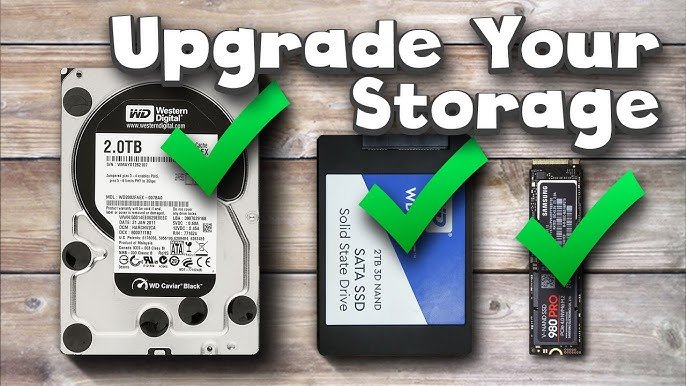
SSDs use NAND flash memory to store data. Think of it like a grid of tiny switches that can be turned on or off to represent information. When your computer needs to get data, it can access these switches almost instantly. This is why SSDs are so incredibly quick. There are different types of SSDs such as SATA, NVMe, and m.2. SATA SSDs are generally a bit slower than NVMe or m.2 SSDs because they are constrained by older technology. NVMe and m.2 SSDs use a much faster interface with the motherboard making them the best choice for gaming systems. These types of drives are usually the most expensive. The benefit is that these drives will significantly reduce game load times and improve gameplay responsiveness.
Benefits of Using SSDs for Game Storage:
- Faster Loading Times: Games load in a flash, meaning less waiting and more playing.
- Quicker Boot-Ups: Your computer starts up faster, getting you into the game sooner.
- Improved Game Responsiveness: Smoother game play and reduced lag in many cases.
- Faster texture loading: Games load texture faster allowing you to see the game worlds details.
When to Use an SSD for Game Storage
If you can only have one, put your most-played games on the SSD. This is most beneficial when the game is large or when you play it often. For the games you play daily, putting them on the SSD is a good choice. You will be able to get into the game faster and that allows you to play more of your favorites.
You should also use SSDs for your operating system (Windows, macOS, or Linux) to ensure your computer boots quickly and is responsive to all commands. SSDs are best when responsiveness is crucial for your gameplay.
Understanding HDDs: The Storage Giants
HDDs, on the other hand, are like big, roomy libraries. They store information on spinning disks, kind of like a record player. A needle moves across the disk to read the data. Because of these moving parts, they are generally slower than SSDs, but they also have a much larger storage capacity at a lower cost. That makes them good for storing a large number of files and less-frequently played games. HDDs still use a magnetic platter to store data. The platter spins and a mechanical arm reads the data. The speed that the platter spins at determines how quickly data is read. The most common speeds for HDDs are 5400rpm and 7200rpm. The faster the speed, the faster the read and write speeds.
How HDDs Work
HDDs use magnetic platters that spin to store and retrieve data. A read/write head moves across the surface of the platter to access the information. The speed that this platter spins impacts the performance of the hard drive. Typically, these platters spin at either 5400 or 7200 revolutions per minute (RPM). Higher RPMs generally mean faster read and write speeds, but they also consume more power and can be noisier. Hard Drives are best used when the game is not frequently played and you want to save space on an SSD drive. When it comes to storage capacity and cost per gigabyte, HDDs still reign supreme.
Benefits of Using HDDs for Game Storage:
- Larger Storage Capacity: Store a massive amount of games without breaking the bank.
- Lower Cost Per Gigabyte: Get more storage for your money compared to SSDs.
- Good for Backups: Ideal for backing up your games and other important files.
- Good for Games Not Played Frequently Perfect for keeping all those older games that you might want to play but don’t play often.
When to Use an HDD for Game Storage:
HDDs are perfect for games you don’t play very often or for a large library of games you might access occasionally. If you have a lot of games and don’t want to delete them when you need to make room on your SSD, move them to your HDD to keep them available. If you can only pick one game to put on your SSD, choose the one that benefits most from fast loading speeds. All of your other games can live comfortably on the HDD.
SSD vs. HDD: A Side-by-Side Comparison
Let’s compare these two types of storage directly to see where they shine:
| Feature | SSD (Solid State Drive) | HDD (Hard Disk Drive) |
|---|---|---|
| Speed | Much faster | Slower |
| Loading Times | Very fast | Slow |
| Storage Capacity | Lower (typically) | Higher |
| Cost | More expensive per gigabyte | Less expensive per gigabyte |
| Durability | More durable (no moving parts) | Less durable (moving parts) |
| Noise | Silent | Can be noisy |
| Boot-up times | Fast | Slow |
| Ideal Use | Operating system, frequently played games | Mass storage, less frequently played games |
Hybrid Solutions: Best of Both Worlds?
There’s another option to consider: using both an SSD and an HDD. This allows you to get the benefits of both types of storage. You can store your operating system and your most-played games on the SSD for speed and put everything else on the HDD for storage. This is a popular choice for gamers who want the best overall experience.
Setting Up a Hybrid Storage System
Setting up a hybrid storage system is very simple, you just need to have both an SSD and an HDD connected to your system. Once that is done, you will need to install your operating system on the SSD. Then you can install games on either the SSD or the HDD as you choose.
- Operating System: Install your operating system (Windows, macOS, or Linux) on the SSD for fast boot and overall system performance.
- Most-Played Games: Install games you play most frequently on the SSD.
- Large Game Library: Install all other games on your HDD.
This ensures fast load times for your favorite games and keeps the large amount of storage you would want available on a hard drive.
The Impact of Storage on Gaming Performance
The type of storage you use can significantly impact your gaming experience. It’s not just about load times, although they are a big factor. Having games stored on an SSD also can improve texture loading, improve the speed of your system, and result in a better gameplay experience.
Load Times
The biggest difference you will notice is in load times. Games stored on an SSD will load significantly faster than games stored on an HDD. This means you’ll spend less time waiting on loading screens and more time actually playing. It is common for games on an SSD to load up to 5 or 6 times faster than on a mechanical drive.
Game Performance
While not as dramatic, having a game on an SSD can also improve performance, especially in open-world games. Faster loading can reduce texture pop-in. It may also make your games feel less laggy. This improved performance can also help you stay engaged in the game.
Overall Experience
Ultimately, having your games on an SSD makes the entire experience feel smoother and more responsive. You will spend less time waiting and more time doing what you want. This can make a huge difference in your satisfaction while gaming.
Which is Best for You?
Choosing between an SSD and HDD (or using both) depends on your budget and gaming habits. If you want the absolute fastest experience and can afford it, an SSD is the best choice. If you need lots of space and want to save money, an HDD is good. If you want a bit of both, using an SSD and an HDD is a good solution.
Consider Your Budget
SSDs are typically more expensive than HDDs, especially when looking at higher storage capacities. If you have a limited budget, an HDD may be more practical. However, if you can spend a little extra to get an SSD it is well worth it.
Think About Your Gaming Habits
Consider how often you play the same games. If you have a handful of favorite games you play all the time, those should be on an SSD. If you have a large collection and many that are only occasionally played, an HDD will serve you well.
Evaluate Your Storage Needs
Look at the total size of your game library. If you are approaching the maximum capacity of your existing drive, it might be time to add another. Look at how much space your games use and pick the drive that meets your capacity requirements.
Future of Game Storage
As technology improves, SSDs are only becoming more affordable and faster. It is easy to imagine a future where everyone will use SSDs in their gaming systems. That doesn’t mean HDDs will completely disappear; they will likely continue to be used for mass storage and back ups of all kinds of files. But for gaming, SSDs are quickly becoming the standard for loading game worlds quickly.
The Rise of NVMe SSDs
NVMe SSDs are the latest evolution in solid state technology. This type of drive provides the fastest speeds currently available for consumers. NVMe SSDs use the PCIe connection of the motherboard to provide superior throughput. They are the best choice for modern gaming systems and will likely become the standard for years to come.
The Future of HDDs
HDDs will likely remain a good choice for storing large amounts of data in the future. With the high cost of SSDs for high-capacity drives, they will still be a great choice when cost or capacity is your primary concern. For backing up files, and keeping seldom played games available, HDDs still have a place.
In short, deciding between an SSD and an HDD for game storage boils down to priorities: speed versus capacity and cost. If you are looking for the best gaming experience, an SSD is the best choice. For large libraries of less-frequently played games, an HDD will work great. If you can afford both, they are the best combination for a great gaming experience and large storage capability.
M.2 vs SSD vs HDD – Best Storage for Gaming
Final Thoughts
Ultimately, for gaming, you should prioritize an SSD for game installations. Load times improve drastically and gameplay feels more responsive. HDDs remain suitable for mass storage of less frequently used files.
Consider an SSD for games you play regularly. This approach offers the best balance between speed and cost. ‘does game storage go into ssd or hdd’ becomes a question of performance versus quantity.

