
No, rebuilding the database on your console does not delete your installed games.
Many gamers worry about losing their precious game collections when performing maintenance tasks. The question, “does rebuilding database delete games?” pops up frequently, causing some concern. It’s understandable, as nobody wants to lose progress or have to reinstall everything. Let’s clarify what this process actually does and put those fears to rest.

Does Rebuilding Database Delete Games?
Okay, let’s talk about something that might sound a little scary: rebuilding your PlayStation’s database. Maybe your games are acting glitchy, your menus are slow, or your system just feels a bit off. Someone might have told you that rebuilding the database is like a magical fix-it button. But then, a big question pops into your head: “Does rebuilding database delete games?” It’s a valid concern! Nobody wants to lose all their hard-earned game progress or, worse, their entire game library. So, let’s dive deep and figure out exactly what rebuilding the database does, and more importantly, what it doesn’t do.
What Exactly is a PlayStation Database?
Think of your PlayStation’s database like a super organized filing cabinet. It keeps track of all the important stuff on your console. It knows where your games are stored, what your settings are, what trophies you’ve earned, and even how your different apps are arranged on your home screen. It’s basically the brain that keeps your PlayStation running smoothly. This database is constantly being updated as you use your console. You install new games, delete old ones, change settings, earn new trophies – all of these actions get recorded in the database.
Over time, this database can sometimes get a bit messy or disorganized. Think of it like your real-life desk: the more you use it, the more cluttered it might become. Sometimes a file gets misplaced, a record goes a little wonky, or things simply become out of order. That’s when problems start. You might notice slower loading times, games freezing, or other weird glitches. Rebuilding the database is like cleaning up this cluttered desk and putting everything back in its place, allowing your PlayStation to work more effectively and quickly.
Why Would You Need to Rebuild Your Database?
There are several reasons why you might consider rebuilding your PlayStation’s database. Here are a few common scenarios:
- Sluggish performance: If your PlayStation is taking a long time to load menus, start games, or move between different screens, it might be a sign that the database needs a refresh.
- Game freezes or crashes: Experiencing frequent game freezes or crashes can sometimes be attributed to a corrupted or disorganized database.
- Error messages: If you are seeing odd error messages that don’t seem to have a logical cause, a database rebuild may be a good troubleshooting step.
- Slow downloads or installations: If downloads and installs are slower than normal, the database could be the culprit.
- General system instability: If your PlayStation feels generally unstable or unreliable, rebuilding the database could help bring it back to its optimal state.
- Issues with trophies or game data: Sometimes, errors with trophy syncing or game save data can indicate a database issue.
It’s important to remember that rebuilding the database isn’t a magic bullet for every problem, but it’s a good first step for fixing many common issues. It’s also a safe procedure that won’t harm your system if you’re just trying to optimize performance.
The Rebuilding Process: What Actually Happens?
So, what exactly happens when you rebuild your PlayStation’s database? It’s not like a full system reset, which would definitely erase your games and saves. Here’s a breakdown of the process:
- The PlayStation will first perform a quick check and backup of your existing database information.
- Then, your PlayStation will scan all of the storage space available on the console.
- Following the scan, your PlayStation will carefully rebuild a new database, listing all the data and content stored within the console.
- Finally, your PlayStation will organize the content and store it appropriately.
This process is essentially reorganizing the information within the database, making it more efficient. Think of it as a library putting all the books back on the shelves in the right order. It’s not deleting the books (your games) – it’s simply making it easier for the library (your PlayStation) to find them. Crucially, the rebuild is not altering the game data itself, just its place within the index used by the console.
Does Rebuilding the Database Delete Games? The Short Answer
Now for the question we’ve all been waiting for: No, rebuilding the database on your PlayStation does not delete your games, game saves, or any other downloaded content. It’s a common misconception, but rest assured, your games are safe. The rebuild is strictly about the database itself, not the actual files or information associated with those games. Your game installations, game saves, and other content are stored separately and will be untouched by the database rebuilding procedure.
What Gets Affected by Rebuilding?
Okay, so your games are safe, but does rebuilding the database change anything? The answer is yes, it can, but usually just minor things. Here’s what you might experience:
- Your most recent game activity in your activity feed: This might be cleared. It’s just your recent activity, not your actual progress or saves.
- Folder Organization on Home Screen: If you have made custom folders to organize your games, these folder might get reset.
- System Messages: This includes messages like friend requests, group invites, etc., will likely be cleared.
- Notification settings: Some user-specified notification preferences may be reset to default.
- Some game specific settings: Sometimes, the database rebuild can reset certain game-specific configurations. You may need to reconfigure some settings in a game if you had them custom set.
These changes are all relatively minor and easily fixed. They don’t affect your actual games or your ability to play them. It is also possible that you notice no changes after the process, every user experience is unique and different, the best way is to proceed with rebuilding the database when there is a need.
How to Rebuild Your PlayStation Database
If you decide to rebuild your PlayStation’s database, here’s how to do it. The process is similar for all PlayStation consoles (PS4 and PS5), but there might be slight variations in menu wording.
For PlayStation 4:
- Completely turn off your PlayStation 4. Make sure it’s not in Rest Mode.
- Press and hold the power button until you hear two beeps. This will boot the console into Safe Mode.
- Connect your controller using a USB cable.
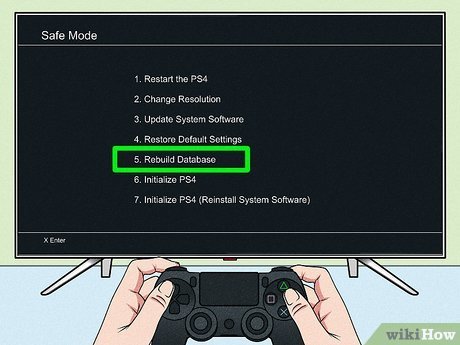
- From the Safe Mode menu, select “Rebuild Database.”
- The process will begin, and it might take a while depending on how much data you have. Your system will restart after it is complete.
For PlayStation 5:
- Completely power off your PlayStation 5. Make sure it is fully turned off, not in Rest Mode.
- Press and hold the power button until you hear two beeps. This will boot the console into Safe Mode.
- Plug in your controller using a USB cable.
- Select the “Rebuild Database” option from the Safe Mode menu.
- The system will then begin the rebuilding process, and the time this takes depends on the amount of data you have. Once it is complete, your system will restart normally.
The process is safe, but it’s wise to make sure your PlayStation is properly powered and won’t turn off mid-process. A sudden power loss during a rebuild could cause issues. Once finished, you’ll see if it fixes the issue you were experiencing.
When Should You Not Rebuild the Database?
While rebuilding the database is generally safe and a good troubleshooting step, there are a few times you may not want to do it:
- During a major game install or update: It’s always best to avoid restarting your system or making changes like rebuilding the database during an install or update of a large game. Let the process finish before doing anything else.
- If you’re having serious hardware problems: If your PlayStation is showing major signs of hardware failure, a database rebuild won’t fix it. Things like overheating, hardware failures, or sounds may mean hardware damage.
In these situations, you will want to look at other options first.
Tips for Keeping Your PlayStation Database Healthy
While you can always rebuild the database, here are a few things you can do to help keep it healthy in the first place:
- Regularly shut down your console properly: Avoid just unplugging it or leaving it in Rest Mode for extended periods.
- Keep your system software up to date: Updates often include database optimizations and other fixes that can improve stability.
- Avoid rapidly starting and stopping games: This can sometimes cause errors in the database.
- Don’t interrupt downloads or installations: Allow these to complete fully without interruption.
By taking good care of your system, you can help prevent many issues that would require a database rebuild. However, as mentioned, it is a standard process and nothing to be afraid of, so if it is needed don’t hesitate.
Rebuilding Database vs. Factory Reset: A Crucial Difference
It’s very important to understand that rebuilding the database is not the same as doing a factory reset or initializing your PlayStation. A factory reset or initialization is similar to formatting your computer’s hard drive and it will delete all of your games, saved data, and personal settings. Here’s a quick comparison:
| Action | Deletes Games? | Deletes Game Saves? | Impact on Settings |
|---|---|---|---|
| Rebuilding Database | No | No | Minor settings changes |
| Factory Reset/Initialization | Yes | Yes | Resets system to factory defaults |
If you are unsure what you need to do, make sure to choose the correct option on your PlayStation system.
Why the Confusion Around Deleting Games?
So why do many people believe that rebuilding the database will delete their games if it doesn’t? There are probably a few reasons for this confusion. First, people might confuse it with a factory reset, which definitely does delete everything. It is also possible that many users don’t fully understand what a database is, and because it sounds like something important, people might assume that it impacts game storage.
Also, some older systems or devices might have had more drastic database rebuild procedures that could lead to data loss. Some users might be remembering that when making an assumption about PlayStation systems.
But with PlayStation consoles, the database rebuild is designed specifically to not touch your game data, which is a key difference compared to more drastic fixes.
By understanding what a database does, and what the rebuilding process entails, we can remove the fear of losing our games.
So, there you have it. Rebuilding the PlayStation database is a safe and helpful procedure that can fix some common system issues. It is not a game eraser, and your games are completely safe. So, the next time your PlayStation feels a little off, don’t be afraid to give it a try!
Does rebuilding ps4 database delete everything?
Final Thoughts
Rebuilding your PlayStation database does not delete installed games. The process only reorganizes the data. It can fix issues with game performance.
You might experience improved loading times. Your game saves remain untouched. Rebuilding the database is a safe maintenance step.
So, does rebuilding database delete games? The answer is a definite no. Therefore, you must not worry about data loss.

