
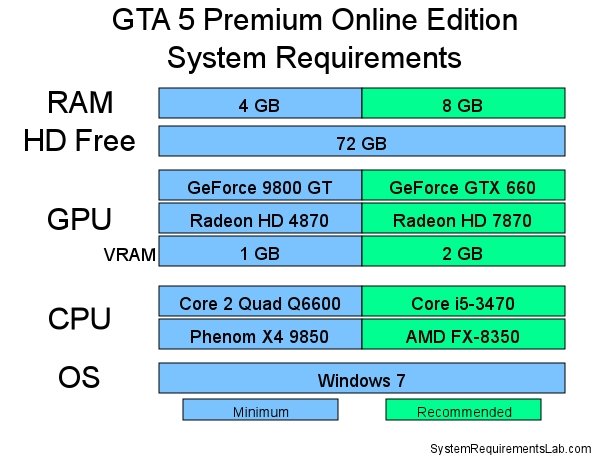
Minimum specifications for GTA 5 Online on PC include an Intel Core 2 Quad CPU Q6600 or AMD Phenom 9850 Quad-Core Processor, 4GB of RAM, and an NVIDIA 9800 GT 1GB or AMD HD 4870 1GB graphics card.
Ready to dive into Los Santos online? Before you hit the streets, it’s vital to understand the gta 5 online pc requirements. Knowing these specifications will guarantee a smooth, enjoyable gaming experience with your friends.
The right hardware prevents frustrating lag and performance issues. Check your system’s specs against the required levels to see if your computer is ready for action.

GTA 5 Online PC Requirements: Can Your Computer Handle Los Santos?
So, you’re itching to jump into the chaotic world of Los Santos with your friends in GTA 5 Online? That’s awesome! But before you start planning your heists and car chases, it’s super important to make sure your computer can actually run the game. Nothing is more frustrating than buying a game and then finding out your machine isn’t strong enough. Let’s break down everything you need to know about the GTA 5 Online PC requirements, so you can have a smooth and fun gaming experience.
Understanding Minimum vs. Recommended Specs
When we talk about PC requirements for any game, you usually see two sets of numbers: minimum and recommended. What do these mean? Think of it like this:
- Minimum Specs: These are the absolute lowest settings your computer needs to have to run the game, and they might not be pretty. You might have to play with lower graphics, and the game may not be as smooth, and maybe there will be some stutters. It will run, but it might not be the most enjoyable experience.
- Recommended Specs: These are the specs that Rockstar (the game’s creator) suggests for the best experience. If your computer meets these specs, you can expect to play the game with good graphics and smooth, fast gameplay. It’s the way the game is meant to be experienced!
Aiming for the recommended specs is always a good idea if you want to have the best time in GTA 5 Online. Let’s look at the specific numbers.
The Nitty-Gritty: GTA 5 Online Minimum PC Requirements
Okay, let’s get into the actual numbers. These are the very least your computer should have to play GTA 5 Online:
Operating System
You need at least:
- Windows 10 64 Bit or later versions. It is super important that you have the 64-bit version, not the older 32-bit version. If you are using the older windows, it is better to upgrade to Windows 10 or Windows 11 for the better experience.
Processor
Your computer’s “brain” needs to be at least:
- Intel Core 2 Quad CPU Q6600 @ 2.40GHz (four cores). If you are using an AMD processor, then you should have at least AMD Phenom 9850 Quad-Core Processor.
Make sure you have at least a quad-core processor. This means it has four “brains” working together. It helps the game run more smoothly.
Memory (RAM)
You will need at least:
- 4 GB of RAM. This is like your computer’s short-term memory, where it keeps things running. GTA 5 needs at least 4GB to work. These days, 8GB or 16GB is more common and very helpful.
Graphics Card (GPU)
This is the part that handles all the graphics and visual elements of the game. You need a card that can handle a lot of visual information, which needs at least:
- NVIDIA 9800 GT 1GB or AMD HD4870 1GB. It is always better if your graphic card have a dedicated 1 GB or more graphics memory, it helps in the gameplay.
Storage
Make sure you have enough room on your hard drive to store the game files. You’ll need at least:
- 100 GB of space. This is for the base game and the online parts, and with updates it’s better to have a little more. It’s better to have a SSD rather than HDD, it helps in faster loading time in the game.
Sound Card
This is for the game sound, you need at least:
- 100% DirectX 10 compatible sound card.
Aiming Higher: GTA 5 Online Recommended PC Requirements
If you want to enjoy GTA 5 Online with good graphics and smooth gameplay, you need to aim for these recommended specs. They are a big step up from the minimums.
Operating System
For the best experience, use:
- Windows 10 64 Bit or higher.
Processor
Your computer’s “brain” should be at least:
- Intel Core i5 3470 @ 3.2GHz (four cores) or better. If you are using AMD processor then you should have AMD X8 FX-8350 @ 4GHz (8 Cores) or better.
Here, the more processing power you have, the more smoothly your game will run, especially with lots of things happening on-screen.
Memory (RAM)
For best results, you should have at least:
- 8 GB of RAM or more. With more RAM, the game can run smoothly and faster.
Graphics Card (GPU)
To get the best visual quality you need:
- NVIDIA GTX 660 2GB or AMD HD7870 2GB or better. These cards have more memory, which makes the game look better and move smoother.
Storage
For best performance, you need to have:
- 100 GB of space or more, and it is better to have it installed on a SSD drive, for a faster loading time.
Sound Card
For the better sound experience, you need:
- 100% DirectX 10 compatible sound card.
Why Meeting the Requirements Matters
You might be thinking, “Oh, I’ll just play with lower settings if my computer isn’t that good.” While that’s true to a certain extent, there are good reasons to make sure you meet at least the minimum requirements.
- Smooth Gameplay: If your PC is struggling to run the game, it can feel choppy, or “laggy.” This can make it hard to aim, drive, and basically do anything. Smooth gameplay is much more enjoyable!
- Better Graphics: With the right specs, you can enjoy the beautiful world of GTA 5 with all the details Rockstar intended. Trees, cars, characters, everything looks better with better graphics.
- Avoiding Crashes: If your computer is barely meeting the requirements, the game might crash often. This is very frustrating, especially when you’re in the middle of a mission.
- Online Play: In GTA 5 online, performance matters a lot. If you have low fps in the game, then you will be at the disadvantage against the player with the higher fps.
Checking Your Computer’s Specs
Not sure what parts your computer has? Here’s how to check:
For Windows 10 & 11:
- Click on the Windows start button.
- Type “System Information” and click to open.
- Look for the following information:
- Operating System: You will find your windows version here. Make sure that it is Windows 10 or 11.
- Processor: The name of your CPU will be shown here. Compare the CPU with the minimum and recommended CPU.
- Installed RAM: This shows how much RAM you have in your computer. Check this and compare with the minimum and recommended RAM.
- Now, to find the graphics card, look in the search bar in Windows, and type ‘Device Manager’. Click on Device Manager.
- Find and Click on ‘Display Adapters’. It shows your graphic card name. Check this and compare with the minimum and recommended GPU.
Upgrading Your PC: A Few Tips
If your computer doesn’t meet the requirements, don’t worry! You might not need a whole new computer. Here are some upgrades you could consider:
- RAM: Adding more RAM is often the most cost-effective way to improve your game performance. If you have 4GB now, try upgrading to 8GB or 16GB, it is much more helpful.
- Graphics Card: If your card is old or weak, a new one will make a big difference. This might be the most expensive upgrade, but it’s also one of the most impactful for gaming.
- Storage: Adding a new SSD will reduce the loading time in the game.
Before you buy any new parts, make sure they are compatible with your computer. Check your motherboard specifications to make sure that you buy compatible parts. You can research on the internet about which parts to buy for your computer.
Graphics Settings: Fine-Tuning for Your PC
Even if you meet the recommended specs, you may still need to tweak the graphics settings in GTA 5 to get the best performance. Here’s what you should think about:
Resolution
The higher the resolution, the sharper the image. However, higher resolution needs more power, and can slow down the game. If your system is not too strong, you can try lowering the resolution to increase the fps in the game.
Texture Quality
This controls the detail of surfaces, like walls and roads. Lowering this can improve performance if you have a less powerful graphics card.
Anti-Aliasing
This makes edges look smoother, but also makes the game more demanding. Try turning this off or lowering it if you want more fps in the game.
Other Settings
Experiment with other settings like shadows, reflections, and population density. Lowering these settings can help the game run smoother.
The best way is to play around with the settings and find the perfect balance between visual quality and performance. Each computer is different, and each player has different preferences.
The Importance of Drivers
Your computer needs special software called “drivers” to make your hardware work correctly. It’s important to have the latest drivers for your graphics card. Updated drivers can sometimes improve the game performance a lot.
How to Update Graphics Drivers:
- Nvidia: Go to the Nvidia website and download the latest drivers for your graphics card model.
- AMD: Go to the AMD website and download the latest drivers for your graphics card model.
It is good to keep your graphics drivers updated all the time. Sometimes new driver updates can fix some of the game bugs and glitches.
By carefully checking your computer’s specifications and making any necessary changes, you can ensure a great experience playing GTA 5 Online. It’s worth the effort to get it running smoothly so you can enjoy all the fun Los Santos has to offer. You have a good chance to have smooth gameplay if your computer meets the recommended requirements. Now, go have some fun and remember to always play safely.
GTA 5 requirements for PC & Laptop. How much Processor, RAM, Graphics is required. Can you run it?
Final Thoughts
Meeting the minimum ‘gta 5 online pc requirements’ ensures a playable experience. Lower settings may be needed on older systems to achieve decent framerates.
Recommended specifications deliver smoother gameplay with better visuals. You must have a suitable GPU and processor.
These requirements balance performance and graphical fidelity. Check official specifications for the best results before playing.

