
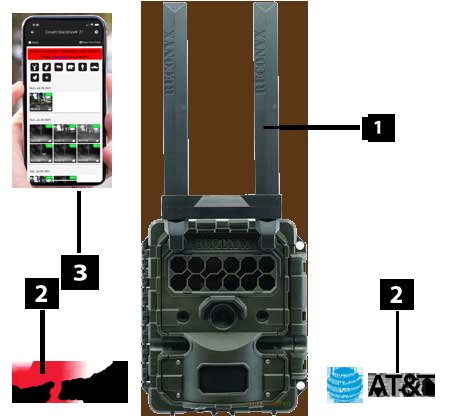
Cellular game cameras operate by capturing images or videos with motion sensors, then transmitting these files wirelessly through a cellular network to your phone or computer.
Ever wondered how you can get photos of wildlife activity right on your phone, without physically retrieving a memory card? The answer lies in cellular game cameras. These innovative devices use mobile networks to send captured footage directly to you. Understanding exactly how do cellular game cameras work can really enhance your scouting and tracking efforts, allowing you to monitor remote locations efficiently.

How Do Cellular Game Cameras Work?
Ever wondered how those cool game cameras out in the woods send pictures right to your phone? It’s not magic, it’s technology! These cameras, also called cellular trail cameras, have become super popular for hunters, wildlife watchers, and even for keeping an eye on your property. Let’s dive in and learn about all the parts that make these clever cameras tick.
The Basic Parts of a Cellular Game Camera
Think of a cellular game camera as a tiny, self-sufficient security system for the outdoors. It’s got several key parts that work together:
- The Camera Lens: This is how the camera sees the world. It captures the image, just like the camera on your phone.
- The Image Sensor: This little chip turns the light that comes through the lens into a digital picture. It’s like the camera’s eye.
- The Infrared (IR) Flash: For taking pictures at night, this emits a light that animals can’t see well, so they won’t get spooked. Some cameras use regular light flashes too.
- The Motion Sensor (PIR): This sensor detects heat and movement. When something moves in front of the camera, the sensor tells the camera to wake up and take a photo or video.
- The Cellular Module: This part is like the camera’s phone. It connects to cell towers to send pictures and videos to your phone or computer.
- The SIM Card: Similar to the SIM card in your smartphone, this card allows the camera to access the cellular network, so it can send data.
- The Battery or Power Source: Cameras need power to work! They use batteries, and some can use solar panels for extra power.
- The Memory Card: This is where the camera saves the pictures and videos. It’s like a little hard drive inside the camera.
- The Antenna: The antenna helps the camera get a good cell signal, so it can send photos without any trouble.
These components, all tucked into a weatherproof case, work together to capture and send those important moments.
How a Cellular Game Camera Captures an Image
Okay, let’s get into more detail about how a game camera actually captures an image. It’s a cool process!
The Motion Detection Process
The Passive Infrared (PIR) sensor is the key to this. Here’s how it works:
- Heat Detection: The PIR sensor looks for changes in heat. Anything that is warmer than its surroundings, like a deer or a squirrel, will trigger the sensor.
- Triggering the Camera: When the sensor detects heat or movement, it tells the camera to wake up and start taking pictures or videos.
- Adjustable Sensitivity: Most cameras let you adjust the sensitivity of the PIR sensor. This means you can set it to be more sensitive (taking pictures of even small movements) or less sensitive (only taking pictures of big animals). This can help you avoid lots of photos of just swaying leaves.
Capturing the Image
Once the motion sensor is triggered, the image capturing process begins:
- Lens and Sensor: The camera lens focuses the light onto the image sensor.
- Taking the Picture or Video: The image sensor captures the light and turns it into a digital picture or video.
- Night Vision: If it’s dark, the infrared flash (IR) emits light, which is invisible to the animal, allowing the camera to take clear pictures even at night.
- Storing the Data: The picture or video is then saved onto the memory card.
The Cellular Connection: Sending Images to You
Now, for the most important part – how the pictures get to your phone! This is where the cellular magic happens.
The Cellular Module
This is the brain of the communication process:
- Connecting to the Network: The cellular module uses the SIM card to connect to a cellular network, just like your phone.
- Data Transmission: Once connected, the camera can send the pictures and videos that it has captured.
- Network Coverage: The camera needs a good cell signal to be able to send data. If the signal is weak, it might take longer to send photos, or the camera might not be able to send them at all. Choosing a camera and location with strong cellular coverage is very important.
The SIM Card and Data Plans
The SIM card is a crucial element that enables cellular data transmission. Here’s how it works:
- Identifying the Camera: The SIM card identifies the camera on the cellular network. It’s like a phone number for the camera.
- Data Plan: Just like your phone, cellular game cameras need a data plan. This plan determines how much data the camera can use to send pictures each month. You usually need to buy this from a cell provider and it comes in different sizes for different uses and needs.
- Types of Plans: Some cameras use data plans from the major phone carriers, while others use their own data plans designed specifically for game cameras. Some plans are per month, or per year. You need to select the plans according to your needs.
How the Data is Sent
Let’s look at the data transmission process in detail:
- Uploading the Images: Once the photo is taken, the cellular module is triggered to upload the photo to a server via the cell network.
- Sending Notification: Then the camera sends a notification, letting you know that a new photo or video is available. Usually, you see these messages in an app on your phone.
- Accessing Your Pictures: You can access the photos and videos through a mobile app or a website, depending on the camera’s brand.
Powering Your Cellular Game Camera
All of this tech needs power to work. Here’s how cellular game cameras stay powered up:
Batteries
- Standard Batteries: Most cameras use AA batteries. The number of batteries and their power varies from camera to camera.
- Battery Life: How long the batteries last depends on how often the camera takes pictures and how often it sends them, and the batteries you use.
- Lithium Batteries: Some people like to use lithium batteries, which last longer and work better in cold weather.
External Power Sources
- Solar Panels: Some cameras can connect to solar panels. These solar panels can recharge the batteries, making them last much longer.
- External Battery Packs: You can also use external battery packs to extend the camera’s power.
The Importance of Signal Strength
A strong cell signal is very important for cellular game cameras. Without it, the camera won’t be able to send photos reliably. Here’s what you need to know:
- Signal Bars: Just like on your phone, your camera will have signal bars that show you how strong the cell signal is.
- Testing Signal: Before you set up your camera, it’s a good idea to test the signal to make sure it’s strong enough.
- Antenna Adjustments: Some cameras let you adjust the antenna to get a better signal.
- Signal Boosters: If the signal is very weak, you might need to use a signal booster to improve it.
Advanced Features of Cellular Game Cameras
Today’s cellular trail cameras come with some pretty amazing features that enhance their usability and effectiveness.
Remote Control
Many cameras can now be controlled remotely via your smartphone:
- Changing Settings: You can change settings like picture quality, video recording length, and motion sensor sensitivity right from your phone.
- Checking Battery Levels: You can see how much battery life is left and take action when it’s low
- Camera Status: Get real time information about the camera’s connection and status.
GPS Tracking
Some advanced models have GPS tracking built in:
- Camera Location: This helps you locate your camera if you move it or forget where you put it.
- Theft Protection: It can also help if someone tries to steal your camera, as you can track its location.
Cloud Storage
Many systems now use cloud storage:
- Backing Up Photos: Your photos are automatically saved to a cloud service, so you won’t lose them if your memory card gets full or damaged.
- Accessibility: Access your photos and videos from any device, as long as you have an internet connection
Video Recording
Many cameras now have high quality video recording capabilities:
- Video Length: Many allow you to choose the length of the video clips you record.
- HD Recording: High-definition recording offers a clearer picture of what your camera is observing.
Email Alerts
You can receive real time alerts to your email:
- Immediate Notifications: Email alerts can be used to let you know when an image has been captured in real time.
- Easy Viewing: The emails often contain the photo, which allows for instant viewing
Choosing the Right Cellular Game Camera
With so many options out there, it’s important to choose the right camera for your needs. Here are some things to think about:
Image Quality
This is one of the most important features. Look for cameras with:
- High Megapixels: More megapixels mean a clearer, more detailed picture.
- Good Lens: A quality lens will capture better pictures, especially in low light.
Cellular Connection
Think about cell signal in the location you plan to use the camera:
- Network Compatibility: Make sure the camera is compatible with the cell networks in your area.
- Antenna Strength: Look for cameras with strong antennas to get a better signal.
Battery Life
Consider how long you need the camera to run on a set of batteries:
- Battery Type: Consider the battery type, options are lithium batteries, AA batteries or external power sources.
- Power Consumption: Check how long the batteries will last based on the camera’s use.
Trigger Speed
The speed at which the camera reacts to motion is an important factor:
- Fast Trigger Speed: A fast trigger speed ensures you capture moving animals before they move out of the view.
Durability
Since these cameras are outside, they need to be sturdy:
- Weatherproof Housing: Make sure the camera is weatherproof, to protect it from rain and snow.
- Durable Build: A well built camera can handle bumps and drops and stay working for longer periods.
Price
Camera prices range from very affordable to expensive. Look at your budget and find the best model in your price range.
- Value: Balance the cost of the camera with the features it offers
- Long Term Costs: Also consider the cost of data plans and batteries.
Choosing a cellular game camera depends on your individual requirements and circumstances. Think about your needs and research cameras that best meet those requirements.
Cellular game cameras are an amazing piece of technology. They allow us to see what’s happening in nature when we are not there. From the PIR sensor detecting movement, the camera capturing an image, to the cellular module sending it to our phones, each step is essential. Understanding how these pieces work together can really help you make an informed decision when buying one.
How Do Cellular Trail Cameras Work
Final Thoughts
Cellular game cameras use a built-in SIM card, similar to a phone. This connects to a mobile network. The camera then sends captured photos or videos directly to your device or cloud storage.
This process relies on motion sensors triggering the camera. When movement is detected, the camera activates. It captures the image and immediately transmits it via the cellular network.
Therefore, how do cellular game cameras work? They combine sensor technology, cellular communication, and image capture to deliver remote monitoring. The mobile network is a must for data transfer.

