
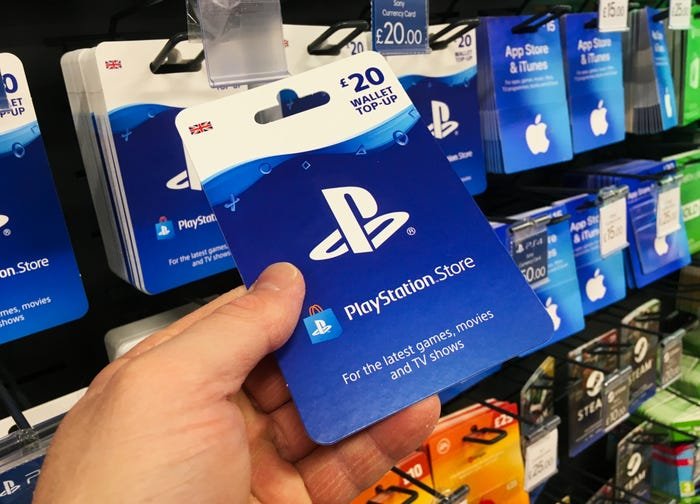
You cannot directly gift digital games on the PS4. Instead, purchase a PlayStation Store gift card for your friend, allowing them to buy the game themselves.
Want to surprise a friend with a new PlayStation 4 game but unsure how to do it? It’s a common question, as many players wonder “how do you gift games on ps4” directly through the console. Sadly, it isn’t a straightforward process.
The PS4 doesn’t have a built-in feature that allows you to gift games digitally to another account. This can be a bit frustrating, especially when you want to share the joy of a new release.
However, don’t worry, there is a good alternative! You can easily purchase a PlayStation Store gift card. Your friend can then use the credit to buy their desired game.

How Do You Gift Games on PS4?
Want to give a friend or family member the joy of a new PlayStation 4 game? It’s a great idea! But gifting games on the PS4 isn’t as simple as handing over a physical copy. There are a few things to know, and we’re going to explore all of them here. Let’s dive into the world of digital game gifting!
Understanding Digital vs. Physical Games
Before we jump into the how-to, it’s good to know the difference between buying a physical game and a digital game. Physical games come on discs that you can put in your PS4. You can give the disc to someone else, and they can play it on their console. Digital games, on the other hand, don’t have a physical form. You buy them from the PlayStation Store, and they download to your console.
Think of it like this: a physical game is like a book you can hold, while a digital game is like an e-book on your tablet. The main difference is that you can’t directly hand over a digital game like you can a disc. That’s why we need to go through some specific steps to gift them.
The Key Method: PlayStation Store Gift Cards
The most common and straightforward method to gift a game on PS4 is to use PlayStation Store gift cards. These cards work like any gift card: they hold a certain amount of money that can be spent at the PlayStation Store. Your recipient can then use this money to buy the game they want.
Why Gift Cards are the Best Way
Here are some reasons why gift cards are usually the preferred method:
- Flexibility: Your friend can pick the exact game they want, even if it’s not the one you had in mind. They might want a different version or even another title altogether.
- No Region Locks: Unlike physical games, which may have regional restrictions, gift cards generally work in the region they are purchased for. So if you’re gifting someone in another country, make sure you get a gift card for their specific location.
- Works for all Digital Content: Gift cards can be used not only for games but also for downloadable content (DLC), themes, and subscriptions like PlayStation Plus.
How to Purchase a PlayStation Store Gift Card
You can purchase gift cards in two primary ways:
- Physical Gift Cards: Many stores that sell electronics and games also carry PlayStation Store gift cards in physical form. You can find them at places like Walmart, Target, Best Buy, and GameStop. These are usually located near the video game sections and are easy to grab during your regular shopping trip.
- Digital Gift Cards: You can also buy digital gift cards directly online through retailers or the PlayStation Store website. These are delivered to you via email, usually with a code that you can give to your friend.
Different Denominations and Pricing
PlayStation Store gift cards come in different amounts, usually $10, $20, $25, $50, $75, and $100. Prices may vary slightly depending on where you buy them. Sometimes, retailers have promotions where you might even get a discount on the gift card itself.
Consider the price of the game your recipient wants. Look at the PlayStation Store’s prices to see if you’ll need to give them a gift card of the exact price of game or if giving them some extra money will give them flexibility.
Using a PlayStation Store Gift Card
Once you have the gift card, there are steps your friend needs to take to use it.
Redeeming the Code
Here’s how they can redeem the code:
- Sign In: First, they’ll need to sign in to their PlayStation Network account on their PS4.
- Go to PlayStation Store: On the home screen, they’ll select the PlayStation Store icon.
- Redeem Codes: They need to scroll down the sidebar menu and choose “Redeem Codes”.
- Enter the Code: They should carefully enter the 12-digit code from the back of the gift card or from their email.
- Confirm: Once the code is entered, they press confirm, and the funds will be added to their PlayStation Store wallet.
Purchasing the Game
Once the funds are in their account, they can browse through the PlayStation Store and purchase the game they want. They can simply go to the game page and click on “Add to Cart” or “Purchase” to complete the transaction.
Important Notes on Gift Card Use
- Region Compatibility: Make sure the gift card is for the region where your friend’s PlayStation Network account is registered.
- Expiration Dates: Some gift cards might have expiration dates. Always check the fine print, especially if you are buying a physical one from a retail store.
- Funds Remain: Any remaining balance on the gift card stays in their PlayStation Store wallet. They can use it to buy more games or content.
Alternative Options for Gifting Games on PS4
While PlayStation Store gift cards are the most convenient way, let’s look at some other less common gifting options.
Using the PlayStation Store Wishlist
The PlayStation Store has a ‘Wishlist’ feature. Your friend can add games they want to their wishlist, which can give you ideas for what to gift them. However, it’s important to know that you cannot directly gift a game from someone’s wishlist. It simply acts as a reference.
How to Use the Wishlist
- Adding Games: Your friend can go to a game page on the store and click the heart icon to add it to their wishlist.
- Viewing Wishlist: They can access their wishlist through their account menu.
- Sharing the List: They cannot directly share this list with you, but they can share a screenshot of their wishlist with you, letting you know which games they’re interested in.
Though you can’t directly gift from the wishlist, it can still be a helpful way to know which games your friend wants most. Then, you can buy a gift card for the right amount.
Gifting Physical Games (If Possible)
If you have a physical disc of a game your friend wants, you can certainly gift that. Keep in mind that this only works for games available on disc. For many newer titles, digital downloads have become the norm. Also, ensure they have a console capable of using physical disc, as there are now the PS5 Digital edition that doesn’t have a disk drive.
You also have to consider that the person you are gifting is not likely to get a digital copy of the game, and they will not have it tied to their account. That said, this is still a good option for used games.
Important Considerations When Gifting
Before you go ahead and buy that gift card, let’s take a look at some important things to consider:
Region Compatibility
This is a crucial point! Make sure that the PlayStation Store gift card you are buying is for the same region as your friend’s PlayStation Network account. For example, if your friend’s account is registered in the United States, you’ll need a US gift card. A UK gift card won’t work for them. This is very important for digital content, as unlike physical copies, gift cards have specific region compatibility.
Game Availability
Not all games are available digitally. Some older or smaller titles may only be available on disc. If there’s a specific game your friend is after, double-check its availability in the PlayStation Store before buying a gift card. You could even do a quick search on the PlayStation website to see if it’s there.
Age Ratings
Pay attention to game age ratings. Games have ratings that tell you the appropriate age groups for them. Gifting an M-rated (Mature) game to a young child might not be a good idea. It’s always wise to respect these ratings, especially when gifting to children.
Digital Game Size
Digital games can be very large. Ensure that your friend has enough storage space on their PS4 for the games they want. If their hard drive is full, they’ll need to manage their storage to make room for new games.
Internet Connection
Downloading digital games requires a good internet connection. If your friend has slow internet, the download process could take a long time. It’s worth considering that, especially if they have data caps.
Troubleshooting Common Gifting Issues
Sometimes things don’t always go as smoothly as planned. Here are some common issues people face and how to fix them:
Code Not Working
If the code from the gift card isn’t working, here’s what you should do:
- Double-Check Code: Make sure the code has been entered correctly. It’s easy to mistake a letter or number.
- Card Activation: If you bought a physical card, make sure it was activated properly by the store. If not, you may need to go back to the store with a receipt for them to activate it.
- Region Issues: Double check that the gift card matches the region of the PlayStation account that you are using it on.
- Contact Support: If none of those work, contact PlayStation Support for help.
Account Region Mismatch
If there is a mismatch in the card region and the account region, the code won’t redeem. Always verify the region of both the card and account before making the purchase.
Storage Issues
If your friend is having trouble because they don’t have enough storage, they will need to delete unwanted games or media or buy additional external storage for their PS4.
Gifting games on the PS4 is a great way to share some fun with your loved ones. While you can’t directly gift a digital game, PlayStation Store gift cards are a very straightforward solution that will allow your friend to pick the games that best suit their taste. By understanding the process and considering things like regional compatibility and storage, you can make sure your gift is a hit.
How To Buy a Game on Playstation Store as a Gift?
Final Thoughts
You cannot directly gift games on PS4 through the PlayStation Store. Instead, buy a digital code from a retailer or purchase a PlayStation Store gift card. The recipient then redeems the code or uses the gift card to buy the game they want.
How do you gift games on ps4? The key is purchasing gift cards or codes instead of gifting directly through the console. This method is your must approach to gifting on PlayStation.

