
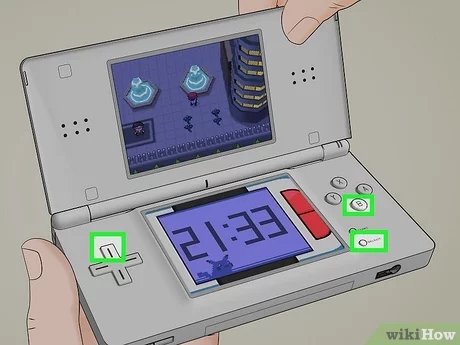
To reset a Pokémon game, you typically need to press a specific combination of buttons on your console during the game’s startup. The exact button combination varies depending on the specific game and system.
Ever felt the urge to start your Pokémon adventure completely anew? Maybe you want to try a different starter, or simply experience the journey again. The question of ‘how do you reset a pokemon game’ pops up frequently among trainers, and the method depends on the specific game.
Different consoles and generations of games require varied button presses during start up. This simple action allows you to wipe your progress and start over. So, next time you’re itching for a fresh start, remember the magic combination!

How Do You Reset a Pokémon Game?
So, you’ve been on an epic Pokémon journey, maybe caught ’em all (or at least most of them!), and you’re ready for a fresh start? Perhaps you want to replay the game with a different starter Pokémon, or maybe you just want that feeling of a brand new adventure again. Whatever the reason, resetting your Pokémon game is a common thing that many trainers do. But how exactly do you do it? Well, it’s actually pretty simple, but it can be slightly different depending on which game you’re playing and what system you’re using. Let’s dive into the details and get you back on the road to becoming a Pokémon Master (again!).
Resetting on Nintendo Switch
The Nintendo Switch is home to some of the newer Pokémon games, like Pokémon Sword and Shield, Pokémon Scarlet and Violet, Pokémon: Let’s Go, Pikachu!, and Pokémon: Let’s Go, Eevee!, and even remakes such as Pokémon Brilliant Diamond and Shining Pearl. Resetting these games is relatively straightforward, but there is a difference between deleting your save data from the game’s menu and deleting it from your system’s settings.
Deleting Save Data From the Game Menu
Some, but not all, Pokémon games on the Switch offer a way to delete your save file directly from their in-game menus. This method is generally preferred if it’s available, as it’s quicker and more convenient. Keep in mind that this method can vary slightly from game to game. Below is a general outline of how you usually can do it:
- First, start the game and get to the title screen (where you see the game logo).
- Look for an option related to “Settings,” “Options,” or something similar. It’s often in the bottom corner.
- Go into the settings. Now search for an option about “Save Data”, “Delete Save”, or something along those lines. The wording may differ slightly between games.
- The game will likely give you a warning, making sure you know that you’re about to delete your save data. Carefully read it.
- If you’re sure, confirm that you want to delete the save file.
Remember, once you delete your save data, it’s gone! You’ll start the game with a clean slate, and you can begin your new journey with a completely fresh adventure.
Deleting Save Data Through System Settings
If the game you are trying to reset doesn’t have an option in the game menu, or you are having trouble finding it, you can delete save data via the Nintendo Switch System Settings. Follow the steps provided below.
- Close the game you wish to reset. If the game is open, press the Home button on the Switch controller to return to the Switch home menu.
- On the Switch home menu, go to “System Settings.” It’s the gear icon on the bottom row of the home menu screen.
- Scroll down the left-hand menu to “Data Management.”
- On the right, find and click on the option “Delete Save Data”.
- A list of games will appear. Find the specific Pokémon game you want to reset and select it.
- Choose your user profile from the list. (If you have multiple user accounts on your console.)
- The Switch will ask you to confirm again. Read carefully and then hit “Delete Save Data” if you’re sure.
Once confirmed, your save data will be removed, and you can start a brand new game next time you boot up that Pokemon game. This method works for all Pokemon games on the Switch, even the digital only games.
Resetting on Nintendo 3DS and 2DS
The Nintendo 3DS and 2DS are home to classic Pokémon titles, such as Pokémon X and Y, Pokémon Omega Ruby and Alpha Sapphire, Pokémon Sun and Moon, and Pokémon Ultra Sun and Ultra Moon. Resetting on these handheld consoles is very similar for each game, but the process of deleting save data always uses the game’s built-in menus. Here’s how to do it:
- Start up your Pokémon game.
- Get to the game’s title screen (where you see the logo and press a button to start).
- Here you will need to find the correct button combination. Usually the buttons that you will need to press are: UP on the directional pad, the B button and the X button at the same time. Press and hold them at the same time.
- If you do it correctly, the game will give you an option to delete your save data.
- Again, the system will ask for confirmation. Read the message to make sure you are doing the right thing.
- If you’re ready for a reset, select “Yes” to delete the save data.
It’s important to know that once the save data is gone, there is no way to get it back. But you will be able to start a new game, with a fresh story.
Resetting on Older Nintendo Consoles
Older Pokémon games, such as those on the Game Boy, Game Boy Color, and Game Boy Advance, do not have the in-game menu options that modern games have. These games’ saves are handled by the cartridges they come on. Let’s explore how to handle this situation!
Resetting on Game Boy, Game Boy Color, and Game Boy Advance
The methods for resetting games on these older Nintendo consoles are quite similar. The easiest thing to do when starting is to try and reset the game from the start menu.
- Make sure that the game cartridge is plugged securely into the console.
- Turn on the console and let the game start up.
- At the start screen, check to see if there is an option to reset. Some games give you an indication as to what button combinations to press, some require you to do your own research.
If the games menu doesn’t have a reset option you will need to try a different method, explained below. The older systems don’t have an in-game way to delete your save data. Instead, the data is typically stored in the game cartridge itself, and the game usually overwrites this data when you start a new game. So, if you want to play through the game again, simply start a new game, and your old save will be overwritten.
However, if you want to delete the old save data, without starting a new game, this can be done in several ways:
- Battery Removal (Game Boy/Game Boy Color): Older Game Boy and Game Boy Color games sometimes use a small battery inside the cartridge to keep the save data. By carefully removing this battery (please do this with extreme care or seek professional help if unsure) and then putting it back you can delete the save data. This is a very old-fashioned method and is not always recommended.
- Forcing a Data Reset (Game Boy/Game Boy Color/Game Boy Advance): Turning off the console while saving or removing the cartridge when the game is in the middle of saving data. This can sometimes corrupt or delete the data. This method has a risk of damaging your game. So please do not attempt to do this unless you have the skills or understanding.
It’s important to note that the methods for Game Boy, Game Boy Color and Game Boy Advance games are not recommended by official Nintendo channels. This is due to a number of risks. These methods can permanently damage or corrupt your games save data, or the game itself. It is very important that you consider these risks when attempting to reset your save data on these older systems. The methods mentioned above should only be used if you are very comfortable with them, if you are not, it is best to just start a new game.
Resetting on Nintendo DS
The Nintendo DS is a home to several Pokémon games such as Pokémon Diamond and Pearl, Pokémon Platinum, Pokémon HeartGold and SoulSilver, and Pokémon Black and White, Pokémon Black 2 and White 2. These games have a slightly different method of deleting save data compared to older Nintendo handhelds. You do not need to take any physical actions. Here is how to reset your save data.
- Start your Pokémon game.
- When you get to the title screen, check to see if there is an option to reset. Some games give you an indication as to what buttons you need to press.
- If there is no indication on screen, it will be one of two options. Hold up on the directional pad, select and the B button at the same time, or hold L, R, and the start button at the same time.
- When you get the reset screen, read it carefully and make sure you are sure about deleting your save data.
- Once you are ready, confirm it and the game will be reset.
You are now ready to start a fresh new game on the Nintendo DS. This will work on all the Nintendo DS Pokemon games. If you are having any trouble or the game doesn’t give you a reset menu, you should try each combination of buttons mentioned above until you find the correct combination.
Important Things to Remember Before Resetting
Before you reset your Pokémon game, take a moment to consider these important points:
- Irreversible Action: Resetting your game deletes all your progress. Once your save data is gone, there’s no turning back. Make absolutely sure you’re ready to say goodbye to your team, items, and progress.
- Trading: If you have special Pokémon that you’ve worked hard to get (like shinies or Pokémon with good stats), consider trading them to another game or a friend before resetting. That way, you can have them again after you’ve completed your new save!
- Transferring Pokémon: For some games, especially on the Switch, Pokémon can be transferred to Pokémon HOME. This can be a great way to keep your favorite Pokémon safe before you begin a new save.
- Time-Based Events: Some Pokémon games have time-sensitive events (like daily lotteries). Resetting might make you miss these events if you haven’t collected them yet.
- Complete your Pokédex: If you are trying to complete your Pokédex, make sure you do not reset your game. Make sure you have traded over any needed Pokémon.
Why Reset a Pokémon Game?
There are many reasons why a person may want to reset a Pokémon game, here are a few of the most common reasons:
- New Adventures: Sometimes, you just want to start over with a fresh new journey! It is exciting to start the game and meet all the characters again.
- Different Starter: You may want to choose a different starter Pokémon. Maybe you chose the water type last time and this time you want to choose the fire type.
- Challenges: You could want to try the game under harder restrictions. Maybe try playing without using any items or with only one type of Pokémon.
- Shiny Hunting: You may be trying to hunt for a shiny Pokémon. Resetting before you receive your starter pokemon is a popular way to do that.
- Missing Pokémon: You may have missed a specific Pokémon, so you may want to restart the game to try and catch them again.
- Trying a New Team: Players may want to have an experience with a completely different team of Pokémon
Whatever the reason you have for resetting, you can see that the ways to reset a Pokemon game are not that difficult. You may have to do some research or try different options but it is generally an easy thing to do.
Resetting your Pokémon game is a straightforward process. Whether you’re using a Nintendo Switch, 3DS, DS, or an older handheld console, the core idea is the same: find the option to delete your save data, or simply overwrite your save file by starting a new game. Just make sure that you are ready to go, and that you know exactly what you are doing. Once you are sure, get ready to have a great new adventure in the world of Pokémon.
How to Delete / Restart Pokemon X, Y, Sun, Moon, Alpha Sapphire & Omega Ruby!
Final Thoughts
Resetting a Pokémon game varies by console, but generally involves a button combination during startup. Typically, you hold buttons like A, B, X, Y, Start, Select, or directional buttons while the console powers on. This deletes saved data, returning you to the game’s beginning.
Knowing how do you reset a pokemon game is essential for starting a new adventure. Each console generation has its particular reset sequence. Always confirm the method for your specific device before attempting it.

