
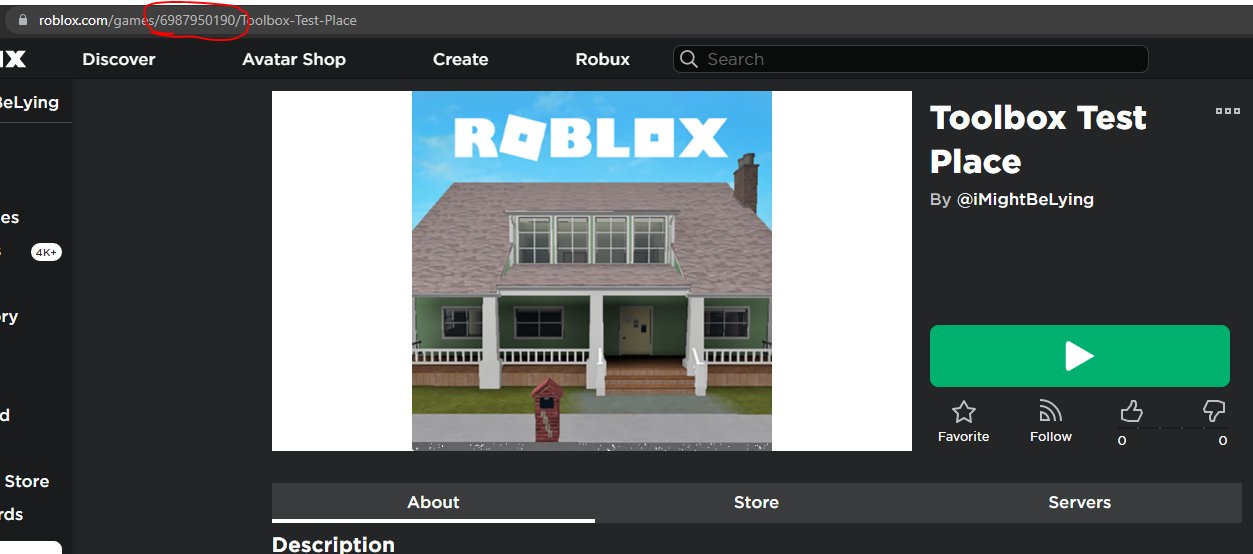
The game ID is found within the URL of the game’s page on the Roblox website. It’s the numerical sequence following “/games/” in the address bar.
Ever wondered how to share a specific Roblox game with a friend? Knowing how to find a games ID on Roblox makes this simple. That unique number is the key to accessing the game directly.
It’s located right in the web address you see at the top of your browser, when you’re on a game’s page. So, it’s easy to copy and share.

How to Find a Game ID on Roblox
Ever wondered how to share your favorite Roblox game with your friends or maybe use a special tool that needs a game’s ID? The game ID is like a secret code for each game on Roblox. It’s what helps the computer know exactly which game you’re talking about. It’s super useful, and finding it is easier than you think! This article will show you all the ways you can grab those game IDs like a pro.
Why Game IDs are Important
Before we jump into how to find them, let’s talk about why game IDs are so important. Think of it like this: if you wanted to mail a letter, you’d need an address, right? A Roblox game ID is the “address” for a specific game. It allows:
- Sharing Games: Easily share the exact game you’re playing with friends using the ID. No more accidentally sending the wrong link!
- Using Scripts: Many Roblox scripts and tools require the game ID to work properly. It’s how the scripts know where to make changes.
- Game Links: The ID is the core part of a game’s direct link, which takes you right to the game on Roblox.
- Development Purposes: If you create games on Roblox, you will need the game ID to make any adjustments, updates or configuration.
So, having the game ID is essential for many different things on Roblox. It makes sharing and using certain tools simple.
Finding the Game ID Through the Browser
The most common way to find a game ID is by using a web browser on your computer or phone. Here’s the breakdown:
Steps to Follow
- Go to Roblox Website: Open your internet browser (like Chrome, Firefox, or Safari) and go to the Roblox website (www.roblox.com).
- Log In: Make sure you’re logged into your Roblox account. If you’re not, you’ll need to enter your username and password.
- Find the Game: Search for the game you want to play or find it in your ‘Continue Playing’, ‘Favorites’, or ‘Games’ section.
- Click on the Game: Click on the game’s icon or title to go to its details page. This page is where all the info about the game is shown, including the game’s images and description.
- Look at the Address Bar: At the top of your browser, you’ll see the address bar. It usually starts with “https://www.roblox.com/games/…”
- Find the Numbers: After the “/games/” part, you’ll see a long number. This is the game ID! For example, in a URL like
https://www.roblox.com/games/123456789/My-Awesome-Game, the game ID is123456789.
It is that simple! The game ID is always the long string of numbers that comes directly after “/games/” in the URL.
Understanding the URL
Let’s take a closer look at a typical Roblox game URL:
https://www.roblox.com/games/123456789/My-Awesome-Game-Title
Here’s what each part means:
https://www.roblox.com: This is the main address for the Roblox website./games/: This tells the website that you are looking at a game page.123456789: This is the unique game ID we’re looking for!/My-Awesome-Game-Title: This is the title of the game. It doesn’t affect the game’s ID.
The URL can sometimes include more things after the ID, like ?someParameter=something but the game ID will always stay the same and it always located after the /games/ part of URL.
Finding Game IDs on the Roblox Mobile App
You can also find game IDs when using the Roblox mobile application on your phone or tablet, although it’s a slightly different process compared to using a browser:
Steps to follow
- Open the Roblox App: Open the Roblox app on your mobile device, and make sure you are logged into your account.
- Go to the Game Page: Search for the game you want to play, and tap on the game’s icon to navigate to its detailed information page.
- Tap the Share Button: Usually located at the top right corner of the screen on the game’s page, you will see a share button that looks like an arrow coming out of a box. Tap on this icon.
- Copy the Game Link: A menu will appear from the bottom of the screen with different share options. Select the “Copy link” option. This action copies the direct game link to your device’s clipboard.
- Paste the Link: Open any application where you can paste text, such as your phone’s notes app or text editor. Paste the copied link there.
- Extract the Game ID: Just like in the browser method, look at the pasted link and find the numbers immediately following the https://www.roblox.com/games/ section.
The game ID, once extracted from the pasted link, will be the same as if you got it from a browser.
Using Third-Party Tools or Extensions
While not officially supported by Roblox, there are some browser extensions and third-party tools that claim to help with finding game IDs. However, you should always be very careful when using these. Some may not work properly or could even try to steal your information.
Things to consider
- Security: Only use tools from trusted sources. Don’t download or use something that looks suspicious.
- Reliability: Not all third-party tools are accurate, they could give you the wrong information.
- Updates: Roblox often makes changes to its website and apps, which can cause some third-party tools to stop working.
The safest and most reliable ways to find game IDs are through the Roblox website and mobile app as shown previously.
Game ID Example
Let’s look at a real example. The game called “Brookhaven RP” has this URL:
https://www.roblox.com/games/4924922222/Brookhaven-RP
In this case, the game ID for Brookhaven RP is 4924922222. So if you needed to share the game or use it in a script, you’d use that number.
Different Types of IDs on Roblox
While we’ve been focusing on game IDs, it’s worth noting that there are other types of IDs on Roblox, each having a different purpose:
Types of IDs
- User IDs: Every player has a unique User ID, and you can usually find them in user’s profile page url, just like game ID. User IDs are numbers that identify a particular player.
- Asset IDs: If you have purchased any gear or clothing on Roblox, you will have an Asset ID which can be found in the URL of that gear/clothing. It’s used to identify specific clothing items, gears or any other items on the marketplace.
- Group IDs: Like user IDs, Roblox groups also have specific IDs which can be found in the group url and you can find them in a similar way like game IDs.
Each ID type is unique and serves a purpose within the Roblox platform. Be sure you are finding the correct id you are looking for.
Using Game IDs for Game Development
If you create games on Roblox, knowing your game’s ID is very helpful. You’ll need it for:
- Editing Game Settings: You can use the ID to manage your game, like setting who can join and making the changes in the game.
- Game Analytics: The game ID is used to track how many people play your game and other important data.
- Scripts: When using scripts to add features to your game, the game ID is usually required to work correctly.
- Promotions: If you are promoting your game on social media or another platforms you will need your game ID to properly link to your game.
It is essential for the developer to know how to find game ID as it helps them in multiple ways.
Troubleshooting Common Problems
Sometimes, people face issues when trying to find a game ID. Here are some common problems and solutions:
Common Problems
- Can’t See the Address Bar: If you don’t see the address bar in your browser, make sure you aren’t in full-screen mode or that the address bar is visible in your browser settings.
- Mobile App Links: If the copied mobile link doesn’t include the full URL, make sure you copied the link correctly, or try using the browser method.
- Third-Party Issues: If a third-party tool is not providing the correct ID or not working as expected, it’s best to avoid using it and rely on the official methods instead.
By taking a careful and systematic approach, you should be able to find the game ID without any problem using the method mentioned above.
Best Practices
Here are some best practices to make finding game IDs easier:
Practices
- Copy and Paste: Instead of trying to remember the game ID, it’s best to copy and paste it.
- Double-Check: Before using a game ID, make sure you copied the correct one.
- Save Important IDs: If you find yourself needing the same game ID often, save it somewhere you can easily access it.
Following these steps will make your experience smoother and more efficient.
Finding a game ID on Roblox is straightforward once you know where to look. Whether you’re using a browser or the mobile app, the process involves looking at the game’s URL and pinpointing the unique ID. Game IDs help you share games, use scripts, and manage your own games on Roblox. Always make sure to use official methods and be careful with third-party tools to ensure your experience is secure.
How to find player id on roblox
Final Thoughts
Finding a game’s ID on Roblox is straightforward. You can locate it in the URL of the game’s page. The numerical sequence in the address represents the game ID, which you can use for various purposes.
This ID is essential for specific game related actions. It assists in custom server creation and other development needs. Therefore, knowing how to find a games id on roblox is fundamental.

