
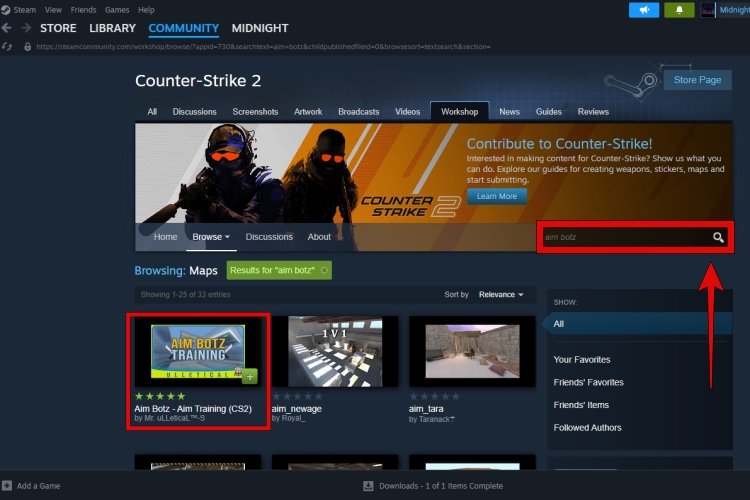
The game name of a workshop map is typically found within the map’s title or description on the Steam Workshop page itself.
Ever stumbled upon an amazing custom map in Steam Workshop and wondered which game it actually belongs to? It’s a common question among gamers exploring the vast world of user-created content. You’re not alone in asking how to find game name of workshop map; many people face this same issue.
Figuring out the correct game is actually quite simple, once you know where to look. The workshop page provides crucial information that will point you in the right direction. The method is usually straightforward.

How to Find the Game Name of a Workshop Map
Ever stumbled upon an awesome-looking map in the Steam Workshop and wondered which game it’s for? It happens to the best of us! Figuring out the correct game for a workshop map is super important. Why? Because trying to use a map made for, let’s say, “Garry’s Mod” in “Counter-Strike: Global Offensive” just won’t work. It’s like trying to fit a square peg in a round hole. Don’t worry, though; this guide will make sure you are a pro at identifying workshop maps’ game names in no time. We’ll explore all the places you should look to correctly place a workshop item in its respective game.
The Obvious First Stop: The Steam Workshop Page
The first place to look, and usually the easiest, is the Steam Workshop page itself. When you find a map you are curious about, go to its specific workshop page on the Steam website. Don’t just look at the thumbnail! Give the page a thorough once-over. Let’s break down what to look for:
The Game Title on the Item Page
Right at the top of the workshop page, near the map’s title and author, you will see the game’s name. Steam almost always puts this info in plain sight, and in most instances, that’s the only thing you need. It might look something like this: “Game: Garry’s Mod,” or “Game: Counter-Strike: Source.” This is your primary, most direct indicator of which game the map belongs to. It is very easy to identify on the steam workshop page. But sometimes it happens that we can’t identify what game is it for, so we need to explore some further ways.
Also, If you are on the Steam client, the game’s name is often mentioned at the top of the item’s page as well.
Visual Clues in the Map’s Thumbnail and Screenshots
Sometimes, the game name might not be as obvious as we would like it to be, or for some reason, the game name is not mentioned. But don’t worry, here is something to consider; Take a close look at the map’s thumbnail image and any screenshots posted by the map’s creator. These images can give you pretty big hints. For example:
- If you see characters from “Garry’s Mod” holding quirky tools and props, chances are it’s a “Garry’s Mod” map.
- If it’s full of soldiers with rifles battling it out on a map with bomb sites, it’s probably for “Counter-Strike: Global Offensive,” or maybe “Counter-Strike: Source.”
- If the images show a lot of vehicles and open terrains, maybe it is for a game like “Arma” or something similar.
- Look for distinctive building styles, textures, and models that are commonly used in specific games. For instance, maps for “Team Fortress 2” will have a very cartoonish, stylized art direction.
These visual cues are very helpful, especially when someone fails to tag their content properly on steam workshop. By observing the details, you can often deduce the intended game for the map.
Checking the Workshop Page’s Details Section
If the top of the page doesn’t give you the answer right away, scroll down a bit. Most Steam Workshop pages have a details section where the map’s creator can add important information. Look for these clues:
Tags
The creator usually adds some tags to their item. Some tags are very helpful to know the name of the game. Check the tags, they are sometimes a good indicator of what the game is. For example, if you see “CS:GO” or “GMod” or “TF2,” you’ll know what game the map is for! Tags should ideally contain the game’s name. It’s also a sign of good workshop etiquette to properly tag items, which is not always the case. Here’s a common mistake made by workshop creators; sometimes they add a lot of tags, and the actual tag, the game’s name, is hard to find because of that. In this situation, you need to check other things as well. We will be discussing them in the upcoming sections.
Description
Take a moment to read the description that the map creator provided. Sometimes, the creator will directly state, “This is a map for…” This is a big help. Even if they don’t directly name the game, they might describe game mechanics or elements that are unique to a specific title. For example:
- “Capture the flag on this awesome map!” might point towards “Team Fortress 2”.
- “Lots of roleplaying fun on this huge space” might lead you to believe it’s for a sandbox game like “Garry’s Mod.”
The description section is often overlooked by users, but it can be a gold mine of information. Some creators even provide other details like what mods are needed for the maps and specific gameplay elements, these are often helpful for identifying the original game as well.
Considering File Extensions
If you download the map directly, sometimes the file extension can give you a clue. For Example:
- .bsp: This is most commonly used for Source Engine games such as “Counter-Strike,” “Garry’s Mod,” and “Team Fortress 2”.
- .vmf: This file extension typically indicates a map file created with the Source Engine editor.
While this method isn’t foolproof, it can be another piece of the puzzle. It is not the most straightforward way to find the game name, but can be helpful in some instances.
Using Your Knowledge of Game Communities
Over time, as you play more games, you will start to become familiar with the style and popular map types for each. You can use this to your advantage when identifying map games. For Example:
Recognizable Map Styles
Certain games have very distinctive map styles that might stand out for you. You’ll start to notice patterns in how the maps look and feel for those games. For instance:
- “Minecraft” maps have a very blocky, cubical design.
- “Counter-Strike” maps are often designed with bomb sites and specific paths for tactical gameplay.
- “Garry’s Mod” maps can be extremely varied and often feature lots of user-created content and a free environment.
- “Left 4 Dead” and its sequel “Left 4 Dead 2” feature maps that focus on survival with hordes of zombies.
Community Trends
Some games have trends and popular types of maps. For example, in “Garry’s Mod,” there are a lot of popular roleplaying maps, sometimes people make these kinds of maps for some other games. By being aware of these community trends, you can make an educated guess about a map’s game.
When All Else Fails: Ask the Community
If you have tried all the above methods, but still can’t figure out which game a workshop map is for, then don’t be afraid to ask the community. This is the best method when other methods fail. Here’s how:
Comments Section
The comment section of the workshop item is the first place you should go to. Post a polite question saying something like “Hey, does anyone know which game this map is for?” or “I am not sure of the game for this map, can someone help me?”. The item’s creator or someone else in the community is likely to know the answer and they may help you. Community members who are familiar with the game and its items can quickly provide the answer. So, when you can’t figure out the game by your methods, ask someone on the page.
Steam Forums
If there is not a response in the comments section, the Steam forums can be your other good place to ask for assistance. Most games have their own dedicated forums where players discuss different topics. Find the forum for games where you think that the map can be made. You can post a thread with the link to the map asking for help. Make sure to provide a clear and descriptive question. Also, make sure to give the link to the workshop map and explain everything you have done so far to figure it out, so others can easily understand what help you need and help you in a better way. People are usually friendly and helpful in game forums.
Discord Servers
Many games have active Discord servers where players can chat and ask questions. Joining a Discord server for a game that you think the map might be for can be a great way to quickly get some help. Members in these groups are active and have good knowledge about the respective game. You can post screenshots of the map and the link and someone will likely be able to identify the game for you.
By utilizing community help, you can often get a quick answer to even the most confusing workshop map. It also saves your time when you can’t figure it out yourself.
Using SteamDB Website
SteamDB is an external website not directly affiliated with Steam that provides a lot of information about Steam, including games and workshop content. You can sometimes find a very specific game name associated with the map on the steamDB.
Here are the steps to utilize it.
- Visit the SteamDB website at https://steamdb.info/
- Paste the workshop map link in the search bar.
- Now hit search, you will see the respective map page on SteamDB.
- Now on this page, look for the game name, you can easily find it.
This is a handy tool for those who like to dive deeper into Steam’s backend information, but remember that it is still a third party website, not directly affiliated to steam.
Why is Finding the Correct Game Important?
You might wonder, “Why does it even matter which game a map is for?” Well, it’s very important. Here are some reasons why:
Compatibility
Maps are specifically designed to work with the gameplay and mechanics of a particular game. If you try to put a map from one game into another game, it simply won’t work. It will often result in errors or crashes. The game’s engine needs to have the correct assets, textures, and models to function properly. Using a map in the wrong game is not just useless but also might cause problems. For example, if you install a Garry’s Mod map in Counter-Strike: Global Offensive, you won’t be able to play it. The game will not recognize it as a valid map, because it is not compatible. For these reasons, identifying the correct game name for the workshop map is a very important step.
Proper Gameplay
Each game has unique gameplay mechanics and objectives. A map for “Team Fortress 2” is built around that game’s classes and objectives. If you try to use it in “Counter-Strike: Global Offensive” there will be no bomb to diffuse and the map won’t function the way it should. This is the case with all games, because all games have their own specific styles of gameplay. Playing the game on the right map is important so that you have the actual proper experience of the gameplay as it was intended to be played.
Avoiding Problems
Trying to use a workshop map for the wrong game might cause your game to crash, and you might have problems like missing textures or other errors. Knowing what game the map is for will save you a lot of headache.
So, taking the time to figure out a map’s correct game is a necessary step before you can start playing it.
Finding the correct game name of a workshop map can be very simple and straightforward if you pay attention to the Steam workshop page. The game title is usually displayed prominently on the map’s Steam workshop page. But if for some reason you cannot find the game name there, then pay close attention to the tags, the description provided by the creator, and the visuals of the map (such as screenshots or thumbnails). If you still have issues identifying the game, then asking the community is a very good option. You can use the Steam forums, discord channels, or the comment section to ask for help. With a little attention, you will become a pro at identifying the game name of the Steam workshop items!
How to PLAY WORKSHOP MAPS In ROCKET LEAGUE On EPIC GAMES [2024]
Final Thoughts
To find the game name of a workshop map, check the workshop page. Usually, the game is prominently displayed. This information helps when searching within the game itself.
Many maps contain the game name within their title or description. Pay attention to these details. These clues will help you identify the right game.
Remember, identifying the game is key for proper loading of the map. This concludes how to find game name of workshop map, simplifying your gaming experience.

