
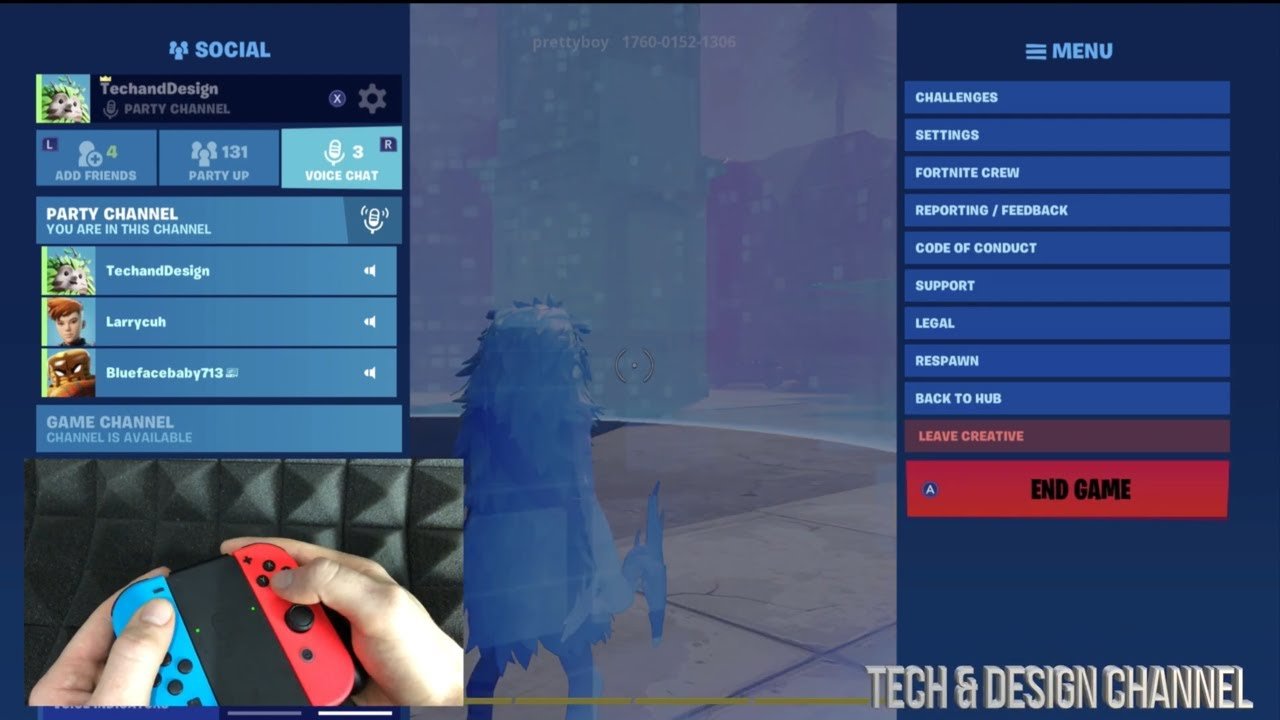
To leave a game in Fortnite, you can access the menu and select the ‘Leave Match’ option.
Frustration mounting after a bad landing? Maybe you just need a quick break. Knowing how to leave a game in Fortnite is actually a simple process. It’s something many players use regularly. This short guide will help you.
We all have those moments when a match isn’t going our way. Sometimes it is best to just get out. Learning how to leave a game in Fortnite efficiently is a valuable skill. This way you can start fresh quickly.

How to Leave a Game in Fortnite: A Complete Guide
Okay, so you’re playing Fortnite, and maybe you need to take a break, switch game modes, or your squad isn’t having the best match. Whatever the reason, knowing how to leave a Fortnite game is super important. It’s not always as simple as just clicking a “quit” button, so let’s break it down step by step, making sure everyone knows exactly what to do.
Leaving a Match in Battle Royale
Fortnite Battle Royale is the most popular game mode, and it has a specific way of handling leaving mid-match. You can’t just leave whenever you want without some consequences, but don’t worry; I’ll guide you through it. The key thing to understand is that leaving a match early can affect your team in squads or duos. This is to make sure everyone tries their best to stay till the end.
The Correct Way to Exit
Here’s how to leave a Battle Royale match the right way:
- Find the Menu Button: Usually, this is the “Esc” key on a keyboard or the “Options/Start” button on a controller (PlayStation, Xbox, or Nintendo Switch).
- Open the Menu: Pressing the Menu button will bring up a screen with different options.
- Look for “Leave Match” or “Leave Game”: Sometimes it will say “Leave Match,” other times it might say “Leave Game.” Look for either of these options on the menu.
- Click/Select It: Use your mouse or controller to select the “Leave Match” or “Leave Game” option.
- Confirm Your Choice: A small pop-up might appear asking if you’re sure you want to leave. Click or select “Yes” or “Confirm” to leave.
Keep in mind you might have to wait a few seconds when you leave and the character will leave the match and your screen goes back to the main menu.
What Happens When You Leave Early?
When you leave a Battle Royale match early, this is what happens:
- If You’re In a Squad or Duo: Your character will stay in the game (as an idle body) for a while and can be eliminated. Your teammates might not be very happy about it since they are now short a player.
- No Rewards: If you leave before your team gets eliminated, you likely won’t receive any battle pass experience or quest progress that you could have earned. You miss out on the rewards for being part of the team.
- Potential Penalty: If you leave matches too often, you may face a temporary matchmaking penalty. This means you might have to wait a little before you can start a new match, which Fortnite does to avoid players who habitually leave games.
It’s best to stick with your squad or duo until the end of the match whenever possible, unless something super important happens in real life.
Leaving Other Game Modes
Fortnite has other game modes besides Battle Royale, like Creative, Save the World, and various limited-time modes. Leaving these modes can be a bit different, so it is good to know their specific rules. Here’s how to leave those modes:
Leaving Creative Mode
Creative Mode is a sandbox where you build your own maps and play mini-games. Since it isn’t focused on winning or team play, leaving is usually simpler. Here is the process:
- Open the Menu: Like with Battle Royale, press “Esc” or the “Options/Start” button to open the menu.
- Find “Return to Hub” or “Leave Creative”: Look for an option that says something like “Return to Hub” or “Leave Creative.”
- Select and Confirm: Choose the option, and confirm your choice if asked.
In Creative Mode, leaving early usually doesn’t cause any issues or penalties. You can jump back in when you are ready, without any concerns of a matchmaking penalty.
Leaving Save the World Mode
Save the World is a cooperative mode where you fight against monsters. Leaving can be more complex, and its effects are similar to Battle Royale. Here’s how you should go about it:
- Open the Menu: Again, use the “Esc” or “Options/Start” button to access the menu.
- Find “Leave Game”: Look for the “Leave Game” option in the menu.
- Select and Confirm: Click or select “Leave Game” and confirm if a pop-up appears.
Leaving a mission in Save the World early will affect your team. It will mean the remaining players have to deal with some challenging fights. Similar to Battle Royale, leaving early in Save the World will mean you don’t earn rewards.
Leaving Limited-Time Modes (LTMs)
Limited-Time Modes change pretty often and have their own special rules. How you leave them is usually similar to Battle Royale, but always double-check if there are any extra instructions from Fortnite.
- Open the Menu: Press “Esc” or the “Options/Start” button to see the in-game menu.
- Look for “Leave Match” or “Leave Game”: Find the usual option to leave.
- Select and Confirm: Select and confirm you want to leave the match.
Since LTMs vary, look for any on-screen instructions that tell you exactly what to do. Some LTMs are like Battle Royale, and you should avoid leaving early.
Common Mistakes When Leaving a Game
Sometimes, players accidentally do the wrong thing when they try to leave a Fortnite match. Let’s look at some common errors:
Force Quitting the Game
Some players get impatient and try to force quit the game by closing the application on their computer, console, or phone. This is a big no-no, here is why:
- May Cause Game Issues: Force quitting can sometimes cause problems with your Fortnite game, making it unstable.
- Can Cause Penalties: The game may see this as leaving the match early and potentially give you a penalty.
- Not Proper for Progress: You might not have your game progress saved, or be able to receive rewards, so this will be a waste of your playtime.
Instead, use the proper menu options to exit the game. It’s safer and more reliable for your game and also for you!
Forgetting to Confirm
Sometimes, after selecting the “Leave Match” option, there will be a confirmation pop-up. If you accidentally ignore this and continue playing, you will remain in the match, which can be annoying if you intended to leave!
- Always Double Check: After clicking “Leave Match,” look out for a confirmation request.
- Select Yes/Confirm: Click or select “Yes” or “Confirm” when the pop-up appears.
Double-check to make sure you’re exiting properly and not accidentally going back into the game.
Leaving During a Victory Royale
This might sound odd, but you might get in a hurry to leave right after a Victory Royale. However, it is crucial to stay until you reach the main menu to ensure you get your rewards!
- Stay for the Victory Screen: Wait to return to the lobby after your Victory Royale to confirm you get your progress rewards!
- Enjoy the Victory: Bask in your win! You deserve it, plus it allows the game to record everything properly.
Leaving too early, even after a win, can sometimes result in lost progress. It’s safer to wait.
Tips for a Smooth Exit
Knowing how to leave a game is one thing, but doing it smoothly is another. Here are some tips to make sure you exit matches without problems:
Communicate with your Teammates
If you are playing with friends, always let them know you plan to leave a match early, especially in squad and duo mode.
- Give a Heads-Up: A quick message saying “I have to leave” goes a long way.
- Avoid Last-Minute Exits: Try not to leave suddenly. It makes it easier for the others to adjust.
Good communication will keep everyone happy and playing the game smoothly.
Check Your Internet Connection
Sometimes, leaving can get glitchy if your internet connection isn’t strong, leading to disconnections and a lot of lag, which makes it hard to leave. If it feels like there is a big delay when you click to leave the game, this might be due to your internet:
- Restart if Necessary: If the game is very laggy, try restarting your router and your device.
- Check Connection: Before playing, make sure you have a good internet connection.
A stable internet connection will make leaving smoother and also make the game more fun to play.
Be Mindful of Penalties
Remember that leaving too many matches early can lead to temporary penalties, especially in Battle Royale. While sometimes life does happen, here are some tips to make sure that it doesn’t happen too often:
- Avoid Leaving Frequently: If possible, finish most matches before you exit the game.
- Take Breaks if Needed: If you’re feeling tired, take a break so you can come back ready for your next game.
By being mindful, you’ll avoid penalties and keep the game fun for everyone.
Use the Correct Menu
Make sure you’re using the actual in-game menu to leave, rather than trying to find some other way.
- Always Use the Menu: Press “Esc” or the “Options/Start” button to access the menu screen.
- Look for the Correct Option: Be sure to pick either “Leave Match” or “Leave Game” when they pop up on the menu.
The menu screen is always the right place to find the “leave” options, never use the forced quit method.
Knowing how to leave a Fortnite match correctly ensures a smoother gaming experience for both you and your fellow players. Now, you’ve got all the information you need to leave any Fortnite game mode. Have fun playing, and when it’s time to go, make sure to exit properly!
How to leave a Game in Fortnite
Final Thoughts
To exit a Fortnite match, you must open the menu using the ‘Escape’ key on PC or the ‘Options/Start’ button on consoles. From there, select the “Leave Match” option. This will safely return you to the lobby.
Remember, leaving a match early might affect your progression in some game modes. Always consider this before deciding how to leave a game in Fortnite. The process is straightforward and can be performed quickly.

