
No, you do not keep PS Plus Extra games if you downgrade to a lower tier.
Ever wondered what happens to those games you downloaded with your PS Plus Extra subscription if you decide to downgrade? It’s a valid question, especially considering how many titles become available through that service. Many gamers ask, ‘do you keep ps plus extra games if you downgrade?’ This can influence important decisions about your subscription.
The answer might not be what you were hoping for, it also can be useful to understand it before you make the switch. So, let’s explore exactly what occurs with your game library when you drop down to PS Plus Essential.

Do You Keep PS Plus Extra Games If You Downgrade?
This is a question many PlayStation gamers wonder about: what happens to all those great games you’ve been enjoying on PS Plus Extra when you decide to go back to a lower tier, like PS Plus Essential? It’s like having a big toy box full of games, and then someone asks you to give some of them back. Let’s explore this situation together to see exactly what happens to your game library when you switch PS Plus plans. This can help you understand what you might face when changing your subscription and you can plan your gaming accordingly.
Understanding PlayStation Plus Tiers
First, let’s quickly go over the different PlayStation Plus tiers. Think of them like different levels of membership, each with its own set of benefits:
PlayStation Plus Essential: This is the basic tier. It gives you access to online multiplayer, a few free monthly games, and exclusive discounts. It’s the foundation for PlayStation’s online services and most online gamers opt for this level.
PlayStation Plus Extra: This tier includes all the benefits of Essential, plus a huge catalog of games that you can download and play. This is where things like the “Game Catalog” come in. This tier is where most of the concern about losing games comes from when downgrading. This tier provides a large collection of PS4 and PS5 games.
PlayStation Plus Premium: This is the highest tier. It includes everything in Extra, plus access to classic PlayStation games, game trials, and cloud streaming in some regions. This one is the ultimate PS Plus experience.
The Core Concept: Access vs. Ownership
The key thing to remember is that with PS Plus Extra and Premium, you’re not actually buying the games. You’re getting access to them as part of your subscription. It’s more like borrowing games from a library. As long as you have an active subscription to Extra or Premium, you can download and play them. These games become part of your game library, accessible as long as your subscription remains on that specific tier.
This “borrowing” concept is important, because it’s why things change when you downgrade.
What Happens When You Downgrade from Extra to Essential?
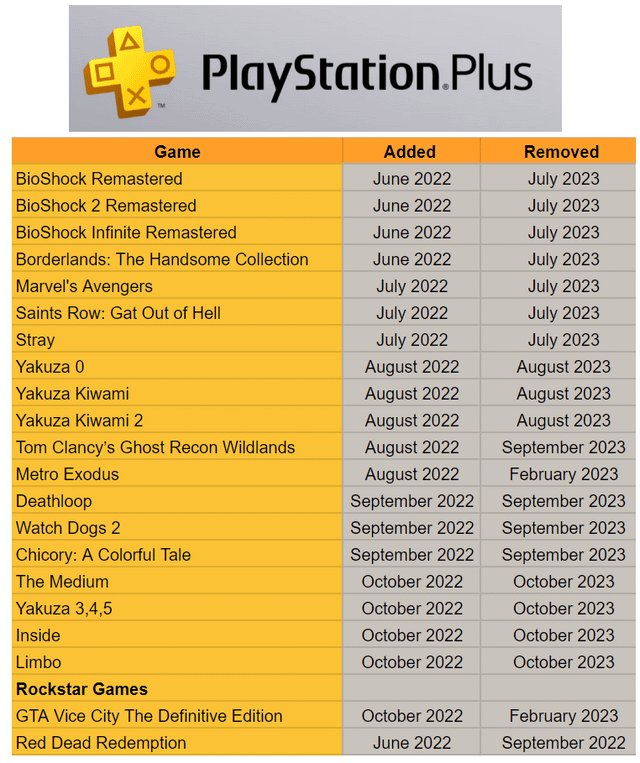
So, here is the big question: If you downgrade from PlayStation Plus Extra to Essential, what happens to the games you got from the Extra Game Catalog? The simple answer is: you lose access to them.
Here is a breakdown of this situation:
Game Locks: When you downgrade, the games you got from the Extra or Premium Game Catalogs will be locked. This means that you will not be able to launch and play those games. They will remain in your library, but they will have a lock icon on them, indicating that they are not accessible with your current subscription.
No Refunds: Downgrading will not get you a refund for those games since you never actually purchased them. The money you spent is for accessing the game catalog.
Save Data Remains: The good news is, your save data for these games is usually safe. This means, if you ever decide to resubscribe to Extra or Premium in the future, you should be able to pick up right where you left off, if you use the same account. Your progress isn’t gone, just paused.
Monthly Games are Yours: The free monthly games you get with any tier of PS Plus (including Essential) are yours to keep forever, as long as you have an active PS Plus subscription. These are different from the games in the Extra/Premium catalogs and this is an important distinction to make.
Scenario: How Game Access Changes with Downgrading
Let’s imagine a scenario to make this clear. Imagine you had these games on your console when you had a PS Plus Extra subscription:
Spider-Man: Miles Morales (from the Game Catalog)
Demon’s Souls (from the Game Catalog)
Crash Bandicoot 4: It’s About Time (a monthly PS Plus game)
Now, what happens when you downgrade to PS Plus Essential?
Spider-Man: Miles Morales will be locked. You won’t be able to play it.
Demon’s Souls will also be locked, not playable until you upgrade your subscription.
Crash Bandicoot 4: It’s About Time will still be playable, because it was a free monthly game, and not from the Game Catalog.
This is how downgrading affects your game access. The games from the extra and premium game catalogs become inaccessible, while your free monthly games remain available for you to play.
Why Do Games Get Locked When Downgrading?
So, why does this happen? It all comes down to the licensing agreements that PlayStation has with game publishers. The Game Catalog is designed to provide access to a library of titles as a benefit of the higher-tier subscriptions. When you pay for Extra or Premium, you are paying for the privilege of using those games for a period of time. Once you downgrade, that privilege ends, and the license to play those games expires until you resubscribe.
This is similar to how streaming services like Netflix work with movies and TV shows. You can watch them as long as you subscribe, but once your subscription lapses, you lose access.
Strategies for Managing Your PS Plus Subscription
Now that you know what happens with games when you downgrade, you can use that information to manage your PS Plus subscription. Here are some useful tips:
Plan Ahead: If you know you’ll have less time to game or that you won’t need extra access to games for a period of time, then plan to downgrade your subscription. This will save you money.
Focus on Finishing Games: Before downgrading, try to finish any games in the Extra or Premium catalog that you’re enjoying. This way, you’ll get the most out of your time with the higher-tier.
Check the Monthly Games: Make sure to add the free monthly games to your library every month, even if you don’t plan to play them right away. These games are yours to keep, as long as you stay subscribed to PS Plus at any tier. They can be added to your library and downloaded at a later date.
Consider Game Sales: Sometimes, it might be cheaper to buy a game outright if you plan to play it a lot. Look out for sales on games you want, because you can own them forever, and this can be more economical than continually paying for the highest tier of PS Plus.
Utilize Resubscribing: If you find that you are missing your access to the extra games, consider upgrading back to the level you desire, the games will be accessible again, and your save data will be waiting for you.
Keep Track of Game Lists: Consider making a list of games you want to play and prioritize them based on their availability on the Extra or Premium game catalogs. This can help you decide how long you want to stay in each subscription level.
A Table Summarizing Game Access on Different PS Plus Tiers
To make things clear, here is a table that breaks down what happens with the access to different types of games in the three PS Plus tiers:
| Game Type | PS Plus Essential | PS Plus Extra | PS Plus Premium |
| ————————————- | ———————————- | ——————————————- | ———————————————- |
| Free Monthly Games | Playable while subscribed | Playable while subscribed | Playable while subscribed |
| Game Catalog Games | Locked after downgrading | Playable while subscribed | Playable while subscribed |
| Games Purchased Separately | Playable forever | Playable forever | Playable forever |
| Cloud Streaming Games | Not available | Not available | Playable while subscribed in supported regions |
This table is a quick way to visualize what access you can expect to your games on the different PlayStation Plus tiers.
Are There Any Exceptions?
Generally, the game locking rules are pretty consistent. However, there are a couple of things to be aware of:
Games Leaving the Catalog: Even while you have a PS Plus Extra or Premium subscription, some games may leave the Game Catalog. This is something that is determined by the publishers of those games and can happen from time to time. PlayStation will always give a notice before this happens, so you have a chance to finish the game before it leaves the service.
Regional Differences: Occasionally, there might be slight differences in what games are available in different regions. This may have some slight variations in what happens during the process of downgrading a membership.
Promotional Games: Sometimes, PlayStation offers special promotions where they might give out a game for free for a limited time. These games could have different rules. It’s always best to read the fine print when a special offer is made.
It is advisable to check the official PS Plus terms and conditions for the most precise information regarding games and your subscription.
The Long-Term Perspective
It is important to think about your gaming habits and the type of experience you are looking for. If you like to play a lot of different games from the large library, then PS Plus Extra is a great value. If you tend to only play a few games or are a hardcore online gamer, then the Essential plan might be a more cost-effective option.
Think of it like renting a video game, you have access to that game until you return it, or, in this case, downgrade your subscription. As long as you keep in mind the concept of access and not ownership, managing your PS Plus subscription should be simple.
In conclusion, when you downgrade from PS Plus Extra to Essential, you will lose access to the games you got from the Extra Game Catalog. These games will be locked until you re-subscribe to the Extra or Premium tiers, but your save data usually remains safe. It’s important to plan accordingly and understand that it’s access, not ownership, when it comes to the Extra and Premium Game Catalogs. By understanding how the system works, you can make the best choices for your gaming needs and budget, whether that means keeping a higher tier membership, or going to a basic one.
The aftermath of laying your PS5 on its side… #ps5 #playstation #playstation5 #gaming #games #gamer
Final Thoughts
Ultimately, if you downgrade from PlayStation Plus Extra to a lower tier, you lose access to the Extra tier games. The games you claimed through Extra are no longer playable. This access is tied directly to your current subscription level.
Therefore, the answer is definitively no, you do not keep ps plus extra games if you downgrade. These games are only available when actively subscribed to the Extra or Premium tiers. Downgrading means that you must renew your subscription for access back.

