
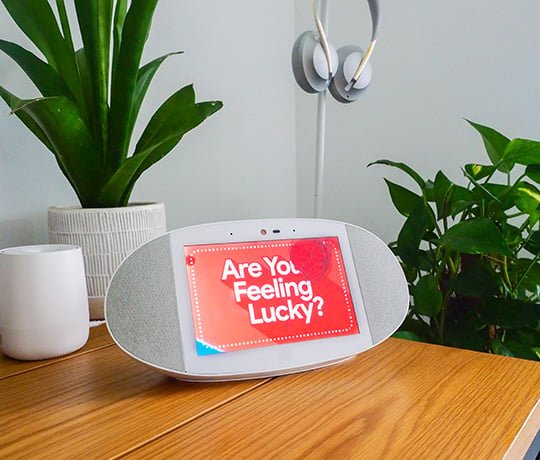
To play games on Google Home, you use voice commands. Say phrases like “Hey Google, play a game” or request a specific game by name that the device supports.
Want a new way to be entertained at home? You can easily learn how to play games on Google Home, and this smart device does more than just tell you the weather. It offers a variety of interactive audio games that you can start with just your voice. These games make a fun way to engage with your Google Home device and can entertain both kids and adults.

How to Play Games on Google Home
Having a Google Home device at your place is like having a super-smart friend who can help you with lots of things. But did you know it can also be a fun game buddy? That’s right! You can play lots of cool games using just your voice. It’s easy and exciting, making those rainy days indoors a lot more entertaining. So, let’s explore how you can start gaming with your Google Home. Get ready to have some fun!
Getting Started: The Basics
Before you jump into the world of voice-activated games, there are a few things you should know. It’s not like using a game console; everything is done with your voice. Google Home uses Google Assistant, which is like the brain that understands what you’re saying. So, you need to talk clearly so it understands you. Here’s a simple way to get going:
Make Sure Google Assistant is Ready
First things first, you need to make sure your Google Home device is connected to Wi-Fi and that Google Assistant is ready to listen. Normally, this happens automatically when you set up your device. But, if you are having trouble, try these steps:
- Make sure your Google Home device is plugged in and turned on. You’ll see lights on the top of it.
- Say, “Hey Google,” or “Okay Google.” If the lights flash or your device responds, it’s ready!
- If it doesn’t respond, check your Wi-Fi connection using the Google Home app on your phone or tablet.
- Ensure that your Google account is logged in on the Google home app as well as on the device.
Talking to Google Home
Talking to Google Home is really easy! Just say, “Hey Google,” or “Okay Google,” before you ask it to do something. For example, to start a game, you might say something like, “Hey Google, play a game.” The key thing is to speak clearly and not too fast so that Google Assistant understands you correctly. Sometimes, if it does not understand, repeat it slowly. And it is good idea to be specific, if you want a particular game, say that name.
Types of Games You Can Play
Google Home has access to a variety of games which you can play through the Google Assistant. These games range from simple quizzes and trivia games to more creative adventures. Here are some of the fun kinds you can find:
Trivia and Quiz Games
Do you like answering questions? If you do, then trivia games are perfect for you. Google Home has lots of these games that test your knowledge on all sorts of topics. You can play with friends or by yourself. These are great for learning new things while having a good time. Here’s how to play them:
- Say, “Hey Google, play a trivia game.”
- Google Assistant might give you a choice of categories, such as history, science, or pop culture.
- Pick a category and listen to the questions. You answer using your voice.
- Have fun trying to get the most correct answers!
Adventure Games
Want to go on an exciting adventure? With Google Home, you can! These games use stories and choices to create interactive experiences. You become the hero of the game and make decisions that change the story. They are fun, engaging, and really make you feel like you are part of the action. The method to start these is as below:
- Say, “Hey Google, play an adventure game.”
- Choose from a list of available adventure games, or go with the one Google Assistant recommends.
- Listen carefully to the story, and make choices by saying what you want to do or say.
- Experience the adventure as it unfolds because of the choices you make!
Word and Puzzle Games
Word and puzzle games are great for exercising your brain and having some fun at the same time. These games help you think about words, letters, and how things fit together. They’re enjoyable and a good way to keep your mind sharp. It works by the given method:
- Say, “Hey Google, play a word game.”
- Select from the choices of word games.
- Follow the instructions from Google Assistant, and use your voice to answer and solve puzzles.
- Enjoy the fun of solving puzzles using the word!
Number Games
If you like numbers and solving puzzles, you will also like Google Home’s number games. These games test your math skills and your ability to think logically. They are not just for practicing math; these also improve your critical thinking and make learning enjoyable. You can try playing them by the following method:
- Say, “Hey Google, play a number game.”
- Choose the game you wish to play from the choices given.
- Use your voice to say the answers and solve number-based puzzles.
- Enjoy the process of working with numbers in a fun environment.
Finding New Games
Sometimes, you might want to try new games. Luckily, Google Assistant is always adding new games. Here is how you can find them:
Asking Google Assistant
The easiest way to find new games is to ask. Just say, “Hey Google, what games can I play?” Google Assistant will give you some options. You might even get new game suggestions every time you ask. You can also be specific, saying “hey Google, I want a new adventure game.” Or you can also say “Hey Google, show me the list of new games.”
Checking the Google Home App
The Google Home app on your phone or tablet can also help you find games. Here is how:
- Open the Google Home app on your phone or tablet.
- Tap on your Google Home device.
- Look for the “Explore” option (it might be a lightbulb or some kind of icon).
- In Explore, you can search or browse different apps, including games.
Tips for Better Gaming
Playing games on Google Home is quite easy, but you can make it even more fun if you learn some tips and tricks. Here are a few ideas:
Speak Clearly and Slowly
Google Assistant is good, but it needs to hear you clearly. Try to speak slowly and say each word distinctly. This is especially important when playing games that ask for specific answers. If you find that the Google Assistant is not understanding, try saying the words more distinctly and a little slower. Also, make sure there is not a lot of noise around you, so that your voice is heard clearly by the Google Home device.
Use Game Commands
Most games have special commands you can use. For example, you might say, “Repeat the question,” or “Skip this question.” Learn these commands, and the game will be much easier to control. Each game has its own set of unique commands, and you learn them as you play more games. Sometimes Google Assistant also tells you, or you can also say “Hey Google, what are the commands?”
Use Specific Game Names
Instead of just saying, “Hey Google, play a game,” you can say the specific name of a game. For example, “Hey Google, play Mad Libs.” This helps you go straight to the game you want to play and saves you time from listening to the suggestions. If you are playing a specific game, saying the specific game name is always faster way to start the game.
Play in a Quiet Place
If there is a lot of noise around you, Google Assistant may not understand you. Try playing in a quiet room where your voice will be heard more easily. You might try to play the game in the library, or in your room with the door closed, or in any space where it is relatively quiet. Minimizing background noise helps Google Assistant hear you better.
Have Fun!
The most important tip of all is to enjoy yourself! Games are for fun, so don’t worry too much about winning or losing. Just relax and have a great time. These voice controlled games are meant to entertain you, and you should definitely enjoy them to the fullest.
Troubleshooting Common Issues
Sometimes, things don’t work the way they should. If you’re having trouble playing games on your Google Home, here are some common problems and how to fix them:
Google Assistant Isn’t Hearing Me
If your Google Home isn’t hearing you, try these things:
- Make sure your microphone is not muted. Usually there is a button or switch at the back to unmute the microphone.
- Check the volume. It needs to be high enough to hear your voice.
- Move closer to the device.
- Make sure there is not too much noise, as the device may not be able to hear you clearly because of background noise.
The Game Isn’t Working Correctly
If the game you are playing is not working correctly, try this:
- Say, “Hey Google, stop the game,” and start it again.
- If the problem continues, check for updates for your Google Home device.
- Reboot your device by turning it off and turning it back on.
- If none of these work, you can try looking for help online in the Google Help forums or in the manufacturer website.
Game is not listed or available
Sometimes, the game you are trying to find may not be available. Here’s what you can do:
- Try saying the exact name of the game again, because sometimes google assistant might mishear.
- Check that the game is supported by your region, as some games are only available in specific countries.
- Look for similar games that are available in your region, or in your device.
Internet is not stable
If your device is having issues with internet, that may also lead to the Google Home not responding properly to your queries and commands. Here are some ways you can try:
- Try to check if you are able to connect to internet using other device on the same network.
- Restart your Wi-fi router, it can sometimes fix the problem.
- Check if the Google Home device is connected to the Wi-fi network, and if required re-connect to the Wi-fi network.
- Move your Google Home device to a place with better Wi-fi signal.
Making Game Time Even More Fun
Playing games on Google Home is fun on its own, but here are some ideas to make it even better:
Play with Friends or Family
Playing together can be very fun! Get your friends and family together and play games as a team. You can also compete with each other, making the game even more exciting. Google Home can support multiple people in a single game.
Create Game Challenges
Make up your own game challenges or rules. For example, you could see who can get the most correct answers in a trivia game. Or you can give time limit for number of questions answered correctly, or number of puzzles solved within the time limit. This adds some extra fun and a sense of adventure to the gaming session.
Make it a Daily Routine
Make playing games a daily thing. It’s a fun way to spend time, and helps keep you connected with family and friends. Set a time every day that everyone can play games together. It could be before dinner, or after lunch, or whenever is suitable for everyone. Make it a habit, and you will have a good time playing all the voice activated games.
Explore Different Types of Games
Don’t just stick to one kind of game. Try out all the types of games Google Home offers. This way, you will have a new and exciting experience all the time. You can also ask other members of your family or your friends to choose the next game, so that you are playing different games.
Playing games on Google Home is simple and fun for everyone. You can play by yourself or with friends, and there are lots of games to select from. Just remember to talk clearly, be patient, and most importantly, enjoy the fun that is available with voice controlled games. Have a great time exploring all the different options on your Google Home device!
Games on the Google nest hub
Final Thoughts
Playing games on your Google Home is straightforward. Use voice commands like “Hey Google, play a game”. Many different kinds are available. Some games test your knowledge, while others offer interactive stories.
The command “how to play games on google home” will quickly get you started. Explore different game options by asking Google. Have fun experimenting with the available selection.

