
To play games on TikTok, you typically use the platform’s built-in effects and filters that offer interactive gaming experiences, often controlled by taps or facial movements.
Have you noticed those engaging videos where people seem to be playing mini-games right within TikTok? Many users are curious about how to play games on tik tok, and it’s actually simpler than you might think. These aren’t complex, downloaded apps, but rather interactive filters.
TikTok’s effect library hosts a variety of these games. You can find them while creating a video. Search for “games” or browse the effects tab to start playing.

How to Play Games on TikTok: A Fun Guide
TikTok isn’t just for silly dances and funny videos anymore! It’s become a place where you can also play games. Yes, you heard that right! While TikTok doesn’t have a dedicated “games” section like a console or a phone app store, users have gotten super creative and found ways to make all sorts of interactive games right within the app. Let’s dive in and see how you can get in on the fun.
Understanding TikTok Game Basics
Before we jump into specifics, it’s good to understand how games on TikTok work. Most games you’ll find aren’t like traditional video games. Instead, they’re often based on:
- Filters: Some filters have interactive elements. You might have to tilt your head, open your mouth, or tap the screen to get a certain result.
- Challenges: These are games created by users that involve specific actions. They’re often tied to a song or sound and the goal is to perform the actions correctly.
- Video Interactions: Users sometimes create videos that require you to make choices. You might see something like “Choose door number 1, 2, or 3” and follow along with the chosen outcome.
- Polls and Quizzes: While not games in the traditional sense, polls and quizzes posted as videos let you participate and see results right on TikTok.
Finding Games on TikTok
Finding games can feel a little like a treasure hunt, but there are a few easy ways to locate them:
- Hashtags: Look for hashtags like #TikTokGames, #TikTokGame, #FilterGames, #QuizTime, #InteractiveVideo. These tags will bring up lots of different types of game videos.
- Trending Sounds: Sometimes, a game becomes popular because of a specific sound. Watch out for what sounds are trending and give the associated videos a try.
- Following Creators: If you find a creator who makes fun interactive content, follow them! You’ll see their new creations when they post.
- For You Page (FYP): The TikTok algorithm is pretty good at figuring out what you might like. If you interact with game videos, it will start showing you more. Keep liking and commenting on videos that catch your eye, and the app will serve you similar content.
- Searching for Specific Games: If you saw a particular game that you wanted to play, try searching the name or a description of it.
Playing with Filters
Many TikTok games use filters. These filters add special effects or animations to your videos. Some are just for fun, but others are specifically designed for interactive game play. Here’s how to find and use them:
How to Find Filter Games
- Open TikTok: Start the app.
- Tap the Plus Button: This is at the bottom of the screen.
- Tap “Effects”: This is on the left side of the screen, near the record button.
- Browse or Search: You can look through all the available filters, or search for words like “game” or “quiz.”
- Tap the Filter to Try It: The filter will be applied to your face in the preview.
How to Play Filter Games
Once you’ve found a filter game you like, here is what to do:
- Follow the Instructions: Most filter games show instructions on the screen or in the creator’s video. This will tell you how to play – maybe you need to blink, open your mouth, or move your head.
- Record Your Video: Tap the record button and play! Follow the directions on the screen to play the game.
- Share Your Results: After you play, you can post the video and share it with your friends.
Examples of Filter Games
- “Which Animal Are You?” This filter cycles through different animals and lands on one randomly, showing you your “animal persona.”
- “Personality Quizzes”: These filters pose questions and analyze your reaction to give you a personality result.
- “Random Result Games”: These filters will randomly select an outcome like “Where Should You Travel?” or “What’s Your Lucky Number?”
Participating in TikTok Challenges
Challenges are a big part of the TikTok experience, and many of them feel like games. They often have a particular goal, and users try to replicate the actions or match the beat of the music.
How to Find TikTok Challenges
- Look on the Discover Page: This is often located on the bottom of your screen labeled “Discover”. This shows popular and trending hashtags. Many of these hashtags are linked to challenges.
- Pay Attention to Trends: Keep your eye on what videos are showing up frequently on the “For You” page. If a lot of people are doing the same thing, it’s likely a challenge.
- Watch Challenge Compilations: Some creators post videos showing lots of challenges in one place. This is a good way to get an overview of what’s going on.
How to Participate in a Challenge
- Watch the Challenge Videos: See what everyone else is doing. Make sure you understand the goal.
- Use the Same Sound or Song: Most challenges are tied to a particular sound. Look for the sound title at the bottom of the video, and tap it. This will take you to a page where you can use the sound too.
- Record Yourself: Do your best to follow the challenge instructions. Have fun with it!
- Post Your Video: Add the relevant hashtag to your post so others can see your entry.
Examples of TikTok Challenges
- Dance Challenges: These involve learning a specific dance routine.
- Lip-Sync Challenges: You try to move your mouth to match the words of a song.
- Transformation Challenges: You start a video one way, and transform it into another using a specific item or clothing item.
- Creative Challenges: These can be anything from “draw this with your eyes closed” to “build something out of paper.”
Interactive Video Games on TikTok
Some creators make videos that are specifically designed to be interactive. These might involve choices, questions, or mini-games.
How to Engage with Interactive Videos
- Watch Carefully: Pay close attention to the instructions in the video.
- Make Choices: If the video asks you to choose something, make your choice and continue following the video.
- Interact by Commenting or Dueting: Sometimes you need to comment to interact with the game, other times you’ll be able to use the “Duet” feature, where your video response is shown alongside the original.
Examples of Interactive Video Games
- “Choose Your Own Adventure” Videos: You’re presented with choices and each choice will lead to a different outcome.
- Story Games: The video will tell a story, and your actions or comments will determine how the story ends.
- Brain Teasers and Puzzles: Some users create videos that pose riddles or puzzles for others to solve.
Tips for Playing Games on TikTok
Playing games on TikTok is all about having fun. Here are some tips to make the most of it:
- Be Patient: Sometimes it takes a little while to figure out how a game works. Don’t get frustrated, just keep trying!
- Be Creative: Put your own spin on challenges or filter games. Make it unique!
- Have Fun: It’s all about enjoying yourself and connecting with other users.
- Follow Safety Guidelines: Always be mindful of what information you share online and stay safe.
- Check Comments: Other players may have tips or hints in the comments section.
Creating Your Own TikTok Games
If you’re feeling creative, you could even try creating your own TikTok games! Here are a few ideas:
- Make a Filter Game: Using TikTok’s effect studio, you can design and create your own personalized filter games, or quizzes.
- Create a Challenge: Come up with an interesting or funny action and pair it with a catchy song. Encourage others to join in with a unique hashtag.
- Build an Interactive Video: Use editing software to put together a “choose your own adventure” video.
Creating your own games can be a lot of fun, and it can even help you build a following on TikTok!
The world of TikTok gaming is always changing, so there will always be new ways to play! Keep looking for what’s new and have fun!
TikTok is an engaging platform that goes beyond simple short videos. The creative ways users incorporate game elements make it a place for fun and interaction. Whether you’re following challenges, playing with filters, or engaging with interactive videos, there are loads of options for everyone to have some fun and create engaging content.
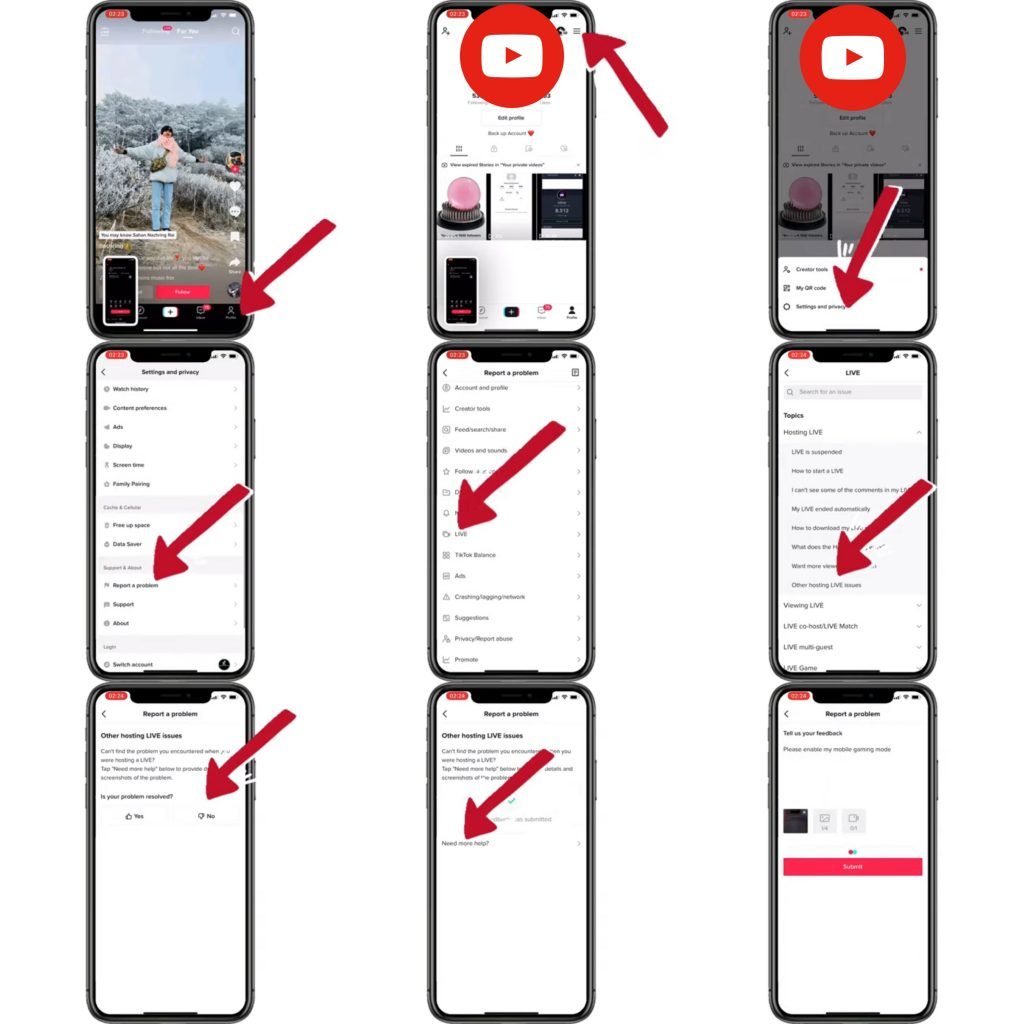
How To Live Stream Mobile Games On TikTok – Full Guide
Final Thoughts
To play games on TikTok, explore the platform’s interactive effects. Many creators use filters and challenges that function like simple games. Find these through trending sounds or hashtag searches.
Another way is to use third-party apps that integrate with TikTok. Some allow for full games to be played and shared. Remember to always check app permissions before using any new service.
Ultimately, ‘how to play games on tik tok’ often means using clever video editing and interactive filters. You can also try games others have made with trending sounds. Have fun exploring this evolving feature!

