
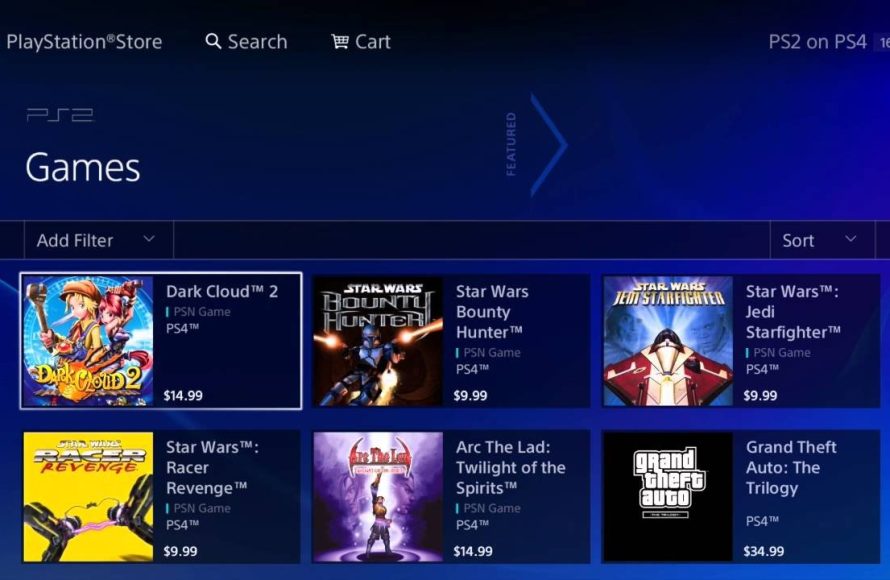
Unfortunately, you cannot directly play PS2 games on a PS4 console as it lacks backwards compatibility.
Want to relive the classics? Many players ask about how to play PS2 games on PS4. The PS4 console doesn’t have the hardware to support physical PS2 discs.
Sony has not built in a method to use older game discs on the newer system. Some PS2 games are available for purchase as digital downloads on the PlayStation Store for PS4.

How to Play PS2 Games on PS4
Okay, so you’re itching to play those classic PlayStation 2 games, but you only have a PlayStation 4? We totally get it! The PS2 had some of the greatest games ever, and it’s normal to want to play them again. The bad news is, the PS4 doesn’t directly play PS2 game discs. It’s like trying to put a square peg in a round hole. But don’t lose hope! There are some ways to enjoy your favorite PS2 titles on your PS4. It just takes a little bit of know-how, and we’re here to guide you through it all.
Understanding the PS4’s Compatibility
First things first, let’s talk about why the PS4 doesn’t just play PS2 discs. It all comes down to different hardware and software. The PS2 and PS4 are built very differently inside. The PS4’s hardware simply isn’t made to read and process the information from the old PS2 game discs. Think of it like trying to play a cassette tape in a CD player – it just won’t work. Furthermore, the PS4 operating system is also not built to support PS2 software. Therefore, using the original disc is a dead end.
The Disc Drive Dilemma
The PS4 disc drive, the part that reads discs, is only designed to read Blu-ray discs (that’s what PS4 games are on) and DVDs. The PS2 used CDs and DVDs, but the way the information is stored is different. It’s like the PS4 speaks a different language than the PS2. So, even if you could physically put a PS2 disc in your PS4, it wouldn’t understand what to do with it. This physical incompatibility is a major barrier to directly playing your old games.
The Official Way: PlayStation Store and PS2 Classics
While you can’t just pop in your old PS2 discs, there is an official route. Sony has been releasing some PS2 games on the PlayStation Store as “PS2 Classics.” These are special versions of PS2 games that have been modified to work on the PS4. They are digitally available, which means you download and install them directly to your console. Think of it as buying a new, improved version of an old favorite!
How to Find PS2 Classics on the PlayStation Store
Here’s how you can find and get these games:
- Turn on your PS4 and go to the PlayStation Store.
- Use the search bar at the top of the screen and type in “PS2.” You can also browse the categories.
- The search results will show the available PS2 Classics.
- Choose the game you want and click “Purchase.”
- The game will then download and install on your PS4.
- Once it’s done, you can start playing!
Limitations of PS2 Classics
While it’s awesome that we have PS2 Classics, there are some drawbacks:
- Selection is Limited: Not all PS2 games are available. Sony handpicks the ones they think people want most, meaning that many great games aren’t available. If your favorite game is not available on PSN store, you are out of luck.
- They Cost Money: You will need to buy these games, even if you already own the original PS2 disc. It may feel a little unfair to buy a game again, but consider it payment for the modification that makes it playable on PS4.
- No Physical Copy: You can’t use your existing PS2 discs to play these. The PS2 classic version is only available through digital downloads.
- Sometimes Improved But Not Always: Some of these classics get a graphical update, but this is not always the case. In some instances, games may look slightly different than what you remember.
The PS Now Option: Streaming PS2 Games
Another way to play some PS2 games on your PS4 is through PlayStation Now (PS Now). This is a subscription service that lets you stream a large number of PlayStation games, including some PS2 titles. It’s like a “Netflix for games,” where you don’t own the games directly, but you can play them as long as your subscription is active.
How PS Now Works for PS2 Games
PS Now streams the game to your PS4. The game actually runs on a server, and you see it on your TV. It’s pretty much like watching a video, but you get to control what happens. Here’s what you need to know:
- Subscription Required: To access the PS Now library you will need to sign up for a subscription which will be charged every month or every year.
- Internet Connection Needed: Because the game streams, you need a fast and stable internet connection. Otherwise, the game might lag, or be pixelated.
- Available Titles: Not all PS2 games are available on PS Now. There are some hidden gems on it, but be sure to check if your favorite games are on there.
- Download Option for some Games: Some PS Now games, including some PS2 games, can also be downloaded to your PS4, so you don’t need to stream them. This is great for games that you want to play a lot.
Pros and Cons of PS Now
Here’s a summary of the good and bad about using PS Now for PS2 games:
Pros:
- Access to many games in one go. You can try several different games without buying them individually.
- New games are added to the library periodically.
- The ability to download some games can be beneficial for play without latency.
Cons:
- Requires a monthly/yearly subscription.
- Requires good internet access.
- PS2 game selection is not comprehensive.
Exploring Unofficial Methods: Emulation
Now, let’s talk about something a little less official, and more complex – emulation. An emulator is like a program that pretends to be a PS2, letting you play PS2 games on other devices, including your computer. This option is not directly available on the PS4 because it is a closed system, and does not allow installing unofficial software or applications directly. Therefore, it’s not a practical solution for the PS4 itself, but we’ll go over it for educational purposes and for people who may have access to other devices.
What is Emulation?
Emulation, in simple terms, is using software to make one device act like another. In the case of PS2 emulation, a computer program imitates the PS2 console’s functions. This lets you run PS2 game files on devices the game was not originally designed to run on. Emulators, if well built, can bring the feeling of playing PS2 games even to newer or totally different hardware.
Why Emulation is NOT Recommended on PS4
It’s important to be clear: You cannot install emulators directly on a standard, unmodified PS4. The PS4’s operating system is built with restrictions that prevent you from loading unofficial software like emulators. If someone online tells you they have an emulator for the PS4, they’re most likely trying to get you to install something harmful to your console. Only if you have a dev kit or a modified PS4, the option of installing unofficial applications is available. It’s best to stick with official methods on your PS4.
How Emulation Works on a Computer (For Education Only)
If you have a computer, here’s a basic rundown of how emulation works:
- Download an Emulator: You would need to find a reliable PS2 emulator (like PCSX2) from a trusted source. Note that it’s crucial to get it from a reliable source, as there are many fake emulators on the internet that carry malware.
- Get the Game Files: You need ISO files of your PS2 games. This is a digital copy of the game.
- Configure the Emulator: Setting up an emulator can require some technical knowledge. You might have to configure settings like video resolution and controller input.
- Start Playing: You can then load your ISO files and start playing on your computer.
Ethical Considerations of Emulation
Emulation can be a gray area, and there are ethical considerations. Ideally, you should only have ISOs of the games you own on disc. Downloading games that you don’t own can violate copyright laws. Many people feel that once they have bought the original game and have it at home, they should be able to use a digital copy of it on a computer, but you should also consider that the company may lose potential revenue. Everyone should keep in mind legal and ethical aspects regarding emulation.
Comparing Methods: Which is Best For You?
We’ve discussed a few ways to experience PS2 games on the PS4. Let’s break down each option to help you decide which one is best for you:
Table: Comparing Ways to Play PS2 Games on PS4
| Method | Availability | Cost | Game Selection | Internet Required | Legality |
|---|---|---|---|---|---|
| PS2 Classics (PlayStation Store) | Directly on PS4 | Cost per game | Limited selection | For download and updates | Official and Legal |
| PlayStation Now | Streaming on PS4, and downloadable on some games | Monthly/Annual subscription | Limited PS2 titles, good number of games in general | Yes (if streaming) or Download option | Official and Legal |
| Emulation (On a computer) | Not directly on PS4 | Emulator free but some cost for game files | Potentially wide (Depends on available ISO files) | No internet is required, but you need internet for searching reliable emulator and ISO files | Ethical gray area, depending on ISO file sourcing. |
Consider these points when choosing the method for you:
- How much are you willing to pay? If you only want a few specific games, it may be more economical to purchase them individually through PS2 Classics. If you like trying different games, a PS Now subscription might be better.
- Do you have a good internet connection? If your internet is spotty or slow, you will not be happy with the streaming option from PS Now.
- How important is a very specific game to you? If you only want to play one particular game that is available on PS2 classics, that’s a good option, but if you like variety then PS Now is worth consideration.
- How much technical knowledge do you have and how much do you want to modify your system? if you don’t want any modification in your system and prefer the official way, then the PS2 classics or PS Now is the choice. If you have some knowledge on emulation and a willingness to try things out, you may explore it on a computer.
Ultimately, the “best” method depends on your personal preference and what you are trying to achieve. Pick the method that is easier and more convenient for you.
In the end, while directly playing your old PS2 discs on a PS4 isn’t possible, you still have good options to revisit your favorite PS2 games. Whether you choose to download PS2 Classics, subscribe to PS Now, or explore emulation on a computer, the thrill of playing those classic games is still very much alive. Have fun, and enjoy your retro gaming journey!
Play PS2 Nostalgia Games on Your PS4! | Step-by-Step Guide
Final Thoughts
Playing PS2 games on a PS4 directly isn’t possible due to hardware limitations and Sony’s focus on newer titles. You cannot insert a PS2 disc into a PS4 console and expect it to work.
Currently, the best option for ‘how to play ps2 games on ps4’ involves using PlayStation Now, a subscription service. This service allows playing selected PS2 titles via the internet. It provides a way for you to enjoy classic games.
Therefore, direct physical play is not supported; PS Now is your key.

