
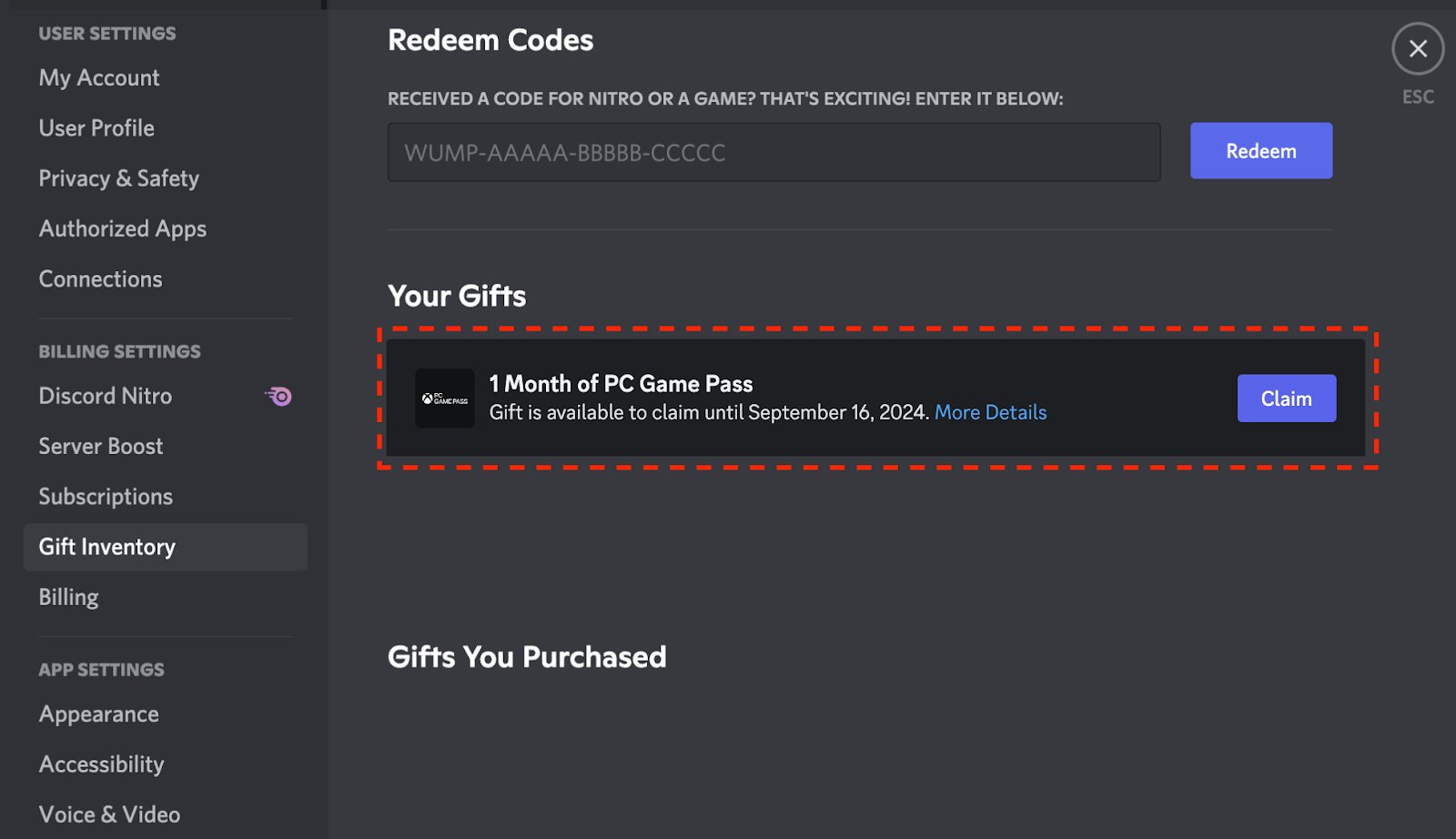
To redeem a Nitro Xbox Game Pass code, go to the Xbox app or the Microsoft Store on your device, click on redeem, and enter your code.
Ever snagged a Discord Nitro perk that includes Xbox Game Pass and wondered what to do next? It’s a common question, and the good news is that the process is straightforward. We’ll quickly walk you through how to redeem nitro xbox game pass code, ensuring you can get to playing games quickly.
This guide simplifies the steps and gets you on your way without any confusion. We understand you’re excited to start playing, so let’s jump right in.

How to Redeem Nitro Xbox Game Pass Code
So, you’ve got a shiny new Discord Nitro code that comes with Xbox Game Pass, and you’re excited to start playing! That’s awesome! But maybe you’re a little unsure how to actually get that Game Pass goodness onto your Xbox or PC. Don’t worry; it’s simpler than you might think. This guide will walk you through each step, so you’ll be gaming in no time. We’ll cover everything from where to find your code to what to do if you run into a little snag. Let’s get started!
Finding Your Discord Nitro Code
First things first, we need to locate that all-important code. It’s not hiding, we promise! Usually, after you get Discord Nitro, the code for the Xbox Game Pass perk will show up in a few different spots, depending on how you got Nitro. Let’s explore where you can usually find it:
Checking Your Discord App
The most common place to find your code is right within your Discord app. Here’s how you check on a computer:
- Open the Discord app on your computer.
- Look for the Discord logo on the top-left corner of the screen, it is placed above all of your channel list. Click on it.
- You’ll be brought to a page with information about new Discord features and promotions, this is where your code usually will appear.
- If you’re on a mobile, the process is similar. Tap on the Discord icon on the bottom of the screen, then look for the gift icon in the same place where you see all the new features and promotions of Discord
- You should see an offer from Discord with a “Claim” or “Redeem” button. Click it.
- After clicking the redeem button, your unique Xbox Game Pass code will appear and it will also show you the instructions on how to redeem it.
- Make sure to copy the entire code.
If you still can’t see it there, here’s what to do next:
Checking Your Email
Sometimes, Discord will also send you an email with your Nitro and the included Xbox Game Pass code. Follow these steps:
- Check the email address you used to sign up for Discord.
- Look in your inbox for an email from Discord, their email address will be similar like ‘[email protected]’.
- Search keywords like “Discord Nitro” or “Xbox Game Pass” in your email search bar if you cannot find it manually.
- Open the email and look for your Xbox Game Pass code, it may contain detailed instructions how to use it.
Important Tip: Make sure to check your spam or junk folders too, sometimes emails can mistakenly end up there.
Understanding Your Xbox Game Pass Code
Before we jump into the redemption process, let’s chat a bit about what that code actually is and how long you have to use it. Most of the times, these codes are linked with the specific kind of Game Pass, whether it’s for PC or Xbox console.
Types of Game Pass Codes
There are generally two types of Xbox Game Pass codes you might receive with Discord Nitro:
- Xbox Game Pass for Console: This one lets you play a vast library of games on your Xbox console. If you are using this one, you won’t be able to use it on a PC.
- Xbox Game Pass for PC: As its name suggests, this version allows you to play games on your Windows computer. If you have this one, you cannot play games on an Xbox console.
- Xbox Game Pass Ultimate: This is the best option because it includes both console and PC access, plus it lets you play games on the cloud and offers additional perks.
Expiration Dates
It’s crucial to know that these codes usually have an expiration date. This means that you have to use it before a specific time. Make sure to look for the expiry date when you get the code, whether in Discord or in your email. Once it expires, it’s no longer valid, so don’t wait too long to redeem it! The expiration of the Xbox Game Pass code will be noted clearly, whether on the Discord app or email itself.
Now that we have a solid understanding of the codes and where to find them, it’s time to move on to the exciting part – redeeming it!
Redeeming Your Xbox Game Pass Code on PC
If your code is for Xbox Game Pass for PC, here’s how you redeem it on your computer:
Using the Microsoft Store App
The easiest method to redeem the code is by using the Microsoft Store app. Follow these steps:
- Open the Microsoft Store app on your Windows computer. You can find it by typing “Microsoft Store” in the search bar.
- Make sure you’re logged in with the Microsoft account you want to use for your Game Pass. You can find which account you’re logged into by clicking your profile icon in the top right corner.
- Click on the three dots icon (it looks like three small dots in a row), which is usually located at the top-right of the window, next to your profile picture.
- From the dropdown menu, choose “Redeem a Code”.
- A window or page will appear, and it will ask you for your 25-character code.
- Type in your Xbox Game Pass code in the box carefully, make sure it’s the correct one. Don’t include any spaces or extra characters.
- Press “Next”.
- If the code is correct and has not expired, you will see the confirmation screen. This screen will show you the name of the product you’re redeeming and how much the subscription is valid for.
- Press ‘Confirm’ to use your Game Pass subscription.
Using a Web Browser
You can also redeem your Xbox Game Pass code through your web browser. Here’s how:
- Open your favorite web browser, such as Chrome, Firefox, or Edge, on your PC.
- Go to the official Xbox website, use this link: https://redeem.microsoft.com.
- Sign in with the Microsoft account you would like to use for the Game Pass subscription.
- Enter your 25-character code in the box provided.
- Click “Next” and you’ll be redirected to a new page. If the code is correct, you’ll see the confirmation screen.
- Confirm to activate your subscription.
After completing any of the above steps, the Xbox Game Pass is now active on your Microsoft account, which means you are able to play any Game Pass game.
Redeeming Your Xbox Game Pass Code on Xbox Console
If you have the Xbox Game Pass for console, here’s how you redeem it on your Xbox console.
Using the Xbox Console Interface
Follow these steps to redeem your code directly on your console:
- Turn on your Xbox console and sign in to your Xbox profile with the account where you want to use the Game Pass.
- Press the Xbox button on your controller to open the guide.
- Go to “Store” by scrolling through the tabs on the screen, it looks like a shopping bag icon.
- Under the “Store” section, find the “Redeem” option. It is usually located at the bottom left of your screen.
- Choose “Redeem a code” by using your controller.
- Enter your 25-character code using the on-screen keyboard.
- Double check that the code you entered is correct, there shouldn’t be any typing errors.
- Click “Next.”
- If your code is correct and not expired, you will see the confirmation page.
- Press “Confirm” to use your subscription.
You can now play Xbox Game Pass games on your console after successfully redeeming your code.
What to Do if You Encounter Problems
Sometimes, things might not go as smoothly as we’d like. If you run into any issues while trying to redeem your code, don’t panic! Here are some common problems and how to handle them:
Invalid or Already Used Code
One common issue is that you might see an “Invalid code” error. This can be caused by a few different things. First, make sure you’ve entered the code correctly. Double check the characters again, sometimes it’s easy to confuse ‘0’ with ‘O’ or ‘I’ with ‘l’. If you still see an error and know you’ve typed it right, the code may have already been used, which can occur if you have multiple people using your Discord account. If you think someone else is using your account and redeeming the code, we recommend changing the password of your account immediately. If the code has not been used by you or your close friends/family members, then contacting Discord or Xbox support is the next logical step, as the code might have been deactivated somehow. In cases, they will ask for the code itself and the purchase proof of the Nitro.
Code Has Expired
As we talked earlier, your Xbox Game Pass code does have an expiry date. If your code is expired, you won’t be able to redeem it, and it will show an error while trying to redeem. Unfortunately, if the code is expired, you can’t use it. The best approach is to ensure that you redeem the code as soon as you receive it to avoid losing your access.
Region Issues
Occasionally, there might be a region restriction for your code. This means that a code that was bought in a particular country might not work in another country. Most often, this is not an issue, but there are some rare cases where it might happen. If you have any region issues, it is best to contact Discord or Xbox support for further assistance.
Having Issues with the Website/App
Sometimes, the Microsoft Store app or the Xbox website might be temporarily down for maintenance or may have some technical issues. You can try again after some time. If the issue persists, you can use another method like trying the website if you are having issues with the app and vice versa.
How to Contact Support
If you are still having problems, don’t hesitate to contact support teams. Here’s how you can reach them:
- Discord Support: You can find Discord support on their website. Head to the Discord support page and submit a ticket.
- Xbox Support: You can visit the Xbox support website and look for the specific support options. Usually, they offer a chat, phone and contact form support.
When you contact the support team, be prepared to share your code (if needed), information about where you got the code (for example, your Discord Nitro), and a description of the error you’re seeing.
Tips for a Smooth Experience
To ensure that everything goes smoothly, here are some tips to keep in mind:
- Redeem Promptly: Use your code as soon as you receive it to avoid forgetting or the code expiring.
- Double Check: Always double-check the code before you confirm. A single typo can prevent you from using it.
- Stable Internet: Make sure you have a stable internet connection while redeeming.
- Use the Correct Account: Confirm that you are using the right Microsoft account. It is the same account you will be using to play the games.
- Read Instructions: Always carefully read the instructions provided by Discord and Microsoft.
By using these tips, redeeming your Xbox Game Pass code should be a breeze!
That’s it! You’ve now successfully learned how to redeem your Discord Nitro Xbox Game Pass code. With the instructions we provided, you can start gaming on your PC or Xbox. Remember to check for any expiration dates and use the correct type of game pass subscription for your devices. If you have any problems, don’t be shy about contacting support. Now, go out there and have fun!
How to Redeem an Xbox Game Passcode From Discord (A Step-By-Step Guide)
Final Thoughts
To redeem your Nitro Xbox Game Pass code, first, go to the Xbox website or app. Then, sign in to your Microsoft account. Locate the ‘Redeem’ option; it’s usually within your account settings or store page.
Enter your 25-character code into the provided field. Confirm your entry, and your subscription benefits activate immediately. Remember that specific steps might vary slightly between platforms. The process to redeem your Nitro Xbox Game Pass code is fairly simple.

