
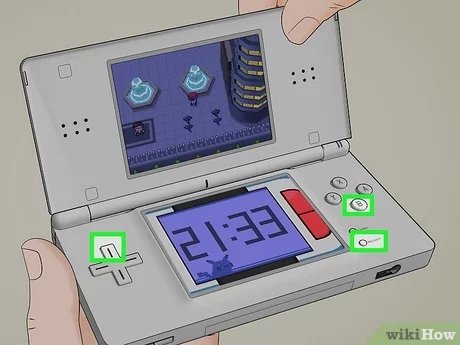
To reset a Pokémon game on a Nintendo DS, press and hold the Up button, Select button, and B button simultaneously on the title screen.
Ever wanted to start your Pokémon adventure over? Perhaps you chose the wrong starter, or just want that fresh feeling again. It happens! We’ve all been there, and knowing how to reset a pokemon game on ds is crucial.
This short guide will quickly show you how to wipe your save data and begin anew. It’s simple to do, so you can easily dive back into the world of Pokémon. This ensures you get that perfect experience you are seeking.

How to Reset Pokémon Game on DS
Have you ever wanted to start your Pokémon adventure all over again? Maybe you chose the wrong starter, or you want to experience the story fresh, with a completely new team? Whatever your reason, resetting your Pokémon game on a Nintendo DS is easy. Let’s jump into how to do it and talk about what happens when you hit that reset button!
Understanding Game Resets on DS
Before we dive into the how-to, let’s talk about what a game reset actually means. When you reset a Pokémon game on your DS, you are essentially erasing your saved progress. This includes your Pokémon team, your items, your badges, and everything else you’ve worked on. It’s like pressing a big “start over” button. It’s important to understand that this action is permanent. So, before you proceed, make absolutely sure you want to erase all your data.
Why Reset Your Game?
There are lots of reasons why players might want to reset their Pokémon game. Here are some common ones:
- New Playthrough: You want to play through the game from the beginning again, with a different approach.
- Wrong Starter: You didn’t pick the starter Pokémon you wanted, and you’re too early in the game to justify restarting but you want your ideal team!
- Experimenting: You want to try different team compositions or strategies.
- Trading Glitches: If you have some trouble with trades, resetting can sometimes help.
- Second-Hand Games: You bought a used game, and you want to clear the previous owner’s save file.
- Collecting Purposes: You want to collect all pokemon again from beginning.
- Just For Fun: You want to play through it with a fresh eyes and to feel the nostalgic joy of pokemon adventure again.
Different Methods for Resetting Pokémon Games on DS
The exact method for resetting your game depends on which DS console you’re using and which generation of Pokemon game you have. Let’s explore the techniques:
Resetting Older Generation Pokémon Games (Gen 4 & 5)
This method applies to the following games:
- Pokémon Diamond
- Pokémon Pearl
- Pokémon Platinum
- Pokémon HeartGold
- Pokémon SoulSilver
- Pokémon Black
- Pokémon White
- Pokémon Black 2
- Pokémon White 2
For these games, the reset process is usually the same:
- Turn On Your DS: Insert your game cartridge and turn on your Nintendo DS.
- At the Title Screen: When you reach the game’s title screen (the one with the logo and game name), press and hold a combination of buttons. Usually, this involves pressing Up on the D-Pad + Select + B buttons simultaneously. Keep them pressed.
- Confirmation: You might get a confirmation message asking if you’re sure you want to delete all save data. Follow the prompts on screen, and press “Yes” to proceed with the reset.
- Start New Game: Once completed, the game will start again as if it was the first time ever, ready for you to play your new adventure!
Note: Some games might have slight differences in button combinations, but this is the most common method. If this method doesn’t work, try other combinations of buttons like X + B + Up at the title screen.
Resetting Pokémon Games on 3DS (Gen 6 & 7 – Played on a DS)
Even if your game is a 3DS game, if you are playing it on a regular DS (original DS, DS Lite, DSi, DSi XL), the reset method remains the same as older DS games.
Games like:
- Pokémon X
- Pokémon Y
- Pokémon Omega Ruby
- Pokémon Alpha Sapphire
- Pokémon Sun
- Pokémon Moon
- Pokémon Ultra Sun
- Pokémon Ultra Moon
Follow same instructions as older generations:
- Turn On Your DS: Insert your game cartridge and turn on your Nintendo DS.
- At the Title Screen: When you reach the game’s title screen, press and hold Up on the D-Pad + Select + B buttons at the same time.
- Confirmation: If a confirmation message appears, respond with “Yes” to delete all save data.
- Start New Game: The game will start from scratch as you expected.
Resetting Pokémon Games on 3DS (Played on a 3DS)
For those of you playing these same generation games on a 3DS system, the reset procedure is similar to how it is done on the DS
- Turn On Your 3DS: Insert your game cartridge and turn on your Nintendo 3DS.
- At the Title Screen: When you reach the game’s title screen, press and hold the combination of X + B + Up or L + R + Start simultaneously.
- Confirmation: Select “Yes” on the pop-up message asking for confirmation of deletion of game’s save data.
- Start New Game: Now your game is clean and you can start your adventure again.
Note: If these don’t work, try holding A + B + X + Y together and follow the on screen prompts to reset.
What Happens After Resetting?
Once you successfully reset your Pokémon game, you’ll find that:
- Everything is Gone: All your Pokémon, items, progress, and saved data will be erased.
- New Save File: The game will start a fresh save file as if you’re playing it for the first time.
- Choose Your Starter Again: You get the fun of choosing your starter Pokémon all over again!
- Start from the Beginning: You will begin from the introduction scenes of the game again.
This means you’ll have to go through the beginning of the game, get your starter Pokemon, and journey all over again.
Important Considerations Before Resetting
Before hitting that reset button, take a moment to think about these points:
- Irreversible Action: Resetting is a permanent action. You can’t undo it! All data will be gone, so think carefully before doing it.
- Trading and Transfers: If you have valuable Pokémon you want to keep, consider trading them to a friend or using Pokémon Bank (for the 3DS games) to move them to a different game.
- Special Events and Items: Sometimes, special event items or Pokémon are tied to a save file. Resetting means losing these too. Make sure you want to lose them, if you choose to reset the game.
- Check Online Resources: If you’re having trouble with a specific game, look up the specific button combination online, forums or in guides. Sometimes the combination can vary slightly between the game.
- Backups: There’s no official way to back up your save files for the DS/3DS games.
Tips for a Fresh Start
Now that you’ve successfully reset your Pokémon game, here are some ideas for making the most of your fresh start:
Plan Your Team
- Type Coverage: Before you pick your starter, think about the types of Pokémon you want on your team, to make sure you have a variety of attacks for all types of opponents.
- Favorite Pokémon: This is your chance to make your dream team with all your favorites!
- New Strategies: Try out different combinations, and make a team that feels unique to you.
Play Through Differently
- Challenge Yourself: Play with rules you have set for yourself. Maybe a Nuzlocke challenge (where you can only catch the first pokemon you see in each new area, and pokemon that faint are considered dead), or you can only use a specific type of Pokemon.
- Explore Everything: Take your time in each area and find all the hidden items or secrets.
- Talk to Everyone: Pay attention to the NPCs in each city or town. They can sometimes give you important clues or useful items.
Enjoy the Journey
- Take Your Time: Don’t rush through it. Enjoy the story, the music, and the exploration.
- Have Fun: Pokémon games are meant to be enjoyed, so remember to have fun with it!
- Share the Experience: Talk to other fans of the game about your journey. Maybe you will pick up a tip or two.
Troubleshooting Common Issues
Sometimes, you may face issues when trying to reset your Pokémon game. Here are some things to check:
Button Not Responding
- Proper Button Press: Make sure you are pressing the correct buttons at the same time. A common mistake is not holding them all down at the same time.
- Controller Issue: Check if your DS buttons are working correctly, test other games if you must.
Not Seeing Reset Option
- Correct Timing: The key press has to happen at the specific title screen, not before or after.
- Check Game: Double-check which game you have, and search for guides for that specific title.
Save Data Not Deleting
- Confirmation Needed: You have to confirm the save data deletion, in the confirmation menu.
- Multiple Files: Some games might have backup save files. Check for that in the in game options.
If you are still having trouble, consider looking for specific answers in the game’s online forums or guides.
Resetting your Pokémon game on a Nintendo DS is a pretty straightforward process. With the right button combinations, you can wipe your data, start fresh and go through your favorite adventure again. Just make sure you truly want to delete your data, and remember to have fun with it. Enjoy your new Pokémon journey!
How to Delete / Restart Pokemon X, Y, Sun, Moon, Alpha Sapphire & Omega Ruby!
Final Thoughts
To reset a Pokémon game on DS, press A, B, X, Y, L, and R simultaneously on the title screen. This action will erase all saved data, bringing you back to the beginning. Be certain you intend to do this because the process is irreversible.
This method is the primary way to reset your game and begin a new adventure. Remember, how to reset pokemon game on ds involves this specific button combination, deleting all progress. You should consider your decision before executing this reset.

