
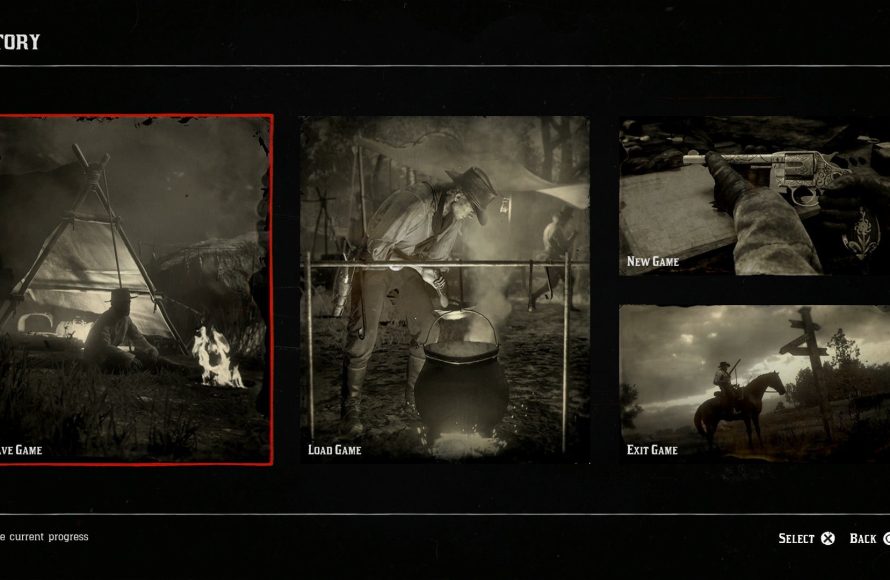
In Red Dead Redemption 2, you can save game progress by accessing the pause menu and selecting ‘Story’ then ‘Save Game’.
Exploring the vast world of Red Dead Redemption 2 is an adventure. You want to protect all the progress made. Therefore, understanding how to save game in rdr2 is quite essential. It’s simpler than you might think, and this short guide provides all you need to know about it.
Knowing where to save and how to do it prevents loss of valuable game time. It’s frustrating when things are lost due to improper saves, and this is exactly what we are preventing. So, go ahead and put this into practice and keep your progress safe.

How to Save Game in RDR2
Red Dead Redemption 2 (RDR2) is a huge game with a lot to see and do. Because of that, you definitely don’t want to lose your progress! Knowing how to save your game is super important. Luckily, RDR2 gives you a few different ways to save, so you’re not stuck replaying hours of gameplay. Let’s explore all the ways you can keep your cowboy (or cowgirl) adventures safe and sound.
Understanding the Basics of Saving in RDR2
Before diving into the specific methods, it’s good to understand the core saving system in RDR2. The game uses a mix of autosaving and manual saving. Autosave is like a helpful friend who’s always watching your back, making backups of your game at certain points. But, don’t fully depend on it! Manual saves are a must, because they give you more control.
Autosave Functionality
RDR2 autosaves your game frequently. You’ll see a small icon in the bottom right corner of your screen, that’s two rotating arrows. This means the game is creating a save point. Autosaves generally happen after important story missions or major events. While autosaves are good, they might not capture all the small side things you did between the main stories. That’s why it’s important to learn how to manually save.
Manual Saving: Taking Control of Your Progress
Manual saves let you pick the precise moment to secure your progress. You can have many manual save slots, so you can jump back to different parts of your adventure. This is super useful if you’re trying to get the best outcome in a mission or just want to explore without losing something good you have done.
How to Manually Save Your Game
Here’s how you can manually save your game in RDR2:
- Pause the Game: Press the “Options” button on PlayStation or the “Start” button on Xbox controller or ESC key on PC to pause the game.
- Navigate to the “Story” Tab: In the pause menu, you’ll see different tabs like “Progress,” “Settings,” and “Story.” Select the “Story” tab.
- Choose “Save Game”: Inside the “Story” tab, choose the “Save Game” option.
- Select a Save Slot: You’ll now see a list of save slots. Pick a new save slot or choose an existing slot. If you pick an existing save slot, the new save will replace the older one, so be careful about that.
- Confirm your Save: Once you’ve picked your slot, select “Save” to store your progress.
That’s it! You’ve created a manual save. This way, you can always return to this particular spot whenever you want.
Choosing the Right Save Strategy
Knowing how to save is one thing, but having a smart saving strategy can really help your RDR2 experience. Here are a few helpful tips and strategies:
When to Save Manually
- Before a Big Mission: If you’re about to start a tricky mission, make a manual save. This lets you easily try again if something goes wrong.
- After a Good Loot: Did you find a hidden treasure or get a really cool item? Save immediately! You don’t want to lose it.
- Before Making Big Choices: RDR2 lets you make a lot of decisions that change the game. If you’re not sure of a decision, make a save first.
- When Experimenting: If you plan to try some cool tricks or explore places, save before you try anything risky.
- Regular Intervals: Don’t wait for big moments only. Make manual saves every now and then, just like keeping up a good habit.
Overwriting Save Slots
When you save, you will see a bunch of slots. You can fill them with new saves. Sometimes, you might need to overwrite an older save. Here’s how to think about it:
- New Save Slots: It’s good to use a new slot each time you want to keep a separate part of the story.
- Overwriting Existing Saves: If you have a save slot that is really old, you can overwrite it with new progress to free up save slots.
- Strategic Overwriting: You might want to keep a save from the start of a chapter, and overwrite the in-between saves. Think before you overwrite.
Managing Your Save Files
As you play, you’ll create several save files. Knowing how to load these saves is as important as saving.
Loading a Saved Game
If you want to continue playing from an earlier save point, here’s how to load a saved game:
- Pause the Game: Press the Options or Start button to go to the pause menu.
- Go to the “Story” Tab: Head to the “Story” section in the menu.
- Select “Load Game”: Find and choose the “Load Game” option.
- Choose Your Save File: Pick the save file from the list you want to play from.
- Confirm: Click on the load button to load the game.
Tips for Managing Save Files
- Descriptive Names: RDR2 lets you see the game progress in a save, but try to remember key points for each save to manage them well.
- Avoid Saving During Missions: Because you could be in a weird spot in a mission, which can mess up the game, never save during missions.
- Keep Multiple Saves: Don’t depend on one or two saves only. Save in different slots to avoid any problem in game.
Cloud Saves and Additional Backup Options
Cloud saves are like extra insurance for your game progress. They automatically upload your save files to online storage provided by your console (PlayStation/Xbox) or platform (PC). They keep your save files safe if something happens to your system.
How Cloud Saves Work
When you save your game, these systems upload it to cloud. if your console breaks, or you start playing on a new console, then you can recover all your progress, because of cloud save.
Checking Cloud Save Settings
- PlayStation: Go to Settings > Application Saved Data Management > Saved Data in System Storage > Upload to Online Storage.
- Xbox: Your saved games upload to the cloud automatically. You can verify it in the storage setting menu.
- PC: Cloud saves for RDR2 depends on what platform you are using, like Steam or the Rockstar Games Launcher. Usually it’s automatic, but you can find settings in the respective launcher.
Using USB Drives for Extra Safety
As extra insurance you can use a USB drive. You can copy save files from the system to a USB drive. For both consoles, this option will be in “Saved Data in System Storage.” Simply copy your saves to the USB. If cloud saving fails, you can load from this USB. This is a great extra backup to keep you safe from any loss of progress.
Troubleshooting Save Issues
Sometimes saving can be tricky. Here are common problems and their fixes:
Game Not Saving
- Check Storage: Make sure your device has enough space to save the game.
- Restart the game: Sometimes a simple restart fixes weird problems. Close the game and launch it again.
- Update Game: Make sure your copy of the game is the latest version.
- Console/PC Problem: If you cannot save any game, it could be a problem with your console/pc. try restarting the console/pc to fix the issue.
Corrupted Save Files
- Use Backup Saves: That is why you have backup saves in different save slots. If one gets corrupted, you can start from other one.
- Check Hard Drive: Faulty hard drives can also cause corrupted saves. check it if you have such issues.
- Reinstall Game: In very rare cases, re-installing the game might be the last option.
Advanced Save Tips for RDR2 Players
Here are some extra tips that you might want to know:
Exploring Different Story Branches
Red Dead Redemption 2 is a game with tons of choices that change the storyline. So it’s a good idea to save before making these choices, so that you can easily jump back to explore different paths. Saving often and in different save slots helps with this.
Keeping Save Files for Different Playthroughs
If you plan to play through the game again with a different style, keeping separate save files can help. This way you can have a high honor playthrough and a low honor playthrough. Keep all saves separate, by naming and arranging them in a good way.
Saving During Exploration
RDR2 is filled with hidden gems. If you’re planning to go off the beaten path, remember to save before getting into any tricky spots. This way, if things go south, you won’t lose all your hard-earned progress. Make a save after finding any interesting spot or discovering any hidden treasure.
Experimenting with Side Missions
Side missions are fun and can sometimes be very rewarding in RDR2. But the rewards can be different from one choice to another. So, before you choose, save first. Then if you don’t like something, you can easily load from that point and redo it.
Saving Before Major Purchases
Buying expensive items like horses or weapons is a big deal in RDR2. Always make a save before you buy any big things. If you are unhappy with a purchase, you can go back to your save point before the purchase.
In short, saving your progress is essential to enjoying Red Dead Redemption 2 without losing any of your gameplay. Make sure to save regularly, use a good system for your save files, and back them up on cloud or USB storage if needed. Doing this will make your RDR2 adventure much smoother and more fun. Now go on, enjoy the wild west and make the most of it!
Red Dead Redemption 2: How to Save Your Game
Final Thoughts
To save your progress in RDR2, use the game’s menu. Access it, then select the save option. The game allows multiple save slots. You can create manual saves anytime.
Auto-saves also exist, but manual saves are crucial for safety. Remember to frequently save your game. This will protect your advancements. ‘how to save game in rdr2’ is simple, use the menu.

