
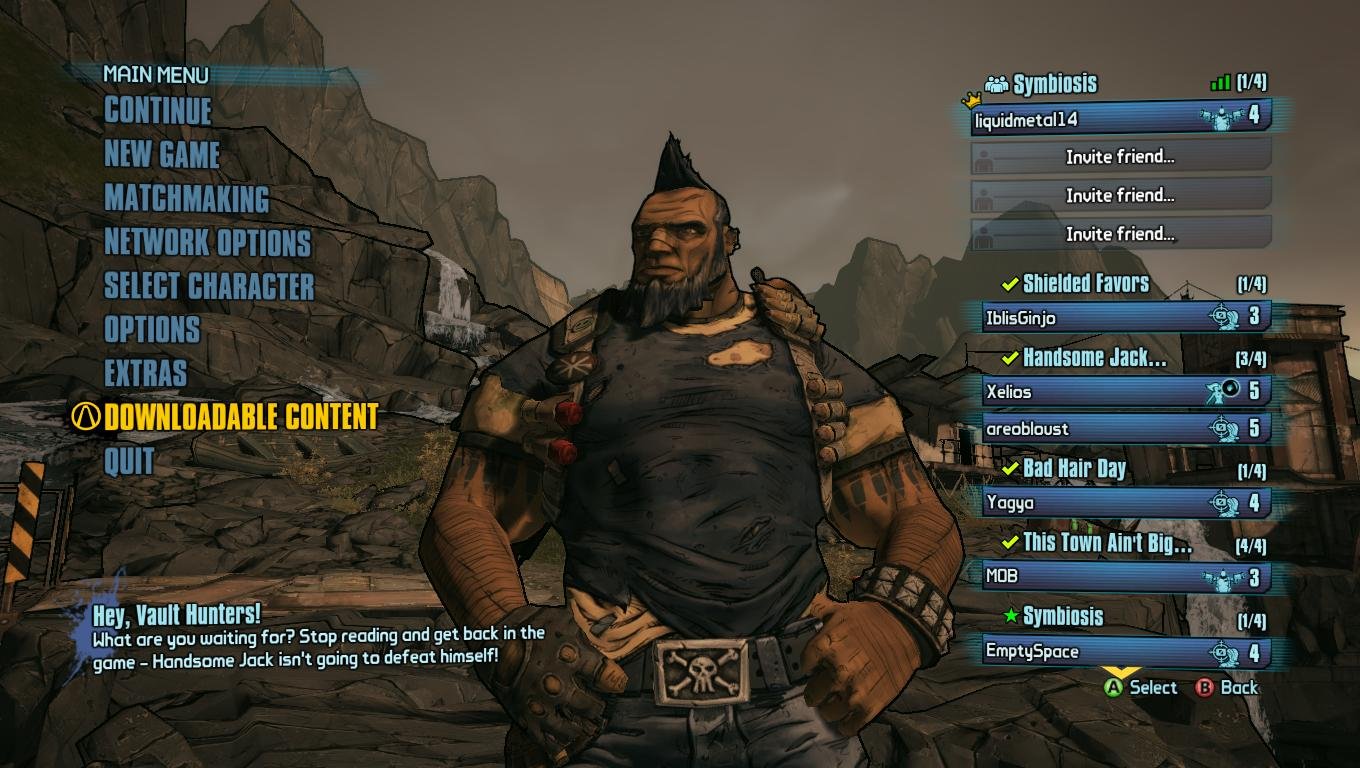
You save game progress in Borderlands by exiting to the main menu; the game automatically saves at that point.
Lost in Pandora and wondering how to save game on Borderlands? It can feel a bit confusing when you don’t see a typical save button. Rest assured, the game handles saving differently than you might expect.
The game automatically saves your progress whenever you exit to the main menu. Don’t worry about losing progress. Simply quit from the menu and everything will be recorded for when you jump back in.

How to Save Game on Borderlands
Saving your progress is super important in any game, especially in a big, action-packed adventure like Borderlands. Imagine playing for hours, getting awesome loot, and then… poof! It’s all gone because you forgot to save. Nobody wants that! So, let’s talk about exactly how saving works in the Borderlands games. It’s a little different than some other games you might have played, but once you understand it, you’ll be a pro. We’ll cover the different ways the game saves, how to make sure you don’t lose your stuff, and answer some common questions about saving in Borderlands.
Understanding Borderlands’ Save System
Unlike some games where you have to go to a specific menu and click ‘save’, Borderlands uses something called an autosave system. This means the game is constantly saving your progress in the background as you play. Think of it like a superhero quietly working behind the scenes to keep your game safe. It’s like having a really good friend watching out for your progress. But it’s not saving every single tiny move you make, it saves at important moments.
What Triggers an Autosave?
You might be wondering, “Okay, if it’s automatic, when exactly does it save?” Well, the game saves at certain key points. Here’s a breakdown of the most common triggers:
- Entering a New Area: Whenever you move from one area to another on the map, the game will save. This is a big one, because it helps keep your spot in the world secured.
- Completing Missions: After finishing a mission, whether it’s a main story quest or a side objective, Borderlands usually saves. It’s like a checkpoint for your accomplishments.
- Using Fast Travel Stations: When you hop onto a fast travel station to zip around the map, the game also saves your progress. This makes sure you always come back to where you left off in terms of travel points.
- After Leveling Up: When your character gains a level and you get to pick new skills, this event often triggers a save.
- Purchasing items or Upgrading Gear: After you make changes to your gear, you will notice a save icon in the corner of your screen.
These are the most common times when Borderlands saves. You can usually tell when the game is saving because a little icon will appear briefly on your screen, usually in the corner. This looks like a spinning circle or something similar depending on the game.
Why Manual Saves Aren’t a Thing in Borderlands
One question that comes up a lot is why there’s no manual save option. Well, it comes down to the way Borderlands is designed. The game is made to be played fairly quickly, going through areas, completing quests, and constantly fighting. The developers probably thought having a manual save option would be annoying and unnecessary because of this type of fast-paced play. Having the autosave system helps keeps things smooth and makes sure you don’t have to stop the action to save constantly.
Borderlands Specific Saving Quirks
Each game in the Borderlands series (Borderlands, Borderlands 2, Borderlands: The Pre-Sequel, Borderlands 3, and Tiny Tina’s Wonderlands) generally uses this autosave system, but there might be some slight differences between games.
Borderlands 1:
The original Borderlands game uses the autosave system that we’ve described, but there is a very slightly less predictable timing for saves. While it does the same main save events, there might be slightly more time between saves or less frequently based on how much combat and action is happening.
Borderlands 2:
Borderlands 2 continues the tradition with mostly the same autosave approach, but with slightly more reliable trigger timing. You’ll find that saving is smoother and often will save after you do something that could be important like completing a quest step.
Borderlands: The Pre-Sequel:
The Pre-Sequel builds on the saving foundation of the earlier games, providing similar reliable autosave triggers such as level-ups, location changes, and mission checkpoints.
Borderlands 3:
Borderlands 3 gives more visible save indicators and saves more frequently during missions and big events, so players don’t lose a lot of time during their gameplay. This game also has a more visible saving icon that lets you know that the game is doing its background saving work.
Tiny Tina’s Wonderlands:
In Tiny Tina’s Wonderlands, you will also find the familiar autosave system from the previous games but in a more stable and consistent manner. This entry in the franchise focuses even more on quick and constant action, and thus makes the autosaving even more reliable for players. You will find that most big events or entering a new location trigger a save so you will always pick up where you left off.
Common Saving Concerns and Solutions
Even with an autosave system, sometimes things can go a little wonky, so let’s cover some common problems and how to fix them:
Game Crashes or Power Outages
The worst feeling is when the game crashes or you lose power while you’re playing. Here’s how you can try to avoid some of this grief:
- Play Near Save Points: Try to get to a new area or complete a small quest before stopping for a break. This way, you know your game will save in a relatively recent position and you won’t lose too much when it happens.
- Be patient. When saving, you’ll see the little icon that we mentioned earlier that will tell you to wait before turning off your console or closing the game, be sure to watch for it and do not power off while that icon is visible.
Lost Progress
If you come back to the game and realize you’ve lost some progress, try not to panic. Check to see where the game saved by looking at the map or checking recent missions. Sometimes, you might only lose a few minutes of playtime. Most of the time if there was an issue, the game will load you to the most recent safe point and you might just have to travel through an area again. If you think you should have been saved but weren’t, this could indicate that there was a technical issue with your save file, which can often be fixed by deleting and reinstalling the game on your platform of choice.
Tips for Keeping Your Game Safe
Even though Borderlands is pretty good at saving on its own, here are a few extra tips to keep your progress safe:
- Always Keep an Eye Out for the Autosave Icon: When you see it appear, you know your game is being backed up. Be patient when you see it.
- Complete Missions Before Quitting: If you have a bit of time, try to finish the mission you’re working on or at least get to a point where you are going to a new area before quitting. This helps to make sure you always have a concrete starting point when you come back to the game.
- Don’t Force Quit During Saving: If you see the save icon is present, don’t turn off the game or your platform. If the system is turned off while the game is saving it could be harmful to the save file.
By following these simple tips, you can keep your progress safe and have a great time in the Borderlands!
Specific Platform Considerations
Borderlands is available on various gaming platforms, including PCs, PlayStation consoles (PS4 and PS5), Xbox consoles (Xbox One and Xbox Series X/S), and even Nintendo Switch for some titles. While the general saving system is consistent across platforms, there are some minor platform-specific things you should be aware of:
PC
On PC, your save files are stored locally on your computer. You can find them in a folder in the “My Documents” area of your computer. Some players also use cloud storage of save data, which is handled by the various platform launchers. For example, if you use Steam to play Borderlands, your data is often saved to the Steam cloud. Knowing where your save files are can be useful if you ever need to back them up or transfer them to another computer.
PlayStation (PS4, PS5)
PlayStation consoles use a combination of local storage and cloud storage for save data. If you have PlayStation Plus, your save files are automatically backed up to the cloud. This means if you ever need to get a new console or something happens to your current console, you can always download your save from the cloud. This is a great system that most people take advantage of.
Xbox (Xbox One, Xbox Series X/S)
Similar to PlayStation, Xbox consoles also use both local and cloud storage. If you have Xbox Live Gold or Xbox Game Pass Ultimate, your save files are automatically backed up to the cloud. When you play on a different Xbox with your account, your saves are retrieved so you can pick up exactly where you left off.
Nintendo Switch
The Nintendo Switch uses local saves, but if you are a Switch Online member, you will have an option for cloud saves, but most games need to be done manually. It is usually easy to make sure your saves are updated, but it is something to make sure you do if you want to have access to your save data on different consoles.
Regardless of which platform you play on, the save system is designed to be user-friendly. However, understanding these slight differences will ensure that your progress is secure, no matter how you enjoy Borderlands.
So, there you have it! Saving in Borderlands is pretty straightforward once you know how it works. The automatic saving system is very convenient and you don’t have to worry about making manual saves. Just remember to play through areas and complete missions or small objectives to make sure your progress is up to date. Enjoy your time exploring Pandora and beyond, and happy vault hunting!
Borderlands 3: How to Save Your Game
Final Thoughts
Borderlands games use an autosave feature. The game saves progress at specific points, like after completing a mission or entering a new area. You cannot manually save.
‘how to save game on borderlands’ relies on this system. Progress is mostly safe, but you may lose a small portion of unsaved progress after a crash.

