
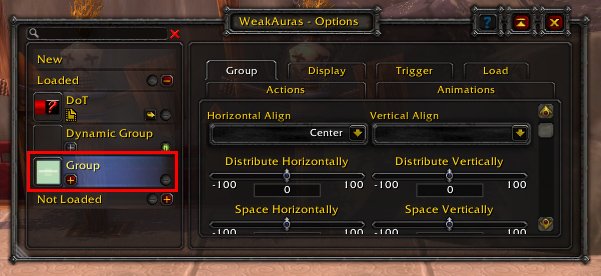
Copy the Weakaura string, then paste it into the in-game chat or a text document and send it to others. They can then import this string via the WeakAuras interface.
Want to quickly share your custom WeakAuras with friends or guildmates? It’s actually a very simple process. There’s no need to search for some complicated method.
Knowing how to share weakaura in game wow lets you easily distribute helpful tracking tools and visual aids. This makes everyone’s gameplay better and more efficient.
The simple method involves copying a specific text string within the WeakAuras interface. You just send that string to others in-game for easy import.

How to Share WeakAuras in Game WoW
Alright, fellow World of Warcraft adventurers! You’ve spent hours crafting the perfect WeakAura to track your cooldowns, display vital information, or make your UI sparkle. Now, you want to share your amazing creation with your friends, guildmates, or even the entire WoW community. That’s fantastic! Sharing WeakAuras is super easy once you know how, and this guide will walk you through all the steps.
Understanding WeakAuras and Sharing
Before we dive into the nitty-gritty of sharing, let’s make sure we’re all on the same page about what WeakAuras are and why sharing them is so beneficial. WeakAuras is an incredibly powerful addon that lets you create custom displays on your screen. These displays can show all sorts of things: when your abilities are ready, how much health a boss has, when a buff is about to wear off, and much more. The possibilities are almost endless! When you share your WeakAuras, you’re letting others benefit from your hard work, and it can make gameplay easier and more fun for everyone.
There are two main ways we will focus on sharing a WeakAura. The first is through the game itself, which we’ll cover in detail. The second involves using a website to share your code. These are both useful methods and we will go through both so that you are familiar with all the ways you can share your WeakAuras. Lets get to sharing!
Sharing WeakAuras Directly in World of Warcraft
The easiest way to share WeakAuras with someone you’re playing with is right within the game. This works well for friends, guildmates, or anyone you’re currently grouped with. The best part is that the other player doesn’t need to copy and paste any code or even go to an external website! It is the quickest method for getting your WeakAura into the hands of your friend.
Step-by-Step Guide to In-Game Sharing
Here’s a step-by-step breakdown of how to share your WeakAura in-game:
- Open Your WeakAuras Interface: Type “/wa” in the chat window and press Enter. This will open the WeakAuras management window.
- Select the WeakAura You Want to Share: In the WeakAuras window, you’ll see a list of all your auras. Find the one you want to share. Click on it to select it.
- Click the “Export” Button: At the top of the WeakAuras window, you’ll see several buttons. Look for the one labeled “Export.” Click this button.
- Choose your export method: A small popup will appear with a variety of ways you can copy the information of your WeakAura. For in-game sharing, we need to choose the “Copy to Chat” option. Once you have clicked that button, the code will be placed in your chat input box.
- Share the Code: Now, the code for your WeakAura is sitting in your chat input. You can now send this information in any chat channel you choose. If you are sending it directly to a specific player, you can send a direct message (also known as a “whisper”) and just copy and paste the code into the message. Once sent, that code is all your recipient needs to install your WeakAura.
Important note: Remember that if you are sending it in public chat, everyone in that channel will get the code. If you only want to share with a specific person make sure you send it to them directly.
How the Recipient Imports the WeakAura
Now that you’ve sent the code, what does your friend or teammate need to do? It’s just as simple!
- Copy the Code: They should copy the entire message containing the WeakAura code (they can click on it in the chat window and it will automatically copy the information).
- Open Their WeakAuras Interface: Just like you, they need to type “/wa” into their chat and hit enter to open their WeakAuras window.
- Click the “Import” Button: In the top bar of the WeakAuras window, there will be an “Import” button. They should click this.
- Paste the Code: A textbox will appear. They should paste the code you sent them into this textbox (Ctrl+V or Cmd+V).
- Click “Import” Again: After pasting the code, there will be another import button at the bottom of the import window. They should click this final import button.
- Enjoy the new WeakAura: If everything was done correctly, the WeakAura should now be available in the other players list of WeakAuras. If they have several groups they will have to check to make sure it is there, and the group that it is in.
And that’s it! The other player should now be using the shared WeakAura. They can now customize it to their liking. Remember, both you and the person receiving the aura need to have the WeakAuras addon installed.
Sharing WeakAuras Using Websites
Sometimes, you might want to share your WeakAura with people you’re not currently playing with, or perhaps share it with a wider audience on forums or websites. In this case, using a website designed for WeakAuras sharing is a great alternative. This often involves copying a long piece of text that represents the WeakAura code.
Popular WeakAura Sharing Platforms
Several websites are popular for sharing and finding WeakAuras. Here are a few:
- Wago.io: This is the most widely used website for sharing WeakAuras. It has a massive library and allows users to easily browse and import various auras. It is also very well organized and easy to use.
- Pastebin: While not specifically designed for WeakAuras, Pastebin is a great place to share raw text code. It’s useful if you want to post your WeakAura code on a forum or other platform that doesn’t have specialized support for WeakAuras.
- Personal Blogs or Forums: You can also post your WeakAura code on your own blog or relevant community forums. This is especially useful if you want to provide context or instructions alongside your WeakAura.
Step-by-Step Guide to Sharing Using Wago.io
For this guide, we will be focusing on using Wago.io as it is the most used WeakAura sharing website. Here’s how it works:
- Export Your WeakAura: Like the previous method, you’ll need to start by exporting your WeakAura from the game. Open the WeakAuras interface (“/wa”), select the WeakAura you want to share, and click the “Export” button.
- Copy the Code: This time, in the export window, you won’t use the “Copy to Chat” option. Instead, you’ll select the option to copy the “import string”. Select it and copy that code to your clipboard (Ctrl+C or Cmd+C). This is the raw code representation of your WeakAura.
- Go to Wago.io: Open your web browser and go to the Wago.io website. If you don’t have an account, you will want to create one for ease of use when uploading.
- Click “Upload Aura”: On the Wago.io website, look for an “Upload Aura” button. It’s usually prominently displayed.
- Paste Your Import String: A text box will appear where you can paste the import string code you copied from the game. Paste it in there (Ctrl+V or Cmd+V).
- Add Details: Now you’ll be asked to add a title, description, and optional screenshots. This information helps people understand what your WeakAura does and how to use it. Be as detailed as you can. Make sure to choose the correct game (World of Warcraft) as well as the correct class/spec that it is intended for if applicable.
- Upload Your WeakAura: Once you’ve filled out all the information, click the “Upload” or “Submit” button. Your WeakAura will now be available on Wago.io for others to find and use!
Important note: Make sure that you have chosen a proper name, description and relevant class, role or any other information that might help other players. This helps players to search through Wago and locate what they are after.
How Others Import from Wago.io
Once your aura is on Wago.io, sharing it is easy. Users can navigate to your specific aura page on the site and click on the “copy import string” button. This copies the import code. Then they can follow these steps:
- Copy Import String: They click the “Copy import string” button on the page that contains your aura code. This copies the string to their clipboard.
- Open WeakAuras in Game: In World of Warcraft, they open the WeakAuras interface using the “/wa” command.
- Click Import: They click the “Import” button at the top of the WeakAuras window.
- Paste: They paste the copied code into the text box.
- Click Import Again: Finally, they click the “Import” button at the bottom of the import window and the WeakAura will be imported to their account.
Sharing with Pastebin
If you’re using Pastebin, the process is very similar. You’d copy the export string from your game, paste it into Pastebin, and share the Pastebin link with others. Recipients would then copy the code from Pastebin and import it into their WeakAuras, just like with Wago.io.
Tips for Sharing WeakAuras Effectively
Sharing a WeakAura is more than just copying the code. Here are some tips to help make the process smoother for both you and the people you’re sharing with:
- Provide a Clear Description: When sharing on websites like Wago.io, make sure to write a clear and detailed description of what your WeakAura does. Explain what it tracks, how it works, and any customization options available.
- Take Screenshots: A picture is worth a thousand words! When uploading to Wago.io, screenshots of your WeakAura in action can help people understand how it will look and function in their game.
- Keep it Up-to-Date: If you update your WeakAura, try to keep your online posts or documentation updated too. This ensures that everyone is using the best version of your creation. If you are sharing a code with an in-game friend, remember to re-send the code to your friend if you make changes to it.
- Be Responsive: If you’re sharing on a platform that allows comments, try to be responsive to any questions or feedback. This can help others use your WeakAura more effectively, and they might also offer useful suggestions for improvements.
Troubleshooting Common Issues
Sometimes things can go wrong when sharing or importing WeakAuras. Here are some common problems and how to deal with them:
- Import String is Too Long: The chat limit may sometimes make the import string too large to fit in the chat window. Use a website if this is the case.
- WeakAura Doesn’t Appear: If a WeakAura doesn’t appear after importing, check that you pasted the code correctly and that you’ve selected the correct group to show the WeakAura. Check if you accidently imported two of the same WeakAura as well, sometimes that can be a little bit confusing.
- WeakAura Doesn’t Work Correctly: This may be because the WeakAura uses a specific addon or a specific in-game setting that the receiver does not have. Sometimes it can also be because you have not set up the trigger settings correctly. Double check all these things to make sure the WeakAura works correctly.
- Addon is Outdated: Make sure that both you and the recipient have the most up to date version of WeakAuras. Outdated versions can cause problems with importing or using the WeakAura correctly.
Sharing WeakAuras is a fantastic way to help your fellow players and to become part of the World of Warcraft community. Whether you prefer to use the in-game method or a website like Wago.io, the process is pretty easy to get the hang of. With a bit of practice, you’ll be sharing your awesome creations with no problems. Happy gaming and happy sharing!
How to Use WeakAuras – Beginners Guide | World of Warcraft The War Within
Final Thoughts
To share your WeakAura in game, copy the import string from the WeakAuras interface. Then, paste that string into a chat window. This action sends the code to others. They can then click on the string to import it themselves.
Remember, sharing this way allows other players to use your custom WeakAura setup directly. This method makes sharing very efficient. So, you quickly understand how to share weakaura in game wow.

