
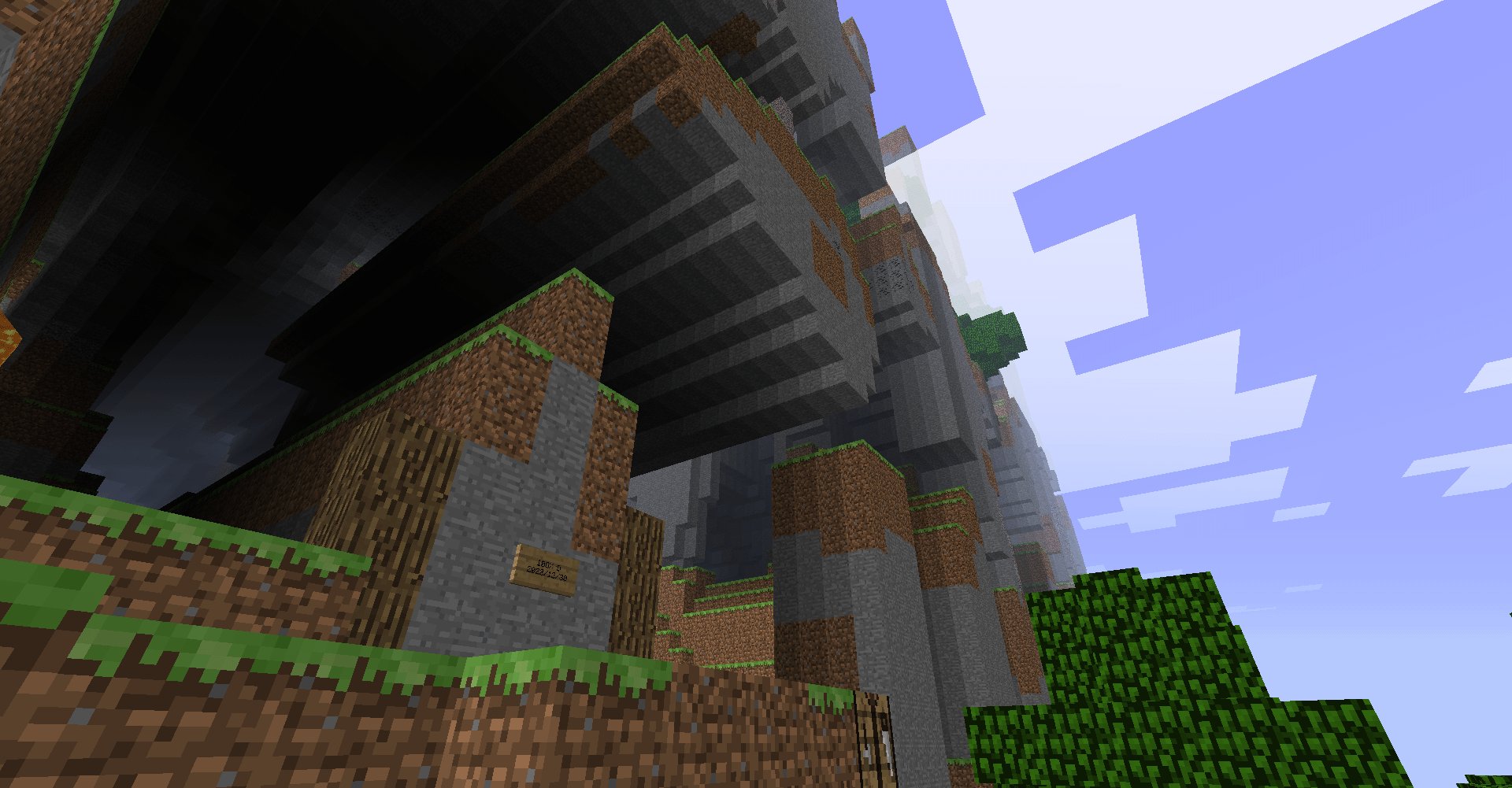
The primary method to spawn a buggy far lands game involves using very old versions of Minecraft, specifically those prior to Beta 1.8, and then traveling millions of blocks from the origin point.
Have you ever wondered how to spawn a buggy far lands game? It’s a fascinating glitch that results in bizarre terrain generation far, far away from the world’s center. This phenomenon occurs in old Minecraft versions.
These older versions had limitations that now cause these peculiar landscapes. You must use specific pre-release builds to experience the true far lands. This is because newer versions fixed the issue.

How to Spawn a Buggy Far Lands Game
Alright, let’s dive into the wild world of the Far Lands! If you’re looking for a truly unique and often glitchy Minecraft experience, then creating a buggy Far Lands game is definitely something you should try. It’s not your typical Minecraft world, that’s for sure. These worlds are known for their incredibly strange terrain and bizarre generation due to how the game handles very large coordinates. We’ll explore how to make this happen, and also why it’s even possible. Get ready for some crazy visuals and a truly unforgettable game!
Understanding the Far Lands
Before we get to making one, let’s talk about what the Far Lands actually are. In older versions of Minecraft, specifically Java Edition Beta 1.8 and earlier, the game used a specific way to generate terrain. This system had a weakness: it struggled to handle terrain generation when a player moved extremely far from the center (0,0) of the world. The result? Instead of the usual hills and valleys, you’d get incredibly tall, jagged cliffs, and sometimes just totally weird block formations. These areas were nicknamed “Far Lands”.
Why the Far Lands Exist
The reason behind this bizarre generation is a mathematical issue involving the way Minecraft calculates the height and placement of blocks. Instead of smoothly transitioning, the calculations get very extreme at the edges, causing these crazy structures. The game was not designed to handle these large numbers, and that is why the generation becomes unstable.
Why they Were Removed
Eventually, the developers at Mojang realized that these Far Lands could cause issues with gameplay. The unstable generation could lead to very slow performance and even game crashes. So, in later updates, they changed the terrain generation system. They fixed the math, so that the calculations worked correctly no matter how far you traveled from the origin. This means you can no longer naturally find the classic Far Lands in newer versions of Minecraft. But, don’t worry! We’re going to learn how to get them back through a bit of trickery.
Getting Started: Which Minecraft Version?
To generate a Far Lands game, you absolutely need to be playing an older version of Minecraft Java Edition. As we mentioned, the Far Lands were a bug in older versions, so playing a newer version will not work. The perfect range is between Beta 1.8 and earlier. Some people have had success with slightly newer versions, but the classic Far Lands are found in those really early Beta days.
Why Older Versions?
The old versions used a different terrain generator. As we discussed, this older version of the game has the specific math problems that create the Far Lands. By going back to these versions, we are reintroducing that buggy code and therefore can re-create those strange landscapes. The newer versions have a fix for this issue, and that’s why we need to go back to the early days.
Steps to Spawn a Far Lands Game
Now, let’s get to the exciting part: actually making the Far Lands appear! Here’s what you’ll need to do:
- Step 1: Install the Correct Minecraft Version:
Open the Minecraft Launcher. Click on the “Installations” tab at the top. Click on “New Installation.” Give your installation a name, like “Far Lands”.
Under “Version,” select one of the beta versions prior to Beta 1.9. Beta 1.7.3 is a good option. You can scroll to find older ones.
Click on “Create.”
- Step 2: Launch Your Old Minecraft Version:
Go back to the “Play” tab in the launcher. Choose your “Far Lands” installation from the dropdown menu to the left of the Play button. Click “Play.” You might get a warning message; don’t worry, just click through it.
- Step 3: Create a New World:
Once the older version of Minecraft is running, click on “Singleplayer”. Click “Create New World.” You can name the world whatever you like.
- Step 4: Start Exploring:
Now for the crucial part. You won’t find the Far Lands right next to your spawn point. They’re VERY far away. You need to travel a great distance from the world origin (0, 0). To know how far to travel we can use the F3 option, press f3 on keyboard, you will be able to see the X, Y and Z co-ordinates. You will start seeing the bizarre terrain around 12,550,000 blocks away from the origin on the X and/or Z coordinate. For best results, you will have to go even further away, around 30,000,000 blocks away from the origin.
Important Considerations
Travel Time
Reaching the Far Lands will take quite a while. Walking will take an incredibly long time. Using things like boats on ice and flying with Creative mode can make this a lot faster.
Game Performance
As you get closer to the Far Lands, your computer will have to work much harder to render (draw) the terrain. This may cause lag. If your game becomes extremely slow, you might have to reduce your render distance in the settings.
Far Lands Variety
There are different types of Far Lands terrain depending on which direction you travel, and the specific beta version you use. Experiment with moving in different X and Z directions. Some versions create more dramatic walls than others. You will have to experiment with different version to see the difference.
Using Tools to Reach the Far Lands Quicker
Moving that far takes an unbelievable amount of time in a normal survival mode world. Therefore we will look into methods to travel this distance in quicker time, like commands.
Creative Mode and Commands
For the purpose of exploring the farlands, using creative mode with commands will be the most efficient method of travel.
To enter creative mode use command in game by pressing “T”, in the command prompt that appears, type, /gamemode creative. Now you can fly and place blocks to help reach the farlands.
Another useful command you can use is the teleport command. In the chat type /tp (x) (y) (z), type in the X, Y, and Z coordinates you want to travel to. For example, /tp 20000000 100 20000000 would teleport you near the farlands, assuming you’re using a suitable older beta version.
Utilizing Chunkbase and Other External Tools
There are external tools available that can assist you with finding the Far Lands, like Chunkbase. These tools help with figuring out the exact coordinates, and allow planning easier.
Chunkbase provides many features, including seed mappers and biome finding tools, along with Far Lands finders. These calculators determine where the farlands will generate based on version and seed, so you do not have to use the guess and check method.
Here’s how you can use Chunkbase to assist you:
- Go to the Chunkbase website.
- Select the correct Minecraft version you’re playing.
- Enter your world’s seed. (If you don’t know it, type /seed in chat.)
- Use the Far Lands calculator and it will provide the locations to travel to.
Exploring the Bizarre Terrain
Once you finally reach the Far Lands, you’ll understand why they’re such an interesting part of Minecraft history. Here’s what you can expect:
Massive Cliffs and Walls
The most iconic feature of the Far Lands is its massive, towering walls of blocks. These cliffs can rise hundreds of blocks high, making for some very dramatic terrain. They look very different from the usual smooth landscapes of normal Minecraft.
Strange Terrain Formations
In addition to the massive walls, you might see other unique terrain features, such as floating islands, jagged overhangs, and strange, almost unnatural patterns in the blocks. The generation is erratic and unpredictable.
Challenges for Survival
Trying to survive in the Far Lands can be extremely difficult because of the odd terrain. Navigating the cliffs and finding resources can be a real challenge. Building a base in such a terrain is even more difficult due to the unpredictable layout of the blocks.
Why the Far Lands are Worth Exploring
Even though it takes some work, and you need to use older versions of the game, checking out the Far Lands is worth doing. Here are a few reasons why:
Unique Gaming Experience
The Far Lands provide a totally different experience compared to standard Minecraft worlds. The strange terrain makes for a more challenging game, and the unusual visuals are extremely interesting. It’s a unique experience to play on a game that was never intended to be played this far out.
A Piece of Minecraft History
They’re a reminder of the early days of Minecraft and the weird, unintended things that could happen in the game. They represent a time when the game was less polished, which is part of their appeal to long-time fans.
A Sense of Adventure
The effort required to reach the Far Lands adds to the sense of accomplishment. You’ll have to use strategy and determination to get to this area and that’s part of what makes the Far Lands exploration so engaging.
Troubleshooting Common Issues
Lag and Slow Performance
If you find your game is lagging too much, reduce your render distance in the video settings. You can also try closing other programs that use a lot of computer resources. This can make the game run smoother.
Can’t Find the Far Lands
Double-check you are using a very early beta version, like Beta 1.7.3 or older. Ensure you are traveling far enough away from the origin (0,0). Try using the teleport command to see if that gets you closer.
Game Crashing
The Far Lands can be very intensive for your computer. If your game crashes, try lowering graphics settings, or allocating more RAM to the game.
Creating a buggy Far Lands game is an exciting journey that takes you back to the early days of Minecraft. By choosing the right old version and traveling a great distance, you can experience the crazy, unusual generation first-hand. Although it requires a bit of setup and time, the unique experience is well worth the effort for any Minecraft fan.
bedrock edition is really weird.
Final Thoughts
To create a buggy far lands game, use older Minecraft versions, specifically Beta 1.7.3 or earlier. Set world type to default. Generate your world and then travel very far, that is millions of blocks away.
This will trigger the generation glitches. These glitches produce the infamous far lands. The process is how to spawn a buggy far lands game for those seeking this unique experience.

