
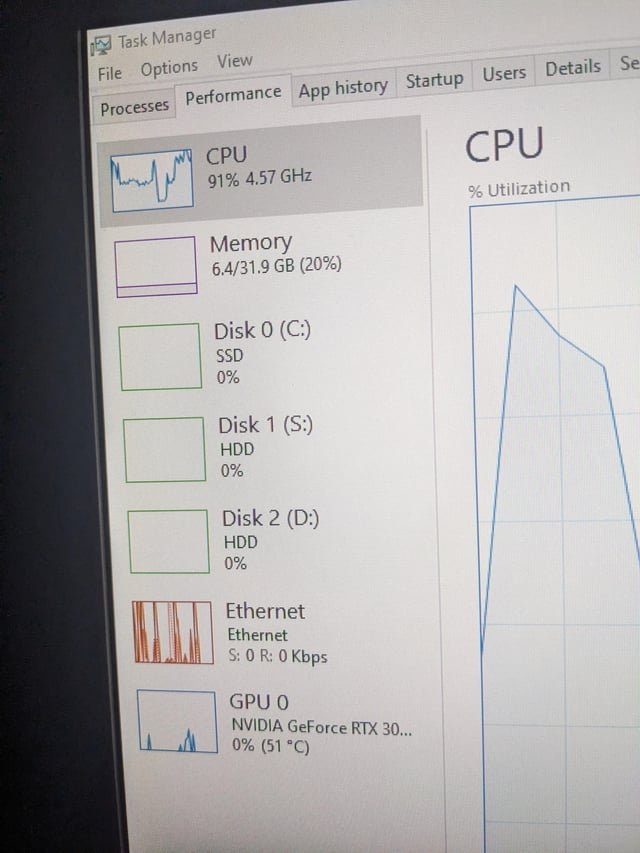
Minecraft relies more heavily on the CPU for its core gameplay, though the GPU is still important for rendering graphics.
Ever wondered if your processor or graphics card does more work when you play Minecraft? Many players ponder the question: is minecraft a cpu or gpu game? The game’s blocky nature might fool you into thinking it’s purely a graphics-heavy title. However, there’s more to it than meets the eye.
Minecraft’s calculations, like world generation and mob behavior, fall squarely on the CPU’s shoulders. The GPU handles the visual representation, making it important but not the primary focus of performance. Knowing this can help when optimizing your system for the best experience.

Is Minecraft a CPU or GPU Game?
Alright, let’s dive deep into the world of Minecraft and figure out what makes it tick! When you’re playing Minecraft, you might wonder, “Is my computer’s brain (the CPU) working harder, or is it my computer’s picture maker (the GPU)?” It’s a great question, and the answer isn’t as simple as picking one or the other. Minecraft actually uses both, but it leans a bit more on one than the other. Let’s explore this in detail.
Understanding the CPU and GPU
Before we get into Minecraft specifics, let’s quickly understand what the CPU and GPU do in your computer.
The Central Processing Unit (CPU)
Think of the CPU as the brain of your computer. It’s responsible for doing all the thinking and calculations. It handles things like:
- Figuring out where each block should be in the world
- Calculating how the game should behave when you break a block, or place a block
- Processing all the information about monsters and animals (what they do, where they are)
- Managing the game’s code and instructions
In simpler terms, if the game was a school, the CPU would be the principal and teachers, organizing and telling everyone what to do. A more powerful CPU can manage the complexities of the game much better, resulting in smoother gameplay, especially when there’s a lot going on in your Minecraft world.
The Graphics Processing Unit (GPU)
The GPU is like the artist of your computer. It takes all the data the CPU has worked out and turns it into the pictures you see on your screen. It’s specialized in doing this kind of work. It takes all of the game’s data and:
- Draws the blocks, characters, and all the other visuals
- Creates the shadows and lighting effects
- Makes the game look smooth and crisp
Going back to our school analogy, the GPU would be the art teacher and all the students making the posters for the school events. It’s all about the visual experience. A better GPU will give you better textures, sharper images, and higher frame rates. A good GPU is very important in modern gaming.
Minecraft’s Engine and How It Works
Minecraft runs on the Java Virtual Machine (JVM) for the Java edition. This means that Minecraft isn’t directly talking to your computer’s hardware. Instead, it uses Java as a middleman which is very important to understand, because it has performance implications. Let’s break down what this means for CPU and GPU usage:
The CPU’s Heavy Lifting in Minecraft
The CPU shoulders a significant part of the workload in Minecraft. It’s responsible for many core game mechanics. Here is the breakdown:
- World Generation: When you create a new Minecraft world, or explore a new area, the CPU is heavily involved in creating the terrain, placing trees, ores, and everything that makes up the environment. This is a calculation-heavy process that needs a decent CPU to process smoothly.
- Game Logic and Calculations: Every action you take, from mining blocks to crafting items, involves calculations performed by the CPU. It also manages the AI of mobs (monsters and animals), how they move, and how they react to the world around them. The more entities or complexity, the more work your CPU has.
- Tick Processing: Minecraft has something called the “game tick.” Every tick, the CPU has to process all the changes happening in the game world. A lot of complicated calculations are made in every single game tick, and when there are many things going on, the CPU is pushed to its limits.
- Mod Handling: When you add mods to Minecraft, you’re adding more to the calculations that your CPU has to handle. Mods can add complex new items, features, and mechanics, making your CPU work even harder.
- Server Processing: If you are running or playing on a server (for a single player also), the CPU handles a lot more work. The more players on the server, the more CPU demand there will be. The CPU is doing the same calculations for every single player.
The GPU’s Role in Minecraft
While the CPU is busy behind the scenes, the GPU handles the visual presentation of the game. The GPU’s responsibilities include:
- Rendering the Game World: The GPU takes the information provided by the CPU and draws all the blocks, trees, characters, and other objects you see in Minecraft. It’s responsible for making the 3D world visible on your 2D screen.
- Applying Textures and Shaders: Textures give each block its unique look, and shaders can add shadows, reflections, and other visual effects. The GPU is the component that handles how they look. If you are using very intensive shaders, then you will be heavily relying on your GPU.
- Frame Rate: The GPU is responsible for how smoothly the game runs, also known as the frame rate. A higher frame rate means smoother movement and visuals, while a lower frame rate can lead to choppy gameplay. A strong GPU helps in achieving a higher frame rate.
- Resolution: When you play Minecraft at higher resolution, your GPU has to work harder to render the same number of objects. This leads to more GPU demand.
Why Minecraft Leans More on the CPU
So, why do many people consider Minecraft to be more of a CPU-bound game? Here’s a breakdown:
- Java and Single-Threaded Processing: The Java Virtual Machine is not optimized for multi-threaded performance. In simple terms, it cannot use multiple “workers” as efficiently as other programming languages. Even though many modern CPUs have multiple cores, Java struggles to split work between them effectively. This means that a single core will often work very hard, while others may not be used as much. Minecraft’s heavy reliance on single core performance makes the CPU the bottleneck in many cases, meaning that even with a good GPU, a weak CPU will limit the game.
- Complex Calculations: The sheer amount of calculations that the CPU needs to do in Minecraft for world generation, game logic, mob AI, and server processing can be very demanding, especially with more complex builds and lots of entities. The CPU will often reach its limits quickly, leading to performance problems.
- Vanilla Minecraft’s Visual Style: Vanilla Minecraft has a relatively simple visual style. This means that most GPUs can easily handle the graphics at normal settings, so the GPU does not always need to work that hard. While it can handle textures and lighting effects, they’re not as demanding as those in some other games. So even with good graphics settings, you are very likely to see much lower GPU usage than CPU usage in vanilla Minecraft.
- Mods and Their Impact: When you add mods, especially mods that add complex new items, mechanisms or world generation, it further increases the CPU’s work load. Many mods add significant overhead on the CPU and even if you have a very capable GPU, the CPU can bottleneck the game and limit the performance.
When the GPU Does Matter in Minecraft
While the CPU generally does most of the heavy lifting in Minecraft, the GPU is still important. There are specific scenarios where the GPU can become a bigger factor in performance:
- Shaders: When you add shaders to Minecraft, it completely changes the way the game is rendered. Shaders can add complex lighting, reflections, shadows, and other visual effects that put a heavy load on the GPU. In these situations, your GPU will suddenly become far more important than your CPU.
- High Resolution and Render Distance: Playing at higher resolutions (1440p, 4K) or with a very high render distance will make your GPU work harder, as it has to render more pixels and objects on the screen. If your GPU is not capable of keeping up, you may experience low frame rates.
- Resource Packs: High-resolution resource packs with detailed textures will demand more processing power from your GPU. A weak GPU will struggle with these and can lead to poor visual performance.
CPU vs. GPU: What to Upgrade for Minecraft
If you want to make Minecraft run better, knowing which part to upgrade is important. Here’s a simplified guide:
Focus on the CPU if:
- You’re experiencing lag, especially when exploring new areas or in crowded servers.
- You’re using a lot of mods that add complex items, mechanisms, or world generation.
- You have an older CPU.
- You want to improve your FPS performance especially when there is a lot happening in the game.
Focus on the GPU if:
- You are using intensive shaders or high-resolution texture packs.
- You are playing at a very high resolution such as 1440p or 4k
- You are playing at a higher render distance and want to maintain a stable framerate.
- You have an older GPU.
Note: If you are looking to upgrade your PC for gaming, it is not about picking one or the other. The ideal gaming PC has a balanced CPU and GPU. But for Minecraft specifically, you might notice that getting a better CPU will give you more performance gains in most situations than a better GPU, except if you are playing with shaders.
Performance Optimization Tips for Minecraft
Okay, so you know that Minecraft leans on the CPU, but what can you do to make it run even better? Here are a few things to try:
General Settings:
- Reduce Graphics Settings: Lowering graphics settings like render distance, shadows, and graphical details will reduce both CPU and GPU usage. Start by reducing the graphics settings, and see how well your game runs. If you are still facing performance issues, then look at other optimization options.
- Lower Your Resolution: If your GPU is having trouble with performance, lowering the resolution can help to increase FPS.
- Update Your Drivers: Make sure your graphics drivers are always up to date to get the latest performance optimizations. These can sometimes boost performance.
Minecraft Specific Settings:
- Optimize Game Settings: Minecraft has some graphics settings that have a big impact on performance, such as render distance, simulation distance and entity render distance. Lowering these will make the game run smoother.
- Use OptiFine or Sodium: These are popular mods that can significantly improve Minecraft’s performance, especially on the CPU. These mods change how the game is rendered and can fix many of the performance limitations of the game.
- Allocate More RAM: By default, Minecraft doesn’t use all of your PC’s memory. You can allocate more RAM to the game in the Minecraft launcher. But, don’t go overboard, allocating too much RAM can sometimes lead to more issues. Typically around 6-8 GB of RAM is more than enough for most situations.
- Clean Install of Java: Make sure that you have the latest version of Java installed in your computer and make sure that you do a clean installation in case there are any issues in previous installations.
Operating System Optimization
- Close Unnecessary Applications: Close any unnecessary applications running in the background that might be taking CPU and GPU resources. The more resources you have for the game, the better the game will perform.
- Operating System Updates: Make sure that your operating system is up to date with the latest updates and service packs.
Testing Your PC’s Performance in Minecraft
Want to see how your computer is handling Minecraft? You can monitor your CPU and GPU usage while playing:
Using Task Manager (Windows)
- Press Ctrl + Shift + Esc to open Task Manager.
- Go to the Performance tab.
- You can see your CPU and GPU usage in real time.
Using Third-Party Programs
There are some great third party programs that are designed for monitoring your system. Some of them are:
- MSI Afterburner This tool is widely used for monitoring your CPU and GPU performance. It’s very easy to set up and use.
- HWMonitor A free tool that gives a very detailed insight into the performance of your system, including CPU, GPU, RAM and other components.
Keep an eye on these while playing Minecraft to see which component is working harder. If your CPU is consistently near 100% while the GPU is at a much lower level, it usually indicates that Minecraft is limited by your CPU. The same can be said for the GPU as well. If the GPU is hitting 100%, it is the component that is limiting the performance.
In conclusion, while both the CPU and GPU play roles in Minecraft, the game tends to rely more heavily on the CPU for its core mechanics. However, there are specific scenarios where the GPU becomes important, mainly when using shaders or higher resolutions. Understanding this balance helps you fine-tune your Minecraft experience, allowing you to optimize your game for smoother and more enjoyable gameplay.
Minecraft: CPU or GPU Dependent?
Final Thoughts
Ultimately, Minecraft leans more towards a CPU-bound game. The game’s calculations, world generation, and many in-game processes heavily rely on processor power. While a decent GPU assists with rendering visuals, it’s not the primary bottleneck.
Therefore, when asking ‘is minecraft a cpu or gpu game’, the answer is certainly the CPU. A powerful processor improves gameplay significantly.

