
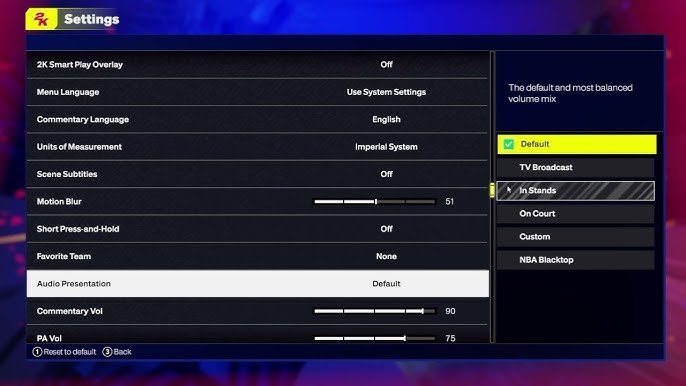
NBA 2K25 audio presentation options include commentary volume, crowd noise levels, and in-game music control, allowing users to customize their auditory experience.
Ever wondered how to fine-tune the sounds in your virtual basketball world? We’re diving deep into the world of sound in this blog post. The NBA 2K franchise has always been praised for its attention to detail, and that extends to the auditory aspects of the game.
We’ll be exploring the various elements of NBA 2K25 audio presentation options and what they mean for you as a player. From the roar of the crowd to the play-by-play commentary, you’ll find ways to tailor it all to your liking.

NBA 2K25 Audio Presentation Options
Get ready to have your ears as happy as your fingers are while playing NBA 2K25! The game developers put a lot of work into making the game sound amazing. It’s not just about hearing the ball bounce; it’s about feeling the energy of the crowd, the squeak of the shoes, and the powerful voice of the announcers. Let’s take a deep dive into the sounds you can expect and how you can change them to make the game sound exactly how you like it.
Commentary: The Voices of the Game
The commentary is a huge part of any sports game. It’s like having a friend there, telling you about the game as it unfolds. NBA 2K25 brings us a set of commentators, each with their unique style and insights. Here’s what you can think about:
Meet the Announcers
NBA 2K games usually have a mix of play-by-play and color commentators. The play-by-play guy tells you what’s happening live, like “He shoots! He scores!” While the color commentator adds details, like “That’s a great move by player X.” 2K25 includes both familiar faces and perhaps new ones. Each voice has a unique character. They might be upbeat, serious, or funny. It’s like listening to a real NBA broadcast. Also, the commentary tries to be smart and fit what’s happening on the court. So if you do a super cool dunk, they might get really excited. Sometimes, they will even talk about things specific to your player in MyCAREER mode.
Commentary Volume
Not everyone likes the voices at the same level. Some players like the commentators to be front and center, while others want them softer. NBA 2K25 makes it easy to adjust how loud the commentary is. This way, you have full control over how much you hear them.
Here are a few reasons why you might want to adjust the commentary volume:
- Focus: If you are concentrating hard, you might want the commentary lower so it doesn’t take your focus.
- Preference: Some players just like less talk and more game sounds.
- Multi-tasking: If you are watching TV or talking with a friend while playing, you may find lower commentary to be good.
Sound Effects: The Heartbeat of the Court
Besides the voices, the sound effects are super important for making the game real. The way a basketball game sounds is as unique as the look of a game. Think about the squeak of the shoes, the swish of the net, and the crowd cheering! These sound effects are not just random. They are carefully created to make you feel like you’re really at the game.
Court Sounds
You hear all the little sounds of a real basketball game. Here are some key court sound effects and what they add to the game:
- Ball Dribbling: The sound of the ball bouncing changes with the type of dribble you do. A hard cross over dribble is different from a slower bounce.
- Shoe Squeaks: Players running and cutting make squeaky sounds, which shows how quick the action can get.
- Swishes: The perfect sound of the ball going through the net is so satisfying.
- Missed Shots: When the ball hits the rim or backboard, it also makes a distinct sound.
Crowd Sounds
The crowd noise in NBA 2K25 is awesome. It can change a lot depending on the game situation. When your team is doing great, the crowd gets loud and excited. If the home team makes a highlight-reel dunk, the arena will erupt in sound! The game makes different sounds for close games, blowouts, home games, and away games. This is the heart of playing at different arenas during each game. You also hear boos and claps, which make the game sound more alive.
Sound Effects Volume
Just like with commentary, you can adjust the sound effects volume. If you want to hear the court more and the crowd a bit less, you can. This helps you to really make the game sound the way that you want it. Here’s why you might want to change the sound effects volume:
- Personal Preference: Some players love to hear each squeak and bounce, so they turn up the sound effects.
- Gameplay Balance: If you want the crowd to be really loud, you can turn it up to feel more like being at a real game.
- Audio Balance: Sometimes, having the sound effects volume a little lower makes it easier to hear other parts of the game like commentary.
Music: The Rhythm of the Game
Music is a crucial part of the game, whether it’s in the menus or during breaks in the action. NBA 2K games usually have a great selection of songs, creating a fantastic mood. The music fits the energy of basketball and helps the game feel fun.
In-Game Music
The game has tracks that play at different times. These music tracks often include hip-hop, pop, and sometimes rock tunes. You usually hear music while you’re in the menus, during time-outs, and sometimes in highlight reels after the game. The music selection is carefully picked to make sure it fits the mood of the game.
Music Volume
You have control of the music volume. This is useful if you’d rather listen to your own music, or just prefer a quieter experience. You might want to adjust the music volume for a few reasons:
- Personal Playlist: Some players like to mute the game’s music and listen to their own tunes.
- Focus: Sometimes, music can be a bit too distracting, so turning it down can be helpful.
- Enjoyment: Some players want the music loud, so it will help to make the game more exciting.
Custom Playlists
NBA 2K games usually let you make your own playlists. You can put your favorite songs into the game and hear them when playing! This option is great if you want to have your own favorite sounds in the background, making the game personal. It is like having your own private music station inside the game.
Adjusting Audio Settings: Your Sound, Your Way
NBA 2K25 puts you in control of the audio experience. It’s like being a sound engineer for your own game. You can adjust the different parts of the audio until it’s just how you want it. The audio settings are usually found in the game’s options. You can adjust things like the commentary, sound effects, and music from there.
Master Volume
The master volume controls how loud the entire game is. Turning this down will make all the sounds softer. Turning it up will make all the sounds louder. This is useful if you need a quick change for the entire game, like turning it down late at night, or turning it up so you can hear it over other sounds.
Separate Volume Sliders
Here’s where things get extra cool. You usually see separate volume sliders for commentary, sound effects, and music. This means you can change each of those sound types alone. You can turn the commentary way down while still having the sound effects be loud. You can fine-tune it until the game sounds just perfect to you.
Headphone Options
If you play with headphones, you have some more things you can change. You can try setting how much bass you get and how much of the audio is coming from each side of your headphones, left and right. This will help you to make the best sound possible when you are using headphones. These options are there to make sure the game sounds great no matter what audio system you use.
Why Custom Audio Matters
Having control of the audio makes a huge difference in how much you enjoy the game. Custom audio lets you get the most from your gameplay. It’s not just about hearing the sounds; it’s about making them fit your playstyle, and making your experience more personal and fun.
Immersion
Good audio can make a game feel more real. When the sounds match what’s happening on the court, you feel like you are actually there in the game. This makes each game that you play more interesting.
Focus
The sound settings can help you focus better. If the commentary is too distracting, you can turn it down. If the crowd noise makes the game more exciting for you, you can turn it up. These sound settings can help you to have the perfect sound for you so you can play better.
Personalization
The best part of custom audio is the ability to make the game sound how you want it. You are in charge of the sound and you are in charge of how good your games sound. You are in charge and you can make the game experience how you want it.
In short, the audio presentation in NBA 2K25 is carefully crafted to create an engaging experience. From the diverse commentary to the heart-pounding court sounds and the energetic music, every element is there to make you feel like you’re part of the game. You have full control to change the audio settings to get everything sounding just how you like it. So, get ready to dive into the game and hear the difference!
How to Change Audio Presentation in NBA 2K25 – Easy Guide!
Final Thoughts
In summary, players can expect diverse ways to experience in-game sound. Options range from immersive crowd noise to detailed commentary. The NBA 2K25 audio presentation options provide many customizable choices. You can adjust these to match your preferred style.
This allows for a personal sound environment. You can tweak individual elements. Overall, this lets the game sound exactly how you want.

