
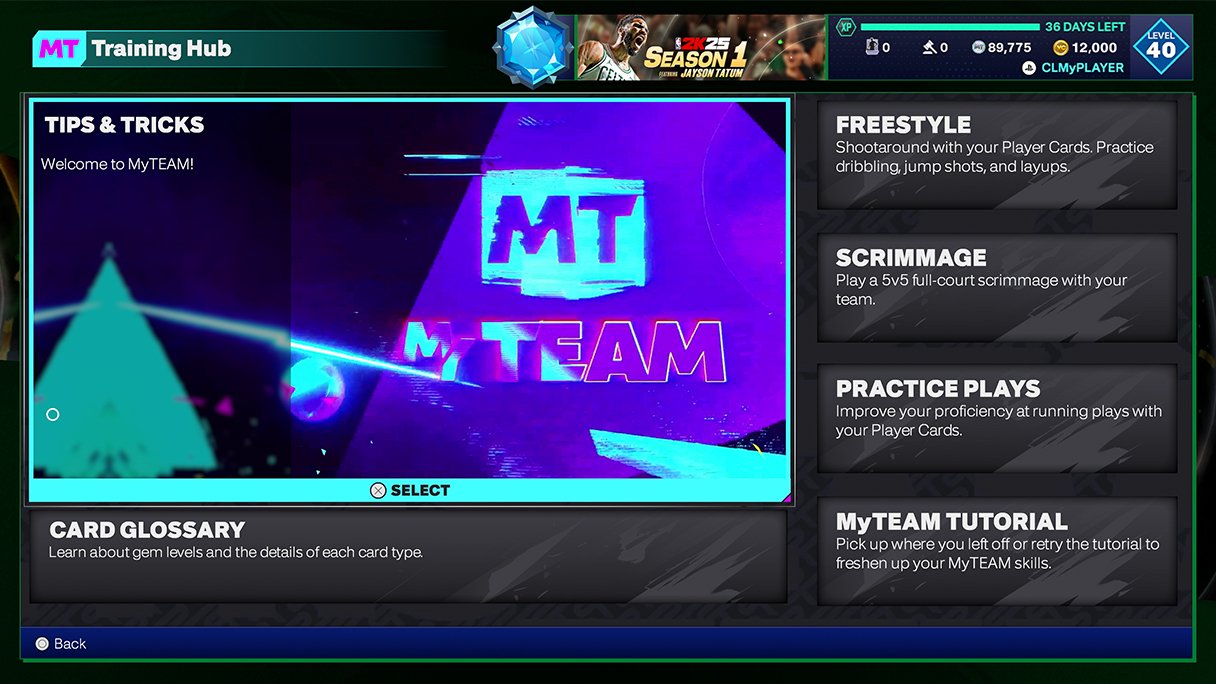
The NBA 2K25 menu system details will feature a redesigned interface for improved navigation and accessibility, along with new customization options for a personalized experience.
Navigating through the game is about to get a whole lot easier! Players are eagerly anticipating the release of NBA 2K25, and one aspect getting attention is its menu system. Let’s talk NBA 2K25 menu system details. The developers are focusing on making it more intuitive for everyone.
Players will find easier ways to access their favorite modes, adjust settings, and personalize their game. The new layout aims to reduce confusion and get you into the action faster. Prepare for a smoother experience than before.

NBA 2K25 Menu System Details
Get ready to dive into the exciting world of NBA 2K25! The game’s menu system is your command center, the place where you start your basketball journey. It’s where you pick your game modes, tweak your settings, and manage your MyPLAYER. This year, the team at 2K has worked hard to make the menus even better. They’re easier to use and packed with even more cool stuff. Let’s break down all the parts of the NBA 2K25 menu system so you can jump in like a pro.
Main Menu: Your Starting Point
Think of the main menu as the launchpad for your basketball adventures. It’s the first screen you see when you start NBA 2K25, and it’s your gateway to all the amazing game modes and features. This year’s main menu has been designed to be super easy to understand. Big, clear icons and text make it simple to find exactly what you are looking for. Let’s take a closer look at the main options.
Play Now
Want to jump straight into a game? The Play Now option is your best bet. Here, you can pick any team you want, set up quick matches, and get right into the action. It’s perfect when you want a fast game without any fuss. Select from regular NBA teams or classic teams that bring back legendary players and matchups. You can also choose to play a game with your friends locally.
MyCAREER
MyCAREER is where you can create your very own basketball player and experience their journey through the NBA. From the first draft to the NBA Finals, you get to live the life of a rising star. This mode includes tons of options for customizing your player, like picking their skills, appearance, and even their personality. Get ready to build your legacy and compete against some of the league’s best.
MyCAREER Hub
The MyCAREER hub is your home base within this mode. It provides quick access to all parts of your career, including playing matches, training sessions, endorsements, and more. It is designed like a neighborhood that you navigate and explore, adding a sense of immersion to the mode. Keep track of your progress, connect with other players, and show off your gear in this central hub.
MyTEAM
MyTEAM is the card-collecting, team-building dream. Here, you can collect player cards, build your dream squad, and compete online or offline. Complete challenges and events to earn new cards and upgrade your lineup. It is not just about picking your favorite players, it also requires good strategy to create a team that works well together. MyTEAM is the mode for players that love collecting and strategizing.
MyTEAM Market
In the MyTEAM Market, you can buy and sell player cards. This is where you can find the missing pieces of your dream team. You can bid on auctions for hard-to-find cards, or you can buy cards instantly at their current prices. If you get a duplicate of a card, you can also sell it back on the market. This makes it so that each team can be unique and different.
The W
The W is a game mode that focuses on the WNBA. This mode lets you create a player and lead her through the excitement and challenges of a professional basketball career in the WNBA. Experience the thrill of competing against the best female players in the world. This mode adds a unique perspective and different style of play to the game.
Seasons
Seasons mode provides you with all of the team management and basketball playing fun, without having to get too in-depth. You can play as your favorite teams in your journey to win championships. You can even play as teams from the past, so that you can relive those classic matchups that you know and love.
Online Play
When you’re ready to take on the world, head to Online Play. This area connects you with other players around the globe. You can play quick games, join leagues, and compete in tournaments. Test your skills against real players and see how you stack up against the best. There is always someone ready to play.
Options/Quit
The Options/Quit section is where you can change your game’s settings and exit the game. In options, you can tweak gameplay, graphics, sound, and controller settings. You can make the game work just how you like it. This is also where you can change the difficulty.
In-Game Pause Menu
While you’re in a game, the pause menu is a crucial part. Pressing the pause button gives you options to change the game on the fly. This allows you to adjust settings, make substitutions, and check out the scoreboard while the action is on hold.
Gameplan
The Gameplan option allows you to modify your strategies in real-time. Change your offensive plays, defensive matchups, and timeouts, to make sure you are in the best position to win. This feature helps you to adapt to the other team’s strategy.
Instant Replay
Missed an amazing play? Instant replay will help you to watch the highlights, or if you are a coach, it can be used to make adjustments. You can see the action from multiple angles, at different speeds. It’s a great tool for analyzing your play. You can also save replays so that you can view them at a later time.
Substitutions and Lineups
Make the right substitutions and adjust your lineup in the middle of a game. You can swap out players based on energy levels, injuries, or the flow of the game. Strategic substitutions can be the deciding factor in a match. You can also create and save different lineups for different situations, making switching players in and out fast and easy.
Controller Settings
The controller settings section provides you the chance to change your controls in the middle of the game. If you’re having trouble, you can always change button layouts to match your style of play. You can also adjust the sensitivity of the sticks.
Audio and Video Settings
Just like in the main menu, the pause menu allows you to change audio and video settings without leaving the match. Adjust the volume or brightness so that the game matches what you are looking for. These settings can help your gameplay. For example, it can make the game easier to see.
Quit/Exit
When you’ve had enough of a game, you can use the quit/exit feature to leave. You can either go back to the main menu or leave the game entirely.
MyPLAYER Menu
The MyPLAYER menu is the heart of your career in NBA 2K25. This is where you see all the information about your created player and can edit them. You can view your stats, check out your badges, and keep track of your progress as you play.
Player Appearance
In Player Appearance, you can change the looks of your MyPLAYER. You can change your height, weight, hair, and any other visual traits. Make your character look how you like. You can also change your clothing and accessories here, making your character look cool on and off the court.
Badges
Badges are special abilities that give your player certain strengths. You can earn and equip badges to help you become a better player. Each badge has a different effect. You can add them to your player and build a unique set of abilities that fits your playstyle. They are a critical part of building a good MyPLAYER, and you need to make sure you have the best ones that fit with your skills.
Attributes
Attributes represent your player’s skills, like shooting, passing, and rebounding. Spend points to improve your attributes and make your player better in specific areas. You get to make your player as good as you can, while trying to overcome any deficiencies that they have. This can help you to build your player into an all-around superstar or a specialty player that excels in one area.
Animations
Customize your player’s moves, from dribbling styles to shooting forms, with animations. Choosing the right animations can make a big difference in your game. It adds some flair to your playstyle, and it can also improve your on-court performance. It allows you to make your player feel more like your own, adding to the immersion of the game.
Takeovers
Takeovers are like super abilities that you can activate during the game after you perform well. You can unlock new Takeovers and equip them in this menu. When active, they give you a massive boost to specific skills, allowing you to dominate. Using your takeover at the right moment can change the flow of the game.
Stats
Track your player’s performance and see how they’re doing in this part of the menu. The stats option gives you a full view of how your player is performing. You can see your points, rebounds, assists, and more. This can help you find areas where you need to improve your game.
MyTEAM Menu
The MyTEAM menu is your hub for all things card collecting and team building. This is where you manage your lineup, open packs, and engage in different challenges and events.
Lineups
In the Lineups menu, you can organize your team, set your starting five and bench players. You can create different lineups for different situations. You can quickly swap between lineups when needed.
Card Collection
The Card Collection is where you can view all of your player cards. You can sort them, filter them, and admire them. If you have duplicate cards, you can quickly see which ones they are.
Packs and Rewards
Open new packs or claim rewards you’ve earned in the Packs and Rewards menu. Opening new packs is always exciting. You can never know who or what will be inside. You can also collect your rewards that you earn by playing the game.
Challenges and Events
Participate in challenges and events to earn rewards and player cards in this section. This can be a fun way to test your skills and get better at the game. This section always has something new for you to do.
Exchange
Sometimes you can trade cards that you have for something new. This is where you would perform an exchange. You can get rid of the player cards that you don’t want and get new cards. This can be a good way to get new players without paying for packs.
Settings and Customization
The Settings menu lets you change the game to match your playing style and preferences.
Gameplay Settings
Here you can change how the game plays, by adjusting the difficulty, game speed, and rule settings. You can tweak these to fit your style and skill level. Whether you want a relaxing experience or a challenging game, these settings will help.
Graphics and Display
Adjust graphics options, like resolution, brightness, and visual effects here. You can make the game look its best on your screen. This makes the game look good while it is running smoothly. You can fine tune how the game runs and looks.
Audio
Modify audio levels, like music and sound effects, so that they are not too loud or too soft. This can change the feel of the game, as well as helping you to focus on the action.
Controller
If you don’t like the default button layouts, you can change them in the controller section. You can personalize the controller to make sure it works the way that you want.
The menu system in NBA 2K25 provides all the controls and options for you to play how you want. The clear interface helps you get right into the game, and customize it to your liking. Take some time to explore all the options so that you can get the most out of the game.
5 SECRET Settings That You NEED To Use In NBA 2K25
Final Thoughts
In summary, early insights suggest a refined interface. Navigation seems quicker and options are more clearly categorized. Players should find moving between game modes a more intuitive process.
The adjustments to presentation aim for a cleaner, less cluttered experience. Expect easier access to essential features, impacting overall gameplay. These anticipated changes in the NBA 2K25 menu system details will greatly enhance player interaction.

