
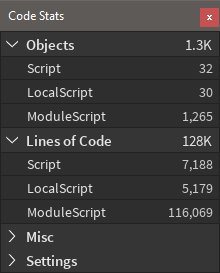
Improving your Roblox code quality involves tracking metrics like script errors, performance issues, and code complexity.
Ever wondered how to make your Roblox games run smoother and be less buggy? The key lies in paying attention to your code quality. Roblox code quality metrics offer a way to measure how well-written your code actually is.
By analyzing these metrics, you can find bottlenecks and areas that could cause problems. This helps in creating better player experiences and easier maintenance of your Roblox games in the long run.

Roblox Code Quality Metrics: Building Better Games
Making games on Roblox is super fun! But just like building with LEGOs, sometimes our game code can get a little messy. That’s why it’s important to think about something called “code quality.” Code quality metrics are like special tools that help us see if our code is good, easy to understand, and works really well. This guide will show you how to use these tools to make your Roblox games the best they can be!
What Are Code Quality Metrics?
Code quality metrics are ways to measure how good your code is. They look at different things, like how easy your code is to read, how many mistakes it might have, and how fast it runs. Imagine if you were building a car, you’d want to make sure the engine was strong, the wheels were on tight, and the paint looked great. Code quality metrics are like that for your game code. They help us build games that are fun to play and easy to fix if something goes wrong.
Why Code Quality Matters on Roblox
You might be wondering, “Why should I care about code quality?” Well, great code helps in many ways:
- Easier to Understand: When your code is clear and well-organized, it’s easier to figure out what it does. That means when you come back to work on your game later or if someone else wants to help you, everyone can easily read and understand what’s going on.
- Fewer Bugs: Good code has fewer mistakes or “bugs”. These bugs can make your game crash or act weird. When your code is written well, it reduces the chance of unexpected things happening.
- Faster Performance: Code that’s written well usually runs faster. This means your game will run smoothly for players. Poor code might make your game slow and laggy, which nobody wants.
- Easier to Change: When your code is easy to understand, it’s also easier to change or add new features. This is important because games always get new updates and changes.
- Teamwork: If you are working with other developers, it’s very important that everyone can read and understand the same code. Good code quality makes collaboration much easier.
Key Roblox Code Quality Metrics
Now let’s take a closer look at some of the important code quality metrics you should know about:
Readability
Readability is all about how easy your code is to read and understand. Imagine your code is a book; if it’s written clearly, anyone can pick it up and understand it. Here’s how we can work on making our code readable on Roblox:
- Naming Things: Choose names for your variables, functions, and other things in your code that make sense. For example, instead of “a,” use a variable named “playerSpeed”. This gives a clear idea about what is stored there.
- Commenting: Adding notes (called “comments”) in your code that explain what different parts do is very important. It’s like writing a note in your code explaining it. This helps you remember why you wrote certain things and assists others if they need to look at your code.
- Consistency: Making sure you always write your code in the same style keeps things organized. Choose your styles and follow it, so that it becomes easier to follow the code.
- Clear Structure: Use indentation and white space to make your code look organized. Just like a paragraph in a book looks cleaner than a jumbled mess, code should look the same.
Maintainability
Maintainability refers to how easy it is to fix, change, or update your code. When your code is easy to maintain, it saves you time and headaches in the long run. Here are some key things to consider:
- Modularity: Break your code into small, reusable pieces called modules or functions. This helps you use the same piece of code in different parts of your game. If you have a special code for jumping, then you can make it modular.
- Avoiding Duplication: Don’t write the same code multiple times. Use functions or modules to handle the same actions. This will reduce the chance of bugs in the code.
- Simple Code: Avoid writing very complicated code. Use simple logic whenever you can. When you make your logic simpler, your code becomes less confusing.
- Planning for Updates: Think ahead about how your code might need to be changed in the future. Try to make the code as simple as possible, so that it’s easy to change.
Performance
Performance measures how fast your code runs and how much of your computer’s resources it uses. Slow code makes the game lag and nobody enjoys playing a laggy game. Consider the following:
- Efficient Algorithms: Using the right methods for doing things can make your code faster. For example, searching a huge list can be slow, so make sure you know the fastest methods.
- Resource Usage: Try not to use too many resources that will slow down your game. For example, avoid creating objects unnecessarily.
- Optimizing Loops: If you have code that runs many times, make sure it’s running as quickly as possible. Loops are a place where you should optimize your code for better speed.
Error Handling
Errors are mistakes in code that can make a game crash or act weird. Good error handling can catch these mistakes and keep your game working well. Here are a few tips:
- Anticipate Errors: Try to think about the ways your code might have a problem. Anticipating the errors before hand can help you handle them better. For example, you can put a check before dividing by zero.
- Use Try-Catch Blocks: Try-catch blocks help you catch errors that happen while your code is running. This will help you handle the errors and display an error message, instead of crashing the game.
- Informative Error Messages: When an error happens, give the player or other developers clear information about what went wrong. This makes fixing bugs way easier.
Security
Security is about keeping your game safe from cheaters and other bad actors. You do not want to see players using unauthorized methods to make their game easier. Here are a few security things to keep in mind:
- Server-Side Logic: Do important things on the server, not the player’s computer. This will make it harder for players to cheat.
- Validating Inputs: Always check the information that comes from the players. Don’t just trust what the player sends. This will reduce a chance of players sending something that can cause problems.
- Avoiding Leaks: Do not reveal sensitive data in your code, to avoid security issues.
Tools for Checking Your Code Quality on Roblox
Luckily, Roblox provides ways to help you check the quality of your code. They might not be specific tools that check all of the above metrics, but there are some available to developers that can help.
Roblox Studio Script Editor
The script editor itself does some level of code checking, as it will:
- Highlight Errors: It will let you know if you have mistakes in your code as soon as you write them. The mistake will show up as red lines.
- Auto-Completion: This can help you write code faster and avoid making mistakes while typing.
- Code Formatting: The editor can automatically fix the way your code looks.
Roblox Lua Style Guide
Roblox has a recommended style guide for writing Lua code, which helps with consistency and readability. Following this guide can really help make your code clean. Although, it doesn’t actually check your code, it’s a guideline that should be followed.
Third-Party Tools
There are also external tools that the Roblox developer community has created to help check code quality. Some of these can do advanced checks that the Roblox Studio does not do by itself. Researching the tools that exist, can greatly improve your code quality.
Example Scenarios and Improving Code Quality
Let’s look at some real-world examples of how these metrics apply to Roblox game development:
Scenario 1: The Messy Script
Imagine a script where a character moves but it doesn’t make much sense. The code is long, messy, and hard to understand. The variables have names like “a” and “b”. It also does the same thing multiple times.
Problems: Poor readability, maintainability, and lots of code duplication.
How to Fix:
- Rename Variables: Give meaningful names to variables such as “playerSpeed” and “jumpHeight”.
- Use Functions: Create functions for character movement, jump, and other actions.
- Add Comments: Explain the code with comments so you can remember what it does and make it easy to understand.
Scenario 2: The Laggy Game
A game that’s very popular but lags terribly due to very poor code. The code has inefficient looping and makes a lot of objects at once.
Problems: Poor performance.
How to Fix:
- Optimize Loops: Ensure your loops are running as efficiently as possible.
- Object Pooling: Don’t create a new object each time you need one. Create them and then reuse it, whenever you can. This helps in reducing the resource consumption.
- Profiling: Use Roblox’s profiling tools to check which parts of your code are taking the longest time to run.
Scenario 3: The Cheater’s Paradise
Imagine a game where players can easily change their character’s health using a simple exploit. Players can just change the game from the client side and easily cheat.
Problems: Poor security.
How to Fix:
- Server-Side Checks: Move the important logic to the server. So that clients cannot easily modify the game.
- Input Validation: Check the inputs coming from the players. Always assume that the clients can be compromised.
Tips for Improving Your Code Quality
Here are some final tips to help you write amazing code:
- Practice Regularly: The more you code, the better you will become. Practice writing clean code consistently.
- Study Good Code: Look at how other developers write code and learn from them. If you admire a game, look at their code and see how they have coded it.
- Ask for Feedback: Share your code with others and ask for advice. Getting feedback from other developers can greatly help in finding errors and making the code quality better.
- Learn Continuously: Roblox and programming are always changing, so never stop learning. Stay up to date with the recent ways of doing things and improving your code.
Improving code quality is a journey, not a destination. By paying attention to these metrics and using the techniques described here, you will become a better Roblox developer and make even more amazing games. Just like learning to build with LEGOs takes time, learning to write great code is also a process. The main point is to keep learning and always strive to do better in making games.
Best Roblox Studio Plugins! #shorts
Final Thoughts
In summary, tracking metrics like script execution time, error rates, and complexity is crucial for maintaining healthy Roblox projects. These Roblox code quality metrics help you identify bottlenecks and areas for improvement. Focusing on clean, well-organized code leads to better performance and easier collaboration. Ignoring these can cause problems down the line, affecting the game experience.

