
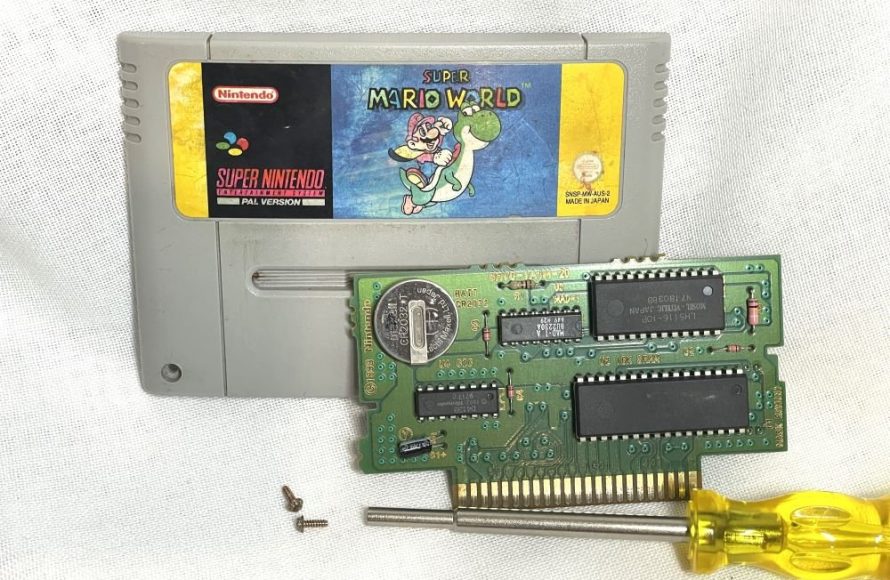
SNES games with batteries store save data, allowing you to continue your progress later. They utilize a small battery on the game board to retain this information even when the console is off.
Ever wondered how you managed to keep your progress in games like The Legend of Zelda: A Link to the Past on your Super Nintendo? The answer lies within: snes games with batteries.
These little power cells tucked inside the cartridges are the unsung heroes of our gaming memories. They kept our worlds alive, even when the console was unplugged.
They provided hours of gameplay to be resumed later. We’ll delve into their importance and how they made our SNES experiences so memorable.

SNES Games With Batteries: A Deep Dive
The Super Nintendo Entertainment System (SNES) holds a special place in many gamers’ hearts. Its vibrant graphics and engaging gameplay defined a generation.
Many SNES cartridges relied on battery-backed SRAM to save progress. This allowed players to return to their adventures later, picking up exactly where they left off.
Why Batteries in SNES Games?
Cartridge-based games didn’t always have save capabilities. Early NES games often relied on passwords, which were cumbersome.
Batteries offered a more convenient solution. They powered static RAM (SRAM) chips inside the cartridge.
This SRAM held the player’s save data even when the console was turned off.
Technical Details of SNES Battery Saves
The batteries used in SNES games were typically CR2032 coin cell batteries.
These batteries provide a stable voltage for several years, typically 5-10 years or even longer.
The SRAM chips themselves are low-power devices. They require minimal current to retain data.
The combination of a long-lasting battery and a low-power SRAM chip made for a reliable save system.
Identifying SNES Games With Batteries
Determining if a SNES game uses a battery isn’t always straightforward. The cartridge label rarely indicates it.
However, a good rule of thumb is that any RPG or adventure game with a save feature will likely have a battery.
Sports games with season modes often used batteries as well. Games like The Legend of Zelda: A Link to the Past are obvious examples.
Other games, such as Super Metroid, also rely on battery saves.
Popular SNES Games with Battery Saves
Many iconic SNES games relied on battery saves. This list showcases some of the most beloved titles.
The Legend of Zelda: A Link to the Past: This classic action-adventure game utilizes a battery to save your progress through Hyrule.
Super Metroid: Explore the planet Zebes and save your game as Samus Aran in this acclaimed title.
Chrono Trigger: A time-traveling adventure where your decisions shape the future, saved thanks to a battery.
Final Fantasy VI (III): Experience a deep storyline and character development, all preserved by battery-backed saves.
EarthBound: The quirky and unforgettable RPG adventure needs a battery to track Ness and his friends.
Secret of Mana: Team up with friends and save your progress as you explore a vibrant world.
Super Mario RPG: Legend of the Seven Stars: A unique blend of platforming and RPG elements, your progress is saved via battery.
The Dreaded “Save Battery is Dead” Message
One of the most disheartening experiences for a SNES gamer is the “Save Battery is Dead” message.
This indicates that the battery inside the cartridge has run out of power. All save data is lost.
The game will still function, but you won’t be able to save your progress.
Replacing SNES Game Batteries
Fortunately, replacing a SNES game battery is a relatively straightforward process.
It requires some basic tools and a replacement CR2032 battery.
Tools Needed for Battery Replacement
You’ll need a few essential tools to replace the battery.
Gamebit Screwdriver: This special screwdriver is required to open SNES cartridges. They come in different sizes, make sure you get the correct one (usually 4.5mm).
CR2032 Battery: Purchase a new CR2032 coin cell battery. Make sure it’s a quality brand for longevity.
Soldering Iron and Solder: These are necessary to desolder the old battery and solder in the new one. If you are not comfortable soldering, consider using a battery holder instead.
Desoldering Braid or Sucker: This will help remove the old solder from the battery terminals.
Battery Holder (Optional): This allows you to replace the battery without soldering in the future, making future replacements easier.
Screwdriver Set (Phillips Head): You might need this for accessing the board after opening the cartridge.
Multimeter (Optional): A multimeter can be used to test the voltage of the new battery and the old one.
Steps for Replacing a SNES Game Battery
Follow these steps carefully to replace your SNES game battery:
1. Open the Cartridge: Use the gamebit screwdriver to remove the screws on the back of the cartridge. Carefully separate the two halves of the cartridge.
2. Locate the Battery: The battery is usually a silver coin cell battery located on the circuit board.
3. Desolder the Old Battery: Use the soldering iron and desoldering braid (or sucker) to remove the solder from the battery terminals. Carefully remove the old battery.
4. Install the New Battery (or Battery Holder): If using a battery holder, solder it in place. If soldering the battery directly, ensure the correct polarity (positive and negative terminals).
5. Solder the New Battery: Solder the new battery terminals to the circuit board. Make sure the solder joints are clean and secure.
6. Test the Connection: Use a multimeter to check the voltage of the battery and ensure it’s properly connected.
7. Reassemble the Cartridge: Carefully reassemble the two halves of the cartridge and secure them with the screws.
8. Test the Game: Insert the cartridge into your SNES and test if the game saves correctly.
Using a Battery Holder
A battery holder is a convenient alternative to soldering. It allows you to easily replace the battery in the future without needing a soldering iron.
Solder the battery holder onto the board where the old battery was.
Then, simply slide the new CR2032 battery into the holder.
Potential Risks and Considerations
While battery replacement is generally safe, there are some risks to be aware of.
Soldering Risks: Soldering irons can cause burns if not handled carefully. Work in a well-ventilated area to avoid inhaling fumes.
Static Electricity: Static electricity can damage electronic components. Use an anti-static wrist strap to ground yourself before working on the cartridge.
Incorrect Polarity: Ensure you install the new battery with the correct polarity. Reversing the polarity can damage the circuit board.
Damage to the Circuit Board: Excessive heat from the soldering iron can damage the circuit board. Work quickly and carefully.
Data Loss: Even with a successful battery replacement, there is always a small risk of data loss during the process.
Alternatives to Battery Replacement
If you’re not comfortable replacing the battery yourself, there are alternatives.
Professional Repair Services: Many retro gaming stores offer battery replacement services. This is a safe option if you lack the skills or tools.
Emulators and ROMs: Emulators allow you to play SNES games on your computer or other devices. They often have built-in save state features that don’t rely on batteries. However, this can be ethically questionable if you don’t own the original game.
Flash Cartridges: Flash cartridges allow you to load ROMs onto a cartridge and play them on your SNES. These cartridges often have their own save mechanisms.
Extending the Life of SNES Game Batteries
While batteries will eventually die, you can take steps to extend their lifespan.
Store Games Properly: Store your cartridges in a cool, dry place. Avoid extreme temperatures and humidity.
Play Games Regularly: Believe it or not, playing the game occasionally can help keep the battery active.
Avoid Leaving Games Unused for Extended Periods: Long periods of inactivity can cause the battery to discharge faster.
The Future of SNES Games and Battery Saves
As SNES games age, battery replacement will become increasingly common.
The retro gaming community is actively developing solutions to address this issue.
Battery holders and alternative save methods are becoming more popular.
The legacy of these classic games will continue thanks to these efforts.
SNES Games with Unique Save Systems
Not all SNES games with save features rely solely on batteries. Some games employed alternative methods.
EEPROM Saves: Some later SNES games, such as Kirby Super Star, used EEPROM (Electrically Erasable Programmable Read-Only Memory) to store save data. EEPROM does not require a battery to retain data.
Password Systems: While less convenient, some games still used password systems in addition to or instead of battery saves.
Common Misconceptions About SNES Game Batteries
There are several misconceptions surrounding SNES game batteries.
All SNES Games Have Batteries: This is false. Many games didn’t require saving and therefore didn’t include a battery.
Batteries Last Forever: Batteries have a finite lifespan and will eventually need to be replaced.
Replacing the Battery is Impossible: Battery replacement is a common and relatively simple procedure.
Data is Always Lost When the Battery Dies: While data loss is likely, there are some advanced techniques that can sometimes recover data before the battery completely dies. These are complex and not always successful.
The Lasting Appeal of SNES Games
Despite the challenges of aging hardware and battery replacements, SNES games remain incredibly popular.
Their timeless gameplay, engaging stories, and memorable characters continue to resonate with gamers of all ages.
The SNES library represents a golden age of gaming. Many consider them some of the best games ever made.
Preserving SNES History
Replacing batteries is an important part of preserving SNES history.
It allows future generations to experience these classic games as they were originally intended.
Maintaining these cartridges ensures that the legacy of the SNES lives on.
Finding SNES Games With Working Batteries
If you’re looking to purchase SNES games with working batteries, here are some tips:
Ask the Seller: If buying online, ask the seller if the battery has been replaced or tested.
Check the Save Function: If possible, test the game’s save function before purchasing.
Consider Recently Replaced Batteries: Games with recently replaced batteries will likely have a longer lifespan.
Factor in Battery Replacement Costs: If the battery is dead, factor in the cost of replacement when determining the price.
The Importance of Proper Disposal
Remember to dispose of old batteries properly. They contain harmful chemicals that can pollute the environment.
Many electronic stores and recycling centers offer battery recycling programs.
Do your part to protect the environment by recycling your old SNES game batteries.
Super Nintendo Cartridge Save Battery Replacement
Final Thoughts
In essence, SNES games with batteries provided a crucial save function, allowing players to preserve their progress. These batteries ensured countless adventures wouldn’t be lost after powering down the console.
Exploring the realm of SNES brings memories of playing through games like Zelda and Earthbound. The battery backup feature was a must-have for these long, story-driven experiences.
These ‘snes games with batteries’ represent a significant technological step forward. They have left an indelible mark on gaming history, paving the way for modern save systems.

