
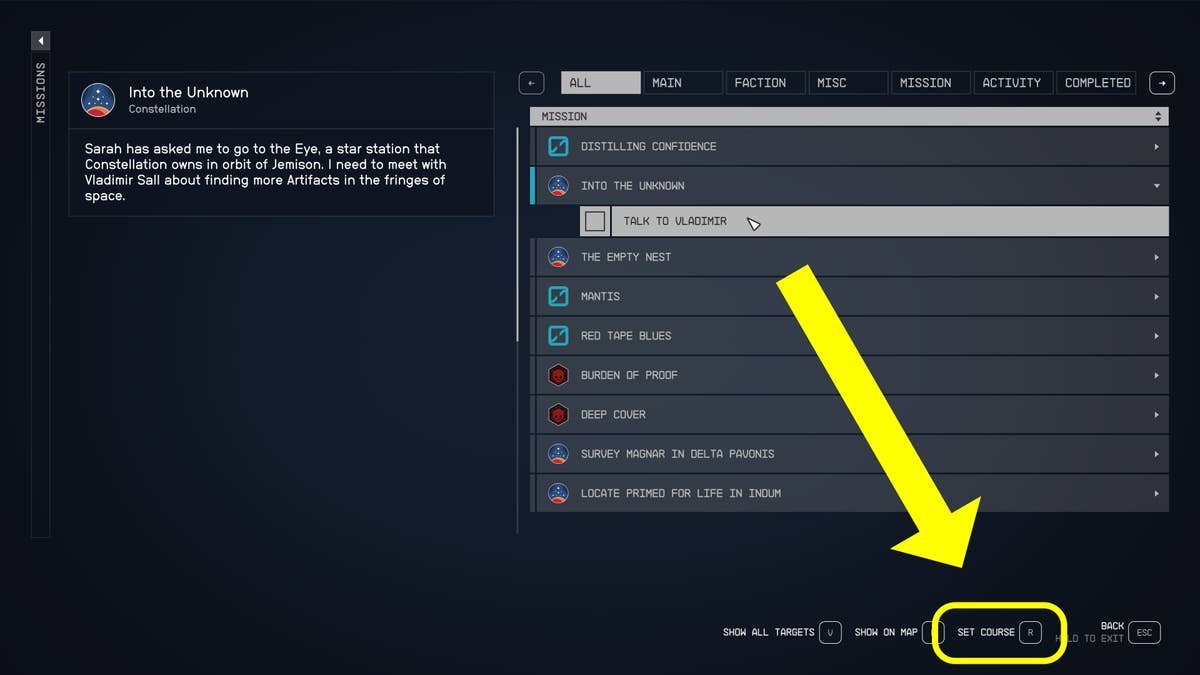
Starfield fast travel options include using the map to travel between discovered locations and using your ship’s grav drive to jump between star systems.
Exploring the vast universe of Starfield can be a real journey, but you don’t have to walk everywhere. Starfield fast travel options greatly reduce travel time, allowing you to quickly revisit places. These options make navigating the game’s numerous planets and star systems much more efficient.
You use the map screen, choosing any visited location for an immediate jump, within the same system. For traveling between star systems, your ship’s grav drive comes into play. It’s simple and quick, keeping you exploring.

Starfield Fast Travel Options
Exploring the vast universe of Starfield can be super exciting, but sometimes you just need to get from point A to point B quickly! That’s where fast travel comes in handy. Instead of flying your ship everywhere, you can use different methods to jump around the galaxy. Let’s dive into all the ways you can zip around in Starfield!
Basic Fast Travel: The Map is Your Friend
The most common way to fast travel is by using your map. When you open your map, you’ll see all sorts of places marked, like planets, space stations, and cities. Most of the time, you can click on one of these locations and, poof, you’re there! It’s like a magical shortcut.
However, not all places are instantly accessible for fast travel. Here’s how it usually works:
- Already Visited Locations: If you’ve been somewhere before, it will usually be available for fast travel from your map. Think of it like remembering a place in your dreams; you can just go right back there without traveling through all the other parts of the dream.
- Unvisited Locations: For places you haven’t visited, you can’t just click and travel. You often need to physically fly your ship to the place first, even if it is marked on your map as an undiscovered location. Then it becomes a fast travel point on the map. It’s like setting up a base that allows you to teleport to it next time.
- Mission Objectives: Sometimes, the game will automatically set up fast travel locations for you as part of a mission. These points will usually be marked on your map, making it easy to quickly jump to where you need to be for your next objective. These shortcuts are super useful and save time.
This system makes sure you explore before you get to use fast travel, so you don’t miss all the cool places in the game.
Fast Travel from Your Ship: Launching into Action
Your ship in Starfield is more than just a way to fly around; it’s your mobile base of operations! It provides another key aspect for fast travel. When you are aboard your ship, you have the ability to fast travel directly to locations you have previously discovered. This can be really convenient if you’re in the middle of a large planet or simply want to head to a specific point immediately without going through several loading screens. The ship’s cockpit interface can help with this.
Here’s how it works:
- Access the Cockpit: First, make sure you are inside your ship’s cockpit. This is where you can control the ship and travel.
- Use the Map Interface: There is a specific control for accessing the map. You can find it using the in game options menu.
- Choose Your Destination: Once you have the map open, you just select your desired point on the map and hit the ‘fast travel’ key. Just like the normal map, you can only travel to locations that you have visited before.
- Blast Off: Once you select your destination, the game will load up the area, and you’ll be there ready for your next adventure.
This makes your ship a key component for quick travel around the various planets and systems.
Fast Travel During Missions: Following the Story
Missions in Starfield often require you to visit specific locations. To make it easier, the game provides special fast travel points related to your mission objectives. This means you can jump right to the action without wasting time traveling long distances through empty space.
How Mission-Related Fast Travel Works
Mission-related fast travel markers are visible on your map and often indicated by a special icon. These markers help you see clearly the best location to fast travel to reach the next part of your quest. These are very convenient, as they often help you avoid unnecessary trips back and forth. It keeps the story moving along at a good pace!
- Mission Markers: Look out for the special icons on your map that guide you toward the next objective of your current mission. These are usually different from regular location markers, so they’re easy to spot.
- Automatic Fast Travel Points: When you get close to a mission objective, a fast travel marker is usually automatically created. This makes it easy to hop back and forth between important areas for the mission.
- Focusing on the Story: The fast travel points for missions help you concentrate on completing your mission objectives, rather than spending all your time traveling. This makes the game more fun and keeps you engaged in the plot.
So, always keep an eye on your map, as you may find that you are able to instantly jump to a new area of the world if you have an ongoing quest.
Fast Travel and Encumbrance
In Starfield, like in many games, your inventory has a weight limit. If you’re carrying too much stuff, you might become “encumbered.” Being encumbered affects how you move, and can prevent you from using fast travel at all!
Why Encumbrance Matters for Fast Travel
- Weight Limits: You can only carry so much before your character becomes too heavy.
- Slow Movement: When you’re encumbered, your character moves very slowly, making exploring tedious.
- Fast Travel Blocked: If you’re carrying too much, the game won’t let you fast travel. You’ll have to reduce your load before you can use fast travel again.
How to Avoid Being Encumbered
- Stash Items: Use storage containers on your ship or at settlements to keep your inventory light.
- Sell Unneeded Items: Vendors are always happy to buy your loot, so sell the stuff you don’t need.
- Upgrade Your Inventory: There are upgrades that allow you to carry more. These will be really helpful on your adventures.
So, manage your gear carefully. It will make traveling in Starfield much easier and more enjoyable.
Fast Travel and the Starfield Map
Understanding how to read the Starfield map is vital for using fast travel effectively. The map not only shows locations, but also provides key information like the planet, system and whether you can fast travel there.
Navigating the Starfield Map
- Planetary View: When you first open the map, you will normally see a view of a planet. This view provides the locations on the planet that you can travel to.
- System View: By zooming out, you can view a system containing multiple planets and space stations. The symbols on the map tell you which areas you can easily reach.
- Galaxy View: Further zooming out gives the player the entire galaxy map. This view includes the various solar systems, all linked together.
Understanding Fast Travel Icons
- Visited Locations: These locations will have a different color and icon, showing you that they are available for fast travel.
- Undiscovered Locations: These may be visible, but greyed out or have a special “undiscovered” marker. You will not be able to fast travel to them until you have visited them in person with your ship.
- Mission Locations: These will have special markers, making it easy to reach objectives.
The map is your guide to the galaxy, so learning how to use it will make navigation and fast travel much more efficient.
Fast Travel in Combat
Fast travel in Starfield is not available while in combat. This prevents players from using fast travel to escape from a difficult or unwanted fight. The game makes you handle combat challenges properly and strategically. You need to beat your enemies fair and square.
Why Fast Travel Is Disabled During Combat
- Fair Play: By disabling fast travel in combat, the game makes sure you engage in the battle. You can’t just run away when things get tough.
- Strategic Choices: This encourages you to make good choices during fights. You can use cover, different weapons and companions to win.
- Immersion: This rule makes combat more real and immersive. It’s not realistic to just teleport away from a battle!
What to Do Instead of Fast Travel
- Find Cover: Use objects in the environment to protect yourself from enemy fire.
- Use Your Weapons Wisely: Choose the best weapons and strategies for each fight.
- Use Healing Items: If you take damage, you can use medical kits to heal yourself.
- Take Advantage of Companions: Your companions can help you fight. Use them to take down enemies together.
- Disengage and Run: Sometimes, the best option is to run to a safe distance. This can be the only way to escape a really difficult encounter.
So, always be ready for a fight. Fast travel isn’t always an easy escape route during combat situations.
Special Fast Travel Points: Unique Locations
As you explore the galaxy, you will come across special locations that have fast travel points. These can be space stations, settlements or even locations linked to missions. These unique spots will add interesting new locations to your map, making travel more interesting.
Discovering New Fast Travel Points
- Space Stations: Many space stations will provide fast travel once you are allowed to dock and visit them. This is helpful when you are on the move between planets and systems.
- Settlements: You can discover settlements on planets which will often add fast travel locations for that planet. This makes it very easy to revisit.
- Mission Areas: Often new locations will only be available once a mission objective has been assigned to them. Once they are discovered, they become part of your map.
Why These Points Are Important
- Faster Travel: The more points you have, the more quickly you can get around the galaxy. This can reduce your travel time a lot.
- Exploration: Exploring new locations will be rewarded by more locations being available to travel to on the map.
- Story Progression: Many key story locations will give you new fast travel options once you have visited them, or completed a quest that is assigned to that location.
So keep an eye out while exploring. You can come across places which can be useful for faster travels.
Fast Travel Between Star Systems: Jumping Through Space
Traveling between solar systems is a key element of Starfield, and this requires its own approach to fast travel. Using your ship’s capabilities, you can travel huge distances between solar systems.
Interstellar Travel: How It Works
- The Starmap: To initiate a jump to another star system, you have to use the Starmap. Select the destination system, and the ship will begin the jump.
- Fuel Considerations: Be sure that your ship has enough fuel. You will need to plan your routes carefully, or upgrade your ship to be more fuel efficient.
- Grav Drive: This special component allows your ship to jump across the galaxy. Each jump will require some time to travel, but this is still fast than flying normally through space.
Things to Remember
- Known Systems: You can only fast travel between known solar systems. So be sure that you explore and visit each system in turn.
- Distance: Longer distances will take longer to travel between.
- Preparation: It’s a good idea to plan long trips, as you may come across problems that require you to land at space stations along the way for repairs or resupply.
Traveling between solar systems in Starfield provides a great way to explore the galaxy, and requires you to understand the different ways of fast travel across such distances.
Planning Efficient Fast Travel
Using fast travel effectively in Starfield needs some planning. You will want to choose the best route, while thinking of your goals. A good plan will make your exploration and questing easier.
Tips for Effective Fast Travel Planning
- Prioritize Mission Points: If you have current quests, try to focus your exploration on locations related to those objectives. This will allow you to complete them quickly.
- Explore New Locations: Try to explore new locations regularly to unlock more fast travel points. This will also allow you to collect resources and new equipment.
- Manage Encumbrance: Always watch your character weight and make sure you are not over burdened. This will mean that you can travel to any location easily.
- Upgrade Your Ship: Improve your ships capabilities. This can allow you to travel to more locations faster and carry more items.
Making the Most of Fast Travel
- Save Time: Using fast travel will save you lots of game time. Use it to focus on your key goals.
- Complete Quests: Use fast travel to get to and complete quests quickly.
- Manage Resources: Go to locations to collect valuable resources and return quickly to your base with the materials.
With a bit of planning, you can make the most out of the fast travel system and play Starfield to the max!
In conclusion, the fast travel system in Starfield offers multiple options to move between locations, including the use of the map, ship’s cockpit, and specific quest points. It’s important to watch your inventory weight so you can fast travel. Understanding the game map is key to making the most of fast travel, which allows you to explore all that the game offers efficiently. The game also makes sure that you cannot escape from combat by disabling fast travel while in a fight. By mastering these travel options and planning efficiently, you can enhance your gameplay and see all the universe that Starfield has to offer!
Starfield Beginners Guide: How To Fast Travel To Your Ship, Planets, Areas, Missions & Cities
Final Thoughts
Starfield fast travel options provide players with varied ways to move around. You can use your ship for interstellar jumps or travel quickly within a system using map markers. Exploring planets becomes less tedious thanks to these options.
Utilizing the map to select landing sites and points of interest offers additional convenience. Starfield fast travel options greatly reduce travel time, letting you focus on other activities. They contribute to the overall exploration pace.

