
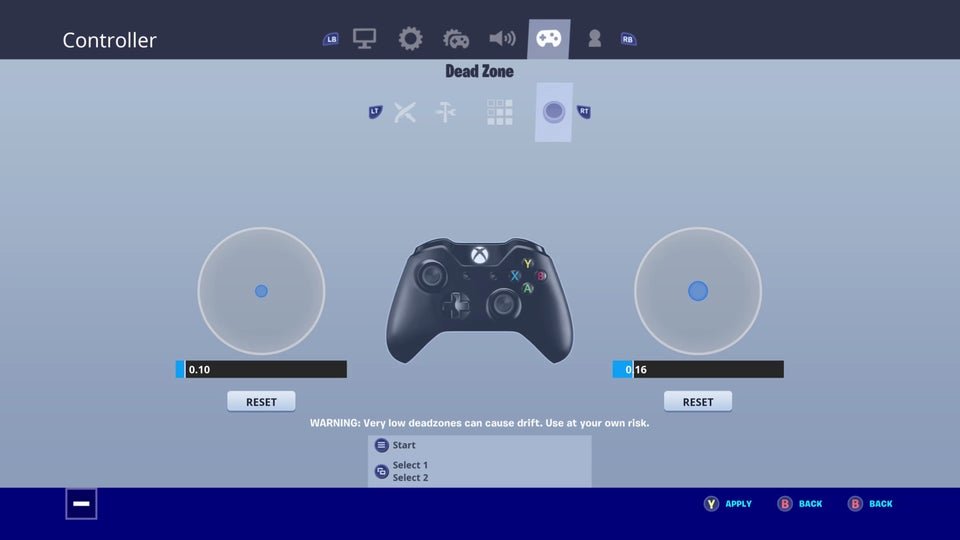
Deadzone in games refers to the area around the center of an input device (like a joystick) where no movement is registered by the game.
Have you ever pushed a joystick slightly and noticed nothing happens in your game? This is likely because of the deadzone, a feature often misunderstood by players. What is deadzone in games? Simply put, it’s a deliberate non-responsive area around the neutral position of your analog stick or trigger.
Game developers implement deadzones to prevent unintentional movements and controller drift, improving overall player experience. A poorly configured deadzone however can feel unresponsive. Adjusting this setting can greatly impact how you control your characters and navigate the game world.

What is Deadzone in Games?
Okay, gamers, let’s talk about something that might be tiny but makes a BIG difference in how your games feel: the deadzone. Imagine you’re trying to steer a race car in a video game. You nudge the joystick to the left, but nothing happens at first. Then, suddenly, the car starts to turn. That little bit of movement you made before the car reacted? That’s the deadzone in action.
The Basics: Understanding the Deadzone
At its core, the deadzone is a small area around the center of your analog stick or trigger where the game doesn’t register any input. Think of it like a cushion. It’s designed to prevent those tiny, unintentional movements you might make from affecting your gameplay. Without a deadzone, even the slightest touch on the stick could send your character running in the wrong direction. It’s like when your hand twitches a bit, but you don’t want that twitch to make your game character move.
Why Do We Have Deadzones?
You might wonder, “Why even have a deadzone if it makes my controls less sensitive?” Well, there are actually several good reasons. Let’s dive into them:
- Preventing Drift: Game controllers, especially analog sticks, can develop ‘drift’ over time. This is when the stick registers movement even when you’re not touching it. A deadzone helps to ignore that unwanted drift, keeping your game character still when it should be.
- Accidental Inputs: Our hands aren’t always perfectly still. We might make small, unintentional movements on the analog sticks and triggers when we’re holding the controller. Deadzones ignore these accidental nudges.
- Controller Variability: Not all controllers are built exactly the same. Deadzones help to make sure that games work smoothly with all kinds of controllers, even if they have tiny differences in how they respond to movement.
- User Comfort: Sometimes holding your fingers on the sticks very lightly for a long time can cause small movements. The deadzone is like a small resting area for your hands.
How Deadzones Affect Gameplay
The size of the deadzone can dramatically affect how your game feels. Let’s consider a few situations:
Too Big of a Deadzone
A deadzone that’s too large can feel unresponsive and sluggish. When you move the stick, you’ll have to move it a long way before your character starts to react. This can be frustrating, especially in fast-paced games that need quick reactions. Imagine trying to aim a sniper rifle and having to move the stick quite a bit before it starts moving, that would make your shots less precise and accurate. This can lead to:
- Delayed responses
- Feeling like the controls are ‘sticky’
- Less accuracy in games requiring precision
- Difficulty in making fine adjustments
Too Small of a Deadzone
On the other hand, a very small or no deadzone can make your game overly sensitive. A tiny touch on the stick could make your character suddenly dart across the screen. This can be difficult to control, especially in games that require smooth and gradual movements. This can cause:
- Unintentional movements or ‘drifting’
- Overly sensitive controls
- Difficulty in making steady movements
- Less stability
The “Just Right” Deadzone
The ideal deadzone is just the right size. It gives your character responsiveness while keeping those unwanted inputs out. It should be small enough that your movements translate quickly into actions, but large enough to stop any accidental jitters. Finding this balance is essential for a smooth and enjoyable gaming experience. When the deadzone is just right:
- Controls feel responsive
- Movements feel accurate and controlled
- You have smooth gameplay
- Gameplay feels comfortable and intuitive
Adjusting Deadzones: Taking Control
Many modern games allow you to adjust the deadzone in the settings menu. This is super helpful because it lets you customize how the game responds to your controller. You can play around with different settings to find that perfect balance.
Finding the Perfect Setting
Experimenting is the key when it comes to finding the ideal deadzone. The “best” setting can vary depending on the game, your controller, and your own personal preferences. Here are some things you might want to try:
- Start with the default setting and see how it feels.
- If the controls feel sluggish, try decreasing the deadzone.
- If your character moves on its own when you aren’t touching the controller, you might have to increase the deadzone.
- Test the settings with movements you make most often in the game. For example, if you like precise aiming, try fine-tuning the settings with the aiming controls in the game.
Deadzone Settings in Different Games
Different games might have different ways of displaying or describing deadzone settings. Some games might use a slider, while others might use percentage values, or even just ‘small’, ‘medium’ and ‘large’ settings. Here’s a breakdown of how you might see it:
| Setting Type | Description | What it means |
|---|---|---|
| Slider | You move a slider to adjust the deadzone. | Moving it to the left often means a smaller deadzone, and moving it to the right means a larger one. |
| Percentage | The deadzone is expressed as a percentage. | A small percentage means a small deadzone (like 5%), while a large percentage means a larger deadzone (like 20%). |
| Preset Values | Using descriptive words, for example small, medium and large. | Small means a small deadzone and large means a larger deadzone. Usually these are predetermined values that have been set by the game developer. |
Beyond Analog Sticks: Deadzones on Triggers
Deadzones aren’t limited to just the analog sticks; they are also used on controller triggers. Think of triggers as the buttons you use to accelerate in a car game or shoot a gun in a shooter game. Trigger deadzones work very similarly to analog stick deadzones: they help prevent accidental actions when you are slightly pressing or only touching the trigger, instead of fully pressing it down.
Trigger Deadzone Benefits
Trigger deadzones help in:
- Precision in acceleration: In racing games, triggers that are too sensitive might cause the player to rapidly accelerate without fully intending to. A proper deadzone can help you control the car more smoothly.
- Avoiding misfires: In shooter games, you might only intend to slightly tap the trigger but not fire your weapon. A deadzone can prevent accidental shots.
Deadzones and Different Input Devices
While we often talk about deadzones in relation to gamepads, they exist with other input devices as well. Understanding how they function with different devices can help you fine-tune your gaming experience.
Deadzones and Joysticks
Joysticks, used in flying games, flight simulators, and even some arcade games, also have deadzones. These can be important to prevent accidental inputs and to help the user achieve precise control. The principles of adjustment are the same: if you notice your aircraft is drifting or not responding precisely, you can adjust the deadzone accordingly.
Deadzones and Steering Wheels
Steering wheels used in racing games also use deadzones. These help ensure that tiny movements around the center of the wheel don’t unintentionally steer the car. A good deadzone in a wheel helps ensure smooth and controlled driving.
The Future of Deadzones
As technology evolves, we might see even more sophisticated ways of managing deadzones in the future. Perhaps controllers will be able to learn and adjust their deadzones on the fly based on how the user plays. This could lead to incredibly precise and responsive controls across all games. The future could also see controllers that use a combination of hardware and software to minimize or remove the issues that deadzones are trying to solve.
A Final Word on Deadzones
Deadzones are a small, but mighty, part of gaming. Understanding what they are, how they work, and how to adjust them can greatly improve your gaming experience. So, next time you jump into a game, pay a little attention to those deadzone settings. It could just be the key to making you a better player!
5 Reasons to Play Deadzone by Mantic Games
Final Thoughts
Deadzone in games is the area where an analog stick registers no input. This intentional space avoids accidental movements. Game developers use deadzones to filter out minor stick drifting.
Essentially, it’s a small ‘neutral’ zone. Understanding ‘what is deadzone in games’ helps you tweak your controller settings. This allows for more precise control and personalized gameplay.

