
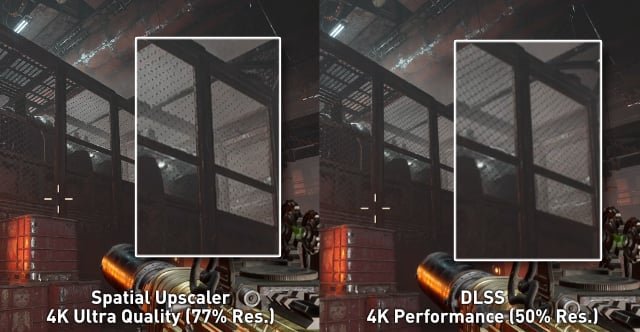
The upscale method in games involves rendering a game at a lower resolution and then using algorithms to enlarge the image to fit a higher resolution display, improving performance without demanding as much from the hardware.
Have you ever wondered how some games manage to look sharp on your screen even if your system isn’t the most powerful? The answer often lies in a clever technique. It’s a process that allows games to run smoothly without sacrificing too much visual quality.
This leads us to a question many gamers ask: what is upscale method in games? It’s essentially a way to bridge the gap between demanding graphics and achievable performance. This method plays a significant role in keeping modern games playable across a broad range of hardware.

What is Upscale Method in Games?
Imagine you’re playing your favorite video game, and everything looks super clear and detailed, like you’re really there! But sometimes, games don’t always look that way. They might look a little blurry or pixelated. That’s where upscaling comes in. It’s like magic for your screen, making lower-resolution images look better on a higher-resolution display. We’re going to explore what this “upscale method” is all about in the world of games.
Understanding Resolution
Before we dive into upscaling, let’s talk about resolution. Think of resolution as the number of tiny squares (pixels) that make up a picture on your screen. A higher resolution means more pixels, leading to a sharper and more detailed image. For instance, a 1080p resolution is like having a good number of these tiny squares, while a 4K resolution has even more, making the image extra clear. When a game is rendered at a lower resolution, it doesn’t have all the pixels needed for a crisp image on a higher-resolution screen. This is where upscaling plays its role.
The Basic Idea of Upscaling
At its core, upscaling in games is about taking an image rendered at a lower resolution and making it fit a higher-resolution display without looking too blurry or pixelated. It’s like blowing up a small picture to make it bigger – but instead of just stretching it out, which would make it look bad, upscaling uses clever tricks to maintain, or even improve, image quality. It’s all about filling in the gaps.
How Does Upscaling Work?
Upscaling methods use different techniques to achieve this. Some of the common approaches are:
- Nearest Neighbor: This is the simplest method. It basically copies the pixel colors to fill the gaps. It’s fast but can lead to a blocky or pixelated look. Imagine taking a LEGO structure and enlarging each LEGO block; you’d get a bigger, blockier version. This method is not often preferred in modern gaming, unless a very stylized, pixelated effect is desired.
- Bilinear: This method blends the colors of the surrounding pixels to create new ones. It produces a smoother look than nearest neighbor, but it can still look a bit blurry. It is like having a picture that’s a bit out of focus; the sharpness is not quite there. It’s more of a basic method that serves as a starting point.
- Bicubic: This technique is more advanced than bilinear. It uses a more complex calculation to blend surrounding pixels, leading to sharper images with less blur than bilinear. Think of it as fine-tuning a picture using different shades of color instead of just a few basic ones. It’s like a good old-fashioned photo editing tool that makes a picture sharper.
- Temporal Upscaling: This method uses information from previous frames of the game to fill in missing details. It’s like predicting what should be there based on the recent action on screen. It can produce great results, particularly in motion, but it requires more processing power. It’s using previous puzzle pieces to guess the next one.
- AI-Powered Upscaling: This is the newest and most advanced type of upscaling. It uses artificial intelligence to learn how to create the missing details. AI algorithms analyze the low-resolution image and then recreate it at a higher resolution. This method can lead to amazing results that look incredibly close to a natively rendered image. It’s like having a super-smart artist who knows how to draw all the finer details that should be there.
Why Do Games Use Upscaling?
You might wonder, if higher resolution is better, why don’t games always just render at that resolution? There are a few good reasons:
Performance Optimization
Rendering games at high resolutions, such as 4K, puts a lot of strain on the computer’s graphics card. The more pixels that need to be processed, the slower the game can run. Upscaling allows games to run at a lower, more manageable resolution while still delivering a good looking image. This means more people can play the game smoothly, even if they don’t have the latest and greatest computer or console. It’s like running a car at a comfortable speed that gets you to your destination smoothly. Games can perform well without requiring top-end graphics cards.
Balancing Quality and Speed
Upscaling helps developers find a sweet spot between image quality and performance. They can render the game at a resolution that allows for smooth frame rates, then use upscaling to make the image look better on higher-resolution displays. This helps keep the game enjoyable while also making it look crisp and detailed on different types of screens. It’s a give and take that can provide the best of both worlds.
Hardware Limitations
Sometimes, the game console or computer might not be powerful enough to run a game at high resolution without causing it to slow down. By using upscaling, developers can get the game to look great even on hardware that may not be able to handle the game at a native higher resolution. This allows for more consistency across different devices and keeps players happy by allowing the game to perform at an acceptable rate. Its like having a little helper that makes things work even when the main thing isn’t up to the task.
Common Upscaling Techniques in Games
Let’s take a look at some specific upscaling techniques that are used in games today:
NVIDIA DLSS (Deep Learning Super Sampling)
DLSS is NVIDIA’s AI-powered upscaling technique. It uses a neural network (a type of AI) to analyze the game image and reconstruct it at a higher resolution. DLSS can produce images that look very close to native resolution. The great thing about DLSS is that it improves performance without losing much image quality. It’s like having a smart AI that takes care of all the visual details for you, so you don’t have to sacrifice performance for image clarity. Nvidia’s DLSS works very well.
How DLSS Works
DLSS uses a complex AI model that has been trained on a large dataset of high-resolution images. When a game uses DLSS, it sends a low-resolution image to the neural network. This network then compares this low-resolution image with all the high resolution images it has studied. Based on this comparison, it fills in the missing information and generates a higher-resolution version. The result is an image that looks much clearer and sharper than other upscaling methods. It’s kind of like having a super-advanced AI do all the hard work. In practice, that means it takes the game rendered at a lower resolution and turns it into something visually that is similar to what would be produced by rendering at the target resolution. By doing this, you have less work on the graphics processing unit, and gain higher frame rates with image quality that is very similar to native rendering.
AMD FSR (FidelityFX Super Resolution)
FSR is AMD’s upscaling solution. FSR is an open source upscaling solution, which means that it can be used by a larger variety of hardware. It uses a different approach to DLSS, using a collection of algorithms to improve the image quality of a game. While it may not perform as well as DLSS in some cases, it’s still a great option for gamers. FSR is like having a universal tool that makes images better, regardless of the specific type of graphics card you have. It is a great option to improve the performance and image quality on various graphics cards and hardware.
How FSR Works
FSR takes the low resolution game image and uses specific algorithms to look at the image and increase the resolution. FSR focuses on filling in the missing details and sharpens the edges, thus giving the overall image a cleaner look. There are various presets, which allows the gamer to choose between higher frame rates and better visual quality. It’s like having a picture editing program built right into your game, letting you adjust it to your liking.
Intel XeSS (Xe Super Sampling)
Intel’s XeSS is another upscaling method that uses AI. Like NVIDIA DLSS, it employs deep learning to enhance image quality. Intel’s XeSS is designed to work across various hardware, making it a very versatile option for gamers. It’s like having a smart helper that’s good at making things look better no matter what kind of computer you are using.
How XeSS Works
XeSS analyzes the low-resolution image and then applies its algorithm to create a higher-resolution image. Like other AI-based upscaling techniques, it is trained on a large dataset of high resolution and low-resolution images. By looking at those, it can decide what details it needs to create when upscaling, thus improving the image quality. It provides options to balance image quality and frame rates to ensure players have a good gaming experience. It’s designed to be flexible so that people can adjust it according to the type of performance that they want and the image quality that they desire.
The Upscaling Process in a Nutshell
To make it easier to understand, here’s the basic process for how upscaling works in games:
- Lower Resolution Rendering: The game is rendered at a lower resolution than your screen. For example, a game might be rendered at 1080p while your screen is 4K.
- Upscaling Method Applied: An upscaling technique (like bilinear, FSR, DLSS, or XeSS) takes this lower-resolution image and begins to process it.
- Image Processing: The method attempts to fill in the gaps to make the low-resolution image look sharper and clearer.
- Higher Resolution Output: The game display now uses the upscaled image to fill your screen, appearing as if it was running at the higher screen resolution.
Benefits of Upscaling
Here are the key advantages of using upscaling in games:
- Improved Performance: Games can run faster on lower end hardware because the graphics card does not have to process as many pixels at once.
- Better Image Quality: Games appear much sharper and more detailed, especially when compared to using simple upscaling methods.
- Compatibility: Games can look good on different types of screens and hardware.
- Reduced Power Consumption: Running games at lower resolution can reduce the strain on the graphics card and reduce the amount of power used.
When Upscaling is Most Useful
Upscaling really shines in certain scenarios:
- High-Resolution Displays: When playing on a 4K or 8K monitor, upscaling helps to make the image clearer without demanding a powerful PC.
- Older Hardware: If you have an older computer, upscaling can make new games playable without the requirement of having to update your hardware.
- Demanding Games: In games that are graphically intensive, upscaling can reduce the strain on the computer and improve the overall gaming experience.
Potential Drawbacks of Upscaling
While upscaling is great, it is not always perfect:
- Reduced Image Quality: While modern methods have come a long way, you can never really completely recreate a picture that was rendered at a higher resolution. So, native resolution will still provide the best visuals.
- Blurriness: Some upscaling methods can still cause slight blurring, especially at lower resolution starting points.
- Artifacts: Some methods may introduce small visual artifacts like shimmering or distortions. This isn’t very common in modern methods, but it can still happen.
The Future of Upscaling
Upscaling technology is constantly evolving. With ongoing improvements in AI, we can expect even more impressive upscaling results in the future. AI-driven methods like DLSS and XeSS are leading the way, with the potential to make games look stunning on all types of hardware and displays. This is a very exciting area for gaming, as it allows game developers to deliver more detailed and immersive gaming experiences without the need for users to have top-of-the-line equipment. As AI technology continues to improve, we can expect upscaling to become an even more important part of the way games are designed, developed, and played.
In short, upscaling is like a clever helper that makes your games look great on any screen by making lower resolution images fit on higher-resolution displays, without major loss in quality or performance. By using different methods, from basic to AI-powered, upscaling is a very useful tool that ensures a smoother, more detailed gaming experience.
Upscaling Explained: DLSS vs XeSS vs FSR & More
Final Thoughts
Upscale methods in games increase the resolution of rendered images. This technique improves visual quality without demanding significantly more processing power. Games achieve better clarity and detail using upscale methods.
Essentially, ‘what is upscale method in games’ involves taking a lower-resolution image and intelligently scaling it up. This process makes games appear sharper on high-resolution displays. Various algorithms handle this task, balancing quality and performance needs.

