
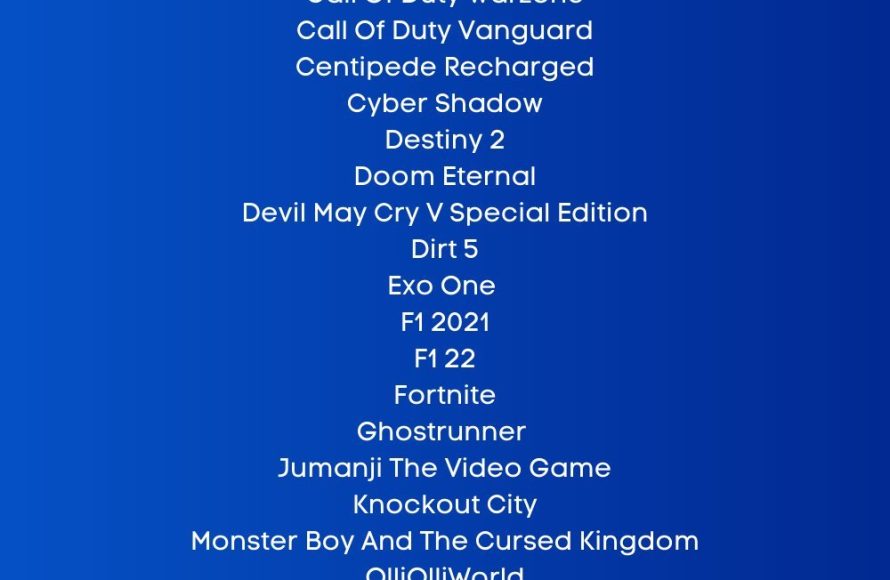
Many PS5 games support 120 FPS, including titles like Call of Duty: Black Ops Cold War, Devil May Cry 5 Special Edition, and Rainbow Six Siege. The exact list varies, and you’ll often need a compatible display for these higher refresh rates.
Curious about achieving the smoothest gameplay on your PlayStation 5? Many gamers are asking: what ps5 games support 120 fps? Getting those super-fast frame rates is a game changer, but it’s not always obvious which games offer this option.
Achieving 120 fps often requires specific in-game settings and a TV or monitor with a 120Hz refresh rate. We’ll dive into some of the games that let you experience the fluidity of 120fps.

What PS5 Games Support 120 FPS?
The PlayStation 5 is a powerful gaming machine, and one of its coolest features is the ability to play games at a super smooth 120 frames per second (FPS). But not all PS5 games can reach this high frame rate. So, if you’re wondering which games will give you that extra-silky gaming experience, you’ve come to the right place. This article will guide you through the exciting world of 120 FPS gaming on the PS5. Let’s explore which titles take full advantage of this feature, what you need to enjoy it, and how it makes a difference in your gaming.
Understanding 120 FPS Gaming
Before diving into the games, let’s talk a bit about what 120 FPS actually means. FPS, or frames per second, refers to how many individual pictures your screen displays each second. The higher the FPS, the smoother the motion on your screen appears. Most games on consoles usually run at 30 or 60 FPS. Moving up to 120 FPS creates a huge improvement in smoothness and responsiveness, making the action on screen feel more fluid and natural.
This is particularly beneficial in fast-paced games, where quick reactions are key. With a higher frame rate, you can see actions unfold more clearly, allowing you to react more quickly. It’s like watching a movie at a higher frame rate—the movement looks much more natural and less blurry. Think of it like this: 30 FPS can feel a little choppy, 60 FPS is smooth, and 120 FPS is like butter! It is important to remember that playing games at 120 FPS won’t magically make you a better player but can provide a competitive edge with less input lag and clearer visuals.
Hardware You Need for 120 FPS
Playing games at 120 FPS on your PS5 requires specific hardware. It’s not just about the console itself. Here’s a quick checklist of what you’ll need:
A PlayStation 5 console: This is the most important part of the equation! Make sure you have an updated console to support the latest features.
A 120Hz compatible display: Your television or monitor must support a refresh rate of 120Hz. Simply having an “HDTV” or “4K TV” does not mean it can do 120Hz. Look for TVs and monitors that specifically list 120Hz support, and also make sure that it supports the HDMI 2.1 standard. Without this, you won’t see 120 FPS in the game. Many monitors also only support 120hz at 1080p, so you need to check the TV/Monitor’s supported resolutions and refresh rate combinations.
HDMI 2.1 cable: You will also need an HDMI cable that supports the 2.1 standard. This cable is needed to carry the extra data required for the higher refresh rate. Most PS5 consoles come bundled with one, but if you’re using an older cable, it might limit your output to 60Hz or lower. Make sure your HDMI cable supports the higher bandwidth for optimal results.
Game Support: Finally, you need a game that can actually run at 120 FPS. Not every game on the PS5 supports this feature.
So, before you get too excited, double check that your TV or monitor and HDMI cable are up to the task. If you are using a monitor, make sure to check the refresh rate is enabled in your computers’ display settings (if the display is also connected to a computer).
List of PS5 Games That Support 120 FPS
Now, let’s get to the main event: the list of PS5 games that support 120 FPS. Keep in mind that this list can change as new games are released and developers update their existing titles, so it’s a good idea to check the game details or developer’s website for the most recent information. Also note, that some games don’t always run at a locked 120fps, so there may be drops during intense gameplay, these games typically utilise a variable refresh rate, such as VRR, to smooth out these changes. Here are some notable games you might be interested in, categorized by their genre for easier browsing:
First-Person Shooters (FPS)
Call of Duty: Black Ops Cold War: This popular FPS game offers a 120 FPS mode for smoother online battles. The responsiveness gains give a clear advantage to players who are using 120fps, making it a popular choice for competitive players.
Call of Duty: Vanguard: Similar to Cold War, this installment in the Call of Duty series has 120fps support on the PS5 and is a must have for fans of the series and high framerates.
Call of Duty: Modern Warfare II: As part of the newest Call of Duty lineup, this title also supports 120 FPS to ensure players have the smoothest possible gameplay, especially crucial in fast-paced online battles.
Call of Duty: Modern Warfare III: The latest entry, continues the trend, letting players play at 120FPS.
Destiny 2: This loot-and-shoot game can run at 120 FPS on PS5, but it is not always in 4k, often dynamically scaling the resolution to keep the frame rate stable, particularly in intense combat scenarios.
Borderlands 3: Experience the chaotic fun of Borderlands at a silky 120 FPS. The improvement here is especially notable during hectic firefights with multiple enemies.
Rainbow Six Siege: This tactical shooter benefits significantly from 120 FPS. The improved responsiveness gives you a better edge against other players, allowing you to line up shots more accurately.
Racing Games
DiRT 5: If you want to experience racing at a breakneck pace, DiRT 5’s 120 FPS mode on PS5 can make the experience much more thrilling, with smoother controls and visuals.
Gran Turismo 7: One of the most well-known racing games, this title has a performance mode which enables 120fps on the PS5.
WRC 9, WRC 10, WRC Generations: If you are a fan of rally racing these titles all support 120hz at 1080p on the PS5.
Fighting Games
Devil May Cry 5 Special Edition: Experience this action-packed spectacle at 120 FPS for an even more intense experience. The added smoothness enhances the visual flair of the game’s combat.
Guilty Gear Strive: This popular fighting game is all about fast-paced combat, and the 120 FPS support on PS5 helps it feel even more responsive. It can make all the difference in those split-second reaction times.
Mortal Kombat 11 and Mortal Kombat 1: These gruesome fighters also join the roster of 120fps titles, offering players fast, responsive action, but remember that it is not available on the PS4 version.
Tekken 8: The latest title in the popular fighting series, enables players to get the smoothest action possible with 120hz.
Action and Adventure Games
The Touryst: This indie game has a unique art style, which really pops at 120fps. This offers a smoother, more responsive experience.
Tiny Tina’s Wonderlands: This is another game with a similar engine to Borderlands 3, so it comes as no surprise that this is on the list.
Devil May Cry 5 Special Edition: Not just for fighting game fans, this action title benefits greatly from the 120 FPS boost. The smoother combat feels so much more responsive and makes the game even more enjoyable.
Uncharted: Legacy of Thieves Collection: While this collection might be known for graphical prowess, it also offers a performance mode that can get close to 120fps during gameplay, meaning smoother gameplay and tighter controls.
Ghostrunner: This parkour-action game is notoriously difficult, but you can get an edge with 120fps on the PS5, offering a more fluid experience and giving you better reaction times.
Sports Games
Tony Hawk’s Pro Skater 1+2: Pull off tricks with ease at a blistering 120fps. The extra responsiveness can make it even more fun to pull off difficult combos.
NBA 2K Series: Several of the latest NBA 2K titles support 120 FPS on the PS5, so you can experience the game in a more fluid way. This provides an advantage to online players, helping with on-court reaction times and smoother gameplay.
EA Sports FC 24: The newest iteration of the football franchise has 120fps on the PS5, making the game feel more fluid.
F1 23 and other F1 titles: Similar to other racing titles on the list, this game series also supports 120fps on PS5.
Indie Games
Rocket League: This popular soccer-with-cars game runs at a smooth 120 FPS on the PS5, making it a perfect choice for players who want the most responsive experience, allowing for tighter controls in a very fast-paced game.
OlliOlli World: The unique art style of this game really shines at 120fps, and gives you better control during the high-paced levels.
Temtem: This Pokemon-like MMO benefits greatly from 120 FPS, offering a more smooth experience.
This is not an exhaustive list, and more games are added all the time, but it covers many of the major titles that support 120 FPS. Remember to check the game’s settings to enable the 120 FPS mode if available.
How to Enable 120 FPS on PS5
Now that you know which games support 120 FPS, let’s talk about how to actually enable it on your PS5. Here are the steps:
1. Check your display settings: Go to Settings > Screen and Video > Video Output. Here, make sure that the “Enable 120Hz Output” is set to automatic or on. This will tell your console that you’re using a 120Hz compatible TV or monitor. Note that you may also need to enable ‘Performance Mode’ if there is one on your display’s settings.
2. Check your game settings: Not every game will automatically run at 120 FPS. Most games with the option will require you to enable it in the game’s settings, this is usually under “Graphics”, “Display” or “Video” options, and may be labeled “Performance Mode”, or “High Refresh Rate Mode”.
3. Restart the Game: Some changes require you to restart the game. Do this after making changes to ensure the settings have taken effect.
4. Check your display output: If your TV or Monitor has the feature, you can double check to see if the display is outputting at 120hz, this can often be found in the display’s info menu.
It is also worth remembering that not every game will have the same resolution at 120fps, with many games running at 1080p or 1440p, rather than 4k to maintain the high frame rate. There are also a few games that are able to do 120fps at 4k, such as a few of the Call of Duty games. Also keep in mind that some games may have dynamic resolution scaling, which means the resolution will be adjusted on the fly to maintain the framerate at 120fps.
The Benefits of 120 FPS
Why is 120 FPS such a big deal? Here are some of the primary benefits:
Smoother Gameplay: The most obvious benefit is the enhanced smoothness. The higher frame rate makes the game look and feel more fluid and responsive.
Reduced Motion Blur: With a higher frame rate, there is less blur on the screen during quick movements. This makes it easier to see what’s happening, especially in action-packed scenes.
Improved Responsiveness: Input lag is a significant factor, particularly in competitive games. With 120 FPS, the time between pressing a button and seeing the action on the screen is reduced, giving you a more immediate and responsive feel.
Competitive Edge: In fast-paced online games, the improved responsiveness and clarity can give you a slight competitive advantage. Being able to react more quickly can make the difference between winning and losing.
Enhanced Immersion: When the visuals are smoother and more natural, it’s easier to get drawn into the game world, making the entire experience more immersive.
Is 120 FPS Worth It?
The question you might be asking is whether all of this is worth it. The answer really depends on what you value as a gamer. If you’re someone who plays a lot of fast-paced online games, then the advantages of 120 FPS can be quite noticeable and potentially provide a competitive edge. If you’re more into story-driven games, and you do not play online, then you may not find as much of a benefit. However, there is no denying that 120 FPS is a better experience, with smoother visuals and controls. If you have a TV/Monitor and HDMI cable that supports it, it is definitely worth trying out. Many gamers who have switched to 120 FPS find it difficult to return to lower frame rates. It’s often said that once you’ve experienced the smoothness of 120 FPS, going back to 60 FPS can feel a little jarring.
Ultimately, the value of 120 FPS comes down to personal preference and the type of games you enjoy. If you are able to play at a higher frame rate then it is worth trying it to see how you like it.
In conclusion, the world of 120 FPS gaming on the PS5 is an exciting one, offering better visuals, improved responsiveness, and a more competitive edge in online games. While it might require a few hardware upgrades, the improvements are worth it if you are looking for the best gaming experience. Always remember to double-check compatibility and enable 120 FPS mode in both your system and game settings.
Enjoy the smoothness and responsiveness of high-refresh-rate gaming!
15 Great PS5 120FPS Games | 2023
Final Thoughts
Many PS5 games offer a smoother experience with 120 FPS support. These higher frame rates significantly improve gameplay fluidity and responsiveness. Games like Call of Duty: Black Ops Cold War and Devil May Cry 5 Special Edition are examples.
Several other titles also take advantage of the PS5’s capability. To know exactly ‘what ps5 games support 120 fps’, check game specifics before purchase. It greatly enhances player enjoyment.

