
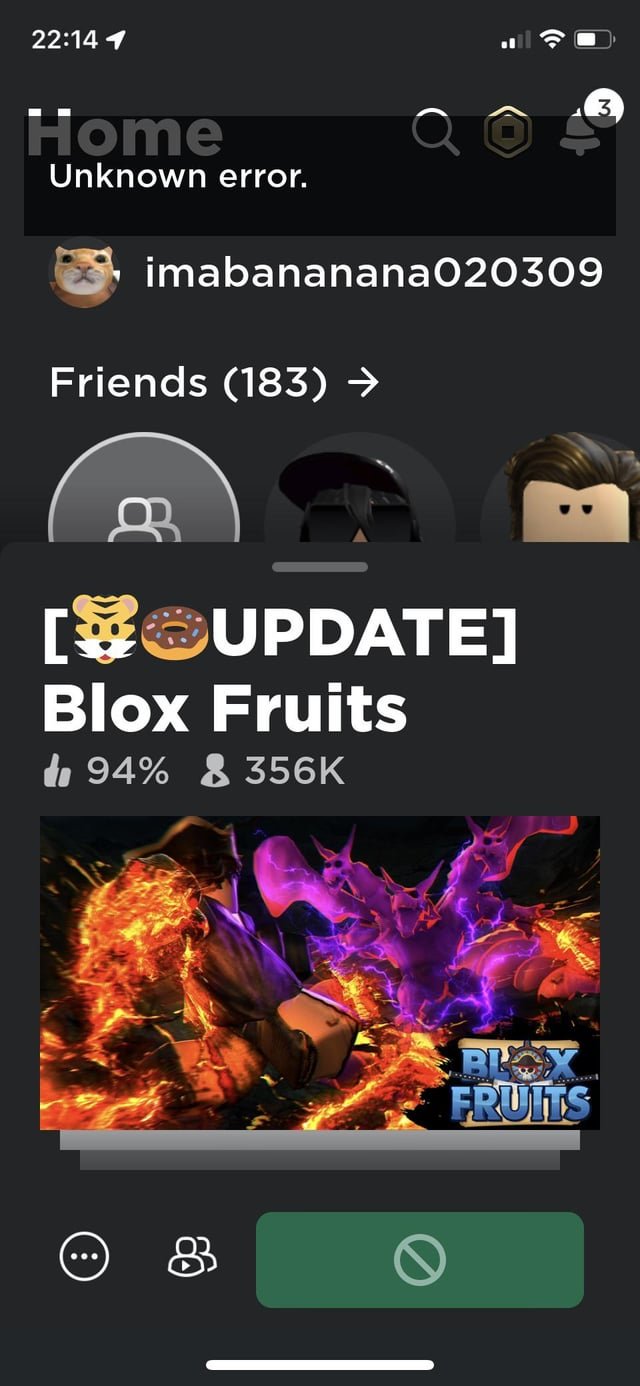
Connectivity issues, server problems, or Roblox account restrictions are common reasons why you can’t join any Roblox games.
Frustration mounts when you’re ready for some Roblox fun, but you keep hitting a wall. Why cant i join any roblox games? It’s a common question and we’re going to tackle it.
This issue can stem from multiple areas. It could be something simple like your internet connection. Or, it might involve more complex server issues with Roblox itself. We’ll explore some of the most common reasons.

Why Can’t I Join Any Roblox Games?
It’s super frustrating when you’re ready to dive into a cool Roblox adventure, but the game just won’t load. You click “Play,” and… nothing! Or maybe you get an error message that makes no sense. Don’t worry, you’re not alone. Lots of Roblox players run into this problem. Let’s explore all the reasons why you might be having trouble joining Roblox games and, more importantly, how to fix them.
Internet Connection Problems
The first and most common reason you can’t join a Roblox game is a problem with your internet connection. Roblox, like most online games, needs a stable and fast internet to work properly. Imagine trying to race a car on a bumpy dirt road – it just won’t go smoothly. The same applies to Roblox and your internet.
Checking Your Internet Speed
Before you do anything else, check your internet speed. You can do this easily by going to a website like “speedtest.net” or “fast.com”. These websites will measure how fast your internet is downloading and uploading information. If the numbers are really low, especially for download speed, that means your internet is slow, and it’s likely the reason for your Roblox problems.
Here’s a simple table to give you an idea of what internet speed you need:
| Speed | What it means for Roblox |
|---|---|
| Low (Below 10 Mbps download) | Likely to experience problems like slow loading or connection errors. May find it very hard to join any game. |
| Medium (10-50 Mbps download) | Should generally work okay for most Roblox games. Might experience some lag or minor issues. |
| High (Above 50 Mbps download) | Best for playing Roblox smoothly with very few connection issues. Allows you to enjoy even the most detailed games. |
If your internet is slow, you may have to talk to your internet provider about getting a faster connection. But before you call them, try these simple fixes.
Simple Internet Fixes
- Restart Your Router and Modem: Think of these as the brains of your internet. Sometimes, they just need a little reboot. Unplug them from the wall, wait about 30 seconds, and plug them back in. Wait a couple of minutes for them to fully turn back on, and then try Roblox again.
- Move Closer to Your Router: If you’re using Wi-Fi, try moving your device (computer, phone, tablet) closer to your router. The farther you are, the weaker the signal gets. Think of it like trying to talk to someone far away; it gets harder to hear.
- Connect with an Ethernet Cable: If possible, use an Ethernet cable to connect your computer directly to the router. This is a wired connection and it usually gives you a much more stable and faster internet speed than Wi-Fi.
- Close Other Applications: If you have other programs open that are using the internet, like online videos or downloading files, they can slow down your Roblox experience. Close them when playing Roblox.
Roblox Server Issues
Sometimes, the problem isn’t on your end; it’s with Roblox itself. Roblox has lots of servers which are like big computers that store all the game information. If those servers have problems, or if there are just too many people trying to play at once, it can be hard or even impossible to join a game.
Checking Roblox Server Status
You can check the Roblox server status on websites like “downdetector.com” or on Roblox’s social media pages. If many people are reporting problems, then the issue is likely on Roblox’s end, and you will have to wait for them to fix it. You can’t fix server issues yourself; it’s up to Roblox to get everything working again.
Server issues can cause errors like:
- Connection timed out
- “Unable to join game” messages
- Games not loading at all
Peak Playtimes
Keep in mind that certain times of the day, like after school or on weekends, more people try to play Roblox. This can sometimes cause server overload even if everything is working normally. Trying to join a game when there are fewer people online might help if you are having trouble joining because of this.
Roblox Updates and Maintenance
Like any software, Roblox needs to be updated regularly. These updates add new features, fix problems, and help keep everything running smoothly. If Roblox is having an update or is undergoing maintenance, then the game might not be available at all.
Update Notifications
Roblox usually gives some notice if they are going to do maintenance. They may put a notice on their website, or you might see a message in the Roblox app. Check for these announcements to be aware of potential downtime. However, sometimes they need to do maintenance unexpectedly and there will not be notifications.
Checking for Client Updates
If the problem is not server issues, check if the version of your game client is updated. If not, the game might not be able to connect to the servers and will stop you from joining the game. You can check for updates by closing the game completely and reopening it. This often makes the game check and install any needed updates. Or you can go to your app store/play store to see if any updates need to be made.
Browser and Device Issues
Sometimes the problem isn’t Roblox itself, but the browser or device you are using to play. It’s like trying to fit a square peg in a round hole; sometimes things just don’t match up.
Browser Compatibility
Roblox is designed to work best with certain web browsers. Make sure you are using one that is compatible. These are the browsers that usually work best:
- Google Chrome
- Mozilla Firefox
- Microsoft Edge
- Safari (for Apple users)
Using an older or unsupported browser might cause problems with loading games or joining servers.
Clearing Browser Cache and Cookies
Your browser saves information as you use it. This saved information is called cache and cookies. Over time, these files can become corrupted and cause problems. Clear them regularly. To clear your cache and cookies, you will have to go to your browser’s settings, and there will be options to do so.
Device Problems
If you’re playing Roblox on a computer, phone, or tablet, make sure your device meets the minimum system requirements. An old or slow device may not be able to run Roblox well. Check the Roblox website for specific device requirements for both desktop and mobile.
Also, make sure you have enough space on your device. Running out of space can also cause problems and cause the game not to work properly.
Restarting Your Device
A simple restart of your device can fix a lot of problems. It’s like giving your device a little break to clear its memory and start fresh. Turn off your device completely, wait a few seconds, and then turn it back on.
Account Restrictions and Settings
Sometimes, the problem is not with the game, your internet or device, but with your account settings.
Account Privacy Settings
Roblox has different privacy settings that you can change. Make sure that your privacy settings allow you to join games. If your account is set to restrict who can join you, this might be why you cannot join. You should also check with a parent if your account has any parental restrictions. To check your privacy settings, you will have to log into the account and then go into the privacy settings.
Account Restrictions
If your account has any restrictions, for instance if you have been banned or are in time out, you will not be able to join the game. If you think your account is restricted by mistake, you might need to contact Roblox’s support.
Game-Specific Issues
Sometimes, the problem lies with the game itself and not with you, your internet or Roblox.
Full Servers
Each Roblox game has a limited number of spots. If the server is full, you will not be able to join. This is very common for very popular games. You may have to keep trying, or you might want to try another game.
Game Errors
Sometimes, developers of the game may make errors in the game code, which can cause a game not to work for a period of time. This usually is not your fault. You will have to wait for the game developers to fix the errors. You may be able to find information about errors on the game page in the comments.
Firewall and Antivirus Issues
Your firewall and antivirus program are like guards that protect your computer from bad stuff on the internet. Sometimes, they might accidentally block Roblox.
Allowing Roblox Through Firewall
You need to make sure that your firewall is not blocking Roblox. You will need to go into the firewall settings and allow Roblox through. Every firewall is slightly different, so you may need to ask for help from an adult.
Antivirus Interference
Your antivirus program may also be blocking Roblox. You might need to add Roblox to your antivirus exception list, which is the list of programs your antivirus allows to run. Check your antivirus settings, and there should be a place for it.
VPN Issues
If you are using a VPN, also known as a virtual private network, it could interfere with you being able to join games. If you are having problems connecting to the game, try disabling the VPN and trying again. If you are not using a VPN, then you do not need to worry about this.
If you have tried all of these steps, and you are still having trouble, it might be a very rare or unusual issue that might require getting help from Roblox support. Try to give them as much details as possible of the steps you have tried.
In conclusion, while the frustration of not being able to join Roblox games is common, it’s not usually a mystery that can’t be solved. Often, the problem lies with your internet connection, server issues on Roblox’s side, or the game itself. By systematically checking each area, like your internet speed, the Roblox server status, browser settings, and account restrictions, you can almost always figure out why you’re having problems and get back to gaming in no time. Remember, troubleshooting is a bit like being a detective, and with a little patience, you will be back in Roblox in a flash.
Fix Roblox "This Experience is Unavailable Due to Your Account Settings" Error
Final Thoughts
In short, various reasons can prevent you from joining Roblox games. Network issues, server problems, or account restrictions might cause the inability to play. A common issue is that your internet connection might not be stable.
Game-specific problems, like full servers or updates, can stop access. Check your internet and confirm that Roblox servers are online. Ultimately, “why cant i join any roblox games” boils down to addressing these fundamental causes.

