
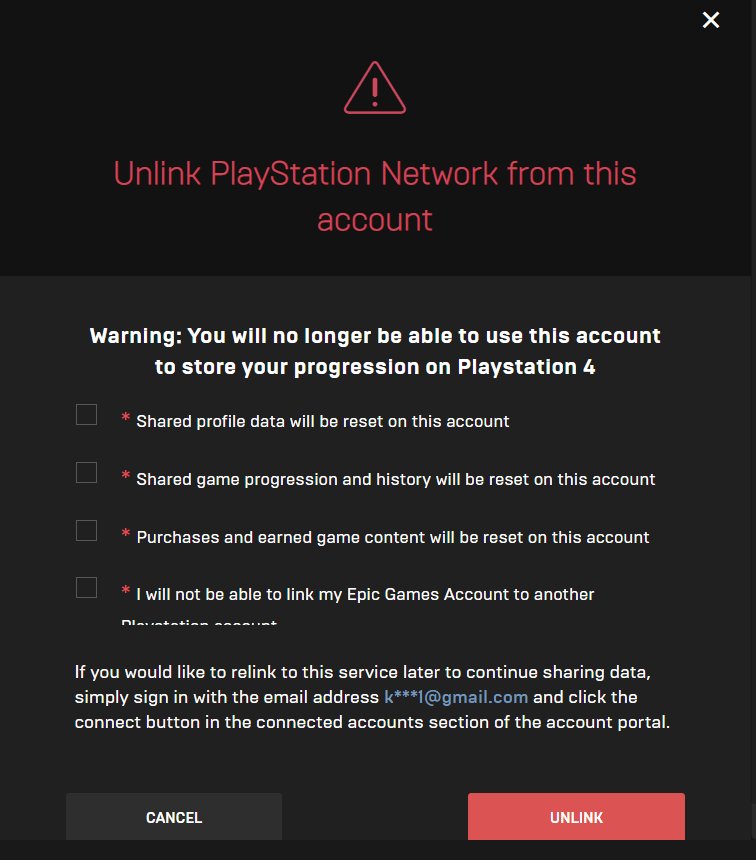
Your Fortnite account was likely disconnected by Epic Games due to a violation of their terms of service, such as cheating, unauthorized purchases, or suspicious activity.
Did you suddenly find yourself logged out of Fortnite, wondering why did Epic Games disconnect my Fortnite account? It’s a frustrating experience, but there’s usually a reason behind it. This disconnection is typically not random; Epic Games has systems in place to detect and act against certain account behaviors.
They want to ensure a fair and safe environment for all players. Understanding the potential causes can help you prevent future issues. So, let’s explore the common reasons why this might happen.

Why Did Epic Games Disconnect My Fortnite Account?
Having your Fortnite account disconnected can be super frustrating, especially when you’re ready to jump into a new match with your friends. It’s like having your favorite toy suddenly taken away! But don’t worry, there are several reasons why this might happen, and usually, it’s something that can be fixed. Let’s explore some of the most common reasons why Epic Games might disconnect your Fortnite account, and what you can do about it.
Terms of Service Violations
Just like most games, Fortnite has a set of rules that every player needs to follow. These rules are called the Terms of Service (TOS), and they’re there to make sure everyone has a fair and fun gaming experience. If you break these rules, Epic Games might disconnect your account. Let’s dive into some common ways players might accidentally break the rules.
Cheating or Hacking
Nobody likes a cheater, right? Using hacks or cheats in Fortnite is a big no-no. Epic Games has systems in place to detect players who are using unfair programs to gain an advantage. These programs might let you see through walls, aim automatically, or even move faster than normal players. If Epic Games detects you using these kinds of programs, they will most likely disconnect your account.
- Using aimbots or wallhacks.
- Using software that modifies game files.
- Taking advantage of glitches to unfairly win.
Account Sharing
Sharing your account with someone else might seem harmless, especially if it’s a friend or family member, but it is against Fortnite’s rules. Each Fortnite account is meant for one person. This is because Epic Games needs to know who is playing to keep things fair and secure. Allowing others to use your account can lead to your account getting disconnected. It might also lead to security risks for your account.
- Letting a friend use your account to play.
- Selling or buying an account.
- Sharing your account information with others.
Inappropriate Behavior
Fortnite is a game played by lots of different people, including kids. Being kind and respectful to others is really important. Epic Games takes things like bullying, harassment, and using bad language very seriously. If you are reported for this kind of behavior, Epic might disconnect your account.
- Using hateful language or slurs.
- Bullying or harassing other players.
- Sending inappropriate messages.
Unauthorized Purchases or Chargebacks
When you buy something in Fortnite, like V-Bucks or a new skin, you need to pay correctly. If you use a method of payment that is not authorized or if you try to get your money back after making a purchase, it can cause problems. This is called a chargeback. Epic Games can disconnect your account if there’s a payment issue like this.
- Using a stolen credit card.
- Issuing a chargeback after buying V-Bucks.
- Having a payment method that is declined.
Security Issues
Epic Games cares a lot about keeping your account safe. If they notice anything suspicious, they might disconnect your account temporarily to protect it. Here are a few security issues that could cause a disconnection.
Suspicious Login Activity
If Epic Games sees that someone is trying to log into your account from a place you don’t normally play from, they might disconnect your account to keep it from being stolen. This might happen if you have a weak password or if you’ve accidentally shared your password with someone else.
- Logging in from a very different location.
- Multiple login attempts from an unusual device.
- Suspicious IP address activity.
Compromised Account
Sometimes, hackers try to steal Fortnite accounts. If Epic Games thinks your account might be compromised (that means someone is trying to get into it without your permission), they’ll disconnect it to keep your stuff safe. They’ll want to make sure you are the only person who has access to your account.
- Your account details were leaked.
- A hacker tried to change your password.
- Unusual purchases made from your account.
Password Issues
Making sure your password is strong is key to keeping your account safe. If you use a weak password or if you don’t change it often, it makes your account easier for others to break into. Epic Games might disconnect your account if they think your password isn’t secure.
- Using a very simple password like “123456” or “password”.
- Using the same password for multiple accounts.
- Never changing your password.
Technical Glitches and System Errors
Sometimes, the reason for a disconnect isn’t something you did. It could just be a mistake in the system or a technical issue. While these issues aren’t as common, they can happen. Let’s take a look at a few.
Server Problems
Fortnite uses big computers called servers to keep the game running. Sometimes, these servers might have problems, like getting too busy or having errors. If a server has an issue, it can cause Epic Games to disconnect your account. These kinds of issues usually get fixed quickly.
- Server outages or maintenance.
- Overloaded servers during peak times.
- Unexpected server errors.
Game Updates or Patches
Epic Games often makes changes and improvements to Fortnite through updates and patches. Sometimes, these updates can cause unexpected issues that might lead to disconnections. This usually happens while Epic is trying to make the game better for everyone.
- Conflicts with new game files.
- Unresolved bugs after an update.
- Incompatible updates with certain devices.
How to Fix Your Disconnected Account
Now that we have covered some of the potential reasons for your disconnected account, lets look at what steps you can take to fix it.
Contacting Epic Games Support
The best thing you can do if you aren’t sure why you were disconnected is to reach out to Epic Games Support. They have people who can look into your account and tell you exactly what happened and how to get it back.
- Visit the Epic Games support website.
- Submit a support ticket with the required details.
- Explain your issue clearly and patiently.
Password Reset
If you think your account was disconnected due to security issues, changing your password is a smart move. Make sure you choose a password that is hard for other people to guess. You can also turn on two-factor authentication (2FA) for extra security. It means that you need a code from your phone to log in from a new device.
- Go to the Epic Games website and click “Forgot Password”.
- Follow the steps to create a new, strong password.
- Set up two-factor authentication (2FA) for added protection.
Reviewing Your Account Activity
Check your account details to see if there’s anything out of the ordinary. Are there any purchases that you didn’t make? Is there a place on the map that you never played from? If you see anything that doesn’t look right, this can be something to talk to Epic Support about.
- Check your purchase history for any unfamiliar transactions.
- Review your login locations.
- Look at your associated accounts and devices.
Checking for Game Updates
Make sure your Fortnite game is updated to the newest version. Sometimes, an older version of the game can cause disconnections. Check your game launcher to see if there are any updates available.
- Open the Epic Games Launcher.
- Check if an update is available for Fortnite.
- Install any pending updates to make sure your game is the latest version.
Clearing Game Cache
Sometimes, old game files can cause problems. Clearing your game’s cache can help fix any issues you might be having with disconnections.
- Close Fortnite game completely.
- Find the game settings for your device.
- Clear the cached data for Fortnite.
Uninstalling and Reinstalling the game
If all else fails, sometimes uninstalling and reinstalling the game can fix lingering problems. This can often clear out any corrupted files that may be the root of your disconnect issue.
- Uninstall Fortnite from your device.
- Download the game again from the Epic Games website.
- Install the game and try logging in to your account.
Remember that getting disconnected from Fortnite can be annoying, but it’s often a problem that you can solve. By taking these steps, you can get back to playing your favorite game!
How to Fix Fortnite Account Link Failed & Already Associated with a Different Account (Easy Method)
Final Thoughts
Ultimately, Epic Games might disconnect your Fortnite account for various reasons, including violations of their terms of service, suspicious activity, or security concerns. These actions often protect the gaming environment. They might also implement it due to account compromise.
So, why did epic games disconnect my fortnite account? The best action to resolve it is to contact Epic’s support directly. This action will give you more specific information about your specific case. They can provide steps you need to recover it.

