
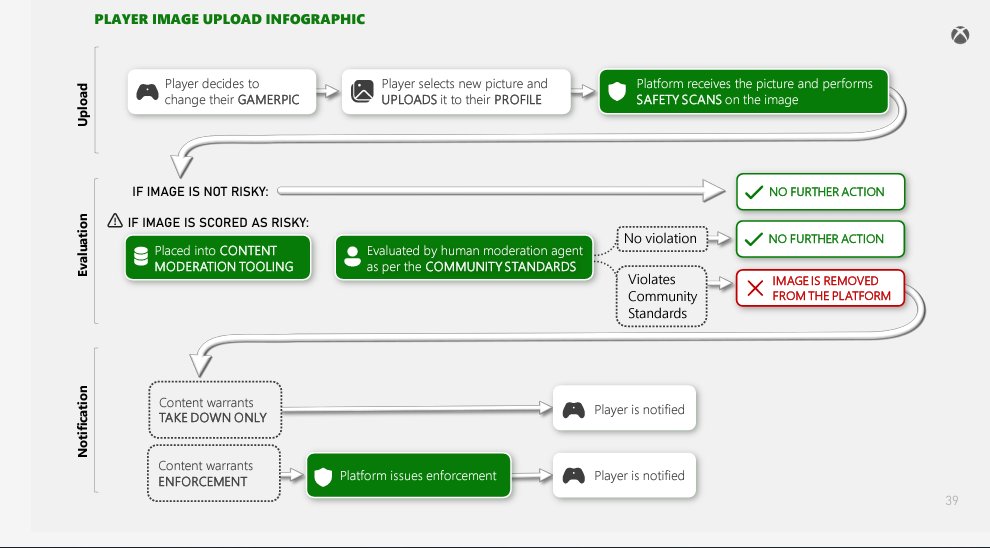
Xbox community moderation tools enable players to report inappropriate behavior, mute or block other users, and manage their own privacy settings for a safer online experience.
Dealing with online interactions can sometimes be challenging. We all know how frustrating it is to encounter negativity in gaming. Luckily, Xbox provides a variety of ways for players to take control. These tools help everyone maintain a positive environment.
Xbox community moderation tools give you the power to manage your interactions. You can report players who violate community standards. This system keeps the platform enjoyable and respectful.

Xbox Community Moderation Tools: Keeping the Game Fun for Everyone
Playing games online with friends is super fun! But sometimes, things can get a little out of hand. That’s where Xbox’s community moderation tools come in. Think of them as the superheroes that help keep the Xbox world a safe and enjoyable place for all gamers, big and small. These tools aren’t just for the grown-ups; they’re designed to help everyone understand how to play fair and treat others with respect.
Understanding the Basics of Xbox Community Standards
Before we dive into the tools themselves, let’s talk about the rules! Xbox has something called Community Standards. These are like the guidelines for how everyone should behave while playing. It’s all about being kind, not cheating, and making sure that everyone feels welcome. Think of it like being polite at a playground, but online! These standards cover all sorts of things, from the words you use to the way you treat other players. It’s important to know them, just like it’s important to know the rules of a game before you play.
Key Areas Covered by Community Standards
- Communication: How you talk to others. This includes voice chat and messages. We need to use kind words, and not say things that could hurt others’ feelings.
- Gameplay: This is about playing fairly. It means no cheating or trying to get an unfair advantage over other players.
- Content: This covers what you share, like pictures, videos, and even your gamer profile. We need to keep it clean and appropriate for everyone.
- Respect: It’s important to treat everyone with respect, no matter who they are or where they come from.
Xbox expects all players to follow these standards. And if someone doesn’t, there are tools to report them, which we’ll explore next.
Reporting Bad Behavior: Your Tool for a Better Xbox Experience
Sometimes, even with the best intentions, someone might not follow the rules. When this happens, Xbox provides tools for you to report bad behavior. Think of it as being a helpful teammate and letting the team (Xbox) know when something isn’t right. It’s not about being a tattletale, but about ensuring a good experience for everyone.
How to Report Someone
Reporting someone is a simple process. Here’s how you do it on your Xbox console:
- Find the Player: First, you need to find the profile of the person who is not following the community rules.
- Open the Profile: Select the player’s profile.
- Choose ‘Report’: There will be an option to ‘Report’ the player. Click on this.
- Explain the Problem: You’ll be given a list of reasons why you are reporting them. Pick the one that best fits the situation. You can also provide more details in the message box.
- Submit the Report: After filling the details and selection of reason, simply submit the report.
The same procedure can be done on the Xbox app on your phone or computer. The reporting system allows you to explain exactly what happened and helps the Xbox team investigate the situation. It’s really useful because it helps make sure that those who are not playing fair are held accountable.
Types of Actions and Enforcement on Xbox
Okay, so you’ve reported someone. Now, what happens? Well, the Xbox team reviews the reports and decides on the proper actions. The goal is to make sure everyone is following the community standards. Here are some examples of actions that might be taken.
Possible Outcomes of a Report
- Temporary Communication Suspension: If someone is using unkind words, they might not be able to chat with others for a while. This can apply to voice chat and messaging.
- Account Suspension: A more serious consequence is to temporarily suspend someone’s Xbox account, which stops them from using Xbox services.
- Permanent Ban: For extreme cases, the Xbox team can permanently ban someone from Xbox. This means they can’t use their account anymore.
- Content Removal: If someone shares inappropriate content, the Xbox team will remove it so it’s no longer visible to the Xbox community.
These actions might seem tough, but they are necessary to keep the Xbox community safe and welcoming. Remember, these aren’t designed to punish but to encourage positive behavior.
Privacy Settings: Keeping Your Information Safe
Besides moderation, Xbox provides some great privacy settings. These settings let you choose who can see your profile, send you messages, or even add you as a friend. These features are very important for the young gamers because they provide them with a safe and healthy environment for playing online. These settings put you in charge of who you interact with and help you keep your personal information private. It’s like having a lock on your locker at school – you decide who gets to peek inside.
Managing Your Privacy
- Who Can See My Profile: You can choose if everyone, just friends, or no one can see your profile information.
- Who Can Send Me Messages: Control who can send you messages – everyone, friends, or no one.
- Who Can Add Me as a Friend: You can decide if anyone can add you, or if you want to approve friend requests.
- Voice Chat Settings: Control who can hear you during voice chat.
- Activity Tracking: You can decide if your gaming activities should be visible to others or not.
Taking time to understand and adjust these settings is a great way to be in control of your online experience. It helps you interact with people you want to, and it keeps you safe from unwanted interactions.
Parental Controls: Giving Parents Peace of Mind
For younger players, parental controls are a great tool. They allow parents to manage what their children can see and do on Xbox. It’s like having a remote control for their gaming experience! With parental controls, parents can set spending limits, decide which games are appropriate, and control how their kids can interact with others online. This can help create a healthy balance between gaming and other activities.
What Parental Controls Can Do
- Spending Limits: Parents can set limits on how much money their kids can spend in the Xbox Store. This can help avoid big surprises on your credit card bills.
- Content Restrictions: Parents can block certain games or apps that might not be age-appropriate.
- Screen Time Management: This lets parents control how much time their kids can spend gaming each day.
- Communication Limits: Parents can choose who their children can talk to online.
Parents can set up these controls through their own Microsoft accounts, and these controls apply to their children’s Xbox accounts. It’s all about creating a safe space where kids can enjoy gaming while their parents have peace of mind.
How to Use Communication Tools Respectfully
Xbox has a lot of ways for players to talk to each other. These can be through voice chat or text messages. While these are great tools for making friends and working together, it’s very important to use them respectfully. Think of these communication tools like speaking in a conversation in real life, but instead using them in a digital world. Using them carefully can ensure great gaming fun, otherwise, they can make the gaming environment very uncomfortable for everyone.
Best Practices for Online Communication
- Use Kind Words: Always try to be polite and encouraging. Saying “good game” after a match is a great way to show respect, or even “good job”.
- Avoid Bullying: Never use hurtful words or make fun of other players. Everyone is there to have fun, and no one likes a bully.
- Be Patient: Sometimes people might not be playing their best. Be patient and offer help or encouragement instead of getting frustrated.
- Respect Different Opinions: Not everyone will agree with you all the time, and that’s okay. Try to understand others’ point of view.
- Report Inappropriate Language: If you see someone using bad language, report them using the proper reporting system. This helps maintain a good gaming environment.
When you communicate with care, you help create a positive and healthy gaming atmosphere. This makes the games more fun for you and everyone else involved.
Staying Safe Online: Important Tips for Everyone
The Xbox community is generally a safe place but like any online environment, there are a few things to keep in mind to stay extra safe. These steps are very simple, and keeping them in mind can help keep your gaming experience fun and safe.
Tips to Stay Safe
- Keep Personal Information Private: Do not share things like your real name, address, or phone number with people you don’t know online.
- Be Careful Who You Talk To: Don’t add just anyone as a friend. Only connect with people you know in real life, or through other mutual friends.
- Don’t Click Suspicious Links: Be careful of links sent in messages that seem too good to be true. They might lead to bad websites.
- If Something Makes You Uncomfortable, Tell Someone: If you encounter something that makes you feel uncomfortable online, always tell a trusted adult, like a parent or teacher.
Staying safe online isn’t hard. With just a bit of caution, you can have great time playing your favorite games with your friends on Xbox.
Xbox Accessibility Tools and Inclusion
Xbox is not just about moderation, it’s about inclusion as well! They have built many accessibility tools for players with different types of challenges. These tools are really important because they ensure that gaming is fun and available for everyone, no matter their background or any other disabilities. They help create a community that is welcoming to all.
Key Accessibility Features
- Controller Customization: Players can customize their controllers with remapped buttons and more. This is important for those who might have trouble with standard setups.
- Audio Controls: Audio settings allow players to adjust game sounds to their needs.
- Visual Controls: These help players change the visuals of a game so that they are easier to see.
- Narrator: Screen narrator helps those who are visually challenged, by converting text to speech.
These tools and features show that Xbox is all about creating a community where everyone feels included and can have fun. It’s not just about playing games, it’s about sharing the fun of gaming with everyone.
Continuous Improvement: Xbox’s Ongoing Efforts
The Xbox team is always working to make the community a better place. They listen to feedback, track reports, and update their tools and policies. It’s like they have a team of builders always adding new and improved things to our playground. Their efforts ensure that the Xbox community remains safe, welcoming, and fun for everyone. This ensures that the guidelines and tools stay updated to address new challenges and keep the community a great place to play.
The Importance of Community Participation
The Xbox moderation tools are great, but they work best when everyone participates. It’s like everyone working together to keep the playground clean and safe. Here are some ways that you can participate:
- Follow the Rules: Do your best to play by the community standards. A great community begins with each player acting responsibly.
- Report Bad Behavior: If you see someone doing something wrong, report it. It’s important to speak up when something does not feel right.
- Be Respectful: Treat all players fairly and with respect. Kindness is always the best policy and makes the gaming experience more enjoyable for everyone.
- Encourage Others: Be positive and encourage good behavior. This can help inspire others to do the same.
Together, we can make the Xbox community a place where everyone can have fun and enjoy gaming, safely.
By using the Xbox community moderation tools, understanding community standards, and practicing good behavior, we can all help create a fun and safe gaming experience for everyone. It’s like being part of a team that works together to make the game better. Remember, everyone has a role to play, and together, we can make the Xbox community a place where everyone feels welcome and can have a great time!
Xbox is BANNING Players for 365 Days… 😲
Final Thoughts
In short, Xbox community moderation tools empower players to maintain a positive gaming environment. These features enable users to report inappropriate content and behavior directly, contributing to a safer experience. Furthermore, proactive monitoring helps reduce instances of harassment and negativity. Xbox community moderation tools play a vital role in keeping the community healthy and enjoyable.

