
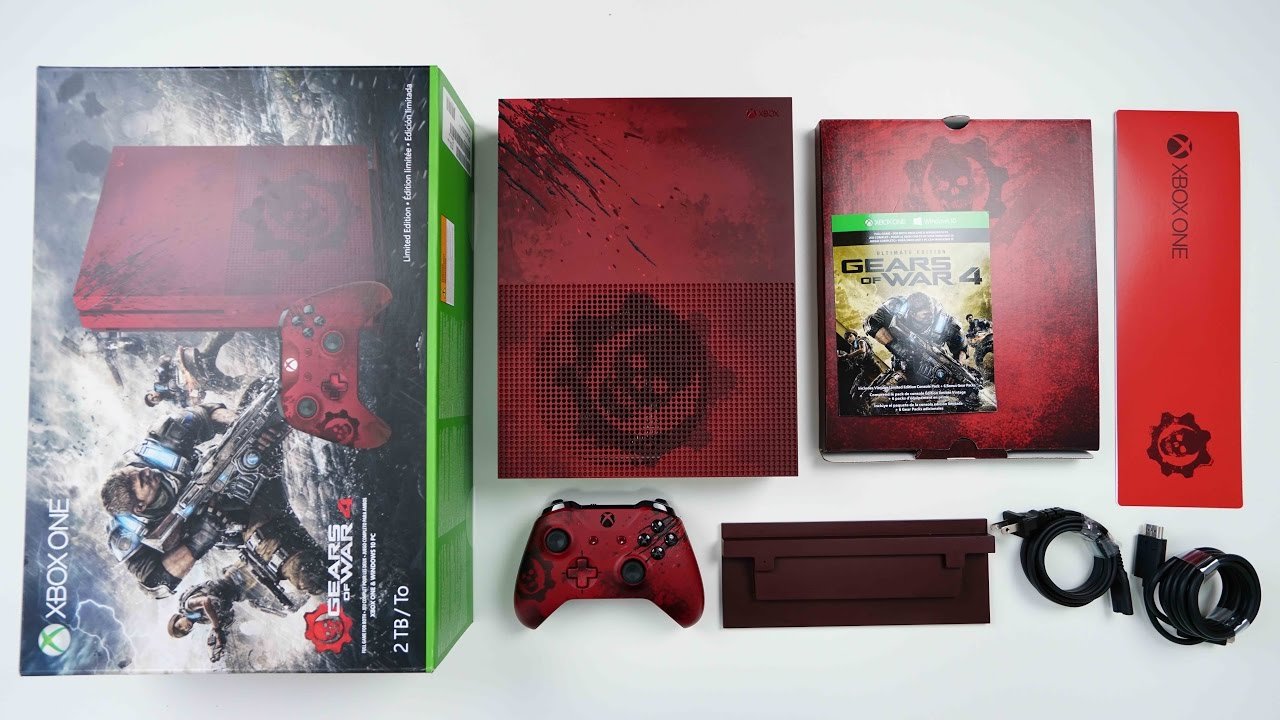
The Xbox console unboxing reveals a sleek new console, controller, power cord, and HDMI cable, ready for immediate setup and gaming.
The box arrives, anticipation builds. The plastic wrapping yields, revealing the pristine Xbox console nestled inside. It’s a moment many gamers eagerly await.
The satisfying sound of cardboard flaps opening marks the beginning of your new gaming journey. This Xbox console unboxing is just the first step to accessing a whole world of entertainment.

Xbox Console Unboxing: A Gamer’s First Look
Getting a new Xbox is super exciting! It’s like Christmas morning, but for video games. Before you can jump into your favorite worlds and start battling dragons or racing cars, there’s one important step: the unboxing. Let’s walk through what you’ll see and find when you open your brand new Xbox console. This isn’t just about tearing into a box; it’s about getting ready for some serious fun. We’ll cover everything from the outside of the box to setting up your new console. We’ll make sure you know what every part is, and how to get started.
The Box Itself
First things first, let’s talk about the box. The Xbox box is usually big and sturdy, made to keep everything inside safe. It’s often decorated with cool pictures of the console itself, games, and the Xbox logo. Look carefully! You might see which Xbox model you have – like the Series X or Series S – printed on the side. The box tells you a lot about what you’re about to get. It’s like the cover of an amazing book, giving you a sneak peek at the fun inside.
Checking the Details
Before opening the box, it’s a smart idea to check a few things. Make sure the box is in good condition with no major dents or tears. If it looks damaged, it’s a good idea to contact the store you bought it from. Also, check for a seal. Usually, there’s a clear sticker or plastic wrap that shows the box hasn’t been opened before. This ensures you’re the first person to touch your new console. You wouldn’t want someone playing with it first, right?
Opening the Box
Okay, the moment has arrived. Carefully open the box, either by cutting the tape or breaking the seal. Inside, you will find things very neatly packed. Xbox packs their consoles with care so they don’t get damaged. You might see a cardboard insert or specially designed trays holding the different parts. This keeps everything from moving around during shipping. Don’t throw these away immediately. They help you keep all parts separate and safe.
What’s Inside?
Here’s what you’ll typically find inside your Xbox box:
- The Xbox Console: This is the star of the show! It will be wrapped in a protective bag or have cardboard around it. Be gentle when taking it out. It’s like holding a precious treasure.
- The Controller: You’ll get an Xbox wireless controller. It might also be in a protective bag. It’s your key to the gaming world.
- Power Cable: This cable connects your Xbox to the power outlet. It’s usually a simple, thick cable.
- HDMI Cable: This cable connects your Xbox to your TV or monitor so you can see the games.
- Quick Start Guide: This guide is like a tiny manual. It has important instructions about setting up your console. It’s a good idea to look at this.
A Closer Look at the Console
Now, take a moment to admire your new Xbox. The design may vary slightly based on the Series X or S model. The Series X is usually larger and has a powerful look, while the Series S is smaller and more compact. Look around the console. You’ll see buttons for power and pairing your controller, vents for cooling, and all the ports at the back. It’s like a high-tech sculpture. Don’t plug anything in yet, just look and get familiar.
The Xbox Controller
The Xbox controller is not just any controller. It’s specifically designed for great comfort and gaming. It has two joysticks, a directional pad (D-pad), face buttons (A, B, X, Y), triggers, and bumper buttons. On the front, you will see the Xbox button to turn on the console. Check the back, you will find the battery compartment or built-in rechargeable area. The controller is how you’ll control your character and explore all the games. Hold it in your hands; feel the smooth curves and where all your fingers will rest.
Unboxing Accessories
Besides the main items, some Xbox boxes may include some smaller accessories. This can depend on where you bought your console and if it was bundled with a particular game or add-ons.
- Batteries for the controller: If your controller is not rechargeable, you’ll find a set of batteries.
- Xbox Game Pass Trial Card: Sometimes, you get a trial subscription of Xbox Game Pass, giving you access to a huge library of games. This is like getting a free pass to a whole gaming playground.
- Game Code: You might get a code for a free game!
Examining the Ports and Connections
It’s important to get to know the ports on your Xbox. This is where you plug everything in. Turn your console to the back.
Understanding the Back of your Xbox
You will see several ports. The one you will use the most at the beginning will be the HDMI port to connect your TV. You will also see the power port where you connect your power cable. Depending on the model, you might see USB ports, Ethernet port, and a storage expansion slot. These ports help your Xbox connect to different things and lets you add more storage if needed. Look carefully, as this is where you plug all the wires.
- HDMI Out Port: This is where you connect the HDMI cable to your TV or monitor. It’s how you see the games.
- Power Port: This is where you plug in the power cable.
- Ethernet Port: If you want a wired internet connection, you plug an ethernet cable here.
- USB Ports: These are for connecting other devices like external hard drives or accessories.
- Storage Expansion Port: (Series X/S only) It’s where you can plug in special storage cards to get more space for games.
Initial Setup
Now that everything is out of the box, it’s time for setup. Don’t rush this part, take your time and make sure you connect everything properly.
Connecting the Cables
First, connect the HDMI cable from your Xbox to your TV. Make sure you plug it into an HDMI input on the TV. Then, connect the power cable from your Xbox to the power outlet. It’s just like plugging in any other electronic device, like a phone charger. Double check your plugs.
Powering On for the First Time
Once everything is plugged in, press the power button on your Xbox console or the center Xbox button on your controller. Your Xbox will start up. You will see the Xbox logo appear on the screen, this means everything is working well. From here, the Xbox will walk you through the rest of the setup process. It’s very simple with on-screen instructions.
Connecting to the Internet
Next, you’ll need to connect your Xbox to the internet. This lets you play online games, download updates, and access all the features. You can choose between a wired connection or Wi-Fi. If you chose wired, plug an ethernet cable into the correct port and to your modem/router. Or, if you have Wi-Fi, select the network you would like to use, and enter the password. Your Xbox will then get online!
Signing into Your Microsoft Account
You’ll need a Microsoft account to use your Xbox. If you already have one (maybe from using Windows or other Microsoft products), sign in with that. If not, you can create one easily on your Xbox or on your computer. This account links all your games, progress, and friends together. Once you’re logged in you will be able to access the dashboard.
Customizing Your Xbox
Once you’re logged in, you can personalize how your console looks. You can change the theme, add a profile picture, and name your avatar. This makes your experience unique. Choose a background you like and makes the Xbox feel like yours. Also explore settings that personalize gaming to your preferences, like volume levels, or accessibility features. This is where your Xbox starts to feel like home.
Exploring the Xbox Interface
The Xbox dashboard is your main area for starting games and finding everything on your console. You will see tiles for your games and apps, as well as tabs at the top for game pass, and other store features. You can navigate with your controller. Take some time to explore the menus and find where everything is located. The more familiar you are, the easier it will be to find what you are looking for.
Game Library and Apps
Your Xbox has a special area for all your games. When you start downloading and buying games, you will find them all in one place. You will also see areas for apps like Netflix and Youtube. These are the apps you use to watch movies, shows or videos online. You can organize the tiles, and find your favorites easily. This area will become very familiar for you as you progress.
Xbox Store
The Xbox store is a place where you can find and purchase new games. There are demos to try, or full games that you can buy and download. You can also find DLC and other content here, which can add extras to your games. Have fun looking through the wide library and picking out new games to play.
Xbox Game Pass
Xbox Game Pass is a subscription service that lets you play lots of games for one monthly fee. If you have a subscription, you’ll have access to tons of different games for free! The games are constantly changing, so you will always have new options to try.
Initial Games and Play
Now that you’ve set everything up, it’s time for the most important part: playing! Choose a game from your collection or from Game Pass. Start it up and get into the action. Use your controller to move around and explore. Don’t be afraid to try different games and find what you like best. Gaming is about having fun and relaxing. Whether you are building a town, exploring a cave, or playing sports, have a great time and enjoy all the work you put into setting it up.
Going through the steps of an Xbox unboxing is like starting on a new big adventure. You’ve taken the box apart, learned what all the parts are, plugged in the wires, and set everything up for the first time. This is where the fun really starts. Your journey into Xbox gaming has begun! There are many exciting moments waiting for you. Have fun and keep exploring!
The New Xbox Console Unboxing… (Series S Carbon Black) + Gameplay
Final Thoughts
The Xbox console unboxing reveals a sleek, powerful piece of gaming technology. Its minimalist design is immediately impressive. The setup process is quick and intuitive, getting you into the action fast.
This new console promises incredible gaming experiences. The controller feels great, and the graphics are crisp. This Xbox console unboxing has surely set the stage for hours of entertainment.

