
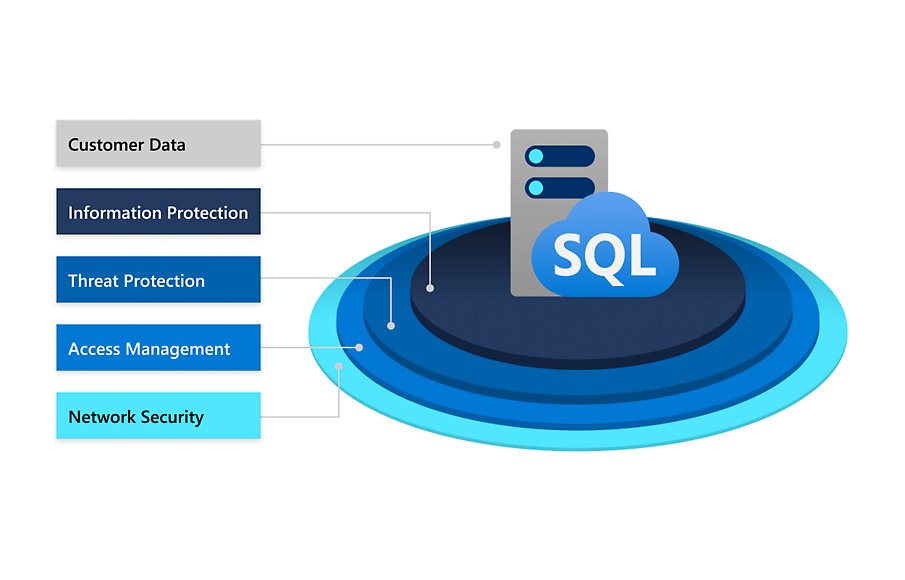
Xbox data security measures include encryption of user data, strong password requirements, two-factor authentication options, and continuous monitoring for suspicious activities.
Concerned about protecting your gaming information? We understand. Your Xbox account holds valuable data and keeping it safe is important. Microsoft implements various Xbox data security measures to defend your personal details.
These protections aim to guard against unauthorized access. This gives players a safer and more secure gaming environment overall.

Xbox Data Security Measures
Keeping your information safe while playing games is really important, especially with your Xbox. Think of your Xbox account like your own special clubhouse – you want to make sure only you and your friends are allowed inside! Microsoft, the company that makes Xbox, works very hard to keep your information private and protected from bad guys. They use many special tools and techniques to do this. Let’s explore some of these important Xbox data security measures.
Protecting Your Account: The First Line of Defense
Your Xbox account is like the key to your gaming world. It’s super important to keep it safe. Here are some things Microsoft does and some things you can do to help.
Strong Passwords: The Key to Your Castle
Imagine your password is like the secret code to your clubhouse. A good password is hard to guess, just like a really tricky puzzle. It should have a mix of things: uppercase and lowercase letters (like A and a), numbers (like 1 and 2), and symbols (like ! and @). Don’t use easy things like your name or birthday; bad guys can guess those too easily! Think of a password like “Tricky!P@$$wOrd123” – it’s long and has all sorts of things, making it a much harder lock to pick.
Two-Step Verification: The Extra Lock
Two-step verification is like having two locks on your clubhouse door. Even if someone guesses your password, they’ll need something else, like a code from your phone, to get in. This makes it much, much harder for bad guys to sneak in. When you turn on two-step verification, Microsoft will send a code to your phone or email whenever you try to log in from a new device. You type in that code, and then you’re in. It’s an extra step but it’s worth it for added safety.
Keeping Your Email and Phone Number Safe
Your email and phone number are connected to your Xbox account. If bad guys get access to these, they can get into your Xbox account too. So, keep your email password just as strong as your Xbox password, and protect your phone. Don’t give your email password to anyone, and don’t share the codes you get for two-step verification with anyone either!
Safeguarding Your Personal Information
Your Xbox account sometimes has your personal information like your name, age, and other details. Microsoft takes steps to keep all this information private.
Data Encryption: Scrambling Your Secrets
Data encryption is like using a secret code to write a letter. When your information is sent from your Xbox to Microsoft’s servers (big computers), it’s scrambled using a special code. This means that even if someone tries to grab the information as it travels, they won’t be able to read it. Only the people at Microsoft with the right code can unscramble it. This keeps your information safe as it moves around.
Limited Access: Only the Right People Can See
Microsoft gives access to your information only to people who need it. Like in your clubhouse, you wouldn’t let just anyone see your private journal, right? Microsoft does the same thing. They have special rules that say only certain employees, for specific reasons, are allowed to access your information. This ensures that your details are only seen by those who need them for things like fixing problems or making your gaming experience better.
Privacy Settings: You’re in Control
Microsoft gives you tools to control who sees what. You can adjust your privacy settings so that only your friends can see your gaming activity, or you can decide if strangers are able to see things like your gamer tag or the games you play. Think of it like having a dial on your clubhouse door, letting you control how much is visible to the outside world. You can change these settings anytime you want, giving you power over your privacy.
- Who Can See Your Profile: Decide if everyone, friends only, or no one can see your gamer profile.
- Who Can Chat With You: Control who can send you messages while playing.
- Who Can See Your Game Activity: Choose who gets to see the games you’re playing and your achievements.
Protecting You Online: Safety While Gaming
Playing online is great fun but it’s important to stay safe while you play and interact with other people. Microsoft has special systems in place to help with this.
Content Filtering: Blocking Bad Stuff
Sometimes, people online might say or send things that are mean, inappropriate, or unsafe. Microsoft has filters that help block some of these things from reaching you. These filters are like a superhero’s shield that helps protect you from seeing bad content. If someone tries to post something bad in a message or on your profile, it’s more likely that the filters will catch it before it reaches you.
Reporting System: Speak Up When Something’s Wrong
If someone is mean or doing something that makes you uncomfortable, Microsoft provides a way for you to report them. This lets them know that something bad is happening and that they need to take action. When you report someone, a team at Microsoft looks into the problem. This helps keep the Xbox community safe and friendly for everyone. When you report someone, think of it like alerting the playground supervisor when you see a kid being unkind.
Monitoring Communication: Watching Out For Trouble
Microsoft watches how people use Xbox to see if anyone is doing anything that breaks the rules, like sending mean messages or cheating. If they see something bad happening, they will take action to stop it. It’s like having a responsible adult always keeping an eye out to make sure everyone is playing fair.
Protecting Your Financial Information
If you buy games or other things using your Xbox, your payment information is also kept very safe.
Secure Payment Processing: Keeping Your Money Safe
When you buy games or add money to your account, Microsoft uses special systems to keep your payment information safe. They use encryption, just like with your personal information, so that no one can grab your card details when they move from your Xbox to Microsoft. These systems work behind the scenes, like secret agents protecting your money. It ensures your payment details are secure and don’t get into the wrong hands.
Parental Controls: For Grown-Ups to Help Out
Parents or guardians can set up special parental controls to manage what kids can do on Xbox. This might involve controlling how much money can be spent on games, which games can be played, and who kids can chat with. Think of these controls like setting boundaries for screen time; they help keep kids safe and make sure they have a healthy gaming experience. Parental controls give grown-ups the tools to help keep kids safe while still allowing them to have fun.
- Spending Limits: Set limits on how much can be spent on games and add-ons.
- Content Restrictions: Control which games and apps can be played based on age ratings.
- Communication Restrictions: Decide who kids can chat with online.
- Screen Time Limits: Set time limits for playing games, helping maintain a balanced routine.
Staying Updated: Keeping Up With Security
Security isn’t a one-time thing; it’s an ongoing process. Microsoft is always working to make Xbox more secure and they also give you tools to stay protected.
System Updates: Important Software Fixes
Just like your phone or computer needs updates, so does your Xbox. These updates include security improvements that help protect your Xbox from new dangers. It’s like giving your clubhouse a fresh coat of paint and new locks. Make sure your Xbox is always updated, so it has the latest protection.
Being Alert: Watch Out for Fake Stuff
Sometimes, bad guys try to trick you by sending fake messages that look like they’re from Microsoft. These messages might ask for your password or payment information. Always be careful with messages you get; don’t click on any links or give out any personal information unless you know for sure it’s real. When in doubt, go directly to the Xbox website or app to check for messages. It’s like being aware of strangers who try to offer you candy – it’s important to be cautious.
What You Can Do to Help
Microsoft does a lot to protect your Xbox account and information, but there are also things you can do to help.
- Choose a Strong Password: Make it something tricky and hard to guess.
- Turn on Two-Step Verification: Add extra security to your account.
- Keep Your Information Private: Don’t share your passwords, and be careful with your personal details.
- Use Privacy Settings: Control who sees what on your profile.
- Report Bad Behavior: Let Microsoft know if someone is being mean or doing something wrong.
- Stay Updated: Make sure your Xbox has the latest software updates.
- Be Aware of Fake Messages: Don’t click on suspicious links.
By taking care and using the tools Microsoft gives you, you’re making your gaming experience safer and more enjoyable. Remember, just like your own personal clubhouse, it’s important to keep your Xbox account safe and secure!
In conclusion, Microsoft implements many different techniques to make sure your Xbox experience is secure and protected. They use things like strong passwords, two-step verification, encryption, and also allow you to report mean behavior. By understanding these safety measures and doing your part, you’ll enjoy using your Xbox knowing that your information is protected.
How to protect my Xbox from viruses and malware?
Final Thoughts
Xbox employs various methods to safeguard user information, including data encryption and account protection protocols. These security measures work to keep personal details safe from unauthorized access.
Regular software updates and privacy settings also play a vital role. Users can customize their privacy options. this gives greater control.
Ultimately, Xbox data security measures prioritize user safety. these practices ensure a secure gaming experience for everyone.

