
Xbox game streaming services allow you to play Xbox games on various devices like phones, tablets, and PCs, without needing a console.
Imagine playing your favorite Xbox titles anywhere, anytime. No need for a physical console, just a solid internet connection. That is the power of Xbox game streaming services.
These services offer a huge library of games playable across multiple platforms. You can pick up a game on your phone during your commute and resume it later on your laptop. Xbox game streaming services bring convenience to the gaming world.

Xbox Game Streaming Services: Play Anywhere, Anytime
Imagine playing your favorite Xbox games not just on your console, but on your phone, tablet, or even your computer! That’s the magic of Xbox game streaming services. They let you jump into fantastic game worlds without needing a powerful console right in front of you. Think of it like watching a movie on Netflix, but instead of watching, you’re playing! It’s a big step in how we play games, making them more accessible and convenient than ever before.
What is Xbox Cloud Gaming?
At the heart of Xbox’s streaming world is Xbox Cloud Gaming, often called xCloud. It’s a way to play Xbox games that live on super-powered computers in Microsoft’s data centers. When you play a game through xCloud, you’re not actually running it on your device. Instead, the game runs on Microsoft’s servers, and what you see and hear is sent to your screen like a video. Your button presses are sent back, so it feels like you’re playing directly on the console. This means you can play demanding games on devices that would usually struggle to run them.
How Does It Work?
It might sound like magic, but it’s all thanks to a really clever system. Here’s a breakdown of how Xbox Cloud Gaming functions:
- The Game Runs Remotely: Your game runs on a powerful server, not your local device.
- Video Streaming: The game’s video and audio are streamed to your device over the internet, like a live video feed.
- Input Streaming: Your controller presses or touch controls are sent back to the server to control the game.
- Low Latency: The whole process happens very quickly, aiming to minimize lag or delays, to provide smooth and playable experience.
This whole process has to be very quick, because any delay between pressing a button and seeing the action on screen (called ‘latency’) can ruin the experience. That’s why a good internet connection is super important.
Xbox Game Pass Ultimate and Cloud Gaming
Xbox Cloud Gaming isn’t a separate thing you buy; it’s actually part of Xbox Game Pass Ultimate. If you’re a Game Pass Ultimate subscriber, you get access to tons of great games to download and play, plus the ability to stream many of those games on a range of devices.
What do you get with Game Pass Ultimate?
Let’s take a look at what Xbox Game Pass Ultimate brings to the table:
- Cloud Gaming on Many Devices: Stream games to your phone, tablet, PC, and even some smart TVs.
- Console Games: Play hundreds of games on your Xbox console, both new and classic.
- PC Games: Play a huge library of games on your Windows PC, with access to titles not available on Xbox.
- Xbox Live Gold: Online multiplayer is included so you can play with your friends.
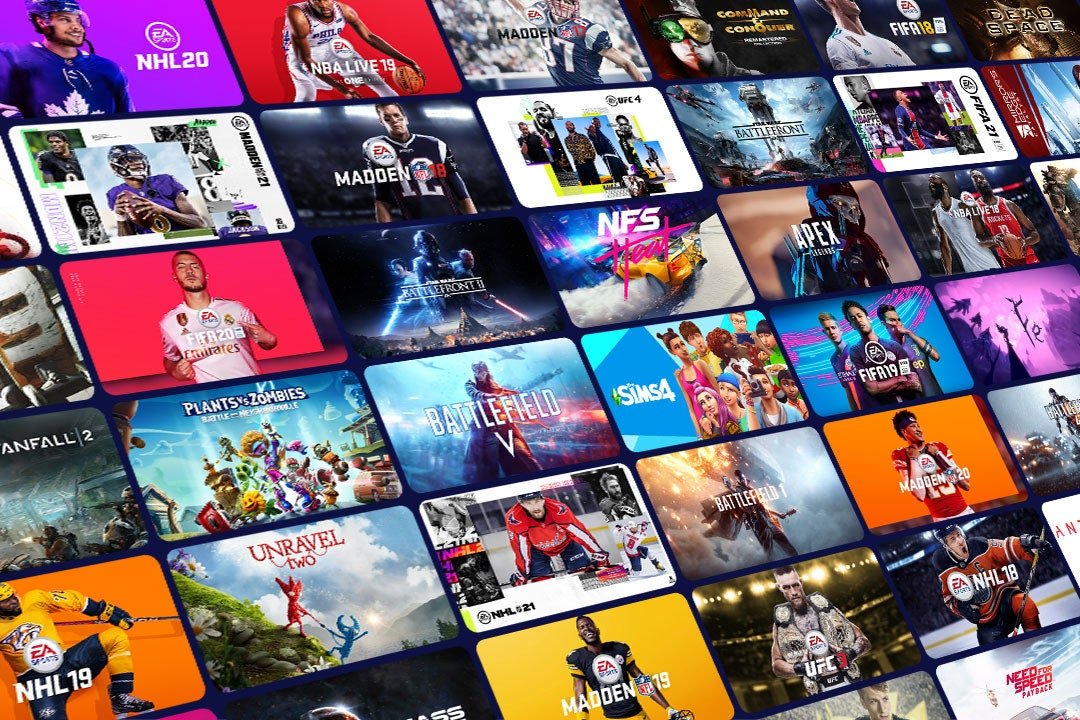
- EA Play: Get access to EA’s library of titles like FIFA, Madden, and Battlefield.
- Exclusive Perks: Get access to member-only content, in-game bonuses, and discounts.
Essentially, Game Pass Ultimate is the key to getting the full Xbox gaming experience, wherever you are.
Devices You Can Use for Xbox Cloud Gaming
One of the most awesome things about Xbox Cloud Gaming is the variety of devices you can play on. You’re no longer stuck to your console or PC. Here’s a look at the different ways you can play:
Playing on Your Phone or Tablet
Your Android phone or tablet can become a portable gaming powerhouse. Simply install the Xbox app, sign in with your Microsoft account, and you can start streaming games on the go. You can also use an iPhone or iPad, but you have to go through a web browser. You may need to get a separate controller because not every game is optimized for touch screen controls, but many support touch controls.
- Android Phones and Tablets: Install the Xbox app and game away.
- iPhones and iPads: Access cloud gaming via the Safari browser.
Playing on Your PC
If you prefer to game on your PC, the Xbox app for Windows lets you start playing right away. The experience is very similar to playing on a console, but you’re using your PC screen and speakers. You can use a variety of controllers with your PC, which allows you to use your favorite gamepad.
- Windows PC: Play cloud games directly through the Xbox app.
Playing on Your Smart TV
Some newer Samsung and LG smart TVs allow you to directly stream Xbox games. You can download the Xbox app on your TV and begin gaming without even owning an Xbox console. This is incredibly convenient and makes gaming accessible to many people.
- Samsung & LG Smart TVs: Download the Xbox app for direct streaming.
Xbox Handheld Devices
Xbox has announced that it is developing an Xbox handheld device, which will allow players to play games on the go. This device is expected to be released in 2024, and will allow players to play a vast library of games directly on the handheld, via Game Pass.
- Xbox Handheld Device: Get access to Game Pass titles on an Xbox dedicated handheld.
This range of devices means you can pick the way that suits you best. The flexibility is a huge benefit for many gamers.
Benefits of Xbox Game Streaming
Why is everyone so excited about Xbox game streaming? Here are some great benefits:
Play Anywhere, Anytime
The most exciting part of cloud gaming is the freedom to play wherever you are. As long as you have a good internet connection, you can play games on a wide array of devices, whether you’re on the bus, waiting in a doctor’s office, or relaxing at home.
No More Large Downloads
Forget waiting hours for a game to download and install. With cloud gaming, you just click “play,” and the game starts almost instantly. This is particularly beneficial for large games, saving a lot of storage space on your device.
Access to Top Tier Games
You can play some of the biggest and most graphically impressive Xbox games without needing a high-end console or PC. This means more people can jump in on the latest and greatest game experiences. This is beneficial for players who do not have access to high-end systems.
Cost Effective
Instead of buying each game individually, a subscription to Xbox Game Pass Ultimate gives you access to hundreds of titles for a monthly fee. This can be much more economical, especially if you like to play a variety of games. It reduces costs associated with owning a physical console and game, making games much more affordable.
No Need to Upgrade Hardware
You don’t have to worry about constantly updating your console or PC. Because games run on Microsoft’s servers, you will be getting the latest graphical performance without having to pay for it. This saves money and makes gaming more accessible to anyone.
Things to Consider: Internet Connection and Latency
While cloud gaming is amazing, there are a few things you should know about. Primarily, your internet connection is absolutely crucial.
The Importance of a Strong Internet Connection
A stable and fast internet connection is vital for a good cloud gaming experience. Here’s what you need to think about:
- Download Speed: Microsoft recommends at least 10 Mbps for HD gaming, but faster speeds like 25 Mbps or more will give you a smoother experience.
- Upload Speed: While download speed is more crucial, a decent upload speed is still needed for sending control inputs.
- Stability: A wired internet connection is always more stable than Wi-Fi, but a strong Wi-Fi signal will work well too. Avoid congested Wi-Fi networks, where multiple users are using the same internet signal.
- Latency: This is the delay between your button press and the game reacting, and can drastically affect playability if it’s too high.
Understanding Latency
Latency, or lag, is the delay between when you do something (like press a button) and when you see it happen in the game. High latency can make games feel sluggish and unresponsive. Here’s what can affect it:
- Internet Speed: Slower internet speeds cause more lag.
- Distance to Server: The further you are from the Microsoft server, the longer it will take for data to travel.
- Network Congestion: Too many people using the same network can increase latency.
To have the best experience, ensure your internet connection is up to the task and as stable as possible.
Game Library and Selection
When you subscribe to Xbox Game Pass Ultimate, you get access to an ever growing library of games, some that are available through cloud streaming. You will find something for everyone, with a huge selection to choose from. It’s like having a giant library of games you can explore at any time.
What kind of games are available?
The games available for cloud streaming include a vast number of titles, spanning many different genres. Here’s what you can expect:
- Microsoft’s First-Party Titles: These include games from Xbox Game Studios like Halo, Forza, Gears of War and Starfield.
- Third-Party Games: The library also includes titles from other developers, both AAA and indie games.
- New Releases: Many games are added to Game Pass on day one, meaning you can play them from the moment they are released.
- Variety of Genres: Everything from action and adventure to sports and strategy games are available, providing a great variety for many users.
The library is always growing, so there’s always something new and exciting to try. This allows users to discover new types of games, as there is no commitment to purchase the games outright.
Using a Controller
While some games support touch controls, using a controller is highly recommended for the best cloud gaming experience. Controllers give you better precision and are more comfortable for long gaming sessions.
Recommended Controllers
Here are some great controllers you can use:
- Xbox Wireless Controller: The official Xbox controller works seamlessly with Xbox Cloud Gaming, and is often the best pick.
- Playstation Dualsense Controller: A great alternative to Xbox Controllers, offering high quality gameplay.
- Other Bluetooth Controllers: Many third-party controllers work well too, as long as they support Bluetooth.
Make sure your controller is compatible with your chosen device. Bluetooth controllers are often the best choice, as they work across multiple devices. Always pair your controller before launching your game for seamless play.
Xbox Cloud Gaming vs. Other Streaming Services
While Xbox cloud gaming is certainly a big player, there are other similar services out there. Here are some notable alternatives:
Playstation Plus Premium
Sony offers a subscription service called PlayStation Plus Premium, which includes access to cloud gaming. However, it’s currently limited to Playstation titles, and you can stream Playstation 5 titles, but this isn’t available on all devices.
GeForce NOW
Nvidia’s GeForce NOW allows users to play games that they own on Steam, Epic, and other PC game stores. It’s a strong choice for PC gamers, but doesn’t have its own subscription service.
Amazon Luna
Amazon Luna is a cloud gaming service that works in a similar way to Xbox Cloud gaming. It has a selection of games, and a varying number of monthly channels to purchase. It offers a wide range of games, but doesn’t have as strong a library as Xbox Game Pass.
Each of these services has its own strengths and weaknesses, so it’s worth checking them out to see which best suits your needs.
The Future of Xbox Game Streaming
Cloud gaming is only going to get bigger and better. Microsoft continues to invest heavily in this technology, with faster server speeds, new games, and improved performance. As internet speeds and technology progress, cloud gaming will become an even bigger part of the way we play games. With the introduction of dedicated Xbox handheld devices, there are exciting times ahead for Xbox users. Improvements in latency reduction will allow players to experience gaming with very little input delay.
Xbox game streaming is changing how we approach video games. It’s all about the ability to play where you want, when you want, without the need for expensive hardware. Whether you are a longtime Xbox fan or a newcomer, it’s an awesome time to jump in. The flexibility, affordability, and wide game selection offer something for everyone. Make sure you’ve got a strong internet connection, and you’ll be ready to jump in.
Which Game Streaming Service is Worth the Money?
Final Thoughts
Ultimately, Xbox game streaming services offer convenient access to a large library of games across various devices. Players can enjoy titles without needing a console, simply requiring a stable internet connection. This expands gaming opportunities to a wider audience, regardless of their hardware.
The accessibility brought by these services is a major advantage. Game Pass Ultimate provides additional value. Xbox game streaming services continue to develop, creating even more gaming choices.

