
Here are some essential Xbox gaming tips and tricks: Utilize controller shortcuts, adjust in-game settings for optimal performance, and regularly update your console software.
Want to level up your gaming experience? We’ve got you covered. This guide provides simple yet effective Xbox gaming tips and tricks that will enhance your gameplay.
Learn how to navigate the console interface more quickly. Improve your response time with strategic controller configurations. You will be amazed how much better you perform.
These simple changes can make a big difference. We’ll help you make the most of your console. Get ready to dominate the competition!

Xbox Gaming Tips and Tricks
Ready to become a better Xbox player? It’s not just about having the newest games; it’s about knowing how to get the most out of your console and your gameplay. Let’s explore some cool tricks and tips that can help anyone, from beginner to seasoned gamer, level up their Xbox experience.
Making the Most of Your Xbox Console
Your Xbox is more than just a game player; it’s a powerful entertainment hub. Knowing its ins and outs can seriously change how you game. These tips are all about the console itself.
Quick Resume: Jump Back Into the Action
One of the best features of modern Xbox consoles is Quick Resume. If you haven’t used it much, you’re missing out. Quick Resume lets you switch between multiple games and instantly jump back in where you left off. No long loading screens! It’s like hitting pause on multiple games at once. To make sure it works well:
- Don’t quit games from the menu. Instead, use the Xbox button to return to the dashboard.
- You can have multiple games in Quick Resume at once, but it depends on the game and how much memory it uses. Experiment to see which games work well together.
Customizing Your Controller
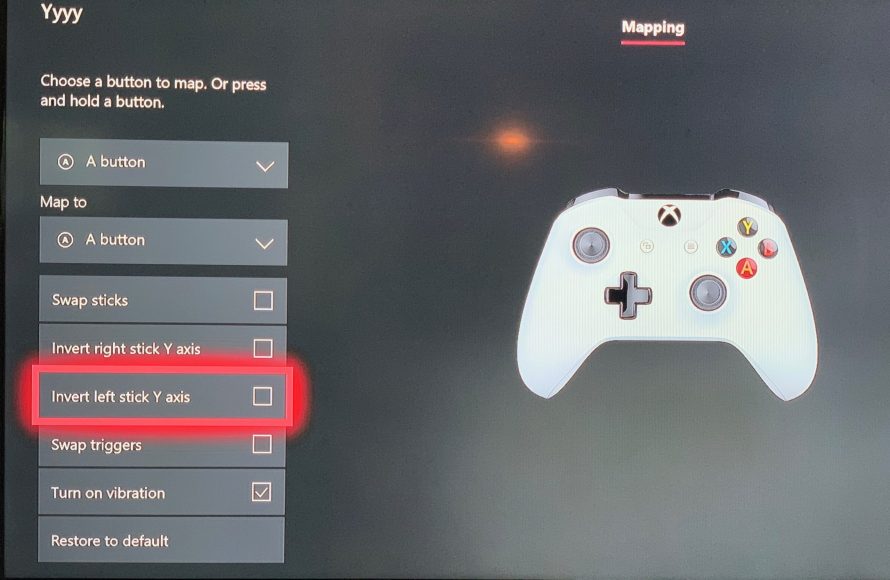
Did you know you can tweak how your Xbox controller works? It’s not just about the look of it; you can change the button layouts too.
- Open the settings menu and go to “Ease of Access.”
- Find “Controller” and pick “Button Mapping.”
- Now you can swap buttons, so if you are more comfy with A doing the job of X, you can do it!
Experiment and figure out what button arrangement works best for you. This can be especially helpful for games with specific controls that you find hard to use.
Xbox Game Pass: Your Gaming Library
If you don’t have it, you should definitely think about Game Pass. It’s like Netflix, but for games! You pay a monthly fee and get access to a huge range of titles.
- There are different Game Pass options (Console, PC, or Ultimate). Pick the one that fits your needs.
- Check the Game Pass library frequently; new games are added all the time.
- Look at games you normally would not try, you might just find a new favorite!
Game-Specific Tricks: Getting Better at Gameplay
Now that you know more about the console, let’s talk about how to become a better player in the games themselves. These aren’t cheats; these are simply smart ways to play.
First-Person Shooter (FPS) Tips
FPS games are super popular, but they can also be tricky to get the hang of. These tips should help:
Aiming and Sensitivity
Getting your aim right is super important. If you are over or under shooting your targets, try these tips:
- Start with a low sensitivity setting. This will help you make small, precise movements.
- Practice in training modes or easy levels to find the sweet spot.
- Do not try to move while you are shooting. It is harder to hit a target when you are moving.
Using Cover and Moving Smartly
Rushing head-first is usually not a good plan in FPS games. Here’s what you should do:
- Use walls, boxes, and other items for cover. Don’t just stand out in the open.
- Move from cover to cover. Try to keep enemies guessing where you are going.
- If you have a grenade, remember to use it. It’s an easy way to flush enemies out of cover.
Listen Up! Sound is Key
In many shooters, the sounds are just as important as what you see. Here’s how to use them:
- Use headphones. You need to hear the enemy’s footsteps to figure out where they are.
- Pay attention to what the sounds are telling you about the game. Do you hear gunshots, footsteps or maybe a reload sound?
Role-Playing Game (RPG) Tips
RPGs are all about growing stronger. Here’s how you can do it:
Quest Management
RPGs often have tons of quests, it can get overwhelming. Here’s how to manage them:
- Check your journal often. Keep track of what your goals are.
- Prioritize quests that give good rewards and that are around your current level.
- Do not just try to complete your quest goals, try to complete side goals and objectives as they can help you level up faster.
Character Builds and Stats
Decide what kind of character you want to play. Here’s how:
- Don’t waste points on stats you don’t need. If you are going to be a knight, spend the points on strength and health instead of magic.
- Use skill trees or perk systems to give your character specific powers and abilities.
Exploring and Talking to NPCs
It can be easy to rush through the story, but slowing down can pay off:
- Talk to all non-player characters (NPCs). They often have clues, quests or even items for you.
- Explore every location, there are always secrets and hidden items to be found.
Sports Game Tips
Sports games are fun, but it can take time to become good at them. Here are some basic tips:
Practice Drills
Every sports game has drills and practice modes. Use them!
- Practice the same drills multiple times until you can do them without even thinking.
- Learn the timing for passes, shots and tackles.
- Focus on one aspect at a time, trying to perfect everything will just confuse you.
Understanding the Game Mechanics
Each sports game has its own rules, it is not always as simple as playing real life sports. Here’s what to pay attention to:
- Learn the player stats. It can make a huge difference when you are picking your team.
- Practice with different positions. It is easier to play well when you know what to expect.
Don’t Get Frustrated
Sports games can be tough, it can be easy to get frustrated. Here’s how to manage it:
- Take breaks. It’s better to come back fresh than to force yourself when you are angry.
- Don’t blame the game. Look at what you are doing wrong and try to fix it.
Optimizing Your Xbox Experience
Beyond playing the games well, there are some things you can do to make sure your whole Xbox experience is super smooth and enjoyable.
Managing Storage Space
Games can be big, and sometimes you run out of space. Here is how to manage it:
- Delete games you don’t play. You can always download them again if you change your mind.
- Think about using an external hard drive. This is a super way to give you lots of extra space.
- Transfer games to your hard drive before deleting them from your console. This means they will not be lost when you decide you want to play them again.
Updating Your Console and Games
Updates are super important. Here’s why you shouldn’t skip them:
- Update your Xbox as soon as you can. This is how you get new features and fix any problems.
- Make sure your games are always up to date. They have important fixes and improvements.
Playing With Friends
Gaming is more fun with friends. Here’s how to connect and enjoy playing together:
- Use the Xbox friend system to add your friends.
- Set up parties so you can talk together while gaming.
- Try out co-op games together.
Using Xbox Mobile App
The Xbox mobile app lets you stay connected to your Xbox even when you’re not at home.
- You can see what your friends are playing and message them, even when you’re not using your Xbox console.
- Use the app to control your Xbox when you’re at home. This means you can easily navigate without picking up the controller.
- Download games to your console even when you are not at home. They will be ready to play by the time you are ready.
Accessibility Settings
Xbox has features that make gaming more accessible for everyone. Check out these cool tools:
- Change button mapping to make controls more comfy for you.
- Adjust the screen so text is easier to read.
- Try out the co-pilot feature to get help with controls.
Keeping Your Xbox Clean and Healthy
Just like any machine, your Xbox needs care. Here’s how to keep it in good shape:
- Keep your Xbox in a cool place. Don’t let it get too hot.
- Make sure there is space for air to flow around your Xbox so it can cool down.
- Clean the vents on your Xbox to keep dust from building up inside of the console.
By using these tips and tricks, you will be in a better position to get the most out of your Xbox. Remember to keep practicing, try new things, and have fun! The world of Xbox gaming is huge and full of cool stuff to do. So, get out there and enjoy all that your Xbox has to offer!
10 Tips Every Xbox Series X/S Owner NEEDS to Know!
Final Thoughts
In summary, adjusting controller sensitivity improves aiming precision. Explore accessibility settings for tailored gameplay. Use Xbox’s Quick Resume feature for fast game switching. These Xbox gaming tips and tricks greatly enhance the experience.
Remember to explore game-specific tutorials. They provide valuable techniques to excel. Experiment with different game modes for varied challenges. Practice consistently; it’s key to improvement in gaming.
Optimizing audio settings can create more immersive environments. Utilizing Xbox’s built-in recording feature lets you share memorable moments. Try these tips for enhanced play, and become better using these Xbox gaming tips and tricks.

