
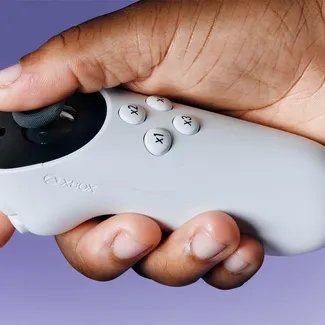
Xbox makes gaming accessible to all through various features like adaptive controllers, co-pilot mode, and customizable display and audio options, letting more people enjoy games.
Imagine a world where everyone can join the fun of gaming, regardless of their abilities. Xbox is pushing boundaries, actively creating features and technology that remove barriers. This commitment to inclusion shows how Xbox making gaming accessible to all is more than a slogan; it’s a core design principle. They are providing tools so that many more people can enjoy the thrill of play.

Xbox Making Gaming Accessible to All
Gaming should be for everyone, right? That’s what Xbox believes, and they’re putting in a lot of effort to make sure it happens. It’s not just about having the best graphics or the newest games. It’s about making sure everyone, regardless of their abilities, can jump in and have fun. Let’s explore how Xbox is doing this, making the world of gaming a more welcoming place for all.
The Xbox Adaptive Controller: A Game Changer
One of the biggest steps Xbox has taken is creating the Xbox Adaptive Controller. Think of it like a super customizable controller that can be used in many different ways. It doesn’t look like a traditional controller. Instead, it’s a flat hub with lots of ports on the back. These ports allow players to connect different kinds of switches, buttons, and joysticks.
How it Works
This controller is fantastic because it lets people use what works best for them. Someone who might find using a regular controller difficult can use something that matches their needs. For example:
- A person who can’t use their hands might use buttons they can press with their feet or head.
- Someone with limited movement in their arms might use a joystick that requires less motion.
- Players who prefer bigger buttons can connect their preferred size.
The possibilities are endless! The Adaptive Controller isn’t just about playing the game; it’s about creating an experience that is comfortable and enjoyable for each unique player.
Beyond the Hardware
The brilliance of the Xbox Adaptive Controller doesn’t stop at its physical form. It’s designed to be compatible with a wide array of third-party assistive devices, making sure that there’s flexibility and many choices when you choose your setup. This open design philosophy means more options for gamers with specific requirements.
Accessibility Settings in Xbox Consoles
The Adaptive Controller is just one piece of the puzzle. Xbox has made sure that the consoles themselves have many accessibility features built in. These settings can change how you experience the game, making it easier to play.
Navigation and Display Options
It can be difficult to see the screen for some players, and Xbox has thought of that. Here are just a few ways they are trying to help with that issue:
- High Contrast Mode: This makes the colors on the screen more different, which is helpful for people who have trouble seeing. Text becomes easier to read against the background.
- Text to Speech: This will read the words on the screen out loud for the user. This helps those who may have trouble reading text on the screen.
- Magnifier: The screen can be magnified so it becomes easier to see parts of the game. This function can make a world of difference to some.
- Subtitle Options: Gamers can change the appearance of the text that appears in games. They can adjust the size, colors and background of the text so that it’s easier to read.
Controller Customizations
It’s not just about how things look. How the game reacts to your controller inputs is also important. Here are some adjustments to the controller settings that can be useful:
- Button Remapping: You can change what each button does. For example, you can switch the A and B button if that makes the game easier to play.
- Stick Sensitivity: If you have trouble with precise movements, the sensitivity can be changed so that movements on the joystick are easier to perform.
- Vibration Intensity: You can adjust the intensity of the controller vibrations. This setting is helpful for gamers who may find the vibration distracting or overwhelming.
Game Design and Accessibility
Accessibility isn’t just about hardware or settings in the menu. It’s also about how games themselves are made. Many game developers are now starting to consider accessibility during the development process, which is very important. Xbox is helping to push these changes along.
What Makes a Game Accessible?
There are several elements that, when implemented, can make a game more accessible to a wider range of players:
- Clear User Interface (UI): Menus and interfaces that are easy to see, understand, and navigate are very important. Using simple language and clear icons can help everyone understand how to play.
- Adjustable Difficulty: Having different difficulty settings ensures that new and experienced gamers can enjoy the experience. Some games offer very precise options that allow you to change the difficulty for specific areas of the game.
- Tutorials and Guidance: Clear instructions and tips on how to play can help players get into a game quickly. It can also allow players to get into the game with minimal effort.
- Visual Cues and Feedback: Games use visual and audio cues, in addition to text, to communicate. Using multiple ways to give feedback can ensure all players have the information they need.
Xbox’s Role in Promoting Accessible Game Design
Xbox is actively working with game developers to encourage these changes. They have created guides for studios and host events to share ideas and best practices. They understand that when developers put accessibility at the front, gaming is better for everyone. They also have a gaming accessibility testing team that tries out new games to see if they’re accessible. This helps developers make better games for everyone.
The Community and Support
Making gaming accessible isn’t just something Xbox does on its own. It involves a whole community. Gamers, developers, and accessibility experts are working together to make gaming better.
The Power of Sharing
There are online groups and communities where people share their personal gaming setups, the equipment they use, and different tips and tricks. By sharing and helping one another, they make the world of gaming more welcoming.
Xbox’s Inclusive Efforts
- Accessibility Insiders: Xbox has a program that invites people with disabilities to provide feedback on games and hardware.
- Events and Workshops: Xbox hosts events that allow accessibility experts and gamers to come together and share ideas.
- Documentation and Guides: They also provide guides to help game developers understand accessibility features and best practices.
Real Impact, Real Stories
All these efforts have made a real difference in people’s lives. It’s amazing to hear how players, who might have thought gaming wasn’t for them, are now able to join in and have fun.
Stories of Empowerment
Many players with disabilities have shared how the Xbox Adaptive Controller has changed their gaming experience. For some, it’s the first time they’ve been able to play a video game by themselves. For others, it has allowed them to connect with friends and family through shared gaming sessions. These stories highlight how powerful inclusion can be.
The Importance of Representation
Making gaming accessible is about more than just hardware. It’s about ensuring that characters in games represent the diversity of the people who play them. When players see themselves in the games they play, they feel valued and included. It makes the gaming world more welcoming and accepting.
Looking Ahead
Xbox is not stopping here. They are continually working on ways to make gaming more accessible. They are always taking feedback from the community, learning about new assistive technologies, and looking for ways to incorporate these findings into their products and services.
Future Goals
Some of the future goals that Xbox has for accessibility include:
- Expanding support for different assistive devices.
- Making even more customization options available within the games and on the consoles.
- Working with more game developers to make accessible game design standard practice.
- Continuing to work with the community to improve the gaming experience for everyone.
Ultimately, Xbox is trying to create a space where everyone can game. No matter what your abilities, there is a space for you in the gaming world, and Xbox is making sure of that. It’s not just about playing; it’s about belonging. By removing the obstacles that can prevent people from accessing gaming, Xbox is making the world of video games more inclusive and fun for everyone.
Xbox’s commitment to accessibility is not just a feature; it’s a belief. It’s a belief that everyone deserves the chance to experience the happiness, fun, and connection that gaming can offer. Through continued innovation, active listening, and community involvement, they’re working hard to make this a reality.
This is a HIDDEN Feature on EVERY Xbox! 😱
Final Thoughts
Xbox strives to break down barriers and include more gamers. The console’s adaptive controller and game pass options show real commitment. This is about welcoming everyone to enjoy the fun.
Xbox’s diverse library ensures many choices. Accessibility features, like subtitles and control remapping, improve the experience. Xbox making gaming accessible to all is their key priority. This makes gaming enjoyable for various needs and abilities.

