
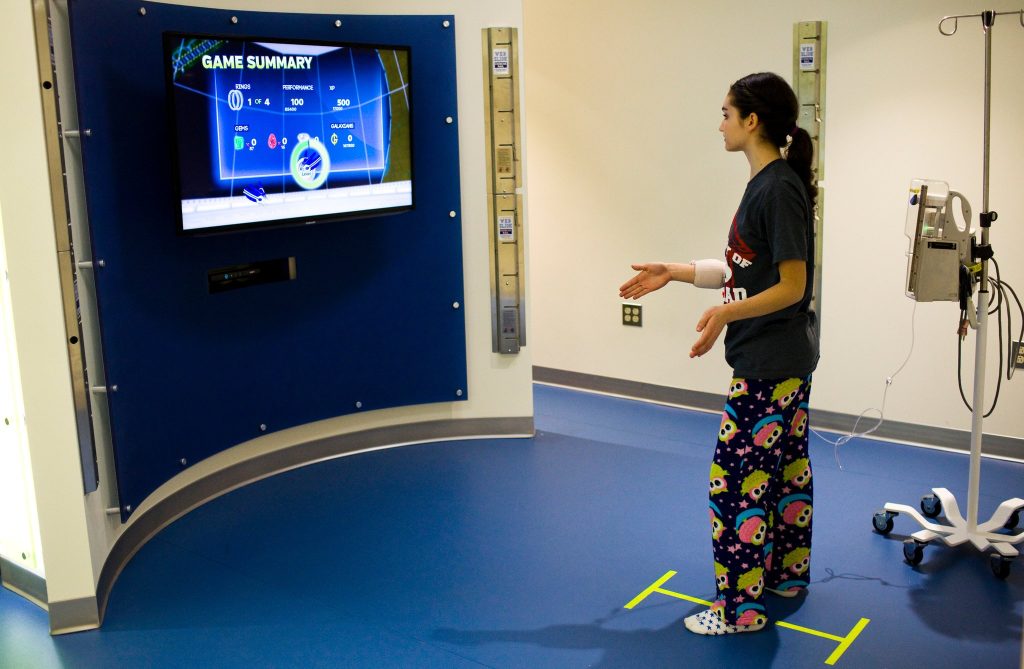
Xbox physical therapy for gamers uses motion-sensing games to help improve movement, strength, and coordination, making rehabilitation engaging and fun.
Do you spend hours gaming on your Xbox? Perhaps you’ve noticed some stiffness or discomfort. Well, there’s a growing field using video games, and it’s called Xbox physical therapy for gamers. This innovative approach blends gaming with rehabilitation techniques.
This type of therapy uses the motion-sensing capabilities of the Xbox to get you moving. It provides a fun and motivating way to address common gaming-related issues. It is also useful for general physical therapy needs.

Xbox Physical Therapy for Gamers
Video games are super fun! But sometimes, spending lots of time gaming can make our bodies feel a little achy or stiff. That’s where Xbox physical therapy comes in! It’s a way to use your Xbox to help you move better and feel stronger. Think of it as a fun way to exercise, using the games you already love.
Why Gamers Might Need Physical Therapy
Have you ever noticed that after a long gaming session, your hands, wrists, or back might feel a bit sore? It’s pretty common. Sitting for long stretches, gripping a controller tightly, and making the same movements over and over can all put a strain on your body. This can lead to things like:
- Pain in your hands, wrists, or fingers
- A stiff neck or shoulders
- Lower back pain
- Headaches
- Eye strain
These issues aren’t just uncomfortable, they can also make it harder to enjoy gaming. Physical therapy can help you avoid these problems and keep playing your favorite games without discomfort. Plus, it helps you move better in real life too!
How Xbox Can Help with Physical Therapy
You might be wondering how exactly your Xbox can help with physical therapy. Well, it’s not about playing any game and hoping for the best. It’s about choosing the right games and using them in a smart way. Certain Xbox games can actually help you improve different areas of your physical health.
Games That Promote Movement
Some games require you to get up and move around. These are perfect for physical therapy because they encourage you to stretch, bend, and work your muscles. Think about games like:
- Dance Games: Games where you follow dance moves on screen can get your heart pumping and help you improve coordination, balance, and flexibility. They’re a great full-body workout!
- Fitness Games: There are many fitness games available on the Xbox that specifically target different muscle groups. These games often include structured workouts and challenges, making exercise feel more like a game.
- Sports Games with Motion Control: Games that use motion sensors require you to swing your arms, step, and move your body similar to the real sport.
Games That Improve Hand and Eye Coordination
Other games can help with fine motor skills, hand-eye coordination, and reaction time. Even if they don’t require much movement, they can still help improve your physical abilities. Consider these types of games:
- Puzzle Games: Games that involve problem solving can improve your cognitive abilities as well as your hand eye coordination when manipulating game pieces or elements.
- Action Games: Games that require fast reflexes and precise movements can help you improve hand-eye coordination, decision-making, and reaction time.
How to Make Your Xbox Games into a Workout
The key to using your Xbox for physical therapy isn’t just about playing games; it’s about being intentional with how you play them. Here are some things to keep in mind:
- Warm Up: Just like before any other workout, do some light stretches before you start gaming, especially if you’re playing games that involve a lot of movement. Simple arm circles, shoulder rolls, and leg stretches can help.
- Take Breaks: Don’t play for hours without stopping. Get up every 20-30 minutes, walk around, do some more stretches, and give your eyes a rest.
- Listen to Your Body: If something hurts, stop! Don’t push through the pain. It’s better to take a break and rest than to get injured.
- Stay Hydrated: Keep water nearby and drink it during your game sessions. Staying hydrated is important for all kinds of movement and activity.
- Proper Posture: Sit with good posture. If you are playing on the couch, sit upright, feet on the floor, and look straight forward.
Designing Your Personal Xbox Physical Therapy Plan
To really get the most out of Xbox physical therapy, it’s a great idea to create a plan. This plan should be customized to fit your specific needs and goals. Here’s a step-by-step guide on how to do just that:
Step 1: Figure Out Your Goals
What do you want to achieve with physical therapy? Do you want to reduce pain? Do you want to be more flexible? Or do you just want to get stronger? Here are some common goals:
- Reduce wrist or hand pain
- Improve neck and shoulder stiffness
- Increase flexibility
- Improve balance and coordination
- Build overall strength
Knowing your goals will help you pick the right kinds of games and exercises.
Step 2: Pick the Right Games
Now that you know your goals, you can choose games that will help you achieve them. Here are some ideas of what to look for:
- For Flexibility: Look for games that involve a lot of movement and stretching, like dance or fitness games that incorporate yoga or Pilates moves.
- For Hand/Wrist Issues: Choose games that require a lighter grip and less repetitive movement. Puzzle games or even strategy games can work as they might require more thinking than hand movement.
- For Strength: Games that require a lot of movement, like sports or fitness games, can help with strength. There are also fitness games that use resistance exercises.
- For Coordination: Dance games, rhythm games, or any game that requires you to move with purpose will work for coordination and balance.
Step 3: Set a Realistic Schedule
Don’t try to do too much too soon. Start with short game sessions and gradually increase the time as you get stronger. Here’s a sample schedule:
- Day 1-3: Start with 15-20 minutes of gaming focused on movement. Take breaks every 5-10 minutes. Add in some gentle stretching before and after you play.
- Day 4-7: Increase your game time to 20-30 minutes. Continue taking breaks and stretching. Try to add a different game that focuses on a different area of your body.
- Week 2 onward: Increase the length of your sessions and the intensity, if needed, based on your goals. Try to incorporate rest days.
Remember, consistency is key. Aim to do some sort of physical therapy (via Xbox or otherwise) a few times a week for the best results.
Step 4: Track Your Progress
It’s helpful to keep track of how you are doing. This can be done in many ways:
- Journal: Write in a notebook or journal about how your body feels before and after your game sessions. Note any changes in pain levels, flexibility, or strength.
- Take Pictures: If you are working on flexibility, take some pictures at the beginning of the month and then later on in the month. This can help you compare your flexibility changes visually.
- Use a Tracker: Use an app or tracker to keep track of your exercise time, distance walked, and other fitness-related metrics.
Seeing how far you’ve come can be very encouraging and can help you to stick with it!
Working with a Physical Therapist
While using your Xbox for physical therapy can be a fun and effective way to improve your movement and get stronger, it’s not a replacement for seeing a real physical therapist. A professional physical therapist is a trained healthcare provider who can assess your individual needs and create a customized program that works best for you. Here are some ways that a physical therapist can help:
Professional Assessment
A physical therapist can do a thorough assessment of your physical health and identify any specific issues or weaknesses you might have. This can include looking at your posture, flexibility, muscle strength, and movement patterns. This personalized approach can allow them to pinpoint what to target in your specific program.
Personalized Exercise Program
Based on your assessment, a physical therapist can design a personalized exercise program specifically for you. This plan might include exercises that you can do on your own, as well as ones that they guide you through during your sessions.
Guidance and Supervision
A physical therapist can provide expert guidance and supervision to ensure that you’re performing exercises correctly and safely. They can make adjustments to your plan as needed and help you to avoid injuries or setbacks.
Advice on Ergonomics and Posture
A physical therapist can give you tips on how to set up your gaming area in a way that is better for your body. They can recommend chairs, tables, and other equipment that can help improve your posture and reduce strain. They can also teach you about posture while gaming.
Combination Approach
The best approach is often to use both! You can work with a physical therapist to create a general plan, and then use the Xbox games to supplement your physical therapy. If that works better for your daily life, you could use the games for the actual therapy. You can also ask your physical therapist for recommendations on the best games for your individual needs. This way you can stay active while playing games.
Other Ways to Care for Your Body as a Gamer
Besides using your Xbox for physical therapy, there are a few other things that you can do to care for your body while you’re gaming. Here are some important tips:
Proper Gaming Setup
Make sure your gaming setup is comfortable and helps you maintain good posture. This might mean:
- Using an ergonomic chair with good back support.
- Placing your monitor at eye level, so you don’t have to strain your neck.
- Having a desk or table that allows you to keep your elbows at a 90-degree angle.
Regular Breaks and Stretching
Take short breaks every 20-30 minutes to get up, move around, and stretch. This can include:
- Walking around and getting your blood flowing.
- Stretching your arms, legs, neck, and back.
- Rotating your wrists and ankles.
Eye Care
Staring at a screen for a long time can tire out your eyes. Try these tips to reduce eye strain:
- Take frequent breaks to look away from the screen and at distant objects.
- Make sure your gaming area is well lit.
- Consider using computer glasses to reduce glare.
Staying Hydrated
Keep a water bottle close by and drink water throughout your gaming sessions. Staying hydrated can help you feel your best and can also help with performance.
Healthy Eating Habits
Eating a healthy, balanced diet can give you the energy and nutrients you need to be active, while gaming, or otherwise. Try to avoid sugary snacks and processed foods.
It’s very possible to stay healthy while enjoying your video games! By understanding that physical well-being is an important part of the gaming experience and following these tips, you can game safely and comfortably. Remember that taking care of your body is the best way to enjoy gaming for years to come. Just like with all things, balance is key, so make sure to give your body what it needs to stay strong and active.
By using a combination of smart gaming choices and healthy lifestyle habits, you can make gaming a fun, safe, and even healthy activity. You can keep having fun while keeping your body in top shape! Remember to always listen to your body and seek professional help when needed. Happy gaming!
Cosmin Mihaiu: Physical therapy is boring — play a game instead
Final Thoughts
Incorporating Xbox into your physical therapy provides a fun and engaging way to improve movement. Many games require specific motions, assisting with range of motion and coordination. This makes recovery less tedious and more enjoyable.
Remember, consult a professional before starting any new exercise routine. Proper guidance ensures you perform the activities correctly, preventing further injury. Xbox physical therapy for gamers is a valuable tool when used appropriately.
This innovative approach can positively impact your physical well-being while doing something you love. Make use of games for a healthier you.

