
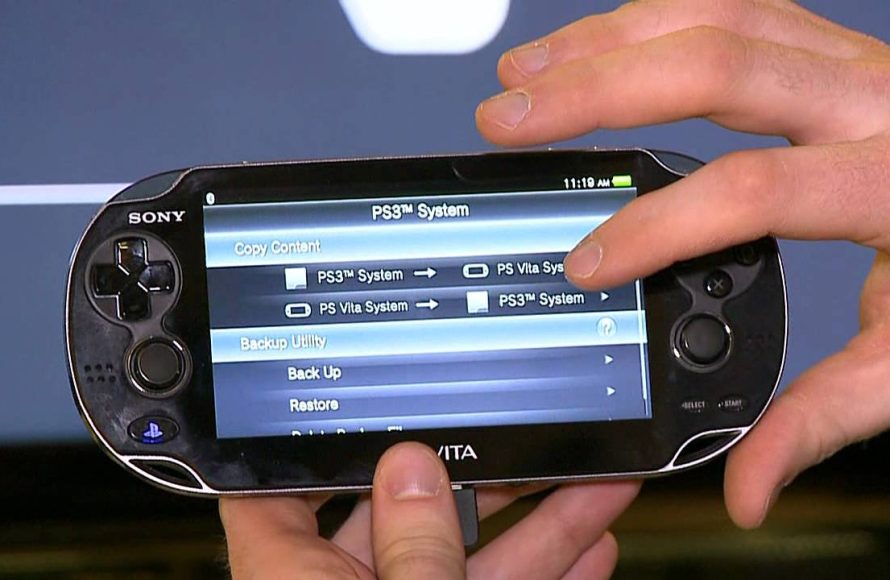
Yes, you can play many PSP games on the PS Vita, primarily through digital downloads from the PlayStation Store.
Ever wondered, “can i play psp games on ps vita?” It’s a question many handheld gaming enthusiasts ask. The good news is that Sony designed the Vita with some backwards compatibility in mind.
Many classic PSP titles are available for purchase and download directly onto your PS Vita device through PlayStation Network. This means you can revisit some old favorites or experience some titles you missed.

Can I Play PSP Games on PS Vita?
The big question for many gamers is, can you play those classic PSP games on your shiny PS Vita? The short answer is, mostly yes! But it’s not quite as simple as popping in a PSP disc. Let’s explore how it all works, what games you can play, and where to find them.
Understanding the PS Vita and PSP Compatibility
The PS Vita is like a super-powered version of the PSP. It has better graphics, more features, and a touchscreen. While it can’t directly play PSP game discs, it’s designed to handle PSP games in a different way. Think of it like this: it’s not like putting a DVD in a Blu-ray player; it’s more like downloading a movie instead of buying a disc.
The Digital Download Difference
The PS Vita plays PSP games that you download from the PlayStation Store. This means you won’t be able to use your old physical PSP game cartridges. Instead, you’ll need to buy digital versions of those games. This is very important point, many users miss it and think that they could just insert physical PSP game discs into ps vita like normal. That is not the case here, here you can download your favorite PSP games digitally from the PlayStation Store and enjoy it on your PS Vita.
How Does the PS Vita Play PSP Games?
The PS Vita uses something called “emulation” to play PSP games. This means the PS Vita acts like a PSP, but it’s doing it all within its own system. It translates the PSP game’s instructions into something it can understand. Because of this, most of the PSP’s great features, like button controls and game play will feel familiar to players who previously played PSP. The PS Vita’s upgraded screen, however, gives you a sharper and better looking gaming experience.
Finding and Purchasing PSP Games
So, where do you find these digital PSP games? The answer is the PlayStation Store. You access it on your PS Vita through the PlayStation Network. This is where you will discover and buy games and add to your digital library.
Navigating the PlayStation Store
Once on the PlayStation store, you can find PSP games by searching through categories or using the search bar. The store is designed to be simple to use, so you will be able to browse for the games easily. However, the store’s layout may feel slightly different than the store on a PS4 or PS5. Just take your time and familiarize yourself with the process.
Searching for Specific Games
If you have a specific game in mind, you can type its name in the search bar. Make sure you spell the name correctly, and check for the correct region as some games might not be available in all regions. If you have played some PSP games in your PSP you will also be able to easily find these same games on the PlayStation Store by simply entering the name in the search bar and check for that same game. Some games may be named slightly differently on the PlayStation Store so take time to check the games correctly.
Checking for Compatibility
While most PSP games work on the PS Vita, it is still good to double check. Generally, any game available on the PlayStation Store with the ‘PSP’ tag can be played on your Vita. But it’s still a good idea to read the details of the game before you buy. This makes sure you know what to expect. It will also notify you if there is any specific compatibility issues. Reading the reviews on the store also will help you in taking better decision about buying the games.
Purchasing and Downloading
Once you have chosen your games, you can purchase them using funds added to your PlayStation account or by using gift cards. The games are then downloaded straight to your PS Vita. Remember that the size of the game might be a bit big depending on the game, and you will need enough storage space on your Vita memory card. Make sure that you have the memory card and enough space to download and store these games. It might also take a bit time to fully download depending on the size of the game, make sure that you have your PS Vita connected to a stable Wi-Fi connection during the time of downloading.
PSP Game Library on PS Vita
Not every single PSP game is on the PlayStation Store, but there are a lot of great ones available. Think of classics like:
- Crisis Core: Final Fantasy VII
- God of War: Chains of Olympus
- Metal Gear Solid: Peace Walker
- Patapon
- Little Big Planet
- Persona 3 Portable
This is just a small sample; there are many other fantastic titles available. The PS Vita also plays PS1 classics that are available on the store. This opens a much greater collection of games from the past to play on the PS Vita. You have the chance to enjoy your favorite classics and also discover some of the games you may have missed on the past.
Limitations of PSP Games on PS Vita
While the experience is generally great, there are some minor differences between playing a game on the original PSP and on the Vita. Some users have reported some rare issues like slowdowns on some games, or some sound glitches. But this is rare and majority of the games work really well. You may have some visual differences as the PS Vita has a better screen so the games may look a little different because of this different resolutions. But this is usually an upgrade and improves the gaming experience.
Setting Up Your PS Vita to Play PSP Games
Getting ready to play your PSP games is quite easy. Here is what you do:
- Update Your System Software: Make sure your PS Vita has the latest system software. This makes sure everything works correctly. It’s generally a good idea to keep your devices updated for better performance.
- Connect to Wi-Fi: You need Wi-Fi to access the PlayStation Store and download games. Ensure you have a stable internet connection to connect to the store and download the game.
- Sign into Your PlayStation Network Account: Use the same account you use for your other PlayStation devices. This is also good if you previously purchased games on a different PlayStation console like PS3, then your purchased games on your old console might appear in your library on the PS Vita as well.
- Download Games From PlayStation Store: After downloading, they are added to your game library. Then you can start to play them.
Using Memory Cards
Your PS Vita will need a memory card to save game progress and store downloaded games. You can buy these cards at most electronics stores or online. Make sure that the card is compatible with your PS Vita system and that it is of a sufficient size to accommodate your games. Games take up space, so having a good sized memory card can help you download and store multiple games at a time. Keep an eye on the storage of the memory card so that you don’t run out of space.
PSP Features on PS Vita
The PS Vita does its best to keep all the best bits of the PSP experience. For example:
- Controls: The buttons work just like they did on the PSP, meaning you won’t need to learn a new way to play your favorite games.
- Save States: You can also usually use the save state feature to save your game at any point, which is useful for games that don’t have regular save points. It’s also great in case you want to stop mid game for any purpose or go back to a certain point in the game.
- Screen: The Vita’s higher resolution screen makes PSP games look better than ever. The screen resolution has increased and the colors of the games will be more brighter.
Customization
In some cases, you may find options to customize controls for PSP games or choose screen display settings. This lets you play the games the way you like them best. This could change the resolution or the size of the screen to play games the way you want.
Are All PSP Games Available on PS Vita?
Unfortunately, not every single PSP game is available on the PS Vita. There can be a number of reasons why some games are not available on the store. Some of the reasons may be: licensing issues, publisher decisions, or technical limitations. Also, a few older or more obscure PSP games might not make it to the PlayStation Store. So always it’s a good idea to check the PlayStation Store to see if your favorite games are available. Some games may come and go so sometimes it’s better to check frequently to see if any of your missing games show up on the store.
Why Some Games Are Missing
Some older games may have licensing issues and the original publisher might not be interested in re-releasing them on the digital store. Some games are hard to emulate for the PS Vita system, or some games are simply not as popular as others, so there may not be as many reasons to bring them to the PlayStation Store. But the important point is, a lot of the good and popular PSP games are usually on the store for you to play. So, it’s generally a great gaming experience.
Common Issues and How to Fix Them
Sometimes, you might run into a few small problems when playing PSP games on the PS Vita. Let’s look at some common ones:
Game Not Downloading
If your game isn’t downloading, try these steps:
- Make sure you have enough space on your memory card.
- Check your Wi-Fi connection.
- Restart your PS Vita.
- Make sure your system software is updated
- You could try logging out and logging in again to PlayStation network.
Game Freezing or Crashing
If a game keeps freezing or crashing, try these:
- Close the game and restart it.
- Make sure there are no other apps running in the background
- Update the system software
- Try uninstalling and reinstalling the game
- If all else fail, try contacting the PlayStation Support
Sound Issues
If you have sound problems, you can:
- Restart the game
- Check your PS Vita volume controls
- Try restarting your system
- Try other headphones
If you have any persistent problems it’s always a good idea to contact the PlayStation support for help.
Is Playing PSP Games on PS Vita Worth It?
Absolutely! The PS Vita is a great way to experience your old PSP favorites with better graphics. You do need to buy the digital copies but this is a good way to bring back the PSP’s best games with an easy and convenient experience. The PS Vita has a much better screen, making the games look more colorful and detailed than on the original PSP. If you have an old PSP that is damaged or not working, the PS Vita is a great choice for those old PSP games you might have on your list. The ability to carry a large collection of games on your Vita makes this a very convenient option. The Vita is definitely worth considering for PSP gamers who want to enjoy the classics with modern improvements. For those who have never played the PSP, the PS Vita presents a great opportunity to discover all the classics of the PSP and experience them on a great console.
So, yes, you can play many of your cherished PSP games on the PS Vita. It’s a great way to experience classic gaming, offering a mix of nostalgia and modern convenience. While it’s not quite the same as playing on the original PSP, the PS Vita delivers a great gaming experience with improved features.
Play PSP & PS1 Games On Your Vita With Adrenaline
Final Thoughts
You can definitely play a vast library of PSP games on the PS Vita. The PS Vita features excellent backwards compatibility for PSP titles, easily accessible through the PlayStation Store.
Many digital PSP games transfer right onto your PS Vita. This provides a great way to enjoy classic PSP games with improved screen quality.
So, can i play psp games on ps vita? The answer is a resounding yes. This makes the Vita a fantastic device for playing both Vita and many beloved PSP titles.

