
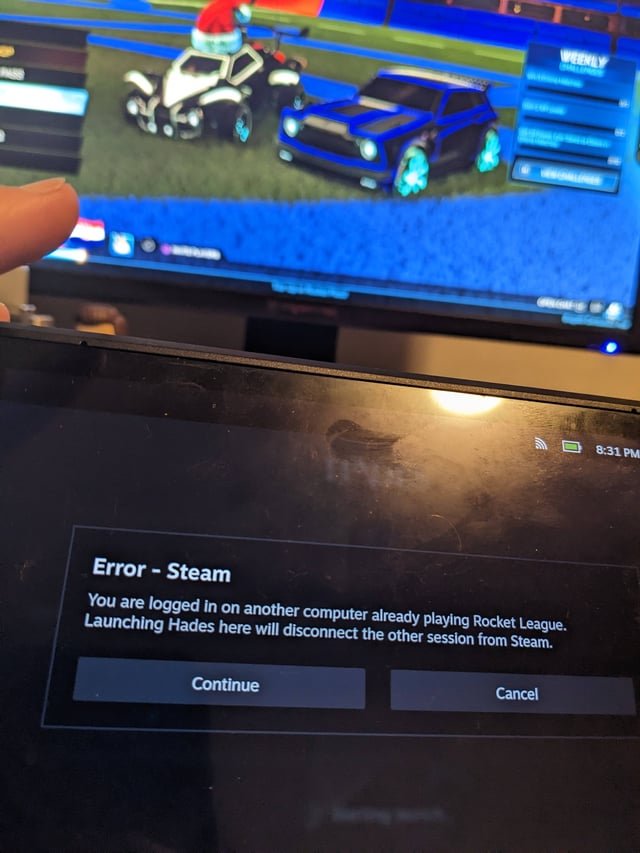
Yes, you can run two games at once, but performance will likely suffer if your computer lacks sufficient processing power and resources.
Ever wondered if your PC could handle more than one game at the same time? It’s a common question for gamers. The curiosity about whether “can i run two games at once” often sparks when wanting to multitask or perhaps test the limits of hardware.
Trying to run multiple demanding games simultaneously can really push a computer. It often results in lag, frame drops, or even crashes. Consider your system specifications before attempting such a task, this will help you understand if your system will cope.

Can I Run Two Games at Once?
Have you ever been playing a super fun game and thought, “Hey, I wonder if I could play another one at the same time?” It’s a cool idea, right? Like, imagine battling dragons in one game while building a city in another. It sounds awesome, but can your computer actually handle playing two games at the same time? Well, let’s dive into the details and see what’s possible.
The Basics: What Your Computer Needs
Before we jump into running multiple games, we need to talk about what makes your computer work. Think of your computer like a really, really smart brain. It has a few important parts that help it do things, like play games. These parts include:
- CPU (Central Processing Unit): This is like the main brain of the computer. It does all the calculations. The better your CPU, the faster your computer can think and work.
- GPU (Graphics Processing Unit): This is like the artist of the computer. It creates all the pictures you see on the screen, especially for games. A strong GPU makes games look smooth and beautiful.
- RAM (Random Access Memory): Think of this as the computer’s short-term memory. The more RAM you have, the more things your computer can remember at once without slowing down. Games need a good amount of RAM to run smoothly.
- Storage (Hard Drive or SSD): This is where all your game files and computer programs live. A fast drive (like an SSD) helps your computer load games and levels faster.
When you run a game, it uses these parts of your computer. If you want to run two games, you are asking your computer to do twice the work. This is where things can get tricky!
Is Your Computer Up to the Challenge?
So, can your computer run two games at once? The answer is: it depends! Here’s what you should think about:
Game Requirements
Every game is different. Some games, like simple puzzle games, don’t need much power from your computer. But other games, like fast-paced action games or games with very detailed graphics, need a lot more power. Check the system requirements of the game. Here’s an example of what you might see when looking at system requirements:
| Minimum Requirements | Recommended Requirements | |
|---|---|---|
| CPU | Intel Core i3 or AMD equivalent | Intel Core i7 or AMD equivalent |
| GPU | NVIDIA GeForce GTX 960 or AMD Radeon R7 370 | NVIDIA GeForce GTX 1070 or AMD Radeon RX 580 |
| RAM | 8 GB | 16 GB |
The minimum requirements are what your computer needs to just barely run the game. The recommended requirements are for a better, smoother gaming experience. If your computer only meets the minimum requirements for one game, it will probably struggle if you try to run two at the same time. Ideally, you need to be at or above the recommended requirements to run even one game smoothly, meaning two games will really put your computer to the test.
Your Computer’s Specifications
To know if your computer can handle two games, you need to know your computer’s specifications. Here’s how to find them on Windows:
- Click the Windows Start button.
- Type “System Information” and press Enter.
- Look for information on your processor (CPU), RAM, and operating system.
- To find your GPU, go back to Start and search for “Device Manager.”
- Expand the “Display Adapters” option. This will show your graphics card.
Once you know these specs, compare them to the games’ requirements. This will give you a good idea if your system is up for running multiple games at the same time. Having a better understanding of your computer’s hardware components can really make all the difference. Remember that even if you can run both games by minimum requirements, it doesn’t guarantee smooth gameplay.
Types of Games Matter
It’s also important to think about what kinds of games you want to play at the same time. As we talked about before, some games need more power than others.
- Low-Demand Games: Simple games like older titles, 2D games, puzzle games, or card games might not be too hard for your computer to handle. These games usually use less of your CPU and GPU, making it more likely you can run more than one at the same time.
- High-Demand Games: New, very detailed, fast-paced games need a lot of power. If you try to run two of these at once, your computer will probably slow down a lot, and games may not work well at all. Expect very bad gameplay experience with low frame rates and stuttering.
The Impact of Running Two Games
Even if your computer seems like it can handle it, running two games at once can have some effects:
Reduced Performance
The biggest problem you might run into is that your games will slow down. This is called lag. When you experience lag, things don’t move smoothly on the screen, and the game might become hard to play. That’s because your computer’s CPU and GPU are working very hard to handle both games.
Overheating
When your computer is working hard, it can get hot. This is because all of those components we talked about are generating heat when they work. If your computer gets too hot, it could slow down even more or even shut off to prevent damage. Be aware of any unusual fan noise. A noisy fan is a sign your computer might be overheating.
Game Crashes
Sometimes, if your computer is working too hard, one or both of your games might crash, which means they suddenly close. This can be very frustrating, especially if you were making progress in the game. Always save your game often if you plan on attempting to run two games.
Competing Resources
Your computer has a limited amount of resources, like processing power (CPU), graphics power (GPU), and memory (RAM). When you run two games, these games have to share those resources. This can cause conflicts and make both games run worse than if you just played one at a time.
Ways to Improve Your Chances
Okay, so maybe running two big games at once isn’t a great idea. But there are some things you can do to improve your chances of being able to run multiple games at once, or at least improve game performance:
Close Unnecessary Programs
Make sure you close all other programs that are running on your computer. Other programs also take up RAM and CPU power, and that reduces the amount available for your games. Closing unnecessary apps and background programs helps free up those resources.
Lower Game Settings
If your game lets you change graphic settings, lower them down. For example, turn down the detail, and the resolution of the game. This will make the games look less fancy, but it will also take less power from your computer. This helps the games run smoother and makes running two of them more realistic.
Upgrade Your Hardware
If you really want to be able to run multiple games at once (and have a good experience), you might need to upgrade your computer. Adding more RAM, getting a better GPU, or a faster CPU can make a huge difference. While this is not the cheapest solution, it will greatly improve your computer’s performance. You can research each component and see the level of improvement you can get.
Streaming and Game Capture
If you plan on running two games and streaming or recording, keep in mind, this will make everything more difficult. Streaming adds another level of load to your system. It requires CPU, RAM, and network resources, while your game is already using these. The same concept applies for game capture. If you are trying to record gameplay, you are adding stress to the system. You must be aware that if your computer struggles to play two games at once, it will struggle even more if you are streaming or recording gameplay of those games.
Alternatives to Running Two Games
Instead of trying to run two games at once, you may want to try these options:
Switching Between Games
Instead of running two games at the same time, you can just play one game for a while and then switch to the other game. This is a much easier task for your computer to handle, and you will likely get a better experience because you are giving one game all the computer’s power instead of sharing it between multiple games.
Using Multiple Devices
If you have a second computer, a tablet, or a game console, you can play one game on each device. For example, you could play a game on your main computer while playing another on your tablet. This helps spread the workload across multiple devices instead of forcing a single device to do all the work.
Background Game Play
Some games are designed to be played in the background. These games are typically less demanding, and they do not require direct engagement from the user. For example, games that do not require much interaction, like some idle games or management type games, may run in the background without any impact on the game you are playing.
So, can you run two games at once? Maybe! But it really depends on your computer and the games you want to play. If you don’t have the best hardware and try to run resource demanding games you may have a bad experience. Always remember to check the system requirements, know your computer specs, and have fun gaming!
Taking a Deep Look at Aster; Multi GPU, Multiple games at once, controller support
Final Thoughts
So, the key question remains: can i run two games at once? Generally, running two demanding games simultaneously proves difficult. Your computer’s performance will significantly decrease, leading to lag. This is because most systems lack the power for such a heavy workload.
You need a very high-end machine to handle that. Consider playing one game at a time. Focus on enjoying a single title for a smooth experience.

