
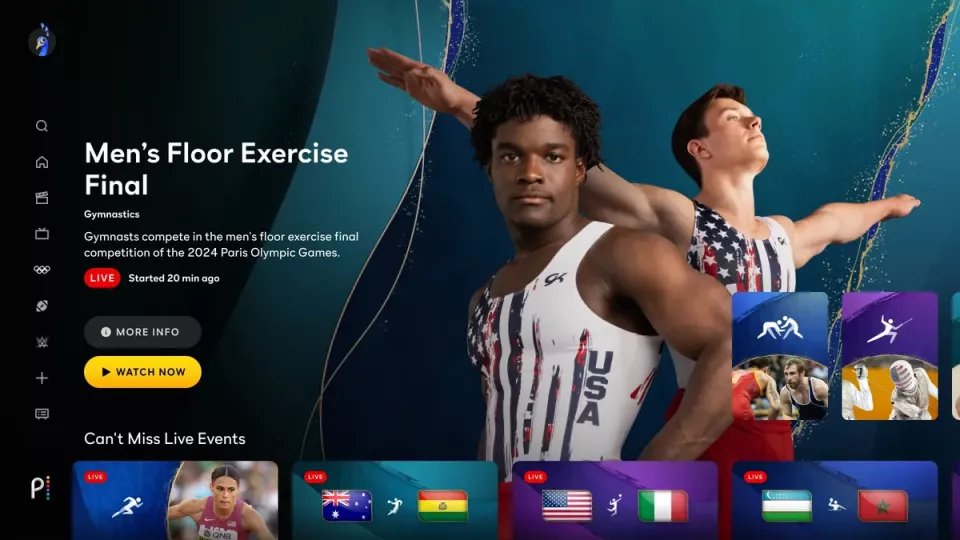
Yes, you can rewatch games on Peacock.
Ever missed a crucial play in that nail-biting game? Or perhaps you want to relive a victory? It’s a common question: can you rewatch games on Peacock? This is what many sports fans are wondering.
Peacock, the streaming service, offers a selection of on-demand content. This includes replays of various sporting events. You can usually find the games available shortly after they conclude.

Can You Rewatch Games on Peacock?
Okay, let’s dive deep into the world of Peacock and game replays! If you’re a sports fan, you probably know how frustrating it can be to miss a live game. Maybe you were stuck at work, or maybe the game was on way too late. Whatever the reason, you might be wondering, “Can I rewatch that amazing game I missed on Peacock?”. The simple answer is generally yes, but there are a few important things to know. It’s not always as straightforward as just hitting “play” on any game you want, so let’s explore all the ins and outs of rewatching games on Peacock.
What Kind of Games Can You Rewatch on Peacock?
Peacock has a good selection of sports content, but not everything is available for replay. Typically, the kinds of games you can rewatch include:
NFL Games: Peacock often streams Sunday Night Football and select other NFL games. These are usually available to rewatch shortly after they finish.
Premier League Soccer: If you’re a fan of English soccer, many Premier League matches are live on Peacock and are available for replay.
Some College Sports: Certain college football and basketball games that are broadcast on NBC networks or their related channels may end up available for on-demand viewing.
WWE Events: Big WWE events like WrestleMania, SummerSlam, and Royal Rumble can often be rewatched on Peacock.
Other Sports: Keep an eye out for replays of other sports content, which might include golf, IndyCar, and cycling events, when they are available through Peacock.
It is important to understand that the availability of replays is often determined by the specific rights and agreements Peacock has with various sports leagues and organizations. Some games may be available for a limited period of time, while others could stay on the platform for much longer.
How Long Do Game Replays Stay on Peacock?
This is a common question that many users have. The answer isn’t always clear-cut, as it can vary depending on the sport, the specific game, and the licensing agreement. Here is a general idea of what to expect:
Short-Term Availability: Many games, especially regular-season NFL and Premier League matches, tend to be available for a limited time after the live broadcast finishes. You might have access for a few days, perhaps a week, in some cases.
Longer Availability for Major Events: Big events like the Super Bowl or major WWE shows may remain available for replay for a longer period, even several weeks or months.
Changes and Takedowns: Remember that Peacock’s content library changes. Sometimes, they may remove game replays after a certain time to make room for new content.
Always double-check the game’s specific details on Peacock to see when it will be removed from the platform. It’s usually indicated on the game’s information page. This will help you plan your viewing accordingly.
Finding Game Replays on Peacock
Now that you know what kind of replays you might find, let’s talk about how you actually find them! Peacock’s interface is pretty straightforward, but here are a few pointers:
The Sports Section: The best place to start is in the “Sports” section of the Peacock app or website. This is often located along the top or side menu.
Browse by League: Within the sports section, you should find categories organized by league or sport. For example, you will see sections for the NFL, Premier League, WWE, and so on. This is helpful for finding specific games you want to rewatch.
The Search Bar: If you know the specific game you are after, the search bar is your friend! Simply type in the team names, keywords of the event or the name of the players to locate the game.
“On Demand” or “Replays” Category: Many streaming platforms have a special section for replays and on-demand content. Look for a category like this within the sports section.
Check the Game’s Page: When you find a game you are looking for, look for a button to watch it. If it’s available for replay, it will usually show up on the game’s main page.
Take your time to navigate through the different options. Remember that the Peacock platform sometimes updates, so things might look a little different.
What About Live Games vs. Replays?
It’s important to know the difference between watching a live game and rewatching a game on demand. When you are watching live, you are seeing the game as it happens in real-time. However, when you rewatch the game, you’re watching a recording of it, so here’s what you should know:
Live Games: You will be seeing the game as it happens. There could be live commentary, commercials, and all the usual elements of watching a game on TV.
Replays: When you rewatch a game, you will usually see the full game as it was broadcast, including all the commentary and commercials. Sometimes, certain on-demand replays might have the commercial breaks shortened or removed.
Pause, Rewind, Fast-Forward: An excellent thing about replays is that you can usually pause, rewind, and fast-forward. This gives you more control over how you watch the game, and it is very useful if you need to take a break or if you want to revisit a specific moment of the game.
No Live Interaction: When you rewatch the game, you won’t have any live interaction. For example, you cannot chat or comment with others like you might during a live game on some other platforms.
Knowing these differences can help you decide whether you want to watch live or save the game for later.
Peacock Premium and Replays
To rewatch games on Peacock, having a subscription is essential. Peacock offers a few different subscription tiers. Here is a quick overview of how they affect your ability to rewatch games:
Peacock Premium: This tier offers a lot more sports content, including live games and most replays. This is the most useful tier for sports fans.
Peacock Premium Plus: This tier offers the same content as Peacock Premium, but with the added benefit of fewer ads (and in some cases no ads). This will be an option for some that prefer not to deal with ad breaks.
Free Tier: Peacock does offer a free tier, but it has a limited selection of content. Typically, you won’t be able to watch most of the live sporting events or their replays on this tier.
If you’re looking to catch up on games you missed, you will need at least a Peacock Premium subscription. Always look at the specific details of your subscription to see what kind of access you get for sports.
Tips for Getting the Most Out of Game Replays
Alright, so you know the basics of rewatching games on Peacock. Here are some extra tips to help you get the best viewing experience:
Set Reminders: If you know you will be busy during a live game, set a reminder so that you can catch up later. This way, you don’t forget about the games you want to watch.
Check Availability: Always check the specific game’s page to see how long it will be available on demand. This way, you can prioritize watching it before it disappears.
Use the Pause Feature: Feel free to take breaks, pause the game when needed and come back to it later.
Rewind to Key Moments: Sometimes, you miss something important. Replays allow you to rewind to see that amazing goal, a great play or a crucial moment in the game.
Follow Peacock on Social Media: Peacock often posts updates about their sports content on social media. This is an excellent way to stay informed about the latest live games and replays that are available.
Keep Your App Updated: Make sure that your Peacock app is up-to-date. Updated apps tend to work smoother and contain new features or fixes, which could improve your viewing experience.
Stable Internet Connection: Watching a replay, like watching live games, requires a stable internet connection. Make sure your internet connection is strong enough so the games can play smoothly without constant buffering.
Following these tips will help you take full advantage of Peacock’s replay feature.
Potential Issues with Game Replays
Sometimes things don’t go perfectly. Here are some potential problems you might encounter when rewatching games on Peacock:
Games Not Appearing: Sometimes, a game you expect to find for replay may not be available. This could be due to licensing issues, or the game might have been removed from the platform already.
Technical Issues: Occasionally, you might experience buffering, error messages, or issues with playback. These issues are usually temporary but can be frustrating.
Limited Replay Availability: As mentioned, game replays may only be available for a limited period, meaning they may disappear from the platform.
Ads (Even with Premium): Although Premium plans offer less ads, some games will still have commercials, especially the replays of live events.
If you run into these issues, try restarting the app, checking your internet connection, or contacting Peacock’s customer support for further assistance.
Comparing Peacock to Other Streaming Platforms
Peacock is just one of many streaming platforms offering sports content. How does it compare to others when it comes to rewatching games?
ESPN+: ESPN+ offers a wide selection of live games and replays, focusing on college and smaller sporting events. However, it doesn’t have many top-tier sporting events.
Paramount+: This platform has a good amount of soccer and other sports, but like Peacock, it does not have all games. Availability of replays is similar, being available for a limited amount of time.
Hulu + Live TV: Hulu + Live TV has a lot of live sports channels. Most of the games you can watch live will be available to watch on demand for a period.
YouTube TV: Similar to Hulu, YouTube TV is another platform that has lots of sports channels and on-demand options. You may find some better replay options with this platform, but it comes with a higher price.
Each platform has its strengths and weaknesses. Peacock is a good choice for fans of the NFL, Premier League and WWE. Make sure to check which platform best suits your needs before committing to a subscription.
The Future of Game Replays on Peacock
Peacock is still growing and changing. The platform continues to add new features and content. Here are some trends to look out for:
More Sports Content: Peacock is likely to add more sports, expanding its range of live games and replays.
Improved Technology: Peacock may improve the user interface to make it easier to find and watch replays.
Better On-Demand Options: Peacock may begin to offer more robust on-demand options, including the ability to customize replay viewing.
Exclusive Games: Peacock may continue to gain exclusive rights to broadcast certain live sporting events. This will mean that you will need a Peacock subscription to watch those games and to rewatch them later.
As streaming platforms become a more significant part of how we watch sports, platforms like Peacock will continue to evolve to meet the needs of fans.
In summary, yes, you can rewatch games on Peacock! It’s a good way to catch up on action you may have missed. While not every game is available, there is a lot of great sports content, mostly the NFL, Premier League, and WWE, with some other sports mixed in. Just remember to check availability, get a Peacock Premium plan, and be prepared for some possible technical issues along the way. Overall, Peacock gives sports fans a way to see games at their own convenience.
Best TV Shows of All Time
Final Thoughts
Yes, Peacock allows you to rewatch many games. Live events become available on demand after they conclude, and this applies to most sports content. The length of availability may vary, so check specifics for each game.
Thus, the answer is definitively yes; you can you rewatch games on peacock. This is a great feature for catching what you might have missed or reliving the best moments. Peacock’s on-demand library makes it a good choice for sports fans.

