
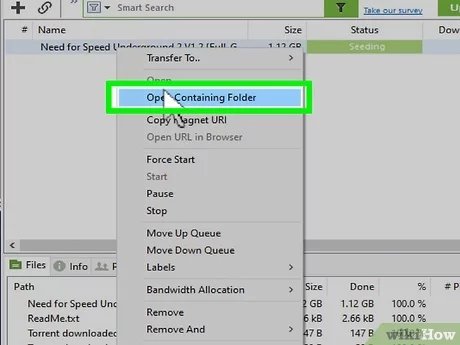
Playing torrent games involves downloading the game files using a torrent client, then typically extracting the files and following any included installation instructions.
Ever wondered how to play torrent games without spending a dime? It’s a common question, and the process is actually quite straightforward once you understand the steps. You first need a torrent client, a piece of software that handles these downloads.
These files arrive as a compressed package and you usually need to extract them to begin the installation. Often the game folder will contain installation instructions or a setup application.

How to Play Torrent Games: A Beginner’s Guide
Okay, so you’ve heard about torrents and maybe even want to try playing games this way. It can seem a little tricky at first, but don’t worry! This guide will break down everything you need to know about how to play torrent games safely and easily. We’ll go step-by-step, covering what torrents are, how to get the right software, find safe games, and make sure everything works correctly. Let’s jump in!
Understanding Torrents: The Basics
Before we jump into playing, it’s important to understand what a torrent actually is. Think of it like a way to share files directly between people on the internet, instead of downloading everything from one big website. It’s like having lots of friends who each have a piece of a puzzle, and you’re putting all the pieces together to get the full picture, or in this case, the whole game.
What are torrent files?
A torrent file itself isn’t the game. It’s a tiny file that contains information about the game and where to find all those little pieces. It’s essentially a roadmap, guiding your torrent software to download bits and pieces of the game from multiple sources. This is also known as “peer-to-peer” or P2P file sharing. These torrent files usually end with the extension “.torrent”.
How does a torrent work?
The torrent works by connecting you with other users who have the files you want. When you download a torrent, your software finds other people (called “peers” or “seeders”) who have parts of that file. Your software downloads little pieces from different users at the same time and puts it all together. The more seeders there are for a torrent, the faster you will usually be able to download the file. Conversely, fewer seeders might slow down the downloading process.
Getting the Right Torrent Software
To download and play torrent games, you’ll need specific software known as a torrent client. This acts like the middleman, taking the information from the .torrent file and connecting you to others so you can start downloading the actual game files.
Popular torrent clients
There are many different torrent clients out there, each with its own style and features. Here are a couple of well-known options:
- qBittorrent: This is a very popular choice because it’s free and easy to use. It works on Windows, Mac, and Linux, making it very accessible.
- Transmission: Many people like Transmission for its simple interface. It’s another good, free option that you can use.
- uTorrent (or µTorrent): This was once a go-to option, but it has shown some advertisements and bundles in recent years. However, it’s still a very popular torrent client, known for its ease of use.
You should always download these clients from their official websites to avoid getting malware (bad software). Don’t download them from third-party websites offering the client.
Installing a torrent client
Once you choose your client, the download and installation process is usually pretty straightforward. Just go to the official website, find the download link for your operating system (Windows, Mac, or Linux), and follow the instructions that are given.
Finding Safe Torrent Games
Okay, now comes a very important part. Finding safe torrent games is crucial. Because torrents involve sharing files from many different users, there’s a chance you could download something harmful, like a virus. Here is what you have to do:
Using trusted torrent sites
The websites you find torrent files on are important, because not all of them are safe. Many are filled with viruses and fake torrents. It’s essential to use reputable torrent sites. Some well-regarded sites (but be aware that they can still contain bad torrents) include:
- 1337x: This site has a wide variety of torrents, including games, movies, and other programs, and it is well-known for its large selection of torrents.
- The Pirate Bay: This is one of the oldest and best-known torrent sites. It’s been around for a very long time, but you still need to be careful with the files you choose to download.
- RARBG: This one is known for higher quality torrents.
However, remember that using these sites still carries some risk. You need to be very careful about what files you choose to download.
Checking for user comments and ratings
Before you download a torrent, check to see if the torrent site has a user rating and comments section. Many sites let you see what other users have to say about that particular torrent file. If people say it contains a virus, or it’s fake, it’s best to just avoid that torrent.
- Look for good reviews: Check to see if other people downloaded it, and it worked for them. If a torrent has multiple thumbs-up, that’s a good sign.
- Avoid bad reviews: If you see comments about viruses, or that the game doesn’t work, just stay away from that torrent.
- Check the ratio of seeders to leechers: This means more people have the complete file than those downloading it.
Verify file sizes
Make sure that the file size of the torrent is accurate for the game you’re trying to download. If the file size seems really small or really big compared to other similar games you’ve seen, that’s a red flag, and you might want to avoid it.
Understanding file extensions
When downloading torrents, the files you download will usually be compressed, so look for .rar, or .zip files. You should also be careful about .exe files in a torrent, and ensure that there is no other unusual extension.
Downloading Your Torrent Game
Now that you have your torrent client installed and have found a trusted torrent, here’s how to download the game:
Opening the .torrent file
Once you’ve downloaded a .torrent file, you’ll need to open it with the torrent client. Most times, you can just click on the .torrent file, and your torrent software will automatically open it. If not, you can open your client and click on the “Add torrent file” button, and select the .torrent file. Once the file is opened, your torrent client will be able to display details about the game that you are going to download, like the total size, how many seeders there are, and all the files that will be downloaded. This will allow you to review and make sure that everything looks good.
Selecting a download location
Before you start downloading, make sure you pick a place to save the game files. When the torrent client starts downloading the files, it will place these files in the location that you specified in settings. Your computer usually has a default download folder for most things. However, you can change this. Usually, you will want to choose a folder where you have lots of space on your computer.
Starting the download
After you’ve chosen the folder, click the “Download” or “Start” button on your torrent client. The client will then find seeders and start downloading little pieces of the game. The download speed depends on how many seeders there are and your internet speed. As the torrent client downloads the files from all of these people, you can monitor how fast it is going and how much it has downloaded.
Seeding after downloading
Once your download is complete, it is polite to “seed” the torrent. That means you keep your torrent client open, and allow other users to download from you. This keeps the torrent network working well and lets everyone enjoy the game. It also helps others to be able to download the game more quickly. After some time you can close your torrent client.
Also, it is important to point out that in some countries, downloading and sharing torrents can be illegal, especially if you are downloading content that is protected by copyright. Be careful and make sure you are complying with your local laws.
Installing Your Torrent Game
Once your game has downloaded, you’re not quite ready to play. Most of the time, you will need to install the game to your computer. Here is what to do:
Extracting the game files
Many downloaded games come in compressed files, like .rar or .zip. You’ll need a program like 7-Zip, WinRAR, or similar to extract these files. Right-click on the file and pick the option like “Extract Here” or “Extract to Folder”. This will create a new folder with the game’s actual installation files.
7-Zip is free and one of the best tools for this purpose.
Running the setup/installer
Look inside the extracted folder. You should see an installation file, often named “setup.exe” or “install.exe.” Double-click on this file to start the installation process. Usually, this will guide you through the installation of the game. Just follow the prompts that you see on your screen and choose the best location to install the game.
Copying the crack (if required)
Sometimes, games downloaded from torrents come with a “crack” folder or file. This is a modified file that lets you play the game without paying for it. If a “crack” is included, copy the files from this folder and paste them into the installed game folder. Often, the torrent site will provide instructions in the comments section.
Note: This practice is often illegal, and not recommended. It is important to be aware of the risks associated with “cracked” games. Furthermore, some cracks may contain malicious software that will hurt your computer.
Running Your Torrent Game
Okay, so now your game should be installed, and you’re ready to play. Find the game’s shortcut on your desktop or in the installation folder, and click on it to start the game!
Troubleshooting installation problems
Sometimes things don’t go exactly as planned. If your game isn’t working, here are a few things to try:
- Reinstall the game: Start over from the beginning and make sure you follow all the steps carefully.
- Check system requirements: Make sure that your computer is powerful enough to play the game.
- Update drivers: Sometimes old drivers can cause problems. Check to see if you have the latest drivers for your video card and other devices.
- Look online for specific solutions: You might be able to find other people who have had the same problem and found a solution.
Staying Safe While Torrenting
Torrenting can be fun, but it’s important to be smart and stay safe. Here are some safety measures you can follow:
Using antivirus software
Always make sure your computer has an active antivirus software. This can help to keep your computer safe from viruses or other harmful programs. A good antivirus program can scan the files that you download and help prevent problems.
Using a VPN
If you choose to use torrents, a virtual private network (VPN) will help hide your activity from your internet service provider. It creates a safe tunnel, and keeps your internet traffic private, so other people can’t see what you’re doing online. There are many VPN services, but make sure you pick a reputable one.
Being aware of copyright laws
It’s important to know that downloading copyrighted material without permission is usually illegal, and can have consequences. Make sure you understand the laws in your country, and be mindful of what you are doing.
Torrenting games can be a great way to play games, but it needs some care and caution. Always be sure to download from reputable sources, check for comments, and protect your computer. You now have a good idea of how to get started safely. Enjoy playing!
How To Open Torrent Files in Windows 10
Final Thoughts
To play torrent games, first, find a reliable torrent site. Download the game’s torrent file, then use a client to retrieve the game files. You must install the game using the setup within the downloaded folder.
Be sure your antivirus is turned off temporarily. Then, use a crack if required; these are often in the downloaded files. Now you know how to play torrent games.

