
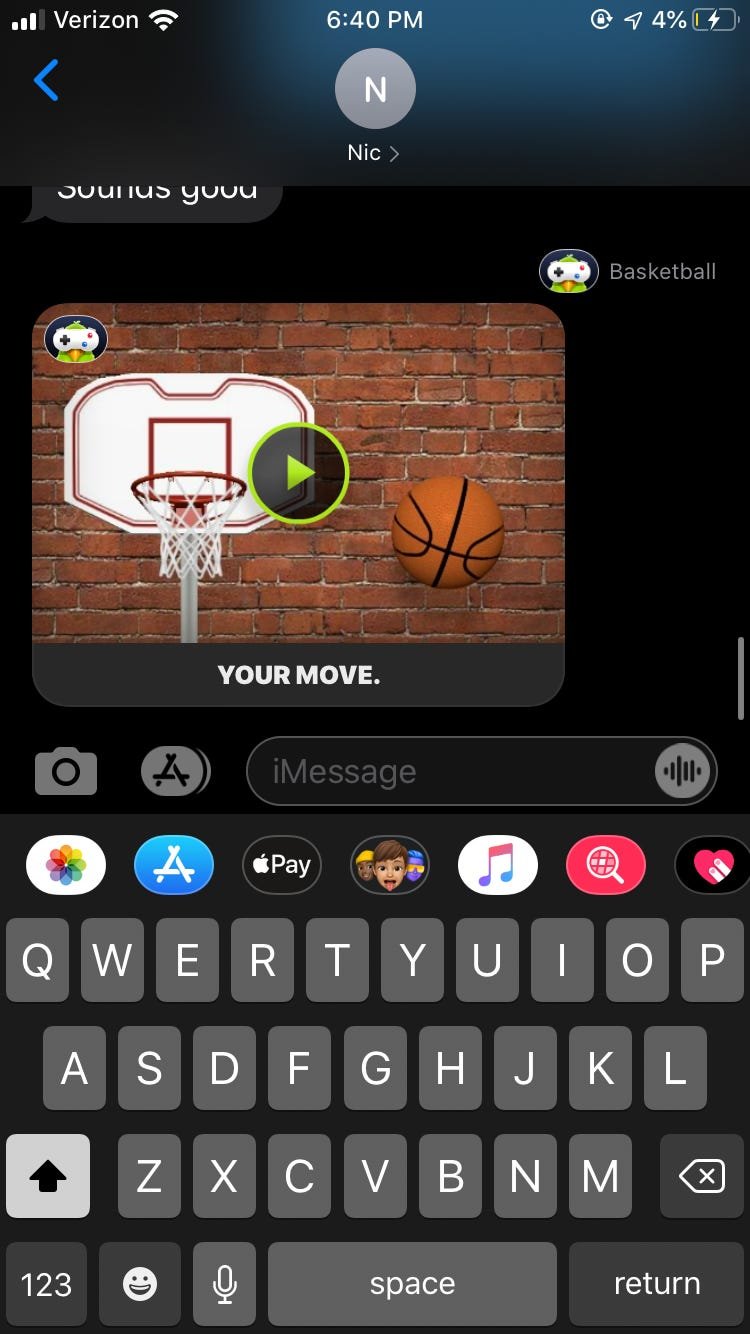
To send iMessage games, open a conversation, tap the App Store icon, select a game, and then tap send.
Want to spice up your iMessage chats? Adding a bit of friendly competition is easy, and knowing how to send iMessage games can make your conversations more engaging. It is a straightforward process, and we are here to guide you through it.
This will allow you to easily send fun games to your friends directly within the messaging app. You can enjoy a quick game of pool or chess, without leaving your message screen. Let’s dive into the simple steps involved.

How to Send iMessage Games: A Fun Guide
Ready to level up your text conversations? Sending iMessage games is a fantastic way to connect with friends and family, turning simple chats into fun competitions. It’s easier than you might think! This guide will show you everything you need to know about how to send iMessage games, from finding the right ones to playing with your buddies. Let’s jump in!
What are iMessage Games?
Before we start sending games, let’s understand what they are. iMessage games are mini-games you can play directly within your Messages app on your iPhone or iPad. They’re like little apps that are made to play with someone else. These games can range from simple puzzles to fast-paced action challenges. They’re a great way to pass the time, challenge your friends, and add some playful energy to your chats.
Finding iMessage Games
Okay, now where do we find these fun games? It’s simpler than you imagine! They are available directly through the App Store inside the Messages application. Here’s how to find them:
Accessing the iMessage App Store
Follow these steps to get into the iMessage App Store:
- Open your Messages app and go to a conversation.
- See the gray App Store icon (it looks like an ‘A’ inside a blue circle) next to the text box? Tap on it.
- If you don’t see the app drawer, tap on the ‘+’ icon to the left of the text box, and then tap the App Store logo.
- This opens the iMessage App Store. You will see a selection of games and other apps made for iMessage.
Browsing and Searching for Games
Once you’re in the iMessage App Store, you have a few choices:
- Explore the Featured Tab: The “Featured” tab shows you the newest and most popular iMessage games. It is a good place to start if you are not sure what you are looking for.
- Browse Categories: You can look at different categories (like “Puzzle,” “Action,” or “Word”). This helps to find games that fit your taste.
- Use the Search Bar: If you know the name of a game you want, you can just type it in the search bar and find it very quickly.
Downloading iMessage Games
When you find a game you like, downloading it is very easy:
- Tap on the game’s icon.
- Press the “Get” button (it may say “Free” if the game is free or show the price).
- If you need to, verify your purchase with your Face ID, Touch ID, or Apple ID password.
- The game will download to your iMessage app.
Important Note: Some iMessage games are free, while others may cost a small amount. Always make sure to check the cost before downloading.
Sending iMessage Games to Your Friends
Alright, you’ve found the perfect game. Now, let’s send it to your friends!
Starting a Game in an Existing Conversation
Here’s how to start playing a game with someone you are already chatting with:
- Go to the conversation where you want to play a game.
- Tap the App Store icon (the ‘A’ in the blue circle) above the keyboard.
- Find the game you downloaded in the app drawer.
- Tap the game icon. This will open the game interface in your conversation.
- Some games let you start a new game or send an invitation. Tap “Start Game” or similar button to send the invite.
Starting a Game in a New Conversation
If you are starting a new conversation and want to begin with a game, follow these steps:
- Open the Messages app and start a new conversation (tap the new message icon in the top right corner).
- Type in the name or number of the person you want to play with.
- Now, just follow the steps above for “Starting a Game in an Existing Conversation,” starting with step 2.
Inviting Multiple Players
Some iMessage games allow multiple players to join in the fun. Here’s how that usually works:
- Start a game in a group message just like you would in a one-on-one message.
- The game usually has a way to send invites for everyone in the group chat.
- Everyone in the group can then join and play.
Playing iMessage Games
Okay, the invitation is sent! Now the fun part – playing the game!
Accepting a Game Invitation
When someone sends you an iMessage game invite, here is what you do:
- You will see a notification in your message conversation.
- Tap on the invitation in the message thread.
- The game will open directly in your Messages app.
- Follow the on-screen instructions to start playing!
Understanding Game Controls
Every game has its own special way to play. Usually, they use simple controls:
- Tapping: Most games need you to tap the screen to do actions.
- Swiping: Some games ask you to swipe left, right, up, or down.
- Dragging: Some games may need you to drag items across the screen.
- Buttons: There might be special buttons for different game moves.
The game itself will usually show you some quick instructions. If you are stuck, look for a “Help” or “Tutorial” button in the game.
Taking Turns and Keeping Score
Most iMessage games are turn-based, so you’ll take turns with your friend.
- After your turn, you might need to tap a button that says “Pass” or “Send” to allow your friend to play.
- Many games keep track of your scores, so you can see who is winning.
- Some games have a “leaderboard” so you can compete with others.
Troubleshooting Common Problems
Sometimes things do not work perfectly. Here are some common problems and how to fix them.
Game Not Downloading
If you are having trouble downloading an iMessage game:
- Make sure you have enough space on your phone or iPad.
- Make sure your device has a good internet connection (try using Wi-Fi).
- Restart your device and then try to download the game again.
- Check to make sure your iOS version is up to date.
Game Not Showing Up
If you are not seeing the game in the app drawer:
- Close the Messages app and open it again.
- Go back to the iMessage App Store and make sure you really downloaded the game.
- Look carefully in the app drawer, sometimes it can hide at the end of the list.
Game Freezing or Crashing
If the game is freezing or crashing:
- Make sure your device has the newest software update.
- Close all the other apps running on your phone.
- Try deleting the game and then download it again.
- If the problem keeps happening, tell the game’s developer about it.
Tips for Having the Most Fun
Here are some ideas to make playing iMessage games even more fun:
- Try a Variety of Games: Don’t stick to the same ones all the time. Explore different genres and try new things.
- Challenge Your Friends: Start friendly competitions and see who is the best at each game.
- Start a Game Group: Make a group message where everyone can play games together.
- Make it a Regular Thing: Schedule a time each week to play games with your friends or family.
Popular iMessage Games
If you are looking for ideas, here are some popular iMessage games you might enjoy:
- Game Pigeon: A collection of different classic games like mini golf, checkers, and more.
- Words with Friends: A word game similar to Scrabble where you create words on a board.
- 8 Ball Pool: A game where you can play pool with your friends.
- Chess: Play a classic game of chess with friends directly in your messages.
There are so many other games to explore, and new ones are added often. Just take a peek at the iMessage App Store and discover some new favorites!
Sending iMessage games is an easy and fun way to connect with your friends and family. From finding the perfect game to sending invites and competing for the highest score, the whole process is pretty easy and entertaining. So, go on and start playing today! You might just find your new favorite way to have fun while you chat.
How To Play Games On iMessage!
Final Thoughts
To send iMessage games, first, open a message thread. Then, tap the App Store icon next to the text input field. Select the desired game from your installed apps.
After selecting, the game interface appears. Now, press send. Your friend receives the game and can directly play within the iMessage app. It’s simple to see how to send iMessage games.

